How to Keep Characters Consistent in GPT Image 2.5

Yifan ZhaoYifan Zhao10분 읽기 ·

How to Keep Characters Consistent in GPT Image 2.5

Keeping characters consistent in GPT Image 2.5 takes more than repeating “same character” in every prompt. Faces can drift, proportions can change, and small editing differences can accumulate across scenes. The most reliable approach is to use a fixed visual reference, lock the character’s defining identity traits, and control exactly what is allowed to change.

The problem becomes more serious in comics, storyboards, campaigns, and AI video workflows, where one inconsistent face, outfit, or prop can break an entire sequence. Character consistency works best as a visual system built from reference sheets, approved anchors, controlled edits, and reusable scene references, rather than asking the model to reconstruct the same character from memory.

Virse makes this kind of production workflow easier to scale on a shared visual canvas, where references, generations, and project context can stay connected. Paid plans include unlimited use of 40+ models, including Nano Banana 2 and GPT Image 2, plus unlimited seats. New users also receive free credits, enough for up to 10 Nano Banana 2 images or one Seedance 2.0 video, while Seedance 2.5, Seedance 2.0, and MiniMax H3 are available from the Virse model page.

virse workforce

What Is the Best GPT Image 2.5 Character Consistency Workflow?

The most dependable workflow is:

  1. Build a multi-view character sheet.
  2. Select one approved image as the identity anchor.
  3. Reuse the same visual reference in every important scene.
  4. Repeat only the traits that define identity.
  5. Separate fixed attributes from scene-specific changes.
  6. Review each result against the approved reference.
  7. Return to the last approved image when drift appears.

The key principle is simple: GPT Image 2.5 character consistency is a visual asset-management problem, not only a prompt-writing problem.

A character may keep the same coat and hairstyle while gradually developing a different jawline or eye shape. In another sequence, the face may stay recognizable while furniture, props, or room geometry change.

From a product-design perspective, the character should work like a component in a design system. The character sheet defines the component, the approved anchor defines the accepted version, and each new scene introduces controlled variations.

How to Build a Character Sheet for GPT Image 2.5 Character Consistency

A character sheet reduces the number of visual decisions GPT Image 2.5 has to invent.

If you provide only a frontal portrait, the model still has to infer the profile, back of the hairstyle, body proportions, clothing construction, and how the face changes with expression. Every missing view creates another opportunity for identity drift.

What Should a GPT Image 2.5 Character Sheet Include?

For an important recurring character, include:

  • front, three-quarter, profile, and back views;
  • full-body front and side views;
  • neutral and expressive facial references;
  • stable hair shape and hairline;
  • fixed body proportions;
  • signature clothing, footwear, and accessories;
  • close-ups of distinctive facial or material details.

Use neutral lighting and a simple background. Highly stylized reference backgrounds can unintentionally influence later generations, especially when color, lighting, and environment are supposed to change.

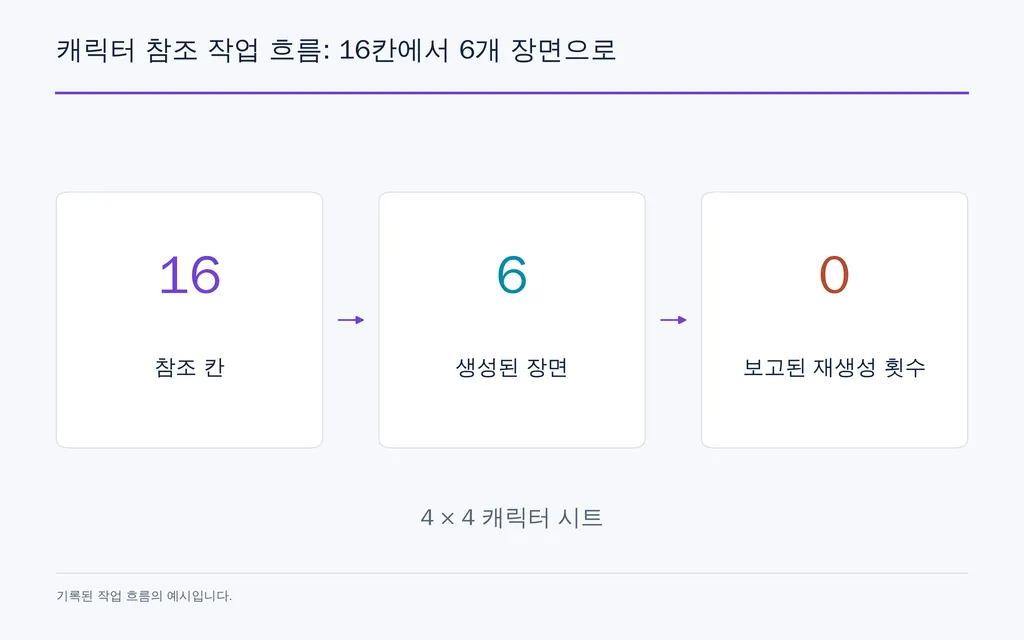
Case Study: 16 Reference Panels, 6 Scenes, 0 Rerolls

One documented workflow included in our research review used a 4 × 4 character sheet with 16 panels, covering front, back and side views, four expressions, four poses, and four detail references.

The same sheet was then reused across six separate scenes. The reported outputs preserved the same recognizable face, yellow raincoat, and red boots, with zero rerolls reported.

This is a single documented workflow, not a standardized benchmark. But it demonstrates an important production principle: adding more useful visual identity information can be more effective than continually making the prompt longer.

Character Reference Workflow: 16 Panels to 6 Scenes

How to Prompt GPT Image 2.5 for Consistent Characters Across Scenes

Once the character reference exists, each new prompt should explain what the reference controls and what the scene may change.

A practical structure is:

Reference Role: Use the attached character sheet as the authority for identity, facial anatomy, hairstyle, body proportions, clothing, and signature accessories.

Scene: Describe the action, environment, camera angle, expression, and narrative moment required for this image.

Keep Exactly: Preserve facial structure, eyes, nose, jawline, skin tone, hairstyle, proportions, and defining accessories.

Change Only: Change the pose, expression, camera position, environment, or lighting required for the scene.

Do Not Change: Do not redesign, beautify, age, or reinterpret the character unless explicitly requested.

Repeat Only the Traits That Define Identity

Long prompts are not automatically more consistent.

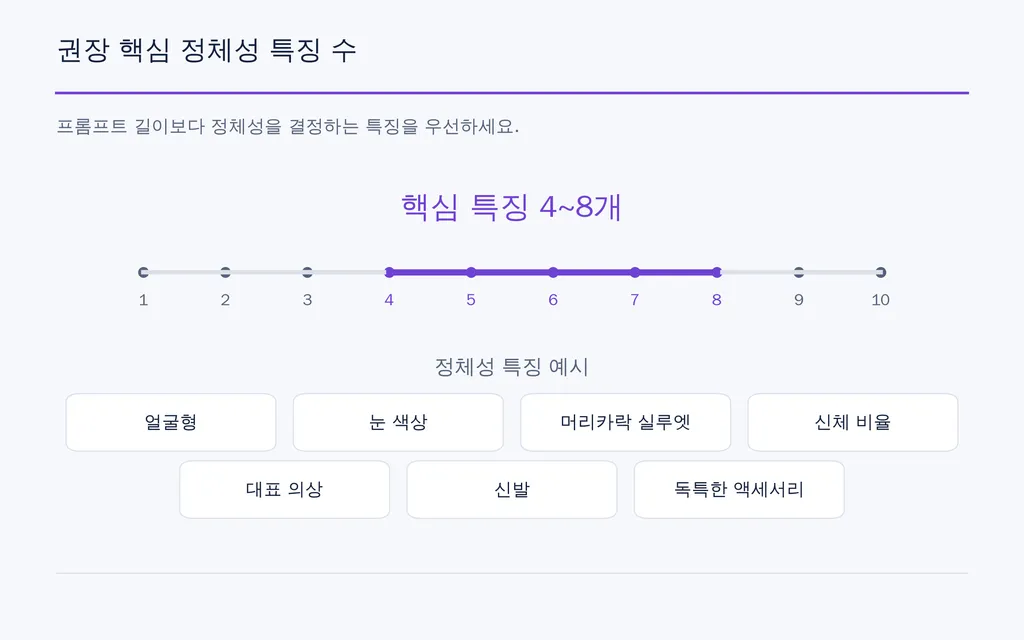
In professional workflows, four to eight high-value identity anchors are usually more useful than dozens of decorative adjectives. These might include face shape, eye color, hairstyle silhouette, body proportion, one signature garment, footwear, and a distinctive accessory.

The goal is not to redescribe the entire image. It is to protect the boundaries of an existing character design.

Recommended Number of High-Value Identity Anchors

How to Prevent Character Drift in GPT Image 2.5 Multi-Turn Editing

Multi-turn editing creates another problem: a small unwanted change can become part of the next input and gradually compound.

Use “Change Only” and “Keep Exactly”

If you only want to change a blue jacket to red, define both sides of the edit.

Change Only: Change the jacket from blue to red.

Keep Exactly: Preserve the face, facial proportions, hair, expression, body shape, pose, framing, camera angle, background, lighting, accessories, and all other clothing.

The important lesson is that what you protect matters as much as what you change.

Case Study: Five Editing Rounds and Hidden Continuity Drift

In one five-round editing test included in our research review, each edited image became the input for the next round.

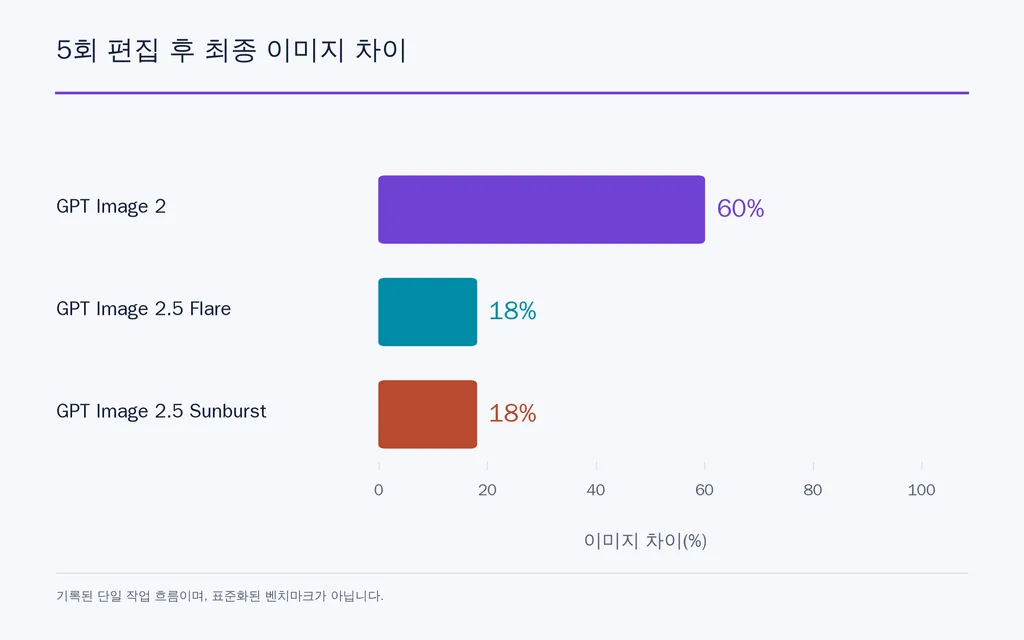
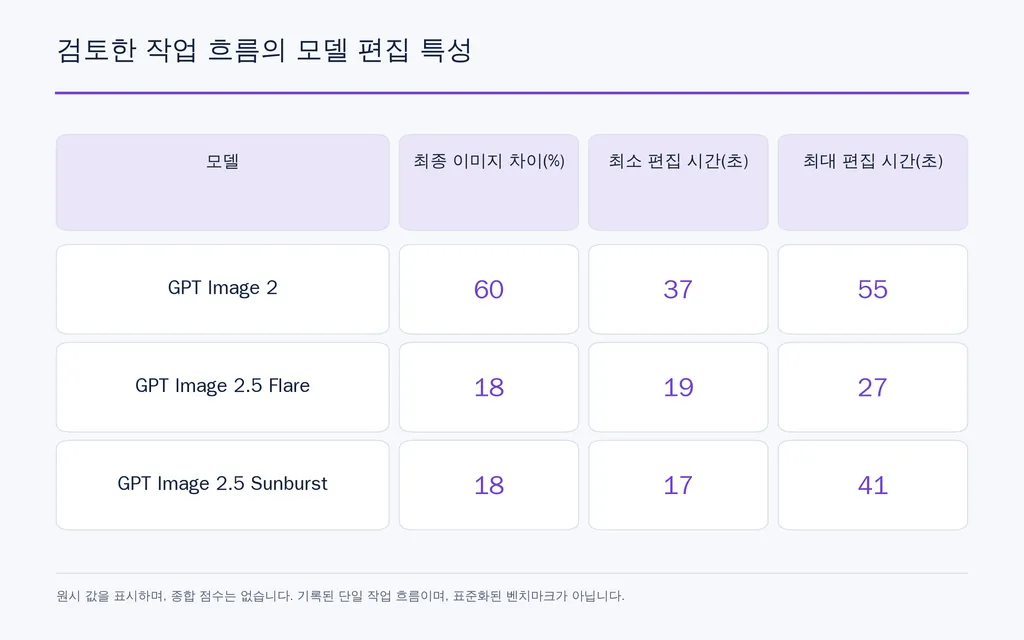
By the fifth round, the measured image difference was approximately 60% for GPT Image 2, 18% for GPT Image 2.5 Flare, and 18% for GPT Image 2.5 Sunburst.

The faces remained recognizable in that particular test, but the overall images did not remain equally stable. That distinction matters: character identity can survive while composition and scene continuity still drift.

The same workflow also omitted a background blackboard from the preservation instructions. It disappeared, and when the blackboard was needed again later, it had to be regenerated in a different position.

These figures come from a single documented workflow rather than a standardized benchmark, so they are most useful as directional evidence for managing edit chains.

Final Image Difference After Five Editing Rounds

Why GPT Image 2.5 Characters Still Drift: Six Common Failure Modes

Face Drift

The clothes and hair stay correct, but the face becomes similar rather than identical.

Use stronger close-up references, multiple angles, and explicit preservation of facial anatomy, not just “same character.”

Angle Drift

The character works from the front but changes in profile or from behind.

The reference does not contain enough three-dimensional information. Add profile, three-quarter, rear, and full-body views.

Wardrobe Drift

Buttons disappear, shoes change, or accessories are redesigned.

Treat important clothing and accessories as identity anchors, and include detail references when necessary.

Reference Leakage

Lighting, texture, background colors, or composition from the reference appear in unrelated scenes.

Keep identity references visually neutral so they communicate the character without adding unnecessary scene information.

Edit-Chain Drift

A small mistake is accepted and becomes the basis for the next edit.

The newest image should not automatically become the new source of truth. Return to the last approved anchor when visible drift appears.

Scene Continuity Drift

The character stays consistent, but furniture, doors, props, or camera geometry move.

This is not primarily a character problem. It requires separate environment and prop references.

How to Keep Characters, Locations, and Props Consistent in GPT Image 2.5

For comics, animation, branded characters, and multi-scene campaigns, build separate visual sources of truth.

A Character Sheet controls identity, proportions, wardrobe, and recurring appearance.

A Location Sheet controls room layout, doors, windows, furniture, materials, colors, and lighting direction.

A Prop Sheet controls recurring objects, product shape, scale, materials, labels, and viewing angles.

This separation makes revisions easier. Changing a character expression should not require the system to reinterpret the entire room.

Case Study: Character Sheet Plus an 8-Panel Storyboard

One documented workflow included in our research review combined a character design sheet with an eight-panel storyboard in a single development board before downstream animation.

Instead of asking eight independent generations to reinterpret the same brief, the workflow established the character, clothing, palette, and visual direction together.

There was no verified ROI or production-time figure reported, so those benefits should not be quantified. The practical value is structural: multiple shots can inherit the same visual rules from one shared reference artifact.

GPT Image 2.5 Flare vs Sunburst for Character Consistency

The model should not replace the workflow. A weak reference system will still produce inconsistency regardless of which variant you select.

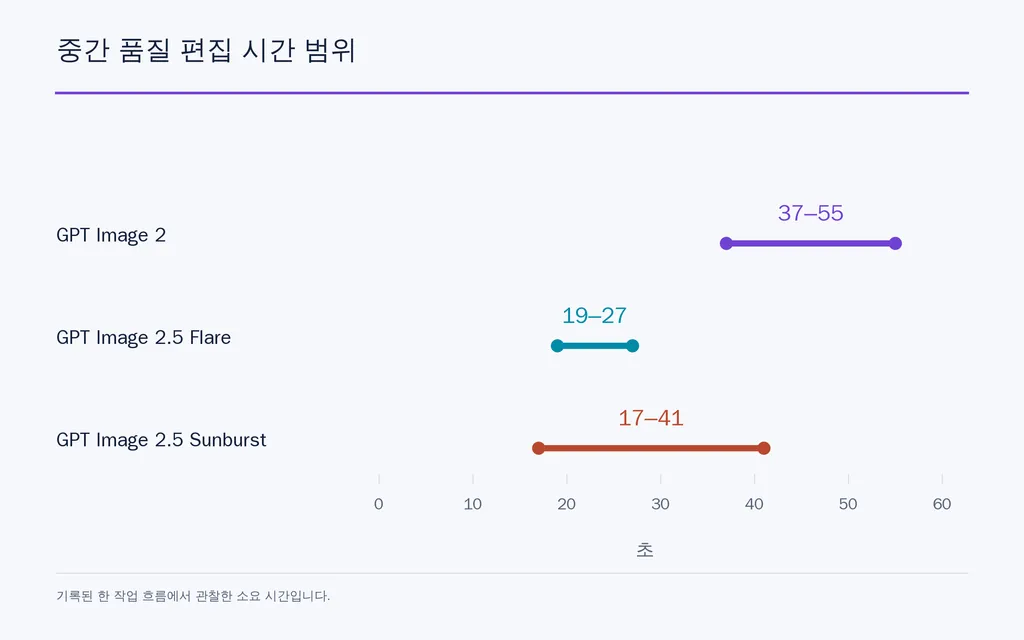
In the five-round workflow reviewed above, medium-quality edit times were approximately 19–27 seconds for Flare, 17–41 seconds for Sunburst, and 37–55 seconds for GPT Image 2. In the same workflow, Flare and Sunburst both showed approximately 18% image difference in the final drift comparison.

Model Editing Profile in the Reviewed Workflow

Again, these are single-workflow observations, not universal performance benchmarks.

For your own comparison, keep the character reference, prompt, dimensions, quality settings, and scene constant. Change one variable at a time. Otherwise, you cannot tell whether better consistency came from the model, reference, prompt, or generation settings.

Medium-Quality Edit Time Range

What Is the Best Production System for GPT Image 2.5 Character Consistency?

For repeatable design production, use this sequence:

Character Bible → Approved Identity Anchor → Scene Reference → Controlled Generation → Consistency Review → Approved Asset

Build the character system before producing dozens of images. Review the face, hair, proportions, clothing, props, and environment separately. During revisions, change as few variables as possible.

Most importantly, maintain an approval boundary. The latest generation is not automatically the correct generation.

This is the same principle used in design systems and brand asset management: establish a source of truth, define permissible variation, and prevent uncontrolled changes from propagating through production.

FAQ

Can GPT Image 2.5 keep the same character across multiple images?

Yes, but consistency is stronger when you reuse an approved visual reference instead of relying on conversational memory alone. Attach the same character sheet or anchor image to important generations, repeat the defining identity traits, and compare each result against the same visual source of truth.

Is one reference image enough for GPT Image 2.5 character consistency?

It can be enough for closely related portraits, but it becomes less reliable when the character changes pose, expression, framing, or camera angle. A multi-view character sheet gives the model information about facial depth, proportions, hair, clothing, and details it would otherwise need to infer.

Why does the face change even when the clothes stay consistent?

Clothing color and hairstyle are obvious visual anchors, while facial identity depends on subtler relationships between the eyes, nose, cheeks, jaw, hairline, and proportions. Use clearer facial references, several angles, and explicit instructions to preserve facial anatomy rather than relying only on “same person.”

How do I change clothes, poses, or locations without changing the character?

Separate fixed identity features from editable scene attributes. Protect facial anatomy, hairstyle, proportions, age, and distinctive features, then explicitly allow clothing, pose, expression, camera angle, or environment to change. If noticeable drift appears, return to the last approved identity anchor rather than continuing from the drifted result.

Conclusion

Keeping characters consistent in GPT Image 2.5 is not about finding one perfect prompt; it is about building a controlled visual system. Define the character with a multi-view reference sheet, establish an approved identity anchor, reuse that reference in every important scene, separate fixed identity features from editable variables, protect continuity during multi-turn edits, and return to the approved source when drift appears. Extend the same method to locations and props, and GPT Image 2.5 becomes far more practical for storyboards, comics, campaigns, branded characters, product imagery, and AI-assisted animation.

Virse 블로그의 다른 글