Best AI Design Tools in 2026: Compared by Workflow and Features
Vincent19분 읽기 ·

Choosing the best AI design tool in 2026 is difficult because tools that appear similar often produce completely different results. Some generate finished marketing graphics, some create editable UI/UX files, some specialize in AI images, and others turn prompts into working applications. Comparing all of them on one generic ranking can lead teams to choose a tool that is impressive in a demo but unsuitable for their actual workflow.
The problem becomes more expensive when a tool claims to deliver “production-ready” designs, follow an existing design system, or eliminate manual cleanup. In real projects, AI-generated output often still requires designers to correct brand inconsistencies, responsive behavior, accessibility issues, component usage, and edge cases. A tool that works well for a one-off social post may fail when a team needs dozens of coordinated assets, multiple product screens, or consistent campaign variations.
The best AI design tools in 2026 therefore fall into four practical categories. Canva and Microsoft Designer are best for non-designers creating marketing visuals; Figma, Galileo AI, and Uizard are best for editable UI/UX work; Midjourney, Adobe Firefly, and Stable Diffusion are best for image generation; and Lovable, Bolt, and v0 are best for functional prototypes and working code. For professional teams producing large volumes of consistent, on-brand work, newer canvas-based platforms such as Virse are designed around multi-agent collaboration, shared project context, and long-term brand memory rather than one-off prompt generation.
Why Choosing the Right AI Design Tool Is Harder Than It Looks
The best AI design tools in 2026 aren't ranked on a single scale — they split into three categories based on what they actually output: finished graphics, editable design files, or working code. Canva and Microsoft Designer lead for non-designers producing marketing visuals. Figma remains the standard for UI/UX teams building products. Midjourney and Adobe Firefly lead for raw image quality. Lovable, Bolt, and v0 lead when the deliverable needs to run as functional software. No tool wins across all four, and most teams end up running two or three side by side.
Choosing between them is harder than the marketing suggests, because almost every vendor now claims "production-ready" output or full "design system" understanding. Some of that holds up under real use. Much of it doesn't survive contact with a live project with existing brand guidelines, a component library, and a deadline. This guide sorts the field by what each tool is built to produce, what's realistic to expect from it based on how design teams actually report using it, and where a human still has to finish the job.
Best AI Design Tools in 2026 at a Glance
Your Need | Best Tool | Why It's the Pick |
|---|---|---|
Social posts, presentations, marketing graphics | Canva (Magic Studio) | Largest template library, generous free tier, fastest idea-to-asset path |
UI/UX design and product prototyping | Figma (Figma AI / Figma Make) | Industry-standard collaboration plus design-to-code handoff in one file |
High-quality concept art and campaign imagery | Midjourney | Most consistently polished aesthetic output of any generator |
Commercially safe enterprise image generation | Adobe Firefly | Trained specifically on licensed content, integrated into Creative Cloud |
Free quick graphics, Microsoft 365 teams | Microsoft Designer | No cost, DALL-E powered, built into Word/PowerPoint/Teams |
Maximum control over image generation | Stable Diffusion | Open-source, locally hostable, fully customizable |
Working prototypes that need to actually run | Lovable / Bolt / v0 | Generate deployable code, not just a mockup |
Repeated, on-brand production at team scale | Virse | Built for multi-asset consistency and team collaboration, not single-output generation |
Three things stand out in this table. First, none of these tools compete on the same axis — a template generator and a code-producing agent solve fundamentally different problems, so ranking them against each other head-to-head misrepresents what each is for. Second, the categories map closely to job roles: marketers land on the top two rows, product teams on the middle rows, and technical or agency teams on the bottom rows. Third, the newest addition to this list — tools built around repeated, team-scale production rather than single-asset generation — didn't exist as a distinct category two years ago, and reflects how far the market has moved past "type a prompt, get an image."
How We Chose These Tools (And Why Most "Best AI Design Tool" Lists Get It Wrong)
Most roundups score every tool against the same generic checklist — ease of use, output quality, pricing — and rank them on one list, as if a color-palette generator and a full application builder belong on the same scale. They don't. We grouped tools by what they actually produce (a static asset, an editable design file, or functional code) and evaluated each against the workflow it's built for, rather than against tools solving a different problem.
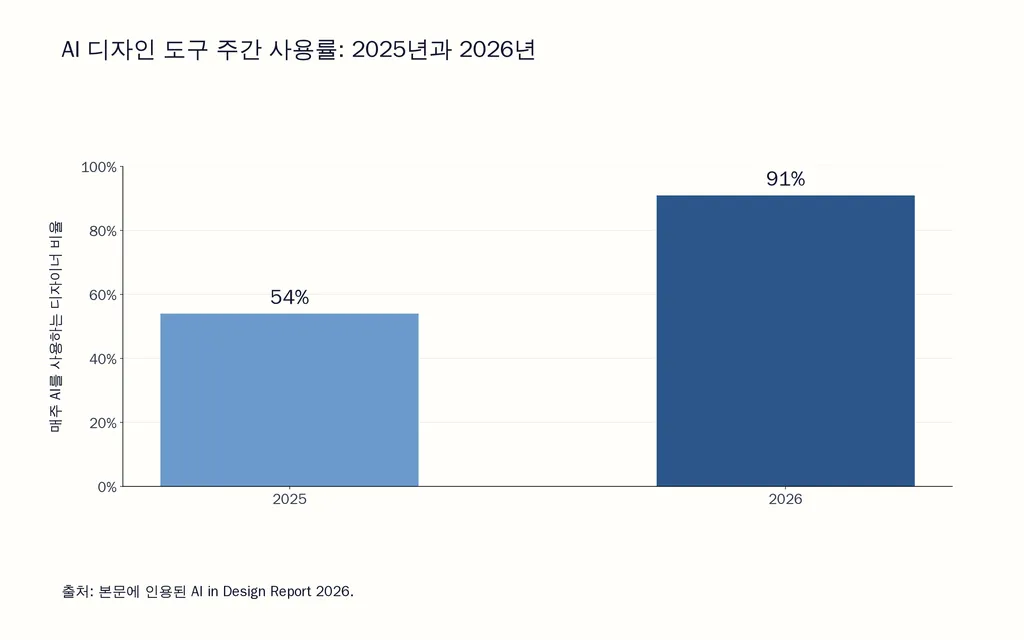
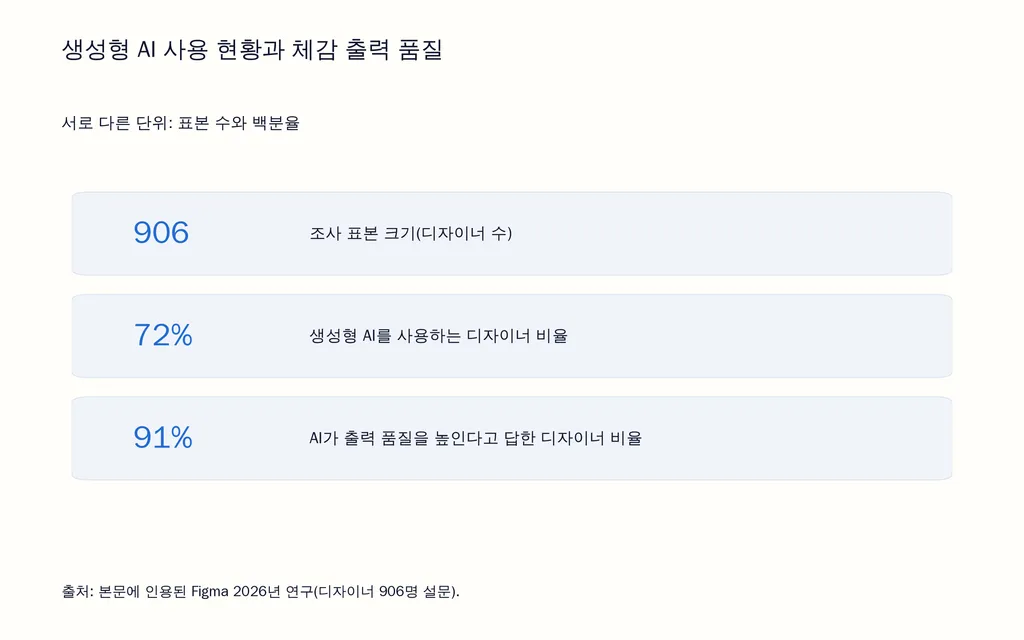
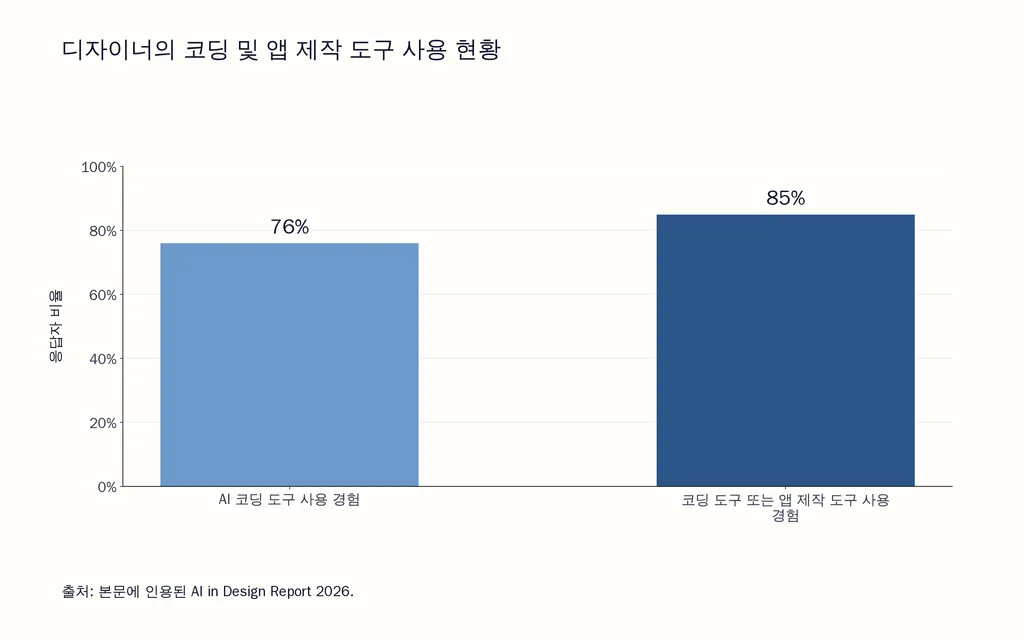
That distinction matters more in 2026 than it did a year ago, and the data backs it up. Independent survey data from the AI in Design Report 2026 found that 91% of designers now use AI for design tasks at least weekly, up from 54% the year before, and the average designer's toolstack has more than doubled — from roughly 3 tools to 7. The same report found that 76% of respondents have used an AI coding tool, and 85% have used a coding tool or an app builder like Lovable, Replit, or Bolt, confirming that "design tool" now regularly includes tools that generate running software, not just images. Separately, Figma's own 2026 research — based on a survey of 906 designers — found that 72% of designers now use generative AI in their workflows, with 91% saying it improves the quality of their outputs, not just their speed.

What the same research also shows is that adoption has outpaced standardization: nearly half of designers surveyed said they're still searching for their go-to tools, despite the sharp rise in daily use. That's a reasonable place to be, given how fast the category is moving — but it also means vendor claims deserve a second look before you commit a team's workflow to them. Reviewing how these tools are described versus how design teams report actually using them surfaces a consistent gap between the marketing language and the real output:
- "Production-ready" usually means prototype-ready. The output looks finished but typically still needs review for edge cases, accessibility, and responsive behavior before it ships to real users.
- "No cleanup required" usually means less cleanup than starting from scratch. Some editing is still standard practice, especially past a single simple screen.
- "Understands your design system" usually means it can reference parts of it. Full compliance with your components, tokens, and interaction patterns is something you still need to verify manually, not assume from a demo.
None of this means the tools aren't useful. It means the gap between what a first draft looks like and what's actually ready to ship is where most of the disappointment with these tools comes from — and it's rarely disclosed in a comparison chart.

AI Design Tools Compared: Category, Best For, Pricing
Free tiers cover the basics on most of these tools; Midjourney remains the notable exception with no free option at all. Commercial usage rights differ meaningfully by tool — Adobe Firefly is the most explicit about training exclusively on licensed content, which matters if generated visuals are going into paid client or advertising work, while other platforms' terms vary by plan and should be checked directly before commercial use.

Best AI Design Tools by Category: A Closer Look
Best for non-designers and marketing teams: Canva and Microsoft Designer
Canva's Magic Design generates a complete, editable layout from a text prompt or an uploaded reference image, and what makes it sticky isn't any single AI feature — it's the combination of a template library reportedly exceeding 250,000 designs, Magic Write for on-the-fly copy, one-click resizing across social formats, and real-time collaboration with shared brand kits. For a marketing team producing social posts, ad creatives, and presentations at volume, that combination consistently shortens the path from a rough idea to a publishable asset more than any single-purpose generator does. The trade-off is depth: Canva's AI layouts skew toward safe, template-adjacent compositions rather than distinctive art direction, which is a reasonable trade for speed but a real limitation for brand teams chasing a more original look.
Microsoft Designer is the strongest free alternative, particularly for teams already living in Microsoft 365. It's powered by DALL-E for image generation and includes AI-assisted layout suggestions, background removal, and a social template library, all built directly into Word, PowerPoint, and Teams. It doesn't match Canva's template depth or Magic Studio's feature range, but for a team that needs one quick branded graphic without opening a dedicated design tool, the zero cost and native integration make it a practical default.
Best for UI/UX and product teams: Figma, Galileo AI, and Uizard
Figma remains the default here, and its position has less to do with any single AI feature than with the full pipeline it covers: design, prototype, test, and developer handoff, all inside one collaborative file. Figma AI handles smart suggestions and visual asset search; Figma Make generates first-draft layouts and components from natural-language prompts; Dev Mode translates finished designs directly into usable code specs. For product teams, the value isn't that Figma generates a screen faster than a competitor — it's that the AI-generated draft lands inside the same file, component library, and review process the team was already using, which is where most standalone generators fall short.
Galileo AI and Uizard serve a narrower, earlier stage of the same workflow. Galileo AI generates high-fidelity, Figma-compatible UI mockups directly from text descriptions, which is useful for founders and product teams who need to visualize an app concept before committing design resources to it. Uizard's standout feature — converting a hand-drawn, photographed sketch into an editable digital wireframe — solves a genuinely different problem: getting a rough, napkin-level idea into a shareable format fast, before it's polished enough for a tool like Figma. Neither replaces a full design system workflow; both compress the time it takes to get a first version in front of stakeholders.
Best for image generation and concept art: Midjourney, Adobe Firefly, and Stable Diffusion
Midjourney remains the benchmark for aesthetic quality in AI-generated imagery — for mood boards, concept art, and marketing visuals that need to look polished with minimal post-processing, it consistently produces results other generators are compared against. It generates images, not layouts or text-accurate compositions, so it's typically paired with Canva or Figma for final assembly, and it has no free tier, which is worth factoring in before testing it against a real brief.
Text rendering has historically been the weak point of AI image generation broadly — competing tools frequently produce garbled or illegible text inside generated images. This is a real limitation to plan around if your use case involves posters, ads, or any graphic combining imagery with readable copy; some newer specialized tools have made meaningful progress here, but general-purpose generators like Midjourney still perform better on pure imagery than on text-in-image accuracy.
Adobe Firefly trades a small amount of raw aesthetic range for commercial safety and deep integration with tools designers already use daily. It's trained exclusively on licensed content, Adobe Stock, and public domain material, which removes a real source of legal ambiguity for agencies and enterprise teams producing client work. Generative Fill inside Photoshop — extending a background, removing an object, or filling in missing image area — is commonly cited by designers as one of the most immediately useful AI features in day-to-day professional work, precisely because the task is bounded and the result is easy to check at a glance.
Stable Diffusion sits at the technical end of the spectrum: open-source, locally hostable for free after hardware cost, and customizable through fine-tuning, ControlNet, and thousands of community-built models. The learning curve is real, and output quality depends heavily on model selection and settings, but for teams or individuals who need maximum control over every part of the generation process, nothing else in this category matches it.
Best for functional prototypes and working code: Lovable, Bolt, and v0
This category didn't meaningfully exist in most "best AI design tool" roundups until recently, but it's now used by a majority of designers according to the AI in Design Report 2026 data cited above. These tools skip the mockup stage entirely: you describe a screen, flow, or app in plain language, and the output is real, often deployable code rather than a static image or an editable design file. v0 generates React and Next.js components a developer can lift directly into a repository. Lovable and Bolt go further, generating full-stack applications with frontend, backend, and database integration from a single brief.
The practical value here is compressing the distance between "idea" and "something a stakeholder can click," which matters most for founders validating a concept or product teams doing rapid interaction testing. The trade-off scales with project complexity: these tools handle common, standard-shaped applications well, but non-standard business logic and larger, more complex projects tend to require more manual correction, and output generally still needs a developer's review before it's genuinely production-ready — echoing the broader "production-ready usually means prototype-ready" pattern covered above.

What AI Design Tools Are Actually Good At in 2026 (And Where They Still Need Humans)
Point automation is more reliable than full generation
The most consistently useful AI features in practice aren't the ones that generate an entire design from a blank prompt — they're narrower, bounded tasks: removing a background, extending a canvas, batch-replacing text labels across a set of frames, or suggesting a color palette from existing brand assets. These tasks share three traits that full-design generation doesn't: the scope is clear, the result is easy to check at a glance, and a bad output costs seconds to undo rather than an hour to fix. Full-layout or full-app generation from a single prompt continues to improve quickly, but it still produces a first draft that needs a trained eye to catch composition, spacing, and brand issues that a narrower, bounded tool wouldn't introduce in the first place.
Design-system consistency remains the hardest unsolved problem
None of the tools in this guide can fully guarantee that generated output complies with an existing design system's components, tokens, and interaction rules. They can reference parts of a connected library, but verifying full compliance is still a manual step. This gap matters more for established products than for net-new projects: teams doing incremental work inside a mature, complex platform get less reliable mileage out of AI generation than teams starting something from scratch, simply because there's more existing structure the output has to respect and more ways for a generated component to quietly diverge from an approved one.
Text-heavy and brand-critical assets still need the most review
Two categories consistently need the heaviest human check regardless of which tool produced them: anything with readable text (due to the text-rendering limitations covered above) and anything representing a finished brand asset, like a logo. AI-generated logo concepts from tools like Design.com or Midjourney are a reasonable starting point for ideation, but treating an AI-generated logo as a final deliverable without professional refinement is one of the most common ways teams end up needing to redo brand-critical work later.
AI Design Tools for Professional Teams and Design Studios
Why brand consistency gets harder at scale
An individual designer can eyeball whether a single output matches brand guidelines. Teams producing dozens or hundreds of assets across campaigns, product SKUs, or regional markets can't reliably do that by hand — and most of the tools covered above weren't built with that scale of repeated production in mind. They're optimized for one person generating one asset at a time, not for a team running the same visual direction across a hundred variations while keeping a shared history of what's already been approved, what the brand's aesthetic preferences are, and how past revisions were resolved.
Canvas-based, multi-agent workflows for collaborative teams
A newer category of platform is built specifically around that gap rather than around single-prompt generation. Virse, for example, is a canvas-based AI design workspace positioned for professional design teams and studios rather than solo users. Designers work by placing reference images, connecting nodes, and organizing visual relationships on an infinite canvas instead of relying solely on a chat prompt, and multiple AI agents can work on different parts of the same project in parallel — one analyzing references, another exploring a direction, another extending approved assets — while sharing the same project context rather than starting from a blank slate each time. The platform is also designed to retain and reuse a team's aesthetic preferences, brand rules, and project history over time, which is directly relevant to the consistency problem described above.
This kind of tool is worth evaluating specifically if your bottleneck is keeping a large volume of output consistent across a team, not if you need a single one-off asset — for that, a template tool or a standalone generator is still the faster, simpler choice. It's also not a substitute for brand review: generated results from any tool in this category, including canvas-based ones, still need a human sign-off before anything ships to production or goes live in a campaign.
How to Choose the Right AI Design Tool for Your Workflow
Match the tool to your output, not the hype
Before comparing feature lists, decide what you actually need the tool to hand you at the end: a finished, publishable graphic (Canva, Microsoft Designer), an editable design file a developer still has to build from (Figma, Galileo AI, Uizard), a raw image you'll compose elsewhere (Midjourney, Adobe Firefly, Stable Diffusion), or working, deployable code (Lovable, Bolt, v0). Picking a tool built for a different output than the one your project actually needs is the single most common reason these tools disappoint people in practice.
- Define what "done" looks like for your project — a finished asset, an editable file, or running code.
- Check whether your team has existing brand or design-system requirements, and how strict they are.
- Test the free tier or trial against a real project, not a polished demo prompt.
- Confirm commercial usage rights match how you actually plan to use the output.
- Budget review time regardless of tool — even the strongest current output needs a human check before it ships.
Why most teams end up combining two or three tools
Given that the average toolstack has grown from roughly 3 tools to 7 in a single year, trying to force one platform to cover ideation, layout, image generation, and code is increasingly the exception rather than the norm. A common combination looks like: Midjourney or Adobe Firefly for image generation, Canva or Figma for layout and composition, and a code-generation tool like v0 or Lovable when the deliverable needs to actually run as software. Standardizing on fewer tools is still worth pursuing for the sake of onboarding time and cost, but for most workflows in 2026, expect to run more than one.
Frequently Asked Questions
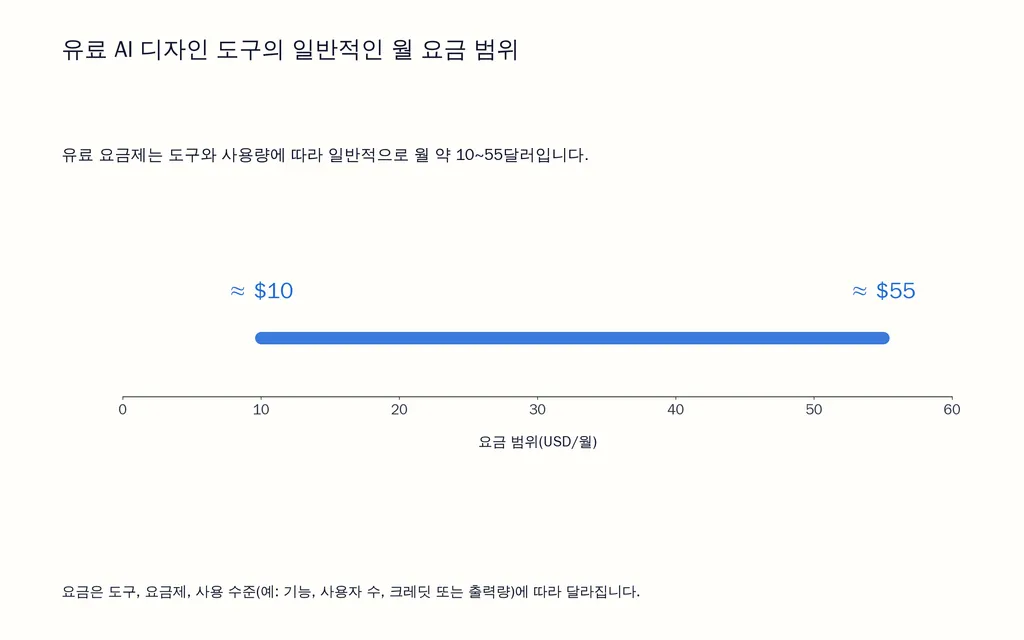
Are AI design tools free to use? Most offer a usable free tier — Canva, Figma, Microsoft Designer, and Uizard all have functional free plans. Midjourney is the main exception, with no free option at all. Paid plans generally range from about $10 to $55 a month depending on the tool and how heavily you use it.
Can AI design tools replace human designers? Not for the work that matters most. They speed up repetitive production — resizing, background removal, first-draft layouts, image generation — but strategic brand thinking, complex design-system work, and final quality judgment still require a person. The tools function as an acceleration layer on top of a designer's judgment, not a substitute for it.
What's the difference between an AI design generator and an AI-assisted design tool? Generators like Midjourney or Stable Diffusion create visual assets from scratch based on a prompt. AI-assisted tools like Canva or Figma build generative features into a broader design environment you already work in, layering suggestions, layouts, or edits on top of an existing workflow instead of starting from nothing each time.
Are AI-generated designs safe to use commercially? It depends on the tool and plan. Adobe Firefly is trained specifically on licensed content, making it the most explicit choice for commercial safety. Canva and Microsoft Designer generally permit commercial use of generated outputs under their terms, and Midjourney allows commercial use on paid plans. Always check the current terms of service for the specific tool and plan before using outputs in client or advertising work, since policies do change.
Which AI design tool is best for beginners? Canva is the most approachable starting point, thanks to its template library and Magic Design feature. Microsoft Designer is a strong free alternative if you're already using Microsoft 365. For early UI concepts specifically, Uizard's sketch-to-digital feature makes getting started easier than opening a blank Figma file.
Can AI design tools understand and follow an existing brand or design system? Partially. Most tools can reference a connected component library or brand kit, but none reliably guarantee full compliance with existing tokens, components, and interaction rules — that still requires manual verification, and the gap is largest for teams doing incremental work on an established, complex product rather than starting something new.
Conclusion
There's no single best AI design tool in 2026 — there's a best tool for the specific output your workflow needs, and most teams end up running two or three of them rather than one. Start by defining what "done" looks like for your project, test the free tier against a real task instead of a demo prompt, and budget time for human review regardless of how polished the first draft looks. For individual creators and marketers, Canva or Microsoft Designer will cover most needs; for product teams, Figma remains the anchor; for raw image quality, Midjourney and Adobe Firefly lead depending on your licensing needs; and for teams producing high volumes of consistent, on-brand work across campaigns or products, it's worth evaluating canvas-based, collaborative platforms built specifically for that scale.