
Where to Use MiniMax H3: Best Use Cases, R2V Workflows, Real Performance and Production Limits
Vincent10 menit baca ·
MiniMax H3 is best used when AI video needs to follow existing creative references rather than invent everything from text alone. Key use cases include R2V, product I2V, character consistency, motion and camera transfer, voice-driven characters, video editing and cinematic production. H3 supports text, image, video and audio inputs, with 768P or 2K output and 4–15-second generation.
The real challenge is keeping products, characters, motion, camera language and sound consistent across revisions. Scattered references often lead to identity drift, unclear inputs, slower iteration and higher generation costs.
Virse is built for this reference-heavy workflow. Its infinite canvas lets teams organize assets and relationships visually while multiple Agents share project context. By retaining brand standards, preferences and project knowledge, Virse keeps AI inside the professional design workflow while designers stay in control of creative decisions. MiniMax H3, Seedance 2.5 and Seedance 2.0, are now available on Virse, so teams can explore and compare multiple leading video models in the same creative workflow.
What Is MiniMax H3 Best Used For?
MiniMax H3 makes the most sense when part of the final result is already defined. If you only have an idea, T2V is appropriate. If an approved product or visual already exists, I2V gives you a stronger starting point. When identity, motion, camera behavior or voice must be carried into a new shot, R2V is usually the most valuable option.
Mode | Start With | Best Use |
T2V | Text | Concepts and cinematic exploration |
I2V | Image | Product and approved visual assets |
R2V | Image, video or audio | Identity, motion, camera and voice control |
MiniMax's current generation guide, defines these same modes around generation from scratch, first/last-frame control and multimodal reference generation.
MiniMax H3 I2V for Product Videos and Advertising
Product I2V is one of the clearest commercial use cases for H3. Instead of describing a shoe, bottle, device or package from scratch, a designer can begin with the approved product image and use generation to explore motion.
ComfyUI's current H3 workflow supports an input image with optional first and last frames. This enables workflows such as product reveals, packaging openings, before-and-after transitions, character pose changes and campaign hero shots.
From a product design perspective, the rule is simple: lock what is already approved and generate what is still undecided. Preserve the product with the image and use the prompt to direct camera movement, action, lighting, environment and audio.
MiniMax H3 R2V for Characters, Motion Transfer and Camera References
R2V is more useful when different references need different jobs. A practical character workflow can use an image for identity, one video for body movement, another for camera behavior and audio for voice.
ComfyUI explicitly recommends assigning each reference a role such as identity, style, motion, camera or voice, rather than assuming the model will infer every relationship correctly.
This makes H3 relevant to AI presenters, virtual characters, fashion videos, character replacement, branded mascots and performance-driven advertising. Our MiniMax H3 review also found that identity stability can remain seed- and configuration-sensitive, so professional workflows should include preview, comparison and selection rather than treating the first generation as final.
MiniMax H3 for Cinematic Shorts and Ad Concepts
T2V remains useful when the creative direction begins with an idea rather than a fixed asset. H3 prompting can combine scene structure, shots, camera movement, action, dialogue and audio, making it suitable for teasers, narrative concepts, B-roll and advertising previsualization.
One documented creator case produced a noir-style teaser in under eight minutes, consuming 189 credits at an estimated cost of about $15; the creator reported no After Effects or manual editing stage. This is a single production case, not an average H3 benchmark, but it demonstrates why the model can be useful for rapid concept validation before a team commits to a more expensive production path.
MiniMax H3 for Native Audio and Hybrid Music-Video Production
H3 can generate dialogue, sound effects and music together with video. ComfyUI's current implementation describes native stereo audio synchronized within the same generation, which makes the model useful for character dialogue, audiovisual concepts and sound-led advertising.
Professional production does not need to be single-model production. In one music-video case we reviewed, H3 was combined with LTX 2.3, Seedance 2.0 (see Seedance 2.5 vs Seedance 2.0),, Velorn and ComfyUI; about half of the finished shots used H3, while other tools handled different needs. The creator still considered H3 relatively slow on an RTX 5090. The useful lesson is to choose H3 for shots where its reference control matters, not automatically for every shot.
Why Is R2V the Most Important MiniMax H3 Workflow?
R2V changes the problem from writing AI design prompts to designing a clear reference architecture. That is H3's most useful distinction for professional creators.
Assign Identity, Motion, Camera and Voice Separate Roles
A strong R2V workflow can follow six steps:
- Decide what must remain visually stable.
- Assign an image to character or product identity.
- Assign a video to the motion that should be reused.
- Add a second video only when camera behavior matters.
- Add audio when voice or performance timing matters.
- Use text to describe what should change in the new shot.
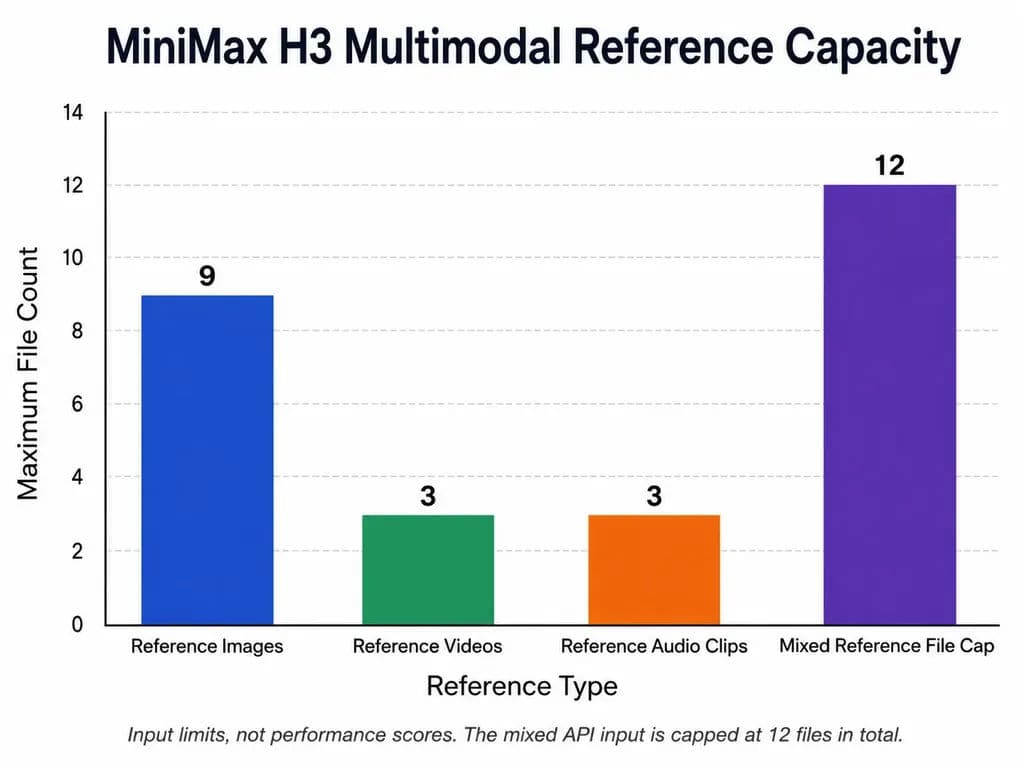
The current API allows up to 9 reference images, 3 reference videos and 3 audio clips, while mixed reference input is capped at 12 files in total. ComfyUI also supports the nine-image, three-video and three-audio reference structure.
More references are not automatically better. The strongest workflows make the responsibility of every asset explicit.
Preview Before Maximizing Reference Fidelity
ComfyUI provides two useful reference-image strategies: match reduces reference size toward generation resolution for speed, while max can retain up to a 2048-pixel short edge for stronger identity fidelity at additional computational cost.
In practice, use faster previews to test composition, motion, seeds and camera direction, then spend more compute on identity-critical finals. Starting every experiment at maximum fidelity turns every failed direction into an expensive one.
How Fast Is MiniMax H3 on Local Hardware?
H3 can run on consumer hardware in some configurations, but there is no verified universal minimum-VRAM figure in the research reviewed. System RAM, model precision, encoder memory, VAE usage, resolution and duration all matter.
RTX 4070 Ti SUPER 16GB H3 Performance
One documented I2V configuration used an RTX 4070 Ti SUPER with 16GB VRAM and 32GB RAM:
- 5.17s at 1056 × 672: 5m 58s
- 5.17s at 736 × 960: 5m 14s
- 6.58s at 736 × 960: 6m 55s
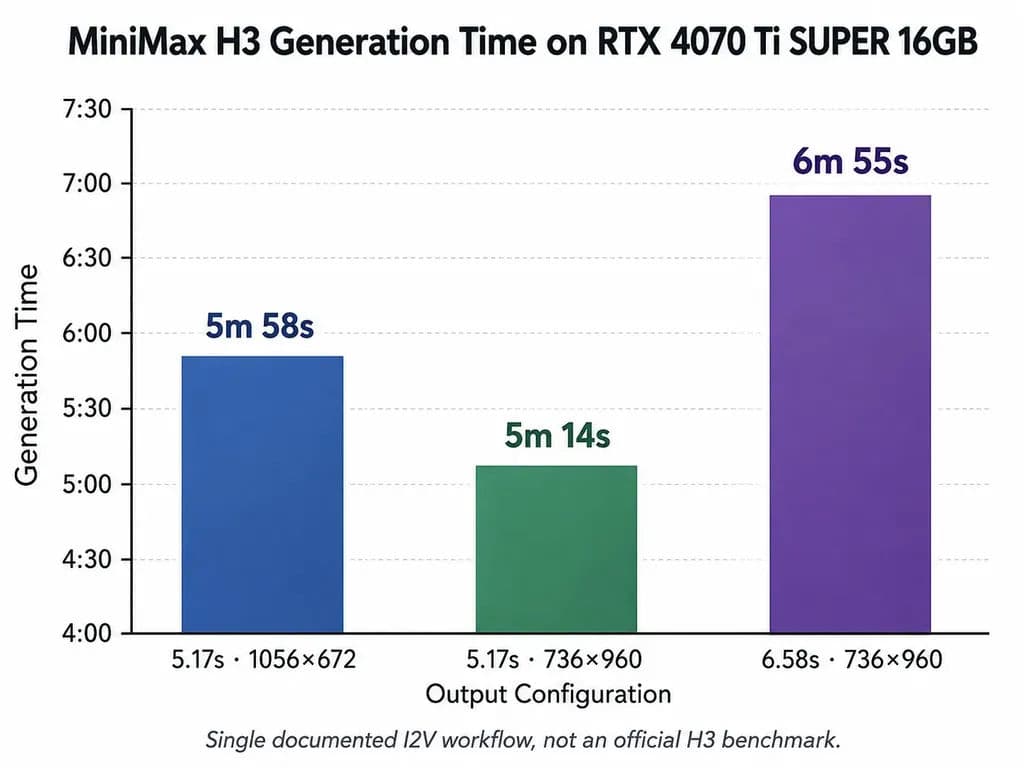
These are individual workflow measurements rather than official benchmarks. They show that 16GB can be workable, but generation may still operate on a minutes-per-shot timescale.
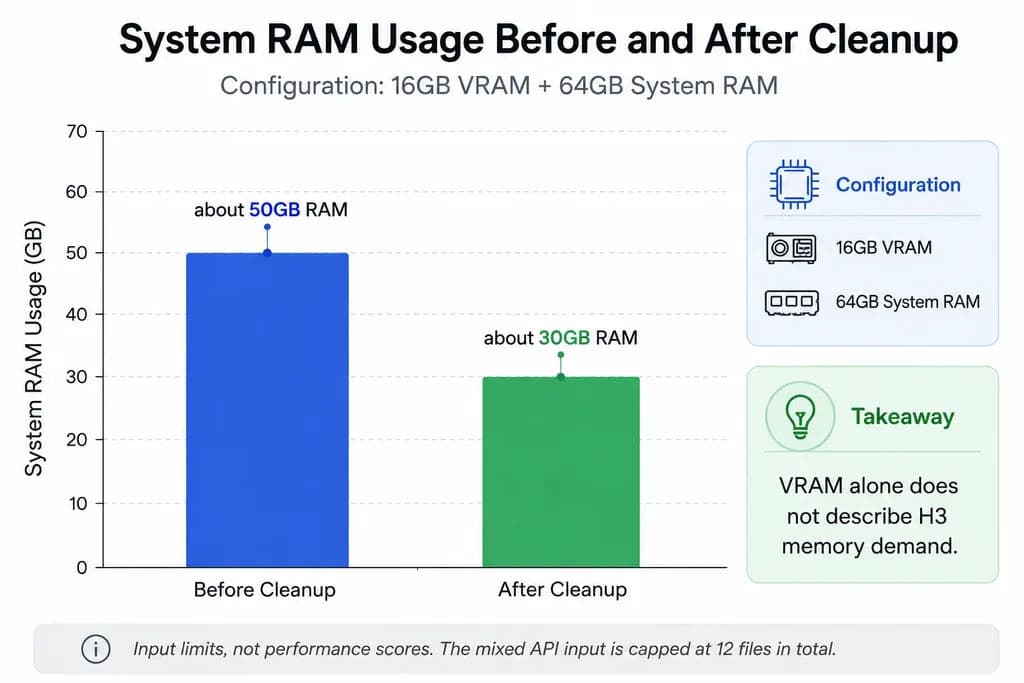
Another 16GB VRAM setup with 64GB system RAM reached roughly 50GB RAM use before cleanup and about 30GB afterward, reinforcing that VRAM alone does not describe H3's memory requirements.
Longer H3 Videos Are More Expensive to Iterate
A separate documented configuration recorded approximately 2 minutes for 5 seconds, 6 minutes for 10 seconds, 12 minutes for 15 seconds, 20 minutes for 20 seconds and 43 minutes for 30 seconds.
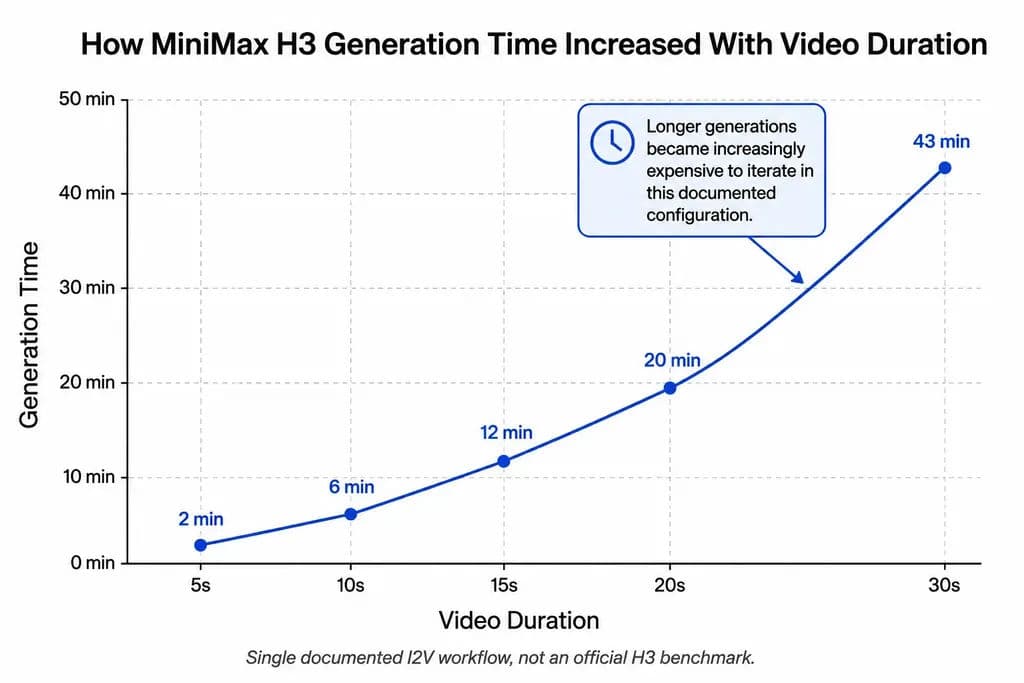
The useful production rule is therefore shot-based generation: find the right short shots first, then assemble the final sequence instead of repeatedly regenerating the longest possible clip.
How Should You Use MiniMax H3 in ComfyUI?
The most important technical distinction is FL2VA versus REF2VA.
Use FL2VA for T2V and I2V
ComfyUI's current H3 implementation uses FL2VA for T2V and I2V, including optional first/last-frame control. If your starting point is text or an approved image, this is the relevant workflow family.
Use REF2VA for Reference-Controlled Video
R2V uses different REF2VA diffusion weights. ComfyUI explicitly notes that REF2VA and FL2VA are separate weight sets. Downloading only the T2V/I2V setup therefore does not provide the complete R2V workflow.
For iteration speed, ComfyUI also states that Sage Attention can roughly double generation speed in supported configurations with minimal quality loss. Our reviewed field case was more conservative at roughly 20–30% on one machine, which is why acceleration should be tested on your own configuration rather than treated as guaranteed.
When Should You Not Use MiniMax H3?
Do not default to H3 when you need deterministic typography, verified chart data, pixel-accurate UI behavior, frame-by-frame animation or fast bulk production where reference fidelity adds little value compared to the best AI design tools suited for those tasks.
One experimental RTX 6000 PRO 96GB workflow used very short H3 generations to extract still images. It reported 14 seconds at 1K and 37 seconds at 2K, reduced with EasyCache to 8 and 22 seconds, but still observed spelling errors, weak small text, fabricated text, inaccurate charts and VAE artifacts.
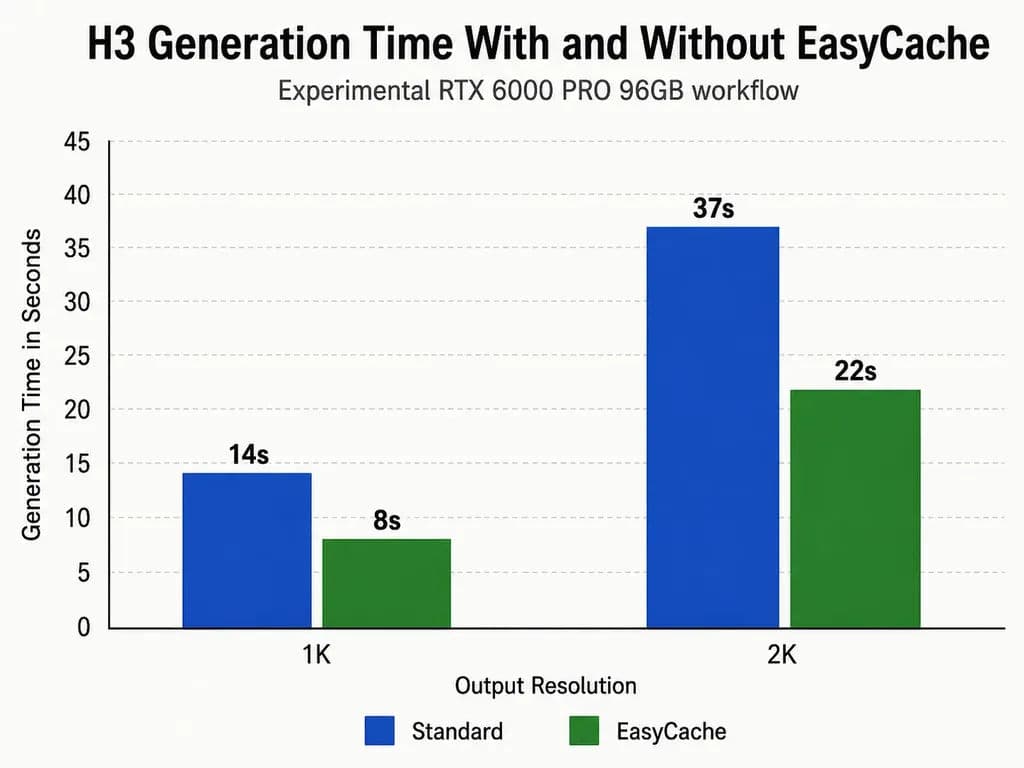
The practical conclusion is important: H3 can be strong for visual exploration without being a precision design tool. Final typography, data visualization, UI details and brand-critical elements still require deterministic review. best AI design tools
Can MiniMax H3 Be Used Commercially?
H3 should be described as open weights under the MiniMax H3 Community License, not as unrestricted open-source software.
The current license states that the standard agreement applies worldwide except the EU, UK, South Korea and United States; organizations in excluded territories can contact MiniMax about separate licensing. It also requires separate prior written authorization when commercial products or services generate more than $20 million in yearly revenue, requires commercial interfaces using H3 to prominently display “MiniMax H3,” and incorporates an Acceptable Use Policy.
For commercial deployment, “open weights” does not mean unrestricted commercial use or “uncensored.” Teams should recheck the current license before launch because legal and licensing terms can change.
FAQ
What is H3 best used for?
H3 is best used for reference-controlled AI video, including R2V, product I2V, character identity, motion transfer, camera reference, voice-driven characters, video editing and cinematic shorts. Its strongest advantage appears when you already have images, videos or audio that define important parts of the desired result.
Can H3 run with 16GB VRAM?
Yes, some documented workflows have run H3 with 16GB VRAM. As discussed in our MiniMax H3 review, one RTX 4070 Ti SUPER case generated roughly five-to-seven-second I2V clips in about five to seven minutes. However, this does not establish an official 16GB minimum; RAM, model precision, resolution, VAE and encoder memory also affect feasibility.
What is the difference between FL2VA and REF2VA?
FL2VA is used for H3 T2V and I2V workflows, while REF2VA is used for multimodal R2V. ComfyUI's current implementation explicitly separates these weight sets. Choose REF2VA when image, video or audio references need to control identity, movement, camera behavior or voice.
Can H3 generate long videos?
The current MiniMax API supports 4–15-second outputs, so H3 is better treated as a shot-generation system than a one-pass long-video tool. For longer projects, generate controlled clips, maintain reference continuity between shots and assemble selected outputs in a broader AI design workflow.
Conclusion
MiniMax H3 is most valuable when video generation becomes a reference-control problem rather than a prompt-writing problem. Use T2V for early cinematic exploration, I2V when a product or visual identity is already approved, and R2V when character identity, motion, camera behavior or voice must survive into a new shot. The strongest professional workflow is not to make H3 generate everything; it is to give each reference a clear creative job, iterate cheaply before final generation, verify precision-sensitive details, and use H3 where multimodal control creates more value than raw generation speed.
Artikel lainnya dari Blog Virse
Alur kerja

What Does a Graphic Designer Do? Real Tasks, Revisions, Tools & Workflow
23 September 2026 by Yifan Zhao
Alur kerja

How to Learn Graphic Design in 2026: A Step-by-Step Roadmap From Fundamentals to Portfolio
23 September 2026 by Yifan Zhao
Alur kerja

What Is Graphic Design? Definition, Real Examples, Process & Tools
23 September 2026 by Yifan Zhao