Nano Banana 2.1 vs Nano Banana 2: Is It Actually Better?
Vincent11 menit baca ·
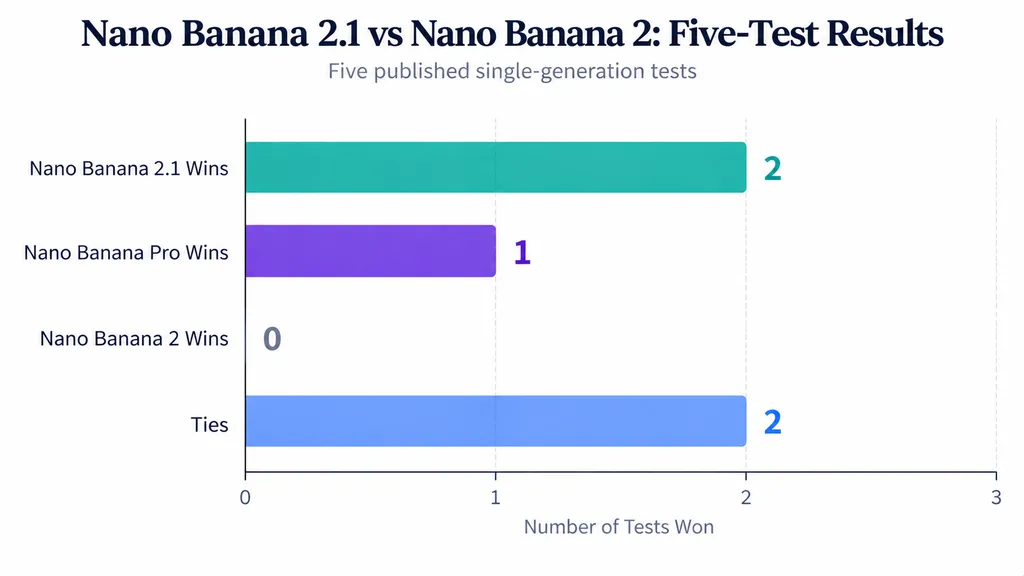
Is Nano Banana 2.1 actually better than Nano Banana 2? Yes, for most AI image generation projects—but not all. Released on October 6, 2026, it improves image quality, prompt following, text rendering, and consistency while lowering costs. In five published tests, 2.1 won two, Pro won one, and two ended in ties.
However, better image quality doesn't always mean better creative control. Nano Banana 2.1 can still alter product details, change unwanted elements, or lose character identity, leading to more revisions, inconsistent brand assets, and higher costs. These challenges also affect commercial image editing
So, is upgrading to Nano Banana 2.1 worth it? This comparison examines real image tests, editing accuracy, character consistency, speed, and pricing to help you decide. For teams needing more control, Virse offers an infinite canvas, collaborating AI agents, shared project context, and long-term design memory to streamline workflows and maintain visual consistency.

Nano Banana 2.1 vs Nano Banana 2: What Actually Changed?
Nano Banana 2.1 is an incremental upgrade to Nano Banana 2 (Gemini 3.1 Flash Image), not an entirely new image-generation system. Both support image creation, conversational editing, and reference-based workflows.
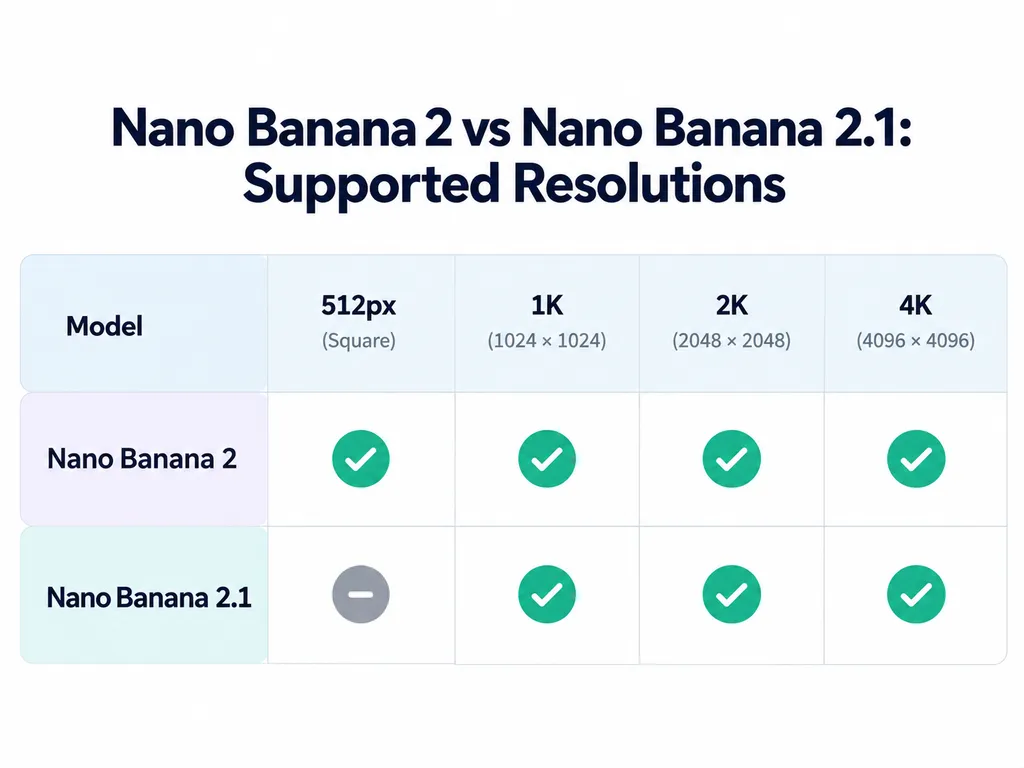
According to Google's documentation, the main differences include:
- Image quality: Improved realism and visual detail at 1K, 2K, and 4K.
- Prompt following: Better interpretation of complex creative instructions.
- Text rendering: Improved typography and infographic layouts.
- Editing consistency: Enhanced character continuity across multiple turns.
- Thinking levels: Minimal, medium, and high, with medium as the default.
- Resolution: Nano Banana 2 supports 512px output; 2.1 starts at 1K.
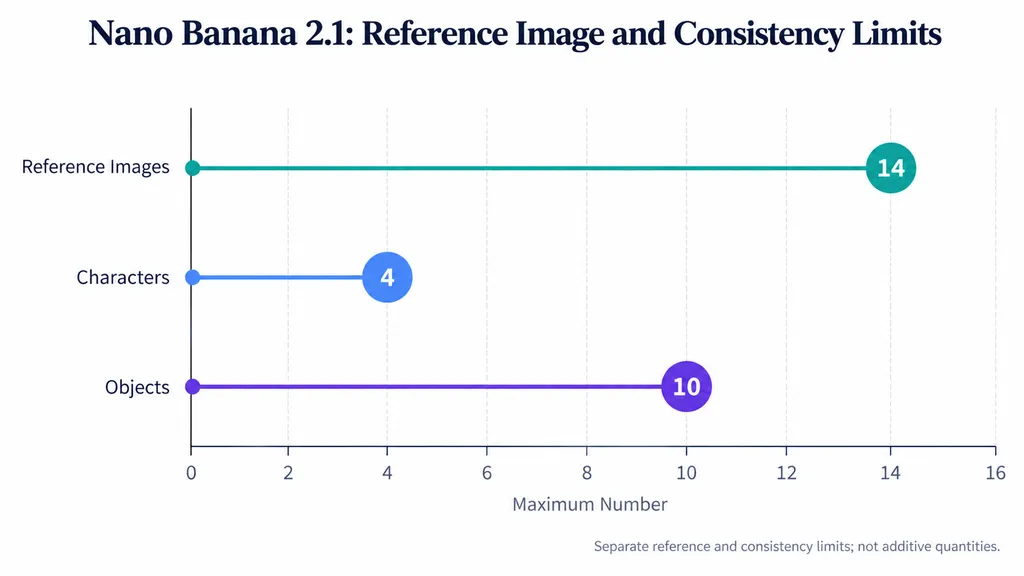
- Reference support: Up to 14 images, including consistency for four characters and fidelity for ten objects.
Which Nano Banana 2.1 Features Matter Most for Designers?
For commercial production, instruction accuracy and reference consistency matter more than visual polish alone.
A product advertisement may require left-side lighting, precise shadows, accurate packaging, and reserved space for promotional copy. Missing one constraint can make the image unusable.
Nano Banana 2.1 also addresses tiling artifacts at extreme aspect ratios, including 1:4, 4:1, 1:8, and 8:1 at 2K and 4K resolutions.
These improvements are relevant to panoramic campaigns and tall product graphics, although the available research does not establish measured artifact-reduction rates.
Nano Banana 2.1 vs Nano Banana 2 Image Quality: What Do Real Tests Show?
Nano Banana 2.1 performed better in selected photorealistic and commercial photography tests, while Nano Banana 2 can remain attractive for natural, documentary-style imagery.
Fuser conducted five same-prompt tests on October 6, 2026, comparing Nano Banana 2.1, Nano Banana 2, and Nano Banana Pro.
The tests used identical prompts and reference images, 2K PNG outputs, and one generation per model per task, without retries.
Results across five tasks:
- Photorealistic scene — Nano Banana 2.1
- Poster typography — Three-way tie
- Product photography — Nano Banana 2.1
- Product image editing — Three-way tie
- Reference character — Nano Banana Pro
These results describe a small exploratory comparison, not statistically representative win rates.
Case Study 1: Photorealism and Unwanted Image Details
The first task featured an elderly fisherman repairing a bright orange net on a misty wooden dock at dawn.
The prompt specified muted colors, natural lighting, visible hands, and a softly blurred harbor.
Nano Banana 2.1 followed the complete composition most closely, producing the full subject, atmospheric background, and detailed hands without unwanted text.
Nano Banana 2 created a warmer image but added an unrequested boat name, "SEA BREEZE." Pro rendered striking hand details but cropped the fisherman's face.
The lesson: A realistic image can still fail a creative brief through unwanted additions or incorrect framing.
For editorial photography, evaluate realism, composition, and instruction adherence independently. A separate published five-prompt comparison also found occasions where Nano Banana 2's less-polished documentary aesthetic was preferable.
Case Study 2: Product Photography and Lighting Accuracy
The product test featured a matte sage-green ceramic coffee dripper on pale oak, illuminated from the left with shadows extending right and empty advertising space.
Nano Banana 2.1 followed the specified lighting and composition.
Nano Banana 2 introduced a blank white panel and weak shadow definition. Pro reversed the lighting direction.
Result: Nano Banana 2.1 was the only output that satisfied the entire lighting brief.
For e-commerce teams, lighting consistency is a production requirement. If separate catalog images use conflicting shadow directions, the overall campaign can appear inconsistent.
This case supports a specific prompt-following advantage, but one successful generation does not establish universal reliability.
Nano Banana 2.1 Image Editing: Does It Preserve Original Details Better?
Nano Banana 2.1 can produce convincing edits, but improved editing capability does not guarantee preservation of unchanged image regions.
Professional design workflows must distinguish three requirements: completing the requested change, following its constraints, and protecting untouched content.
Case Study 3: Serum Bottle Editing and Preservation Drift
Fuser tested a studio image of an amber serum bottle labeled "LUMA 02."
The task moved the bottle onto a wet, moss-covered river stone while preserving its shape, amber glass, dropper cap, and label.
All three models retained the main bottle identity. However, every model changed the originally smooth cap collar into a ribbed structure.
Nano Banana 2.1 kept the label free of water droplets, while Nano Banana 2 and Pro introduced droplets onto it.
Result: A three-way tie, with a shared product-detail preservation failure.
For packaging and e-commerce design, an incorrect cap can misrepresent the actual product, even when the overall image looks attractive.
How to Reduce Editing Drift in Professional Workflows
A practical preservation workflow involves:
- Start with an approved reference image.
- Specify exactly which element should change.
- Identify protected details such as labels, materials, and geometry.
- Generate the edited image from the original reference.
- Compare protected regions at full resolution.
- Recheck those details after subsequent revisions.
Our review of published editing questions also identifies concerns involving unexpected clothing, pose, and text changes. These are useful testing scenarios, not measured failure rates.
Editing success and preservation fidelity should be assessed separately, especially for commercial brand assets.
Nano Banana 2.1 vs Nano Banana Pro: Which Maintains Character Consistency?
Nano Banana Pro preserved reference identity better in one published character test, despite Nano Banana 2.1's documented improvements in multi-turn consistency.
Character identity is especially important for recurring advertising subjects, storyboards, and branded visual narratives.
Case Study 4: The Rainy Bicycle Character Test
The reference featured a woman with curly copper-red hair, freckles, and round tortoiseshell glasses.
The task placed her on a bicycle in a rainy, neon-lit street while maintaining the same identity.
Nano Banana Pro produced the closest likeness, preserving facial structure, curls, freckles, and expression. It also created readable storefront signs.
Nano Banana 2 retained important features but introduced an unrequested smile.
Nano Banana 2.1 generated a convincing full-body scene, yet weakened the curls, glasses, and freckles.
Result: Nano Banana Pro won the reference-identity test.
This illustrates the difference between single-image resemblance and multi-scene character consistency.
For campaigns, test recurring characters across multiple camera angles, poses, expressions, and lighting conditions rather than judging one successful output.
Nano Banana 2.1 Text Rendering: Is It Better for Posters and Infographics?
Google documents improved typography and infographic layout accuracy for Nano Banana 2.1, but published evidence does not demonstrate universally superior text correctness.
Case Study 5: The Concert Poster Typography Test
Fuser tested a minimalist concert poster containing four exact lines, including the title "NIGHT TIDE," venue information, a date, and a website address.
All three models reproduced the requested text correctly, including punctuation.
However, the outputs differed in presentation.
Nano Banana 2.1 generated a photographed poster sheet. Nano Banana 2 produced a textured print presentation. Nano Banana Pro delivered flat, full-bleed artwork, better suited to direct print-layout use.
Result: A three-way tie for text accuracy, with different production suitability.
For posters and infographics, evaluate four dimensions independently: exact wording, hierarchy, spacing, and output format.
An image with perfect spelling may still require substantial layout revisions.
Is Nano Banana 2.1 Slower Than Nano Banana 2?
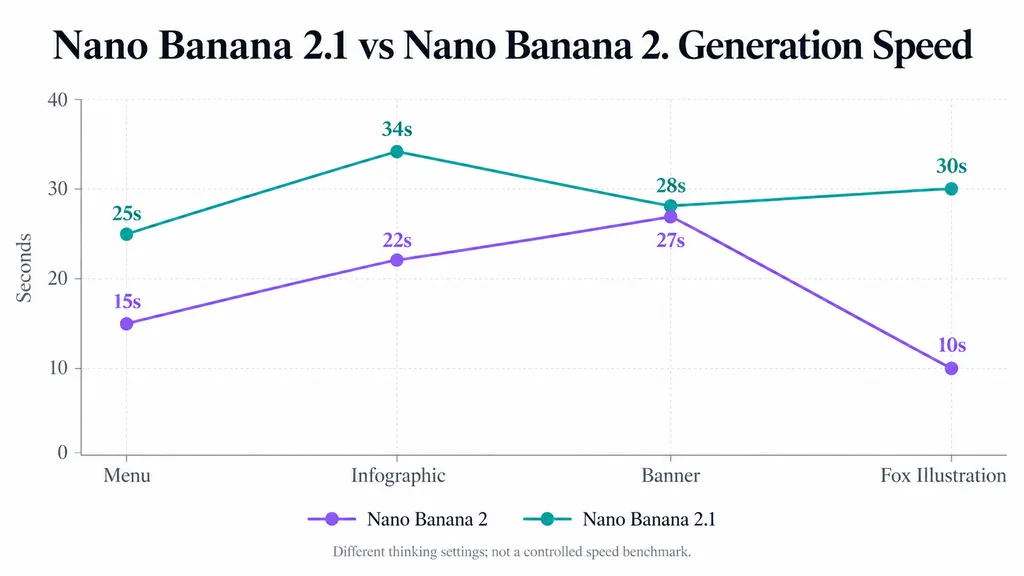
Nano Banana 2.1 took longer in four published provider tests, but different thinking settings prevent a fair intrinsic-speed comparison.
The reported measurements were:
- Menu: Nano Banana 2 took 15 seconds; 2.1 took 25 seconds.
- Infographic: 22 seconds versus 34 seconds.
- Banner: 27 seconds versus 28 seconds.
- Fox illustration: 10 seconds versus 30 seconds.
The arithmetic averages across these individual runs were 18.5 seconds for Nano Banana 2 and 29.25 seconds for 2.1.
However, Nano Banana 2 used minimal thinking while 2.1 used medium thinking.
How Should Designers Benchmark AI Generation Speed?
Compare equivalent providers, prompts, resolutions, reference inputs, and thinking settings where supported.
Repeat each task and measure median latency alongside approval rates.
For production, time per approved image is more useful than raw generation speed because faster outputs offer limited value when they require repeated corrections.
Nano Banana 2.1 Pricing vs Nano Banana 2: Which Is Cheaper?
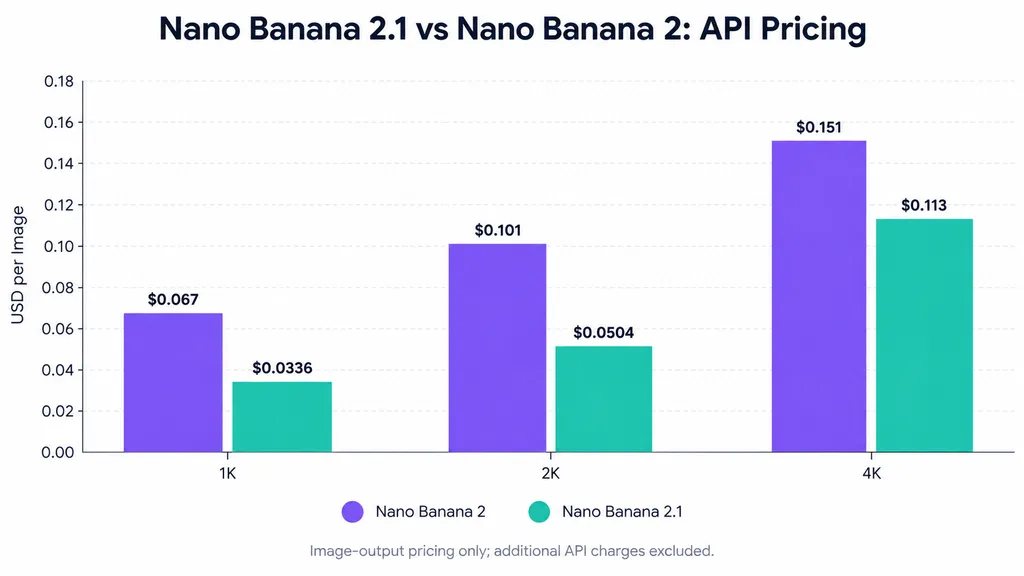
Nano Banana 2.1 offers lower standard API image-output pricing at comparable resolutions, based on Google's October 2026 published rates.
Official API Image-Output Pricing
1K resolution
- Nano Banana 2: $0.067
- Nano Banana 2.1: $0.0336
- Approximate savings: 50%
2K resolution
- Nano Banana 2: $0.101
- Nano Banana 2.1: $0.0504
- Approximate savings: 50%
4K resolution
- Nano Banana 2: $0.151
- Nano Banana 2.1: $0.113
- Approximate savings: 25%
These rates exclude input tokens, other output charges, and applicable grounding fees.
What Does the Pricing Difference Mean for Creative Teams?
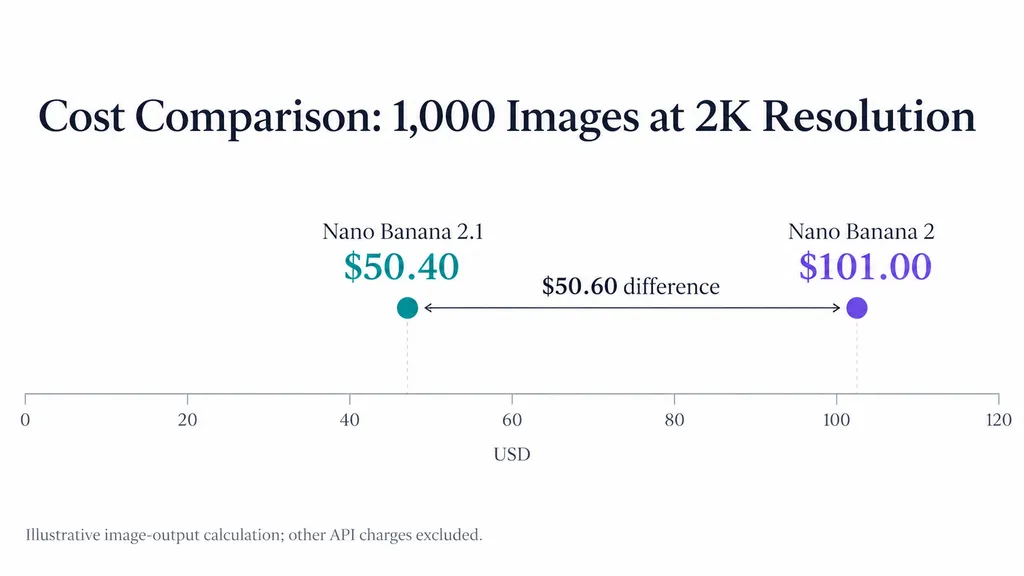
Consider a hypothetical project generating 1,000 images at 2K resolution.
Nano Banana 2 would incur approximately $101 in image-output costs, compared with $50.40 for Nano Banana 2.1.
That represents $50.60 in output savings before additional charges.
However, lower generation prices do not automatically mean lower production costs.
If one model requires more retries or manual corrections, the savings can shrink.
The more meaningful metric is total cost per accepted creative asset, including revision effort.
As of October 15, 2026, Google's official deprecation schedule lists no announced shutdown date for the stable Nano Banana 2 endpoint.
Which Nano Banana Model Should Professional Designers Choose?
Nano Banana 2.1 is the strongest general starting point, but specialized requirements can justify keeping Nano Banana 2 or testing Pro.
For commercial product photography and marketing visuals, start with Nano Banana 2.1. Its documented improvements, selected test advantages, and lower image-output prices make it attractive for everyday production.
For reference-driven characters, compare 2.1 with Nano Banana Pro. The bicycle experiment shows why identity fidelity deserves separate evaluation.
For existing Nano Banana 2 projects, test migration before changing established workflows. Approved visual styles may matter more than adopting a newer model immediately.
For product image editing, require preservation checks regardless of model choice.
A practical evaluation should measure:
- Prompt accuracy — Were all required instructions followed?
- Preservation fidelity — Did protected details remain unchanged?
- Character consistency — Did references retain identifying features?
- Generation efficiency — How long did approved results take?
- Production cost — What was the total cost per accepted asset?
This approach connects model selection to actual design quality rather than isolated visual impressions.
FAQ
Is Nano Banana 2.1 better than Nano Banana 2?
Nano Banana 2.1 is generally the better choice for new projects because it improves realism, prompt adherence, typography, and multi-turn consistency while lowering image-output costs. However, small published comparisons reveal limitations in detail preservation and reference identity. The best model depends on whether a workflow prioritizes visual quality, exact editing, or consistent character appearance.
Why does Nano Banana 2.1 change things I didn't ask it to edit?
Generative image editing can reconstruct surrounding content rather than preserving it exactly. This may alter packaging, clothing, expressions, or text. In one published serum-bottle test, all three models changed an untouched cap detail. Clear preservation requirements, approved original references, and full-resolution comparisons help identify unintended modifications before commercial use.
Is Nano Banana 2.1 slower or more restrictive than Nano Banana 2?
Four published timing samples showed longer generation times for 2.1, but unequal thinking settings make the speed comparison inconclusive. Editing behavior and content restrictions can also vary by platform and task. Available user reports do not establish a measurable increase in rejection rates. Compare both models using representative prompts and equivalent configurations.
Should I upgrade to Nano Banana 2.1 or choose Nano Banana Pro?
Choose Nano Banana 2.1 for everyday commercial generation, product visuals, and cost-conscious creative production. Consider Nano Banana Pro when precise reference likeness or complex in-scene text matters most. Existing Nano Banana 2 workflows should undergo regression testing before migration, particularly when approved product details or recurring character identities must remain stable.
Conclusion
Nano Banana 2.1 is the better default than Nano Banana 2 for most new AI image generation workflows, offering improved capabilities and lower image-output costs. Published comparisons demonstrate advantages in selected photorealistic and product-photography tasks, while exposing ongoing challenges in editing preservation, character identity, and predictable output. For professional designers, success depends on more than visual quality: it requires accurate creative direction, controlled references, efficient revisions, and reliable approval processes. Virse supports this broader workflow through its infinite canvas, collaborating AI agents, shared project context, and long-term design memory, helping creative teams organize AI-assisted production while keeping human designers in control.