FLUX 3 Review 2026: Great Benchmarks, But Is It Production-Ready?
Vincent11 menit baca ·
FLUX 3 is one of the most competitive AI video models to evaluate in 2026, especially for 5–20 second generation, native synchronized audio, FHD output, multi-shot prompting,, keyframes, and Draft exploration. Current pricing starts at $0.17/s for HD, $0.29/s for FHD, and $0.06/s for Draft HD.
But strong benchmarks do not automatically mean efficient production. Character drift, weak reference adherence, retries, queue time, and failed generations can push the real cost per usable clip far above the advertised API price. Public data on FLUX 3 latency, failure rate, throughput, and average retries is still limited
This is where Virse adds value beyond a single generation model. Its infinite canvas lets professional teams organize references, connect assets, run multiple Agents, share project context, and retain brand and design knowledge over time. Instead of replacing designers with one-click generation, Virse is designed to help teams direct, compare, refine, and scale AI-assisted creative work inside a visual workflow.

What Is FLUX 3 and What Makes Its AI Video Workflow Different?
FLUX 3 is Black Forest Labs’ multimodal model for video, audio, images, and action prediction. Unlike FLUX.2, which is primarily focused on image generation and editing, FLUX 3 extends the workflow into synchronized audiovisual generation.
BFL’s FLUX 3 research announcement explains that the model builds on Self-Flow, its approach to aligning multimodal generation and understanding within the same architecture. The practical implication for designers is that image, motion, sound, and scene logic are treated as connected information rather than isolated generation tasks.
FLUX 3 Video became generally available through the BFL API and selected partners on August 4, 2026. BFL’s current documentation still describes the broader FLUX 3 system as a preview while additional capabilities such as Video Editing and Omni Reference remain forthcoming.
FLUX 3 Supports 20-Second Video, FHD, Native Audio, and 10 Keyframes
Current Text-to-Video and Image-to-Video modes support 5–20 second clips at 24 fps, with HD and FHD output. The model can generate dialogue, effects, ambience, multiple shots, and typography within the video.
Image-to-Video accepts up to 10 pinned images, which can be placed at specific timestamps. This is especially useful for professional creative direction because designers can define critical compositions first and let the model generate the transitions.
In practice, that changes the workflow from: prompt → generate → hope
To: define visual states → generate motion → evaluate → refine
For storyboards, product films, campaign concepts, and motion design, this is a more controllable way to use generative video.
FLUX 3 Pricing 2026: How Much Do HD, FHD, Draft, and Continuation Cost?
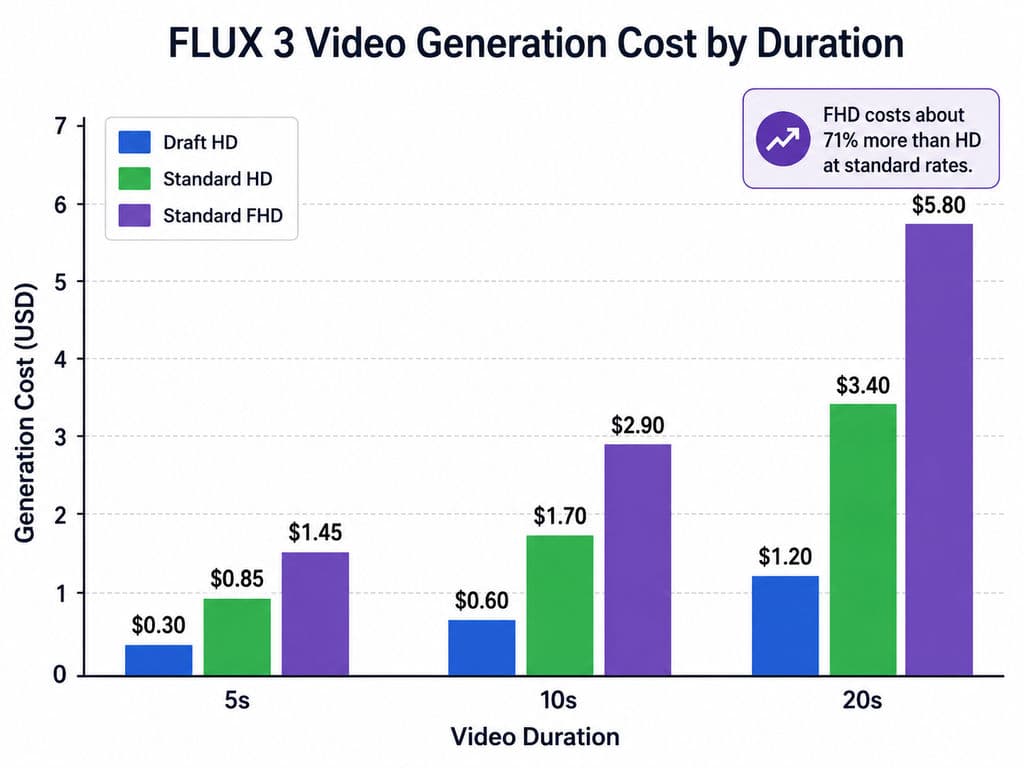
FLUX 3 Text-to-Video and Image-to-Video currently cost $0.17/s at HD and $0.29/s at FHD. Draft HD costs $0.06/s. BFL’s current specifications also price Video Continuation separately at $0.43/s for HD and $0.54/s for FHD.
Duration | Draft HD | Standard HD | Standard FHD |
5s | $0.30 | $0.85 | $1.45 |
10s | $0.60 | $1.70 | $2.90 |
20s | $1.20 | $3.40 | $5.80 |
FHD therefore costs about 71% more than HD at the published standard rates.
FLUX 3 Video Continuation Has Different Limits and Pricing
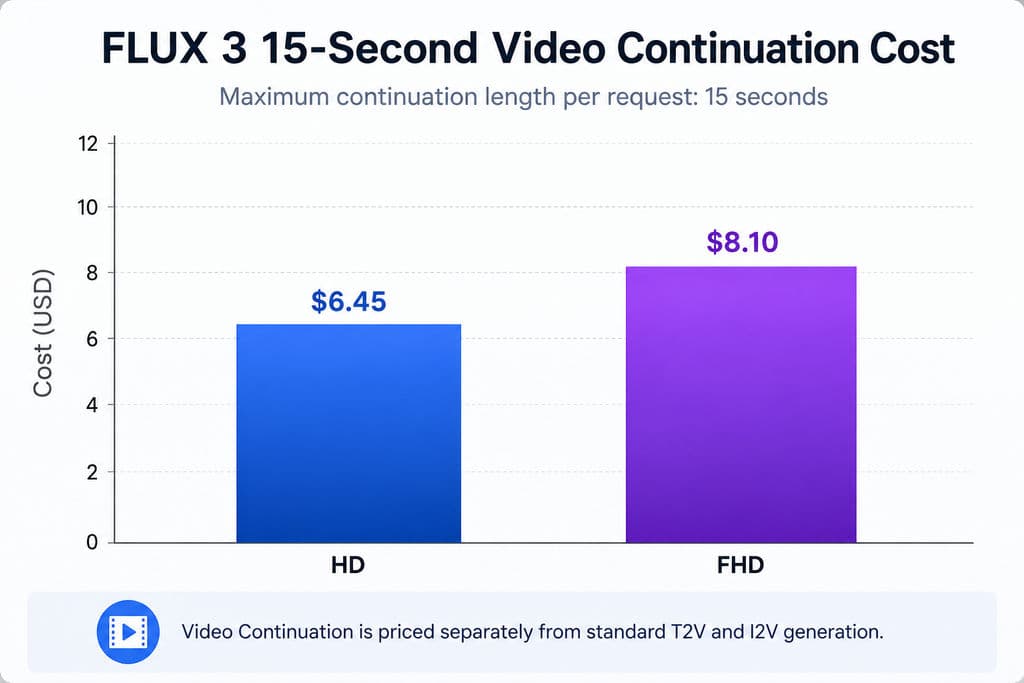
Video Continuation should not be confused with normal 20-second generation. The current specification limits continuation to 5–15 seconds per request.
At the current official rates, a 15-second continuation costs approximately:
- HD: $6.45
- FHD: $8.10
Continuation is therefore substantially more expensive than normal generation. It makes the most sense when extending a strong existing shot preserves continuity that would otherwise require several complete regenerations.
FLUX 3 Real Production Cost: Why Cost per Usable Clip Matters More
Price per generated second is a purchasing metric. Cost per usable clip is a production metric.
Our review of recurring user questions shows that professionals consistently care about retries, failure rate, queue time, consistency, and production readiness. These factors can change the economics far more than a few cents in API pricing.
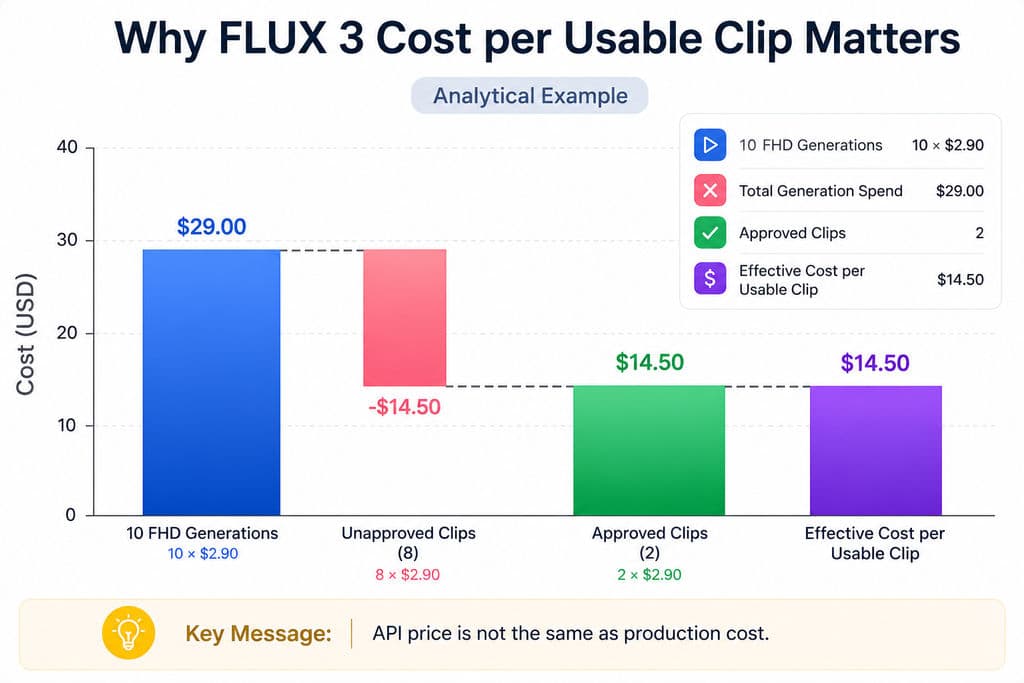
How Retries Can Turn a $2.90 FLUX 3 Generation Into a $14.50 Asset
Consider ten 10-second FHD generations:
10 × $2.90 = $29 total spend
If only two clips satisfy the brief:
$29 ÷ 2 = $14.50 per usable clip
This is an analytical example, not a measured FLUX 3 success rate. Its purpose is to show why agencies should track approval rate rather than assuming every API request becomes a deliverable.
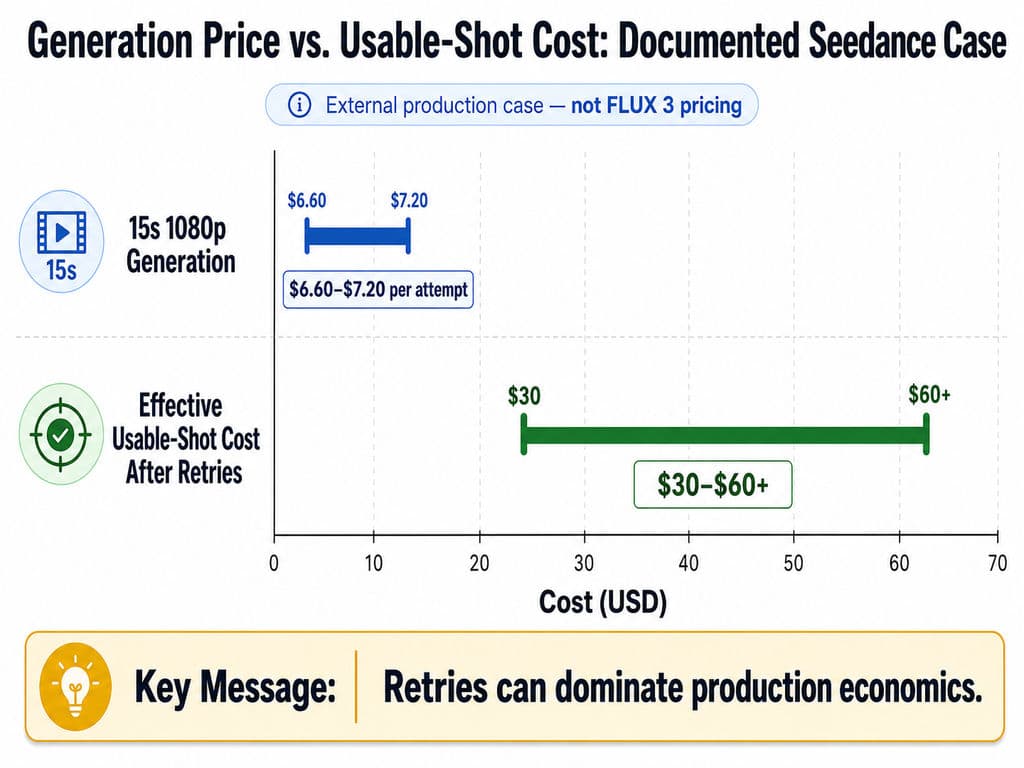
A documented production case in our research review illustrates the same problem with another video model. A 15-second 1080p Seedance generation was reported at roughly $6.60–$7.20 per attempt, while retries sometimes pushed the effective usable-shot cost to approximately $30–$60+.
Those are not FLUX 3 costs. They demonstrate the broader production lesson: generation price and finished-asset cost are not the same thing.
FLUX 3 Performance Benchmarks: What the Latest Results Actually Show
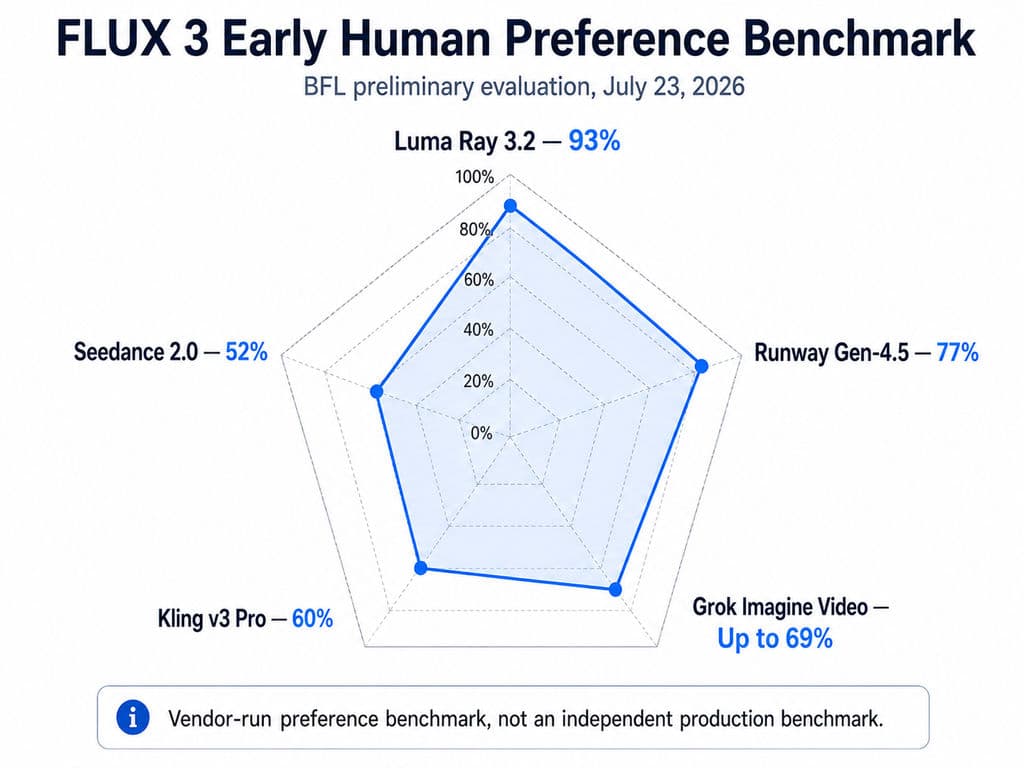
FLUX 3 has strong published quality results, but the benchmarks need to be interpreted carefully because they are BFL-run evaluations rather than independent production benchmarks.
Early FLUX 3 Benchmarks Showed Strong Preference but a Close Seedance Result
In BFL’s July 23 preliminary evaluation , FLUX 3’s 10-second, 720p video with native audio was preferred over:
Competitor | FLUX 3 Preference |
Luma Ray 3.2 | 93% |
Runway Gen-4.5 | 77% |
Grok Imagine Video | Up to 69% |
Kling v3 Pro | 60% |
Seedance 2.0 | 52% |
The most important figure is arguably 52% against Seedance 2.0. That is much closer to an even comparison than a decisive victory.
A same-prompt comparison included in our research review found FLUX 3 stronger in that specific case for native audio, retro color treatment, text rendering, and temporal consistency. Because it was a single comparison without quantitative scoring, it should be treated as a workflow observation rather than proof of overall superiority.
The August FLUX 3 Release Benchmark Is More Relevant Than Early-Access Results
BFL’s August 4 release evaluation reports a T2V all-vs-all ELO score of 1135 for the released model. BFL also says its I2V model ties Seedance 2.0 and outperforms the other models included in its internal comparison.
This newer benchmark is more relevant than early-access testing because the released model had progressed between the July announcement and August launch.
However, the conclusion should remain measured: FLUX 3 is highly competitive in output quality, but vendor-run preference tests do not establish universal superiority.
FLUX 3 Quality Performance Is Not the Same as Generation Speed
A 77% preference against Runway does not mean FLUX 3 is 77% faster.
Current public information still lacks a standardized dataset for:
- median generation time;
- real-time factor;
- GPU configuration;
- API queue latency;
- concurrency;
- failure rate;
- average retries;
- cost per approved clip.
Our research review identifies these as major information gaps , so FLUX 3 performance should be evaluated in three layers: output quality, inference speed, and production efficiency..
FLUX 3 Character Consistency and 20-Second Video: What Case Studies Reveal
Real creative workflows expose problems that leaderboard scores often miss. Two cases from our research are particularly useful: multi-shot 20-second generation and character consistency.
A 20-Second FLUX 3 Case Shows the Potential of Multi-Shot Prompting
One documented generation in our research review produced a 20-second 1080p “lost footage” sequence from one prompt containing multiple cuts and actions.
The case did not report latency, retry count, success rate, or total cost, so it cannot support efficiency claims. What it does show is that FLUX 3 is worth testing for scene sequencing and multi-shot direction, not only isolated five-second clips.
Character Consistency Improves With Better Reference Design
Another documented comparison tested FLUX 3, MiniMax H3, and Seedance. All three showed identity drift when character preservation relied largely on the video model itself, especially when the subject became smaller or the camera moved farther away.
The workflow improved after preparing:
- A clear face reference
- A full-body reference
- Explicit reference inputs for generation
- Repeated checks at different camera distances
The case reported better stability across all three models, although no measurable improvement percentage was provided.
The design lesson is important: character consistency is partly a reference-system problem, not simply a model-ranking problem.
FLUX 3 Draft Mode: The Best Workflow for Reducing Exploration Cost
Draft Mode is one of FLUX 3’s strongest practical features for professional iteration. A Draft generation costs $0.06/s and returns a lower-cost preview. Once a direction is approved, Draft Enhance reproduces the selected shot, seed, composition, and motion at full quality.
BFL’s current documentation makes an important distinction: enhancing a Draft is still billed as a full-quality render. Draft does not make final output free; its value comes from avoiding full-price rendering for directions that will be rejected.
A Better FLUX 3 Workflow Is Draft, Select, Then Enhance
For campaign and design exploration:
- Generate several Draft directions.
- Compare motion, framing, timing, and scene logic.
- Reject weak directions early.
- Select the strongest Draft.
- Enhance only the approved version.
- Review identity, typography, audio, and delivery quality.
A 10-second Draft costs $0.60, versus $1.70 for HD or $2.90 for FHD full generation.
What remains unknown is the average production saving. There is not yet enough evidence to claim a universal Draft ROI or retry reduction percentage. The useful internal benchmark is therefore total spend per approved asset, not Draft price alone.
FLUX 3 Dev, RTX 5090, and Local Generation: What Is Actually Known?
BFL has confirmed FLUX 3 Dev as a future open-weight model, but verified local hardware requirements are not yet available. The August roadmap confirms the planned Dev release without publishing reliable VRAM, RTX 5090, GGUF, quantization, or local-speed benchmarks.
That means current claims such as “FLUX 3 needs X GB of VRAM” should be treated cautiously until the actual Dev model is released and tested.
An RTX 5090 Case Shows Why Hardware Assumptions Are Risky
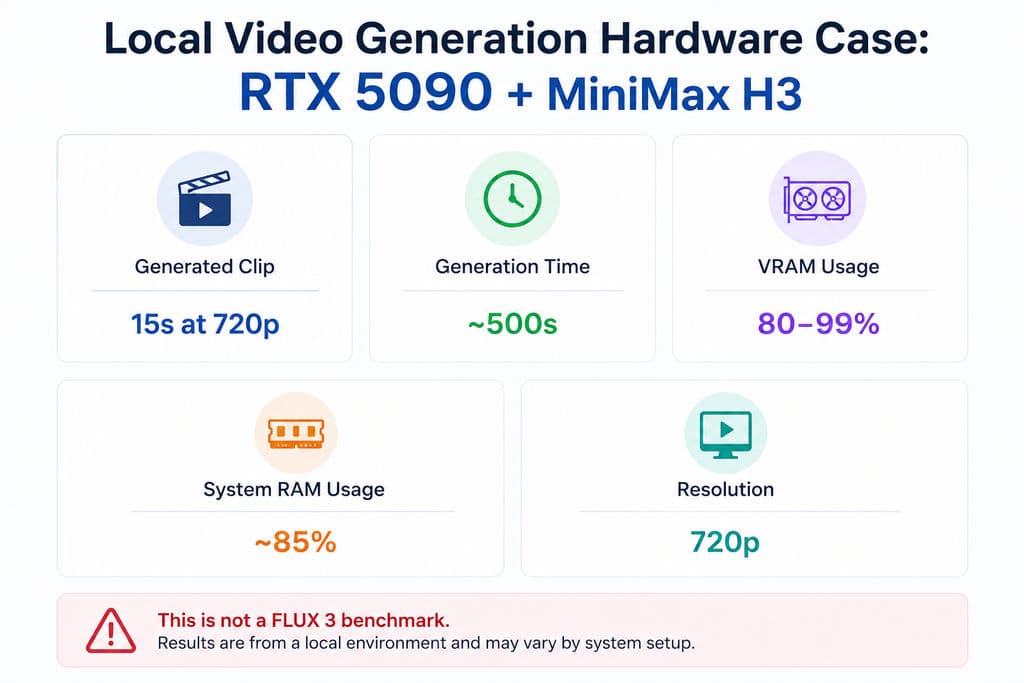
Our research includes a local MiniMax H3 case using an RTX 5090 and 64GB RAM. A 15-second 720p generation reportedly took about 500 seconds, while VRAM usage reached roughly 80–99% and system RAM about 85%.
This is not a FLUX 3 benchmark. It is useful only as context showing that frontier local video generation can remain computationally demanding even on high-end consumer hardware.
Until FLUX 3 Dev ships, API performance should not be used to predict Dev speed, VRAM requirements, or quantized-model quality.
Is FLUX 3 Worth It for Designers, Agencies, and AI Video Production?
Yes—FLUX 3 is worth serious testing if your workflow benefits from native audio, 20-second generation, multi-shot control, keyframes, typography, or low-cost Draft exploration. Its current API pricing is transparent enough to budget experiments, and both early and released-model evaluations indicate highly competitive output quality.
For professional production, however, the decision should be based on repeatable economics rather than the best-looking single result.
Use Case | FLUX 3 Assessment | Main Reason |
Concept exploration | Strong fit | Low-cost Draft workflow |
Campaign and social concepts | Strong fit | Native audio and multi-shot generation |
20-second storytelling | Strong reason to test | Up to 20s T2V/I2V |
Character campaigns | Conditional | Reference quality remains important |
High-volume advertising | Benchmark first | Retry and throughput data are limited |
Video continuation | Cost-sensitive | Higher per-second pricing |
Local RTX 5090 workflow | Too early to judge | Dev benchmarks are not available |
For design teams, I would measure five KPIs during evaluation: cost per approved clip, retries per approved clip, median generation time, character-consistency success rate, and failure rate. These metrics reveal far more about production value than preference scores alone.
Conclusion
FLUX 3 is a highly competitive AI video model in 2026, combining 20-second generation, native synchronized audio, FHD output, up to 10 keyframes, multi-shot control, strong typography, and a practical Draft-to-Enhance workflow. Its pricing makes experimentation predictable, and the latest BFL benchmarks indicate strong output quality, but the close Seedance comparison and missing latency, retry, failure-rate, and local Dev data mean it should not be treated as a universal winner.For creative teams, the strongest approach is to explore cheaply in Draft, direct scenes with references and keyframes, and judge FLUX 3 by cost per usable clip rather than cost per generated second.
FAQs
How much does FLUX 3 cost for 10s and 20s video?
For T2V and I2V, HD costs $0.17/s and FHD costs $0.29/s. A 10s clip therefore costs about $1.70 at HD or $2.90 at FHD, while a 20s clip costs about $3.40 or $5.80. Draft HD costs $0.06/s. V2V has separate pricing and a 15s maximum.
Is FLUX 3 better than Seedance 2?
There is no decisive universal winner. BFL’s early preference test gave FLUX 3 52% against Seedance 2.0, which is close to even. The newer released-model evaluation says FLUX 3 ties Seedance in I2V. The better choice depends on prompt type, references, audio requirements, consistency, retries, and production cost.
Can FLUX 3 keep characters consistent?
FLUX 3 can preserve identity, but character drift can still appear, particularly when faces become smaller or camera distance increases. Our research review found that stronger face and full-body references improved stability across FLUX 3 and competing models. For recurring characters, reference preparation should be treated as part of the production system rather than an optional prompt detail.
Can FLUX 3 Dev run on an RTX 5090?
There is not yet enough verified data to answer reliably. BFL has confirmed a future open-weight FLUX 3 Dev release, but public benchmarks for VRAM, RTX 5090 performance, GGUF, quantization, RAM offloading, and API-versus-Dev quality are not yet available. Hardware results from other video models should not be presented as FLUX 3 performance.