
How Much Is Nano Banana in 2026? Pro, 2, Lite and Free Use Compared
 Yifan Zhao10 min de lecture ·
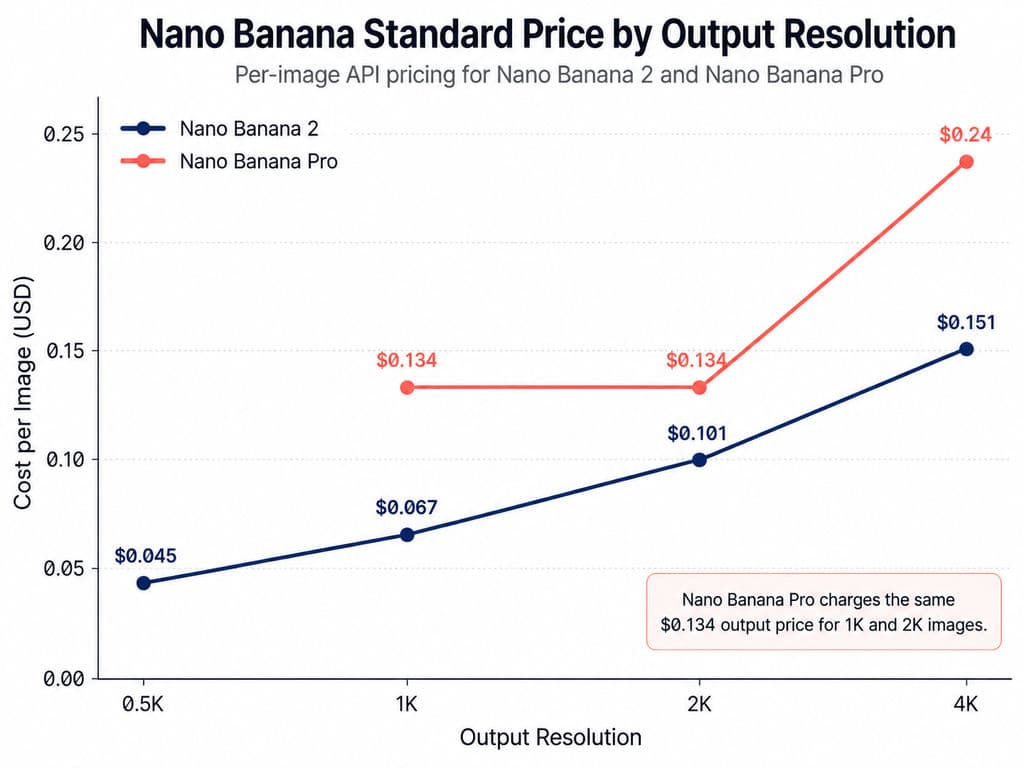
Nano Banana costs from $0.0168 to $0.24 per generated image across Google’s Standard and Batch API options, depending on the model and resolution. Nano Banana 2 Lite starts at $0.0336 per 1K image with Standard processing or $0.0168 with Batch. Nano Banana 2 costs $0.045 to $0.151, while Nano Banana Pro costs $0.134 for 1K or 2K and $0.24 for 4K. The original Nano Banana costs $0.039 per image. Limited consumer access is free, but the current image APIs do not have a free tier. For a broader view of the model’s strengths and limitations, see the Nano Banana review and the practical guide on how to use Nano Banana to edit photos.
The advertised output price is only the starting point. Input images, text and thinking tokens, grounding, retries, filtered generations and human review can raise the cost of every approved asset. Design teams also need to choose between a consumer subscription, Flow credits, Standard API processing, asynchronous Batch jobs and third-party providers. Comparing only the lowest per-image figure can therefore produce a misleading production budget. This is why cost should be evaluated inside the complete AI design workflow from brief to delivery, not as an isolated generation fee.
For teams evaluating Nano Banana as part of a larger creative process, Virse addresses the workflow around image generation rather than trying to replace the designer with a single prompt. Its infinite canvas keeps references, generated assets and revision logic connected, while multiple agents can collaborate on reference analysis, batch production, style continuation, asset organization and repeated revisions. Shared context and long-term memory are designed to help professional teams preserve creative intent and brand standards as production scales, especially in AI design Agent creative workflows and brand-consistent AI ad production.
How Much Does Nano Banana Cost Per Image?
Google currently describes Nano Banana as a family of four Gemini image models. Nano Banana 2 Lite is optimized for speed and scale, Nano Banana 2 is the general-purpose model, Nano Banana Pro handles the most complex visual tasks, and the original Nano Banana is now the legacy option.
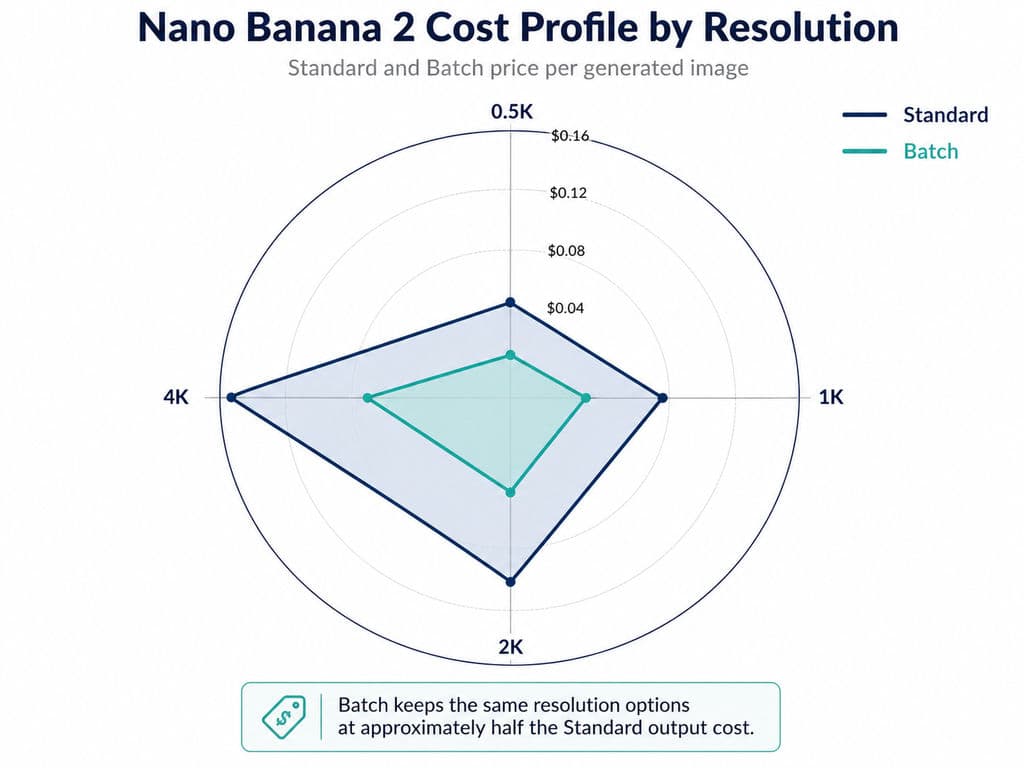
Model and Resolution | Standard | Batch |
Nano Banana 2 Lite, 1K | $0.03 | $0.02 |
Nano Banana 2, 0.5K | $0.05 | $0.02 |
Nano Banana 2, 1K | $0.07 | $0.03 |
Nano Banana 2, 2K | $0.10 | $0.05 |
Nano Banana 2, 4K | $0.15 | $0.08 |
Nano Banana Pro, 1K or 2K | $0.13 | $0.07 |
Nano Banana Pro, 4K | $0.24 | $0.12 |
Original Nano Banana, up to 1K | $0.04 | $0.02 |
These figures represent base image output. Google separately charges for some text, image input, thinking output and grounding activity.
Nano Banana 2 Lite Pricing
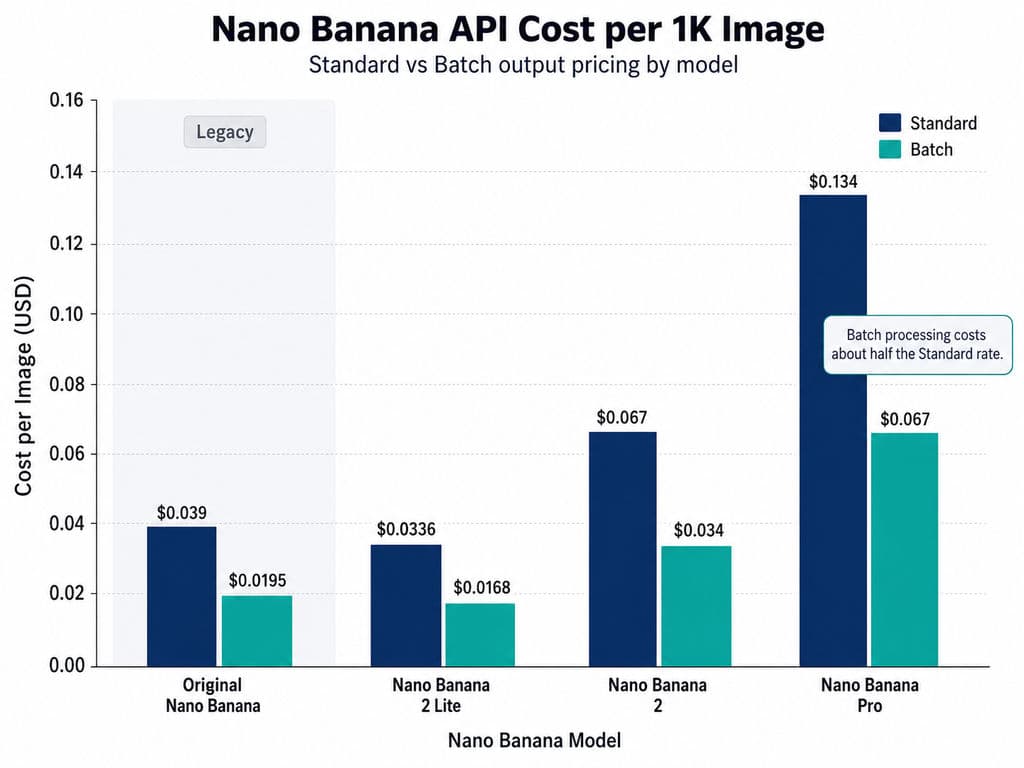
Nano Banana 2 Lite uses the model ID gemini-3.1-flash-lite-image. Google lists one confirmed output size: 1K at $0.0336 Standard or $0.0168 Batch. It is the cheapest current option for thumbnails, simple edits, background changes and large sets of basic visual variations. Google also states that Lite is not optimized for multiple reference inputs or long sequential editing workflows.
Nano Banana 2 Pricing
Nano Banana 2 uses gemini-3.1-flash-image and supports output from 512 pixels to 4K. It combines lower prices than Pro with stronger support for reference images, text rendering, subject consistency and iterative production. Google describes it as the general-purpose workhorse, making it the most practical starting point for product visuals, advertising concepts and editorial assets.
Nano Banana Pro Pricing
Nano Banana Pro uses gemini-3-pro-image. It costs $0.134 for 1K or 2K and $0.24 for 4K with Standard processing. Google positions Pro for high-fidelity work involving factual accuracy, multilingual text, complex compositions, localization and tighter brand control. Batch and Flex reduce the listed output prices to $0.067 and $0.12 respectively.
Is Nano Banana Free in Gemini, Flow and the API?
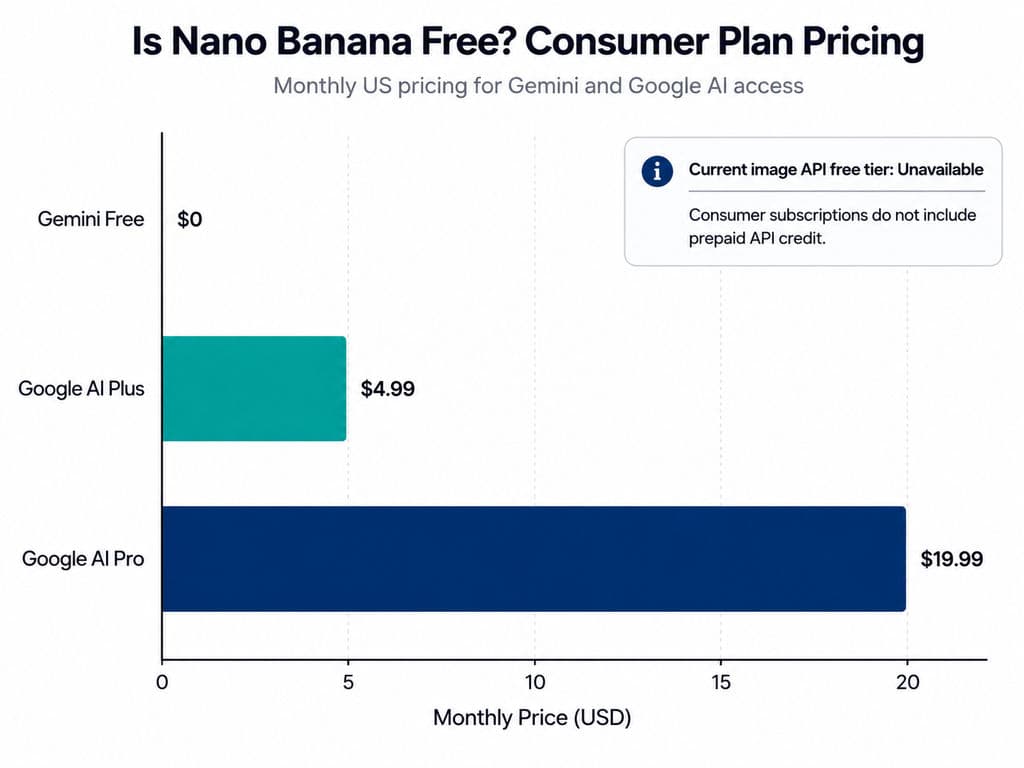
Nano Banana is free to try in some Google consumer products, but it is not free through the current production APIs. The Gemini Free plan costs $0 and includes image generation and editing with variable limits. Google AI Plus costs $4.99 per month in the US, while Google AI Pro costs $19.99 and provides higher consumer usage. Subscription prices and benefits can vary by market.
Google Flow provides 50 daily credits to accounts without a paid AI subscription. However, Google’s current support documentation says those free credits are limited to eligible Veo generations. Separately, Nano Banana 2 is the default image model in Flow and is available for zero credits. Zero-credit generation should not be interpreted as unlimited access because product-level rate limits can still apply.
The official pricing tables mark the free API tier as unavailable for Nano Banana 2 Lite, Nano Banana 2, Nano Banana Pro and the original Nano Banana. Google AI subscriptions are also separate from API billing; paying for Google AI Pro does not create a prepaid API balance.
Where to Use Nano Banana for Design and Production
Gemini and Flow for Individual Creative Work
Use the Gemini app for one-off image generation, conversational editing and early concept exploration. Use Flow when images belong to a wider visual project involving storyboards, scenes, video assets, mockups or connected iterations. Nano Banana 2 is now the default image model in Gemini and Flow, while eligible Pro and Ultra subscribers can access Nano Banana Pro for specialized tasks.
AI Studio and the API for Repeatable Workflows
Google AI Studio is appropriate for testing prompts, reference images, model IDs and resolutions before implementation. The Gemini API is better for websites, design products, e-commerce pipelines and automated content systems that require repeatable settings, usage records and budget controls.
In professional workflows, start with 5 to 50 representative requests rather than launching the full production run. Check the exact model ID, output resolution, usage metadata, approval rate and billing before scaling. This reduces the risk of discovering prompt, quality or cost problems after hundreds of images have already been generated.
Third-Party Platforms for Multi-Model Access
Unified providers can simplify n8n automation and multi-model routing, but the advertised model name may not reveal the exact version, resolution or processing settings. Verify the model ID, failure policy, concurrency, data handling, refund terms and whether 4K output costs more before purchasing credits.
Nano Banana 2 Lite vs 2 vs Pro: Which Model Is Best?
Model | Best Use | Key Trade-Off |
Nano Banana 2 Lite | Basic bulk assets | Lowest cost; limited complex editing |
Nano Banana 2 | General design production | Best overall price-quality balance |
Nano Banana Pro | Brand-critical or complex work | Highest control; highest cost |
Original Nano Banana | Existing integrations | Legacy model; migration recommended |
For most teams, a tiered workflow is more economical than using one model for every stage. Use Lite for inexpensive variations, Nano Banana 2 for general production and Pro only for shortlisted concepts, complex layouts or high-value final assets.
Our review of a documented e-commerce comparison found that Nano Banana 2 maintained bottle proportions and label readability across two runs of the same brief, while also producing suitable lighting and contact shadows. That is encouraging for product-image workflows, but it is a task-specific observation rather than proof that Nano Banana 2 will outperform Pro for faces, localization or long editing sequences.
How Much Does Nano Banana Cost for Bulk Image Generation?
Google’s Batch API processes non-urgent jobs asynchronously at 50% of Standard cost. Its target turnaround is within 24 hours, although many jobs complete sooner. It is best suited to catalogs, blog images, ad variations and other work that does not require an immediate response.
1K Model | 100 Images | 1,000 Images | 100,000 Images |
Lite Standard | $3.36 | $33.60 | $3,360 |
Lite Batch | $1.68 | $16.80 | $1,680 |
Nano Banana 2 Standard | $6.70 | $67 | $6,700 |
Nano Banana 2 Batch | $3.40 | $34 | $3,400 |
Pro Standard | $13.40 | $134 | $13,400 |
Pro Batch | $6.70 | $67 | $6,700 |
These totals exclude input, thinking, retries, storage and review costs. For branded campaigns, those review costs can become significant because AI ad creative brand consistency requires more than generating visually similar outputs.
What Real Nano Banana Workflows Reveal About Cost
A 680-Image API Production Run
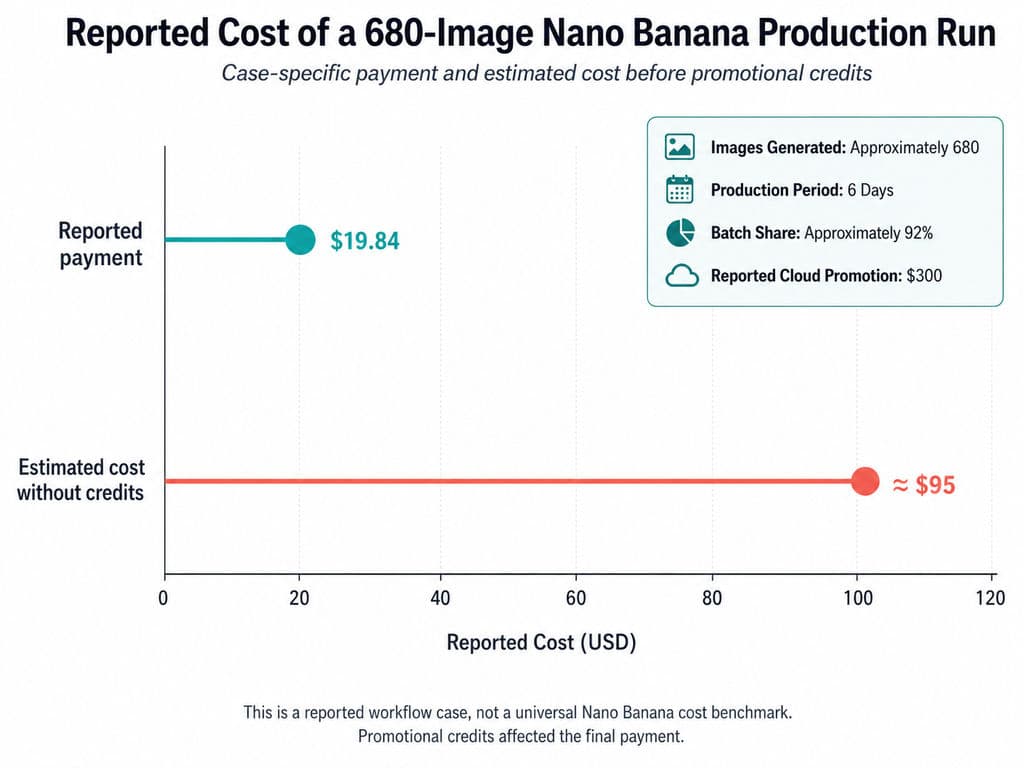
One documented workflow generated approximately 680 images in six days, mainly 4K posters and outfit variations. About 92% of requests used Batch, and the reported payment was $19.84. The same report estimated roughly $95 without credits and used a $300 cloud promotion. Because promotional credits affected the bill, this case demonstrates production scale rather than a repeatable cost benchmark.
A 432-Image Combination Workflow
Another production plan combined characters, vehicles, poses, camera angles, backgrounds and lighting into 432 possible images. Instead of starting the entire job, the operator generated 50 test images first. The important lesson is operational: validate billing and output quality on the combinations most likely to fail before paying for the complete matrix.
Automated SEO and Product Workflows
Our review also found a Shopify pipeline connecting research, writing, Nano Banana image generation and publishing through n8n. Another project tested more than 100 prompts and retained 74 for product, portrait, advertising and brand use. These examples show that Nano Banana can function as an image node inside a larger production system, but the source materials did not provide verified conversion, revenue or ROI results.
How to Calculate Nano Banana Cost per Usable Image
The most useful metric is:
Cost per usable image = total production cost divided by approved images.
For example, 1,000 Nano Banana Pro Batch outputs have a base output cost of $67. With a hypothetical 80% approval rate, 800 images are accepted, producing a base cost of $0.08375 per usable image before input, review and infrastructure expenses. The 80% rate is an illustrative assumption, not a measured Nano Banana benchmark.
Track approval rate, average retries, reference-image input, thinking output, safety failures and review time. A cheaper model can become the more expensive workflow when it requires repeated corrections or produces inconsistent brand assets. This is why teams should evaluate model cost together with the broader creative workflow.
Official API vs Third-Party Nano Banana Pricing
Our source review found third-party offers advertising approximately $0.04 to $0.09 per image. These were provider claims rather than independently audited comparisons, and the available evidence did not confirm that resolution, model identity, output settings and reliability matched Google’s official service.
Compare third-party pricing with Google Batch, not only Google Standard. Before buying credits, confirm the exact model ID, included resolution, failed-request policy, concurrency, retention, commercial terms and refund process. The lowest advertised price is not necessarily the lowest cost per approved image.
FAQ
Is Nano Banana free?
Nano Banana has limited free consumer access through products such as Gemini and Flow. The current Nano Banana image APIs do not offer a free tier. Consumer limits can change by product, account and subscription, so free access should not be treated as a stable production allowance.
Does Google AI Pro include API usage?
No. Google AI Pro increases access within consumer products such as Gemini and Flow, but Gemini API usage is billed separately through the developer project. A Google AI subscription is not an API credit balance.
How much do 1,000 Nano Banana images cost?
At 1K, 1,000 images cost about $33.60 with Lite Standard, $67 with Nano Banana 2 Standard or $134 with Pro Standard. Batch reduces those base output costs to approximately $16.80, $34 and $67. Input, retries and review can increase the final total.
Are failed Nano Banana requests charged?
Google does not publish one universal answer covering every failure, filter and platform. Inspect usage metadata and billing after a small test. Third-party providers may apply different charging and refund policies, so obtain written terms before running a large batch.
Conclusion
Nano Banana pricing ranges from $0.0168 for a 1K Nano Banana 2 Lite Batch image to $0.24 for a Standard 4K Nano Banana Pro image, while limited consumer access is available without a paid API plan. Lite is the strongest choice for low-cost bulk assets, Nano Banana 2 offers the best general balance, and Pro is better reserved for complex or brand-critical work. For reliable budgeting, confirm the model ID, test a representative sample, use Batch for non-urgent production and calculate cost per approved image rather than relying on the advertised generation price alone.
Plus d’articles du blog Virse
Produit
GPT Image 2.5 Pricing: Flare vs Sunburst & the Real Cost per Image
14 septembre 2026 by Vincent
Produit
GPT Image 2.5 Review: Does It Finally Fix AI Image Editing Drift?
14 septembre 2026 by Vincent
Produit
How Much Is Kling 3.0? 2026 Pricing, Credits, and Real Cost per Video
8 septembre 2026 by Yifan Zhao