
Le meilleur processus H3 Max : générer 20 idées, puis effectuer le rendu de la gagnante
Vincent12 min de lecture ·

Le meilleur processus H3 Max consiste à générer d’abord 15–20 concepts distincts, à choisir le plus solide, puis seulement à investir dans des instructions structurées, des tests préalables, la continuité Multishot et le rendu final. La plus grande erreur consiste à invoquer la vitesse de H3 Max pour rendre en meilleure qualité la première idée prometteuse. Utilisez plutôt sa génération rapide pour comparer davantage de pistes créatives avant d’engager des ressources de production coûteuses. Fal indique que H3 Max peut générer une vidéo de cinq secondes en environ trois secondes : l’exploration rapide de concepts constitue donc un de ses principaux atouts pratiques. Vingt idées est un objectif pratique, pas une obligation fixe.
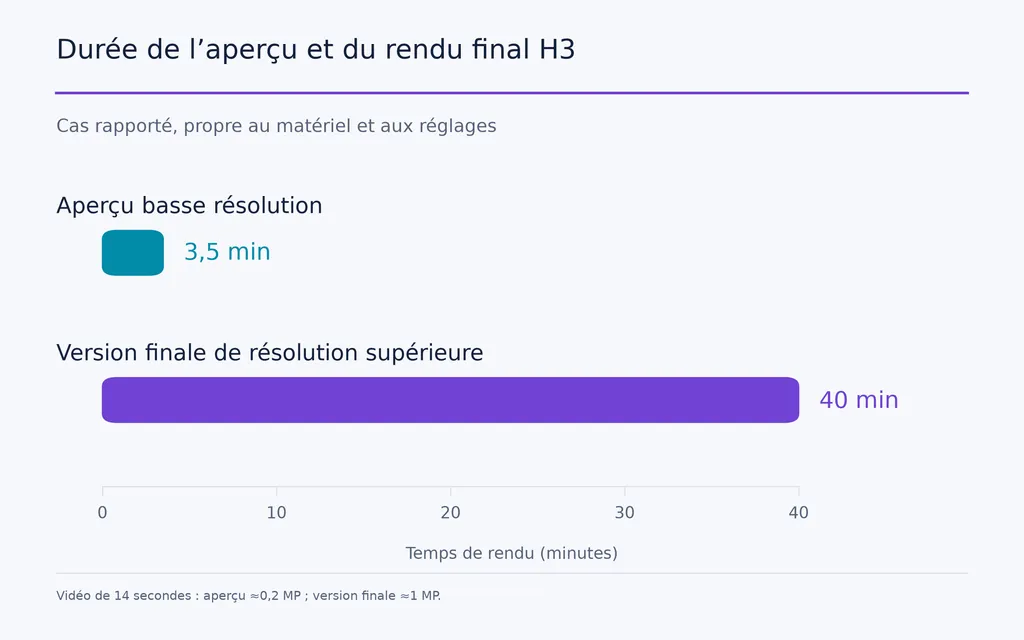
Choisir trop tôt peut coûter cher. Dans les cas publiés de processus H3 que nous avons étudiés, un aperçu de 14 secondes à environ 0,2 MP prenait environ 3,5 minutes, contre environ 40 minutes pour une version finale d’environ 1 MP. Si le mouvement de caméra est incorrect, le dialogue mal calé, le mouvement défaillant ou les références mal attribuées, ne découvrir le problème qu’en qualité finale gaspille bien plus de temps et de calcul. Répéter cette démarche sur plusieurs concepts faibles transforme la vitesse de rendu en gaspillage de production.
Un meilleur processus H3 Max est simple : explorer largement, éliminer à faible coût, valider tôt et n’augmenter le calcul qu’à mesure que la certitude créative progresse. Virse accompagne ce processus en réunissant idées, références, storyboards, ressources et itérations sur un canevas infini, tandis que plusieurs Agents partagent le contexte du projet et que la mémoire à long terme peut conserver les préférences de l’équipe, les standards de marque et les connaissances des projets précédents. Il devient ainsi plus facile de passer de 15–20 pistes initiales à une gagnante validée sans perdre le contexte créatif de chaque itération. Seedance 2.5, Seedance 2.0 et MiniMax H3 sont désormais disponibles sur Virse : les équipes peuvent explorer et comparer plusieurs grands modèles vidéo dans le même processus créatif.

Pourquoi le meilleur processus H3 Max commence par 15–20 idées
Les rendus finaux ratés sont le véritable coût de production
Un rendu lent est gênant. Un rendu lent qui finit rejeté coûte cher.
Le cas des 3,5 minutes contre 40 minutes montre pourquoi exploration et production doivent utiliser des niveaux de qualité différents. Les premières générations ont seulement besoin d’une fidélité suffisante pour vérifier si le concept, la composition, le mouvement et l’histoire fonctionnent.
Dans les processus professionnels, j’utilise un indicateur plus utile que la vitesse brute de génération :
Le nombre de concepts viables évalués par unité de temps.
Si H3 Max permet de comparer de nombreuses pistes avant de s’engager, sa vitesse devient un avantage créatif, plutôt qu’un simple chiffre de performance.
Générer des concepts différents, pas 20 graines similaires
Un lot H3 Max utile fait varier des paramètres significatifs :
- composition
- mouvement de caméra
- mouvement
- environnement
- rythme
- structure narrative
- interaction avec le produit
- direction de l’éclairage
Pour un lancement de produit, comparez une révélation de matière en macro, une situation d’usage humain, une séquence de transformation et une orbite continue. L’objectif est de tester différentes hypothèses créatives, pas de produire 20 variantes cosmétiques.
Notre recherche a également étudié un cas d’automatisation ComfyUI ayant généré 40 vidéos en faisant évoluer les entrées et en consignant les résultats. Le même principe peut transformer la génération par lots en tournoi créatif fondé sur des variations d’idée, de caméra, de mouvement et de graine.
Comment sélectionner le concept H3 Max gagnant
Évaluer la créativité et la faisabilité de production des idées
Le clip le plus spectaculaire n’est pas toujours le meilleur candidat à la production avec H3 Max.
Critère d’évaluation | Points à examiner |
Clarté du concept | L’idée est-elle immédiatement compréhensible ? |
Composition | Le point focal est-il clair ? |
Mouvement | Le mouvement sert-il l’histoire ? |
Identité | Le personnage ou le produit est-il suffisamment stable ? |
Respect des instructions | L’action prévue a-t-elle eu lieu ? |
Risque de continuité | L’idée peut-elle tenir sur plusieurs plans ? |
Le risque de continuité compte, car un excellent clip de cinq secondes peut se fragiliser lorsqu’il est étendu à 30 secondes. Des mouvements de caméra agressifs, des environnements instables ou des interactions complexes peuvent ensuite engendrer de coûteux problèmes de cohérence des personnages.
Cesser d’explorer une fois la piste gagnante identifiée
Ne consacrez pas cette étape du processus H3 Max à corriger des textures, de petits défauts audio ou des détails infimes de timing.
Posez une seule question :
Ce concept mérite-t-il d’être produit ?
Dès que la réponse est oui, passez de l’exploration au contrôle. Continuer à générer des alternatives lorsque la décision est déjà claire gaspille l’avantage offert par H3 Max.
Comment transformer le concept H3 Max gagnant en storyboard
Utiliser des références visuelles pour les décisions visuelles
Notre étude d’expérimentations H3 a repéré des storyboards utilisés directement comme références visuelles. C’est utile, car le cadrage, l’ordre des plans, la position du sujet, les relations spatiales et la progression de la scène se communiquent souvent plus efficacement par des images que par du texte supplémentaire.
Un storyboard doit donc fixer la logique visuelle du concept gagnant avant la rédaction des instructions détaillées.
Cela évite aux instructions finales de devoir inventer simultanément composition, structure narrative, identité, mouvement, dialogue et audio.
Comment structurer les instructions H3 finales
Choisir le mode de tâche H3 avant de rédiger les instructions
Décidez d’abord du type de contrôle nécessaire à la scène.
S’agit-il principalement d’une production pilotée par le texte, ancrée sur une image, contrôlée par les premières et dernières images ou fondée sur des références complètes ?
MiniMax H3 prend en charge un contexte multimodal associant images, vidéo et audio, ainsi que les processus fondés sur la première et la dernière image. Choisir d’abord la structure de la tâche évite de forcer toutes les scènes dans la même méthode d’instructions.
Sélectionnez d’abord la tâche. Composez ensuite les instructions.
Attribuer une fonction principale à chaque référence H3
L’un des motifs les plus marquants de notre étude des questions des utilisateurs est l’ambiguïté des rôles des références.
Une configuration plus claire est la suivante :
- L’image 1 contrôle l’identité
- L’image 2 contrôle les vêtements ou les matières
- La vidéo contrôle le mouvement
- L’audio contrôle la voix ou une autre propriété sonore explicitement définie
- Le storyboard contrôle la composition
Structurez ensuite le texte autour de :
Sujet → Scène → Action → Caméra → Timing → Locuteur → Audio → État final
Un cas structuré de Ref2V étudié dans notre recherche a produit 30 clips d’environ 15 secondes chacun, soit environ 7,5 minutes de contenu généré, avec des dialogues nettement plus fiables après clarification des rôles des références et des locuteurs. Aucun taux de réussite formel n’a été communiqué ; il faut donc y voir un retour sur le processus, et non un test de performance contrôlé.
Comment contrôler le timing, les dialogues et l’audio dans H3
Expliciter le timing
Une scène complexe ne doit pas dépendre de H3 pour deviner chaque temps fort.
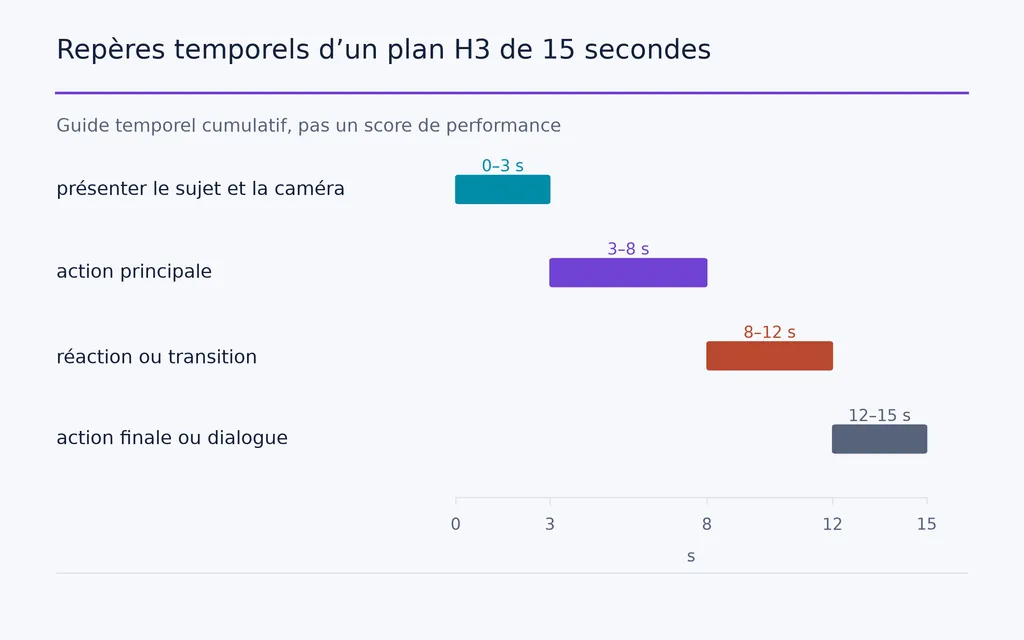
Pour un plan de 15 secondes, définissez des plages claires telles que :
0–3 secondes : présenter le sujet et la caméra.
3–8 secondes : action principale.
8–12 secondes : réaction ou transition.
12–15 secondes : action finale ou dialogue.
Le timing exact varie selon la scène, mais la structure temporelle doit être dirigée délibérément, en particulier avec plusieurs locuteurs, des réactions ou des coupes prévues.
Séparer voix, rythme, dialogue et musique
Notre étude des questions des utilisateurs a retrouvé à plusieurs reprises une confusion sur les références audio : certains voulaient le rythme mais transféraient la voix ; d’autres souhaitaient des caractéristiques vocales, mais récupéraient aussi des paroles indésirables.
Définissez précisément ce que contrôle la référence audio et ce qu’elle ne doit pas contrôler.
Pour les processus ajoutant une musique de fond indésirable, une instruction pratique repérée dans la recherche est non_diegetic_music: N/A. La leçon générale est plus importante : l’audio nécessite une direction aussi explicite que la caméra, le mouvement et le dialogue.
Pourquoi H3 nécessite un test préalable économique avant le rendu final
Tester le comportement avant la fidélité
Le test préalable doit répondre à ces questions :
- La composition est-elle correcte ?
- Le mouvement de caméra est-il correct ?
- L’action prévue a-t-elle lieu ?
- Le bon personnage parle-t-il ?
- Le dialogue est-il correctement calé ?
- Les références sont-elles correctement interprétées ?
- La transition survient-elle au bon moment ?
Le cas précédent de l’aperçu de 3,5 minutes contre le rendu final de 40 minutes en montre clairement l’intérêt. Le matériel et les réglages varient, mais le principe de production reste stable : valider le comportement avant de payer pour la fidélité.
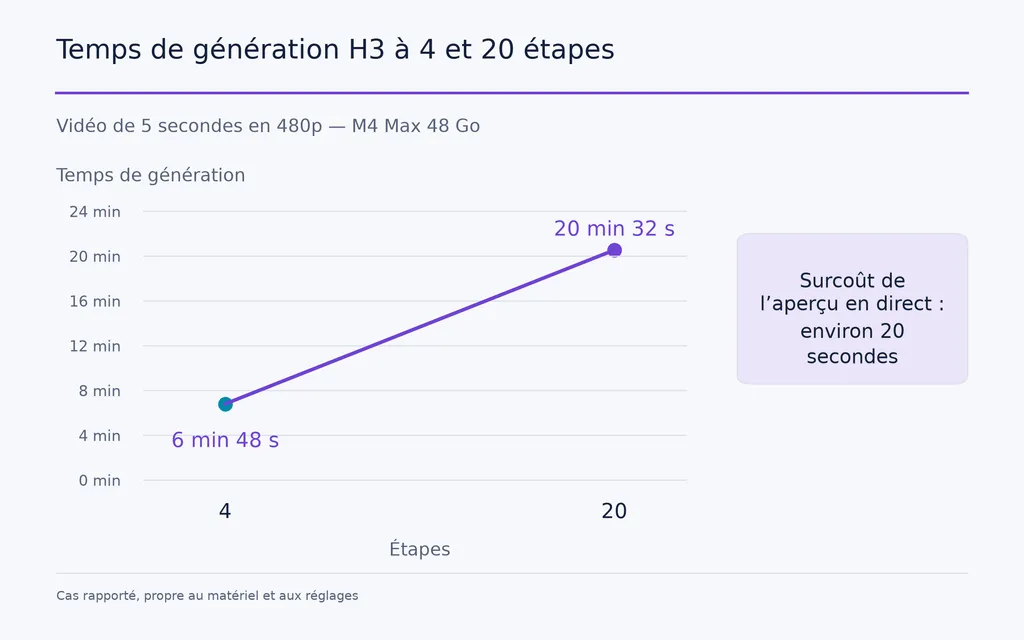
Un autre cas sur M4 Max 48 Go faisait état de générations de cinq secondes en 480p allant de 6 min 48 s à quatre étapes à 20 min 32 s à 20 étapes, l’aperçu en direct du processus H3 ajoutant environ 20 secondes. Ce surcoût peut néanmoins réduire le temps total s’il permet d’annuler rapidement une génération ratée.
Comment déboguer H3 sans tout réécrire
Corriger uniquement la variable défaillante
Classez d’abord le problème H3 :
- identité
- matière
- mouvement
- caméra
- timing
- locuteur
- voix
- musique
- continuité
Si le locuteur est incorrect, corrigez son attribution. Si le mouvement échoue, ajustez l’instruction de mouvement ou la référence. Si la coupe arrive trop tôt, modifiez le timing.
Modifier une seule variable responsable à la fois fait de chaque génération un retour utile.
Notre recherche a également repéré des cas où des options d’accélération amélioraient la vitesse mais réduisaient le respect des instructions dans des scènes difficiles. Ce n’est pas une règle universelle, mais si des instructions bien structurées échouent à répétition, testez la scène sans accélération agressive avant de reconstruire les instructions.
Quand passer de H3 Max à H3 Multishot
Utiliser H3 Max pour découvrir et Multishot pour produire
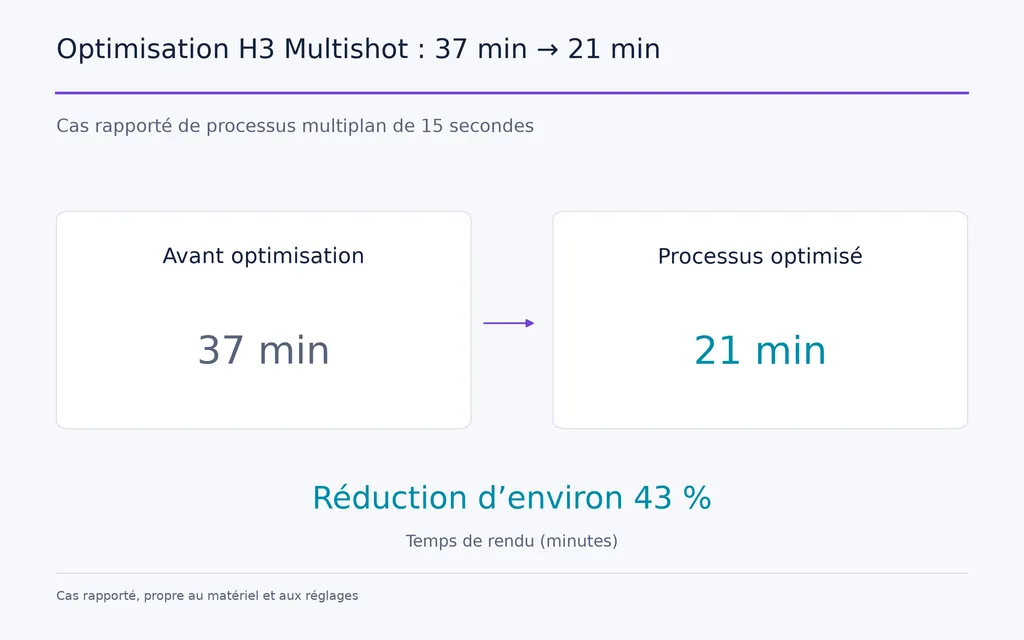
Un cas sur RTX 3090 étudié dans notre recherche a généré environ 29 secondes en 140 minutes. Un autre processus optimisé de 15 secondes est passé de 37 minutes à 21 minutes, soit environ 43 % de réduction. Un cas distinct de trois plans et d’environ 30 secondes annonçait moins de 15 minutes dans une configuration optimisée et environ 21 minutes en qualité supérieure.
Ces cas dépendant du matériel ne doivent pas servir de classement. Ils montrent pourquoi Multishot intervient une fois le concept gagnant sélectionné.
Les versions actuelles de H3 Multishot de Joey Gambino comprennent aussi un aperçu du premier plan, la continuité par épinglage du contexte et des contrôles antidérive. Ces améliorations renforcent le même principe de travail : valider tôt avant de s’engager sur une séquence entière.
Comment éviter la dérive dans les vidéos longues H3
Les plans enchaînés accumulent des pertes d’information
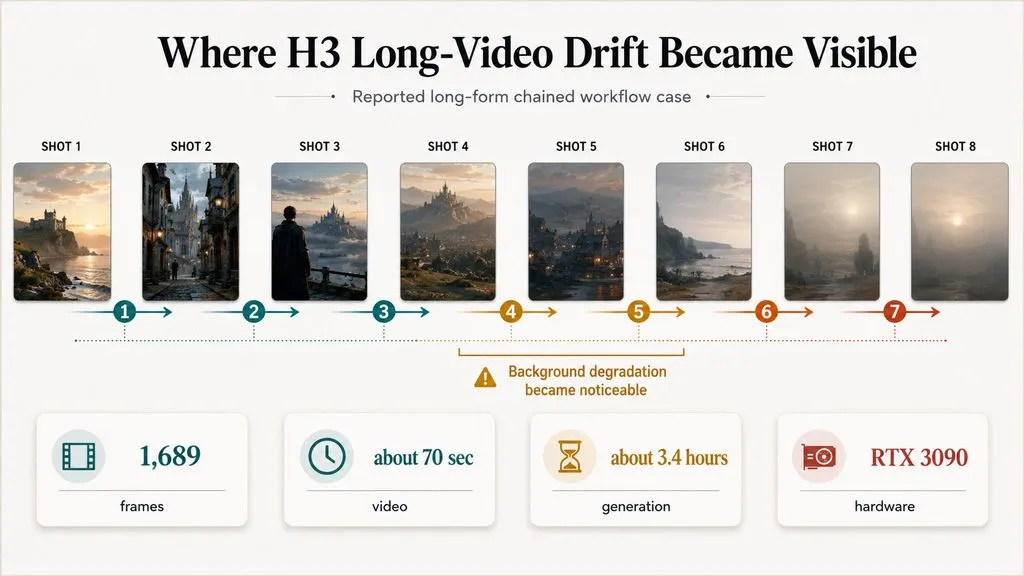
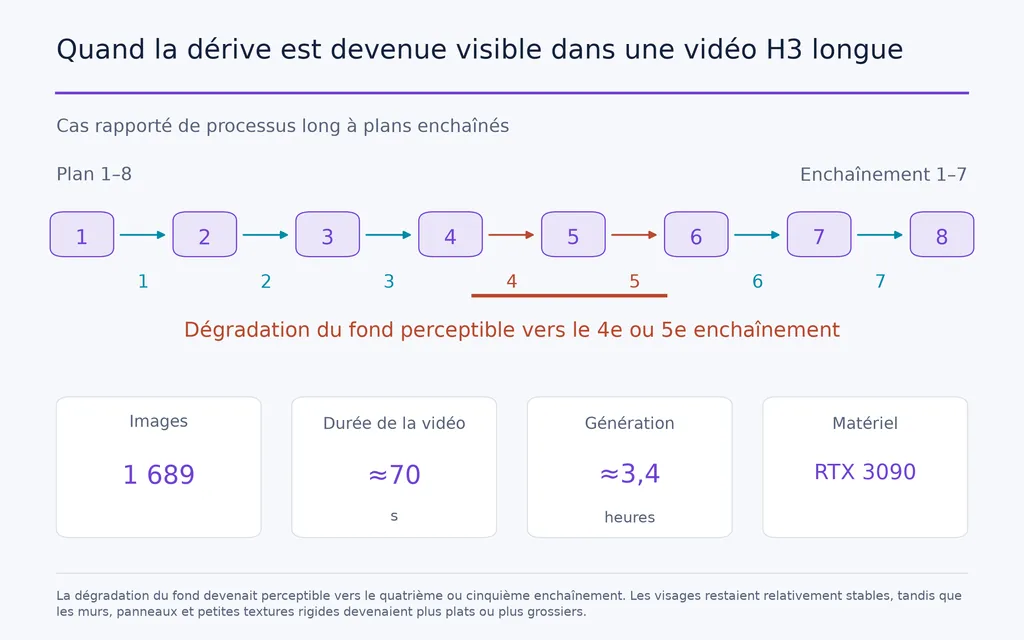
L’un des cas de format long les plus utiles de notre recherche comprenait :
- 8 plans
- 7 enchaînements successifs
- 1 689 images
- environ 70 secondes
- environ 3,4 heures
- RTX 3090
La dégradation du fond devenait perceptible vers le quatrième ou cinquième enchaînement. Les visages restaient relativement stables, tandis que les murs, panneaux et petites textures rigides devenaient plus plats ou plus grossiers.
La continuité longue devient ainsi un problème de préservation de l’information, et pas seulement un problème de cohérence des personnages.
Verrouiller les plans approuvés et réancrer le contexte
Une meilleure architecture de format long est :
Générer → Examiner → Approuver → Verrouiller → Réancrer → Continuer
La documentation actuelle de Multishot traite aussi la dérive accumulée en contrôlant la transmission du contexte précédent. Pour les équipes de production, une piste plus importante est la mise en cache du processus à l’échelle du plan : modifier un plan ultérieur ne devrait pas imposer de recalculer le travail déjà approuvé.
H3 Max, H3, Kling et Seedance : comparaison
Aucune preuve ne désigne un gagnant universel pour toutes les étapes de production.
Outil | Meilleur rôle dans le processus |
H3 Max | Exploration rapide des concepts |
Processus H3 locaux | Production contrôlée et expérimentation |
H3 Multishot | Séquences multiplans approuvées |
Kling ou Seedance | Autres candidats au rendu des plans phares |
Nous avons observé des processus où Kling ou Seedance restaient préférés pour certains plans phares finaux, alors que H3 Max était beaucoup plus rapide pour l’idéation. Il s’agit d’une préférence de processus, pas d’un classement objectif des modèles.
Le meilleur modèle d’exploration n’a pas à être le moteur du rendu final.
Le meilleur processus H3 Max de bout en bout
Pour une production professionnelle, je recommande :
Brief créatif → 15–20 concepts → Brouillons H3 Max → Classement créatif → Gagnant → Storyboard → Choix de tâche → Instructions H3 structurées → Test préalable économique → Correction de la variable défaillante → H3 Multishot → Examen de continuité → Rendu final
Le principe directeur est simple :
N’augmenter le calcul qu’à mesure que la certitude créative progresse.
Questions fréquentes
Faut-il rendre les 20 idées H3 en qualité maximale ?
Non. Les 15–20 idées sont des candidates à l’exploration, pas des livrables finaux. Générez-les à un coût suffisamment faible pour juger le concept, la composition, le mouvement et l’histoire. Seules les pistes retenues doivent passer aux instructions structurées, aux tests préalables, au multiplan et au rendu en qualité finale.
Pourquoi H3 utilise-t-il le mauvais locuteur ou la mauvaise référence ?
Le problème de processus le plus fréquent de notre étude est une responsabilité mal définie des références. Attribuez une fonction principale à chaque entrée, identifiez explicitement le locuteur et précisez quand le dialogue a lieu. Séparer identité, mouvement, apparence, voix, timing et composition facilite la prévention et le diagnostic des échecs. Un guide structuré des références MiniMax H3 peut clarifier leur attribution à ces différents rôles.
Pourquoi la qualité H3 se dégrade-t-elle dans les longues vidéos enchaînées ?
Les générations répétées réinjectent des informations déjà générées dans les nouveaux plans : de petites erreurs visuelles peuvent donc s’accumuler. Dans un cas de 70 secondes et huit plans, la dégradation du fond devenait visible vers le quatrième ou cinquième enchaînement. Les processus plus longs doivent verrouiller les plans approuvés et réancrer périodiquement les informations importantes d’identité et d’environnement.
H3 Max est-il meilleur que H3, Kling ou Seedance ?
Pas pour toutes les tâches. H3 Max est particulièrement intéressant pour l’idéation rapide, les processus H3 locaux offrent un contrôle de production plus poussé, Multishot aide à construire des séquences continues et d’autres modèles vidéo peuvent encore l’emporter sur certains plans phares. Choisissez les modèles selon l’étape du processus plutôt que selon un classement universel.
Conclusion
Le meilleur processus H3 Max ne consiste pas à terminer plus vite la première idée acceptable, mais à prendre de meilleures décisions créatives avant le début de la production coûteuse. Explorez 15–20 pistes significatives, sélectionnez la gagnante, fixez le plan visuel, choisissez la bonne structure de tâche H3, validez le comportement par un test préalable économique, puis seulement investissez dans la continuité Multishot et le rendu final. Engagez le calcul en proportion de la certitude créative et réservez le coût de production le plus élevé aux idées ayant déjà prouvé qu’elles méritent d’être achevées.
Plus d’articles du blog Virse
Flux de travail
FLUX 3 Image Prompt Guide: 12 Prompts & Editing Fixes
22 octobre 2026 by Vincent
Flux de travail

How to Use FLUX 3 Image: Edit Photos Without Unwanted Changes
21 octobre 2026 by Vincent
Flux de travail
Wan 3.0 Prompt Guide: Fix Wrong Motion, Character Drift, and Ignored Instructions
20 octobre 2026 by Yifan Zhao