Poster Sizes Guide: Standard Dimensions for Print and Digital
Vincent12 min read ·
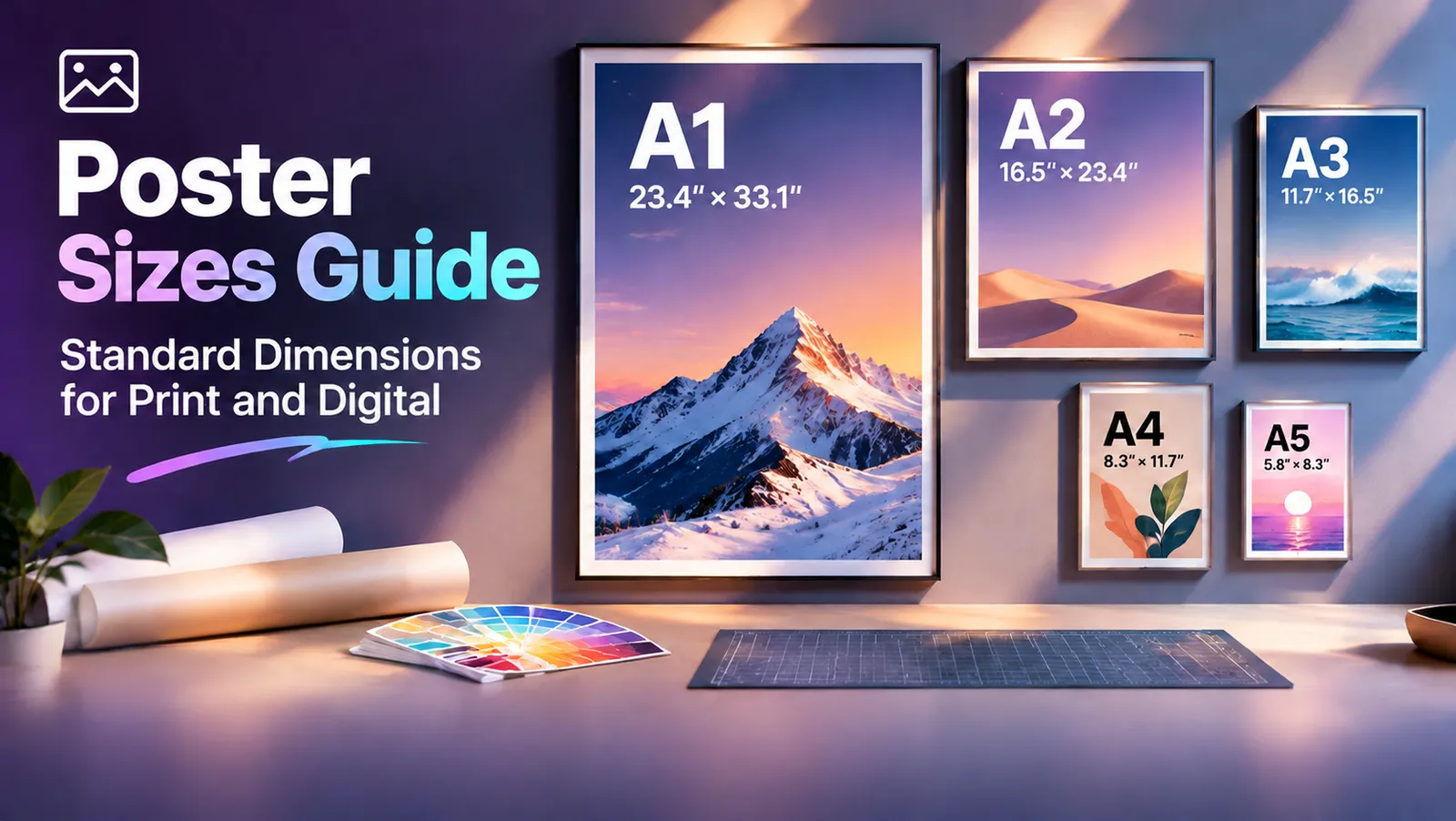
Standard poster sizes include 11 × 17, 18 × 24, 20 × 30, and 24 × 36 inches in the US, while international printing commonly uses ISO formats such as A0, A1, A2, and A3. The right dimensions depend on your display space, design purpose, and viewing distance. You also need sufficient pixel resolution to produce a sharp print.
However, choosing the correct canvas size does not guarantee a professional result. A 24 × 36-inch poster can still look blurry if its original photographs have insufficient resolution. Enlarging small designs, changing aspect ratios, and preparing files for different printers can also cause pixelation, unwanted cropping, and white borders.
Virse makes visual exploration and poster concept development easier with an infinite creative canvas. Bring reference images and generated artwork into one workspace, explore different AI models, and refine promising concepts without repeatedly starting from scratch. Whether you are creating a concert poster, promotional graphic, or decorative artwork, use Virse to explore more creative directions and turn your poster ideas into polished visual concepts.
What Are the Standard Poster Sizes in Inches and CM?
Poster dimensions vary by country, printing provider, and purpose. US printing commonly uses inch-based formats, while international printing frequently follows the ISO A-series system.
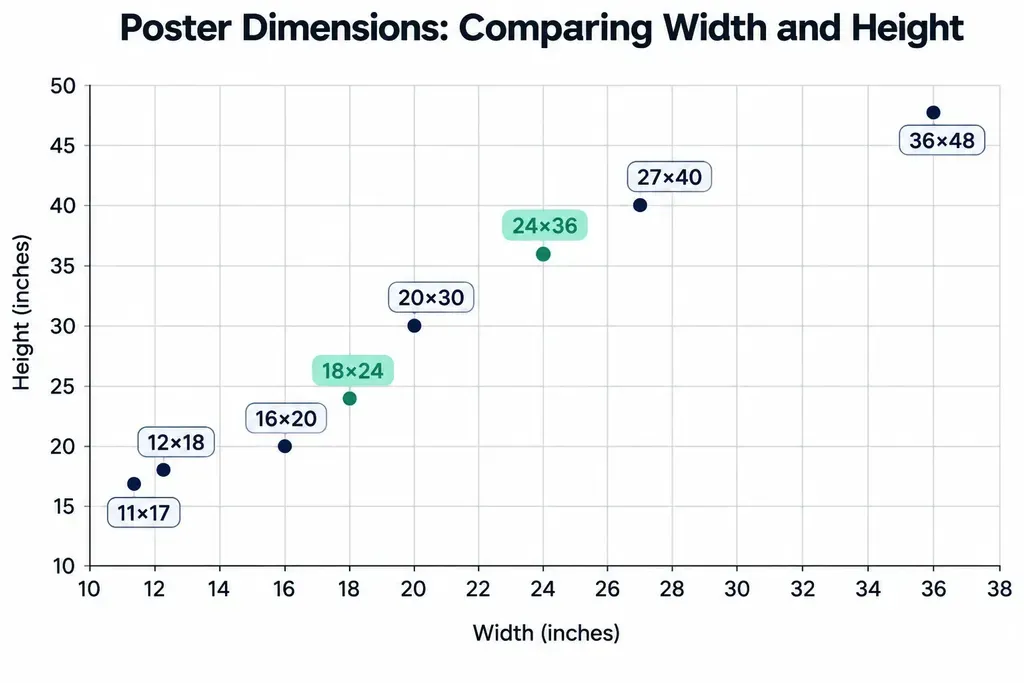
Common US Poster Sizes Chart
Poster Size | Inches | Centimeters | Aspect Ratio | Common Uses |
Small | 8.5 × 11 | 21.6 × 27.9 | 17:22 | Notices, announcements |
11 × 17 | 11 × 17 | 27.9 × 43.2 | 11:17 | Flyers, event posters |
12 × 18 | 12 × 18 | 30.5 × 45.7 | 2:03 | Promotional prints |
16 × 20 | 16 × 20 | 40.6 × 50.8 | 4:05 | Photo and art prints |
18 × 24 | 18 × 24 | 45.7 × 61 | 3:04 | Events, concerts |
20 × 30 | 20 × 30 | 50.8 × 76.2 | 2:03 | Welcome signs, displays |
24 × 36 | 24 × 36 | 61 × 91.4 | 2:03 | Movie, music, advertising |
27 × 40 | 27 × 40 | 68.6 × 101.6 | 3:40 | Movie theater posters |
36 × 48 | 36 × 48 | 91.4 × 121.9 | 3:04 | Large displays, exhibitions |
These are common reference dimensions, not universal printing requirements. Some formats are commercial poster sizes, while others are also used in architectural and large-format printing.
Which US poster size should you choose?
- 11 × 17 inches: Small announcements and promotional materials.
- 18 × 24 inches: Concert posters, event graphics, and decorative prints.
- 20 × 30 inches: Wedding welcome signs and promotional displays.
- 24 × 36 inches: Large advertising, music, and movie-style posters.
- 27 × 40 inches: Traditional movie theater posters.
- 36 × 48 inches: Exhibition graphics and larger presentation displays.
Always confirm the available dimensions with your printing provider before creating the final artwork.
ISO A-Series Poster Sizes
The ISO A-series is widely used internationally. Each successive size has approximately half the area of the previous format while maintaining the same aspect ratio.
Size | Millimeters | Centimeters | Inches |
A0 | 841 × 1189 | 84.1 × 118.9 | 33.1 × 46.8 |
A1 | 594 × 841 | 59.4 × 84.1 | 23.4 × 33.1 |
A2 | 420 × 594 | 42 × 59.4 | 16.5 × 23.4 |
A3 | 297 × 420 | 29.7 × 42 | 11.7 × 16.5 |
A4 | 210 × 297 | 21 × 29.7 | 8.3 × 11.7 |
A0 is suitable for large exhibitions and research displays. A1 is useful for academic posters, while A2 and A3 work well for smaller promotional and informational materials.
An important distinction is that A1 is not identical to 24 × 36 inches. The A-series uses an aspect ratio of approximately 1:1.414, while 24 × 36 inches uses 2:3. Resizing between them may require cropping or additional layout adjustments.
What Size Should a Poster Be in Pixels?
Poster pixel dimensions depend on physical print size and target PPI (pixels per inch). A larger poster requires more pixels to maintain the same image density.
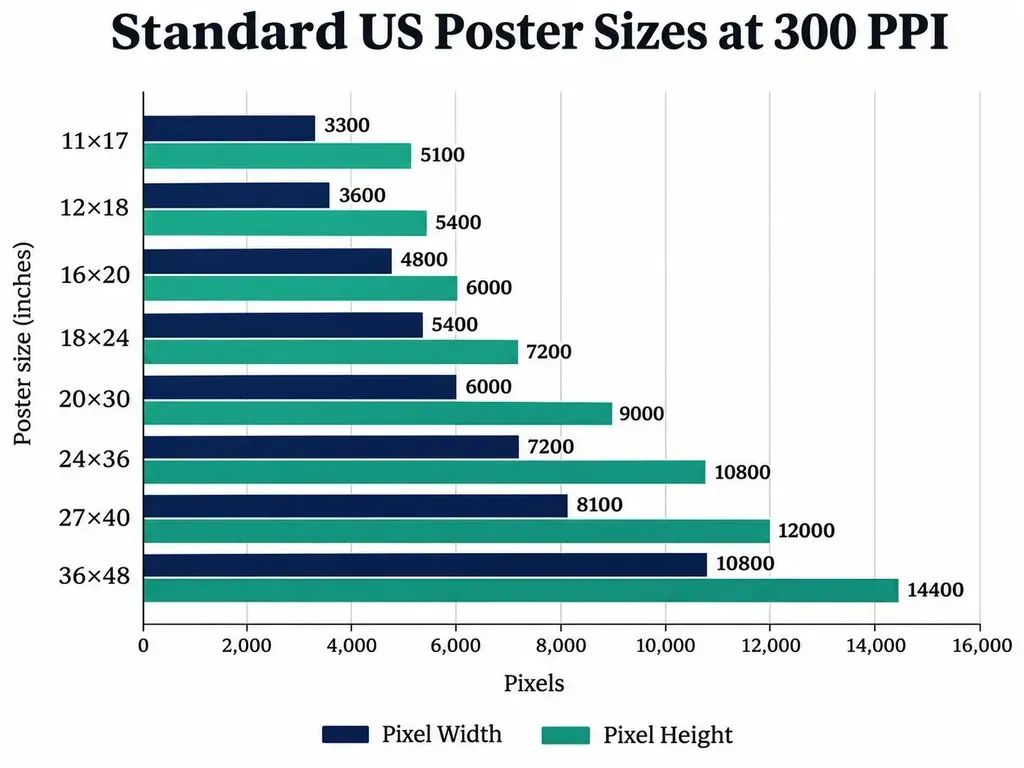
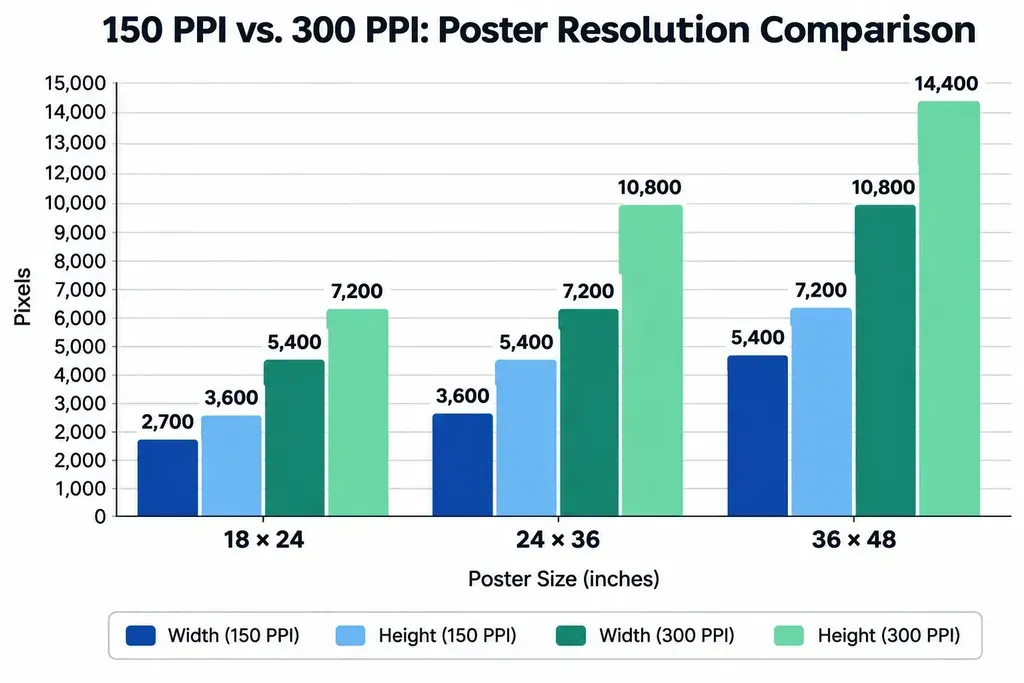
Poster Size Chart at 150 PPI and 300 PPI
The following table shows calculated pixel dimensions for popular US poster formats.
Poster Size | 150 PPI | 300 PPI |
11 × 17 in | 1650 × 2550 px | 3300 × 5100 px |
12 × 18 in | 1800 × 2700 px | 3600 × 5400 px |
16 × 20 in | 2400 × 3000 px | 4800 × 6000 px |
18 × 24 in | 2700 × 3600 px | 5400 × 7200 px |
20 × 30 in | 3000 × 4500 px | 6000 × 9000 px |
24 × 36 in | 3600 × 5400 px | 7200 × 10800 px |
27 × 40 in | 4050 × 6000 px | 8100 × 12000 px |
36 × 48 in | 5400 × 7200 px | 10800 × 14400 px |
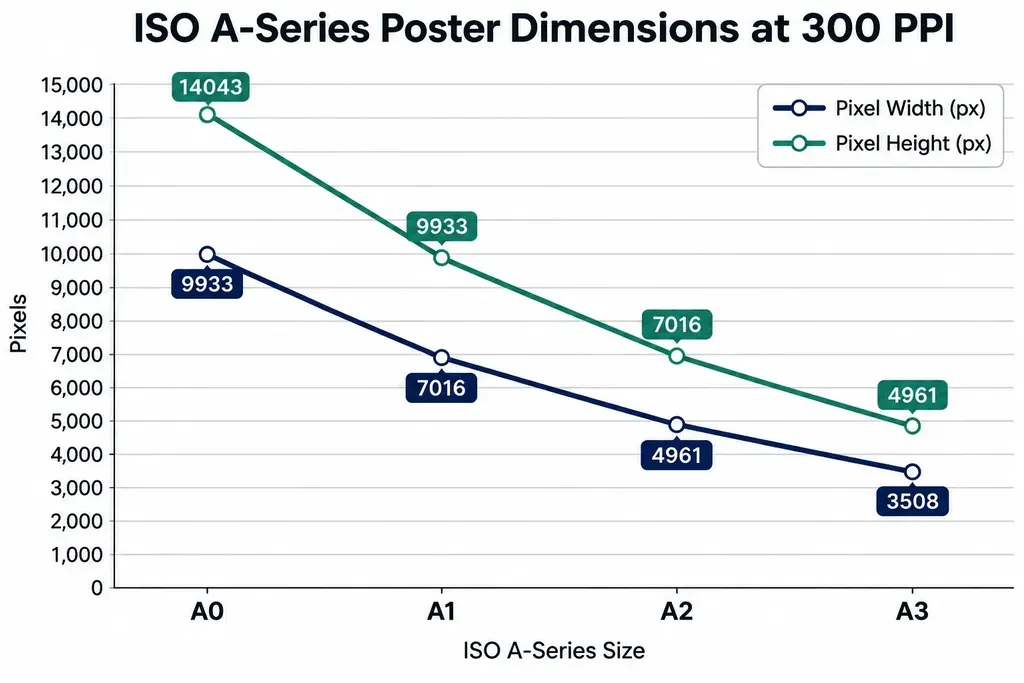
For international A-series posters, the approximate pixel dimensions at 300 PPI are:
Size | Pixels at 300 PPI |
A0 | 9933 × 14043 px |
A1 | 7016 × 9933 px |
A2 | 4961 × 7016 px |
A3 | 3508 × 4961 px |
These figures are mathematical calculations, not guarantees of final print quality. The resolution of each photograph and raster graphic inside the design must also be considered.
How to Calculate Poster Dimensions in Pixels
Use these formulas:
- Pixel width = Print width in inches × PPI
- Pixel height = Print height in inches × PPI
- Inches = Centimeters ÷ 2.54
- Inches = Millimeters ÷ 25.4
For example, a 24 × 36-inch poster at 300 PPI requires:
- Width: 24 × 300 = 7200 pixels
- Height: 36 × 300 = 10800 pixels
The result is 7200 × 10800 pixels.
This calculation is useful when preparing artwork for different printing services or checking whether an existing image can support a larger print.
What Poster Size Should You Use for Different Purposes?
The best poster dimensions depend on the display environment, viewing distance, and amount of information in the design.
Movie, Music, and Event Poster Sizes
Common formats include 18 × 24, 24 × 36, and 27 × 40 inches.
A concert poster needs to communicate the artist, event date, and location quickly. A movie poster needs sufficient space for its main artwork, title, and supporting information.
One reported design scenario in our research involved a 24 × 36-inch music poster that appeared pixelated after enlargement. The underlying production issue illustrates an important distinction: setting the canvas to the correct physical dimensions does not guarantee that the photographs inside it have enough resolution.
For this type of project, check the original pixel dimensions of the main artwork before finalizing the composition.
Academic and Business Poster Dimensions
A0 and A1 are useful formats for academic conferences, scientific presentations, and exhibitions. A2 and A3 offer more compact alternatives.
One reported school science fair scenario involved enlarging a smaller Canva design to A1. The designer was concerned about whether text and phone photographs would remain clear after enlargement, and Canva Magic Resize was considered.
The final printing result was not documented. However, the case highlights an important limitation of automatic resizing: rearranging a layout is not the same as increasing the resolution of its photographs.
For academic posters, prioritize readable headings, clearly separated sections, and sufficiently detailed charts.
Large-Format and Wedding Welcome Poster Sizes
Large-format posters are used for exhibition graphics, retail advertising, wedding welcome signs, and decorative displays.
Another reported scenario involved a 1080 × 1920-pixel design intended for a welcome sign measuring approximately 2 feet 5 inches × 5 feet 4 inches.
The concern was whether the relatively small original image would become pixelated when enlarged. This is why designers should calculate effective PPI at the final physical dimensions rather than relying on the original canvas dimensions alone.
Before enlarging a welcome sign or exhibition graphic, check the source resolution, final print dimensions, and viewing distance.
What Are the Standard Digital Poster Sizes for Social Media?
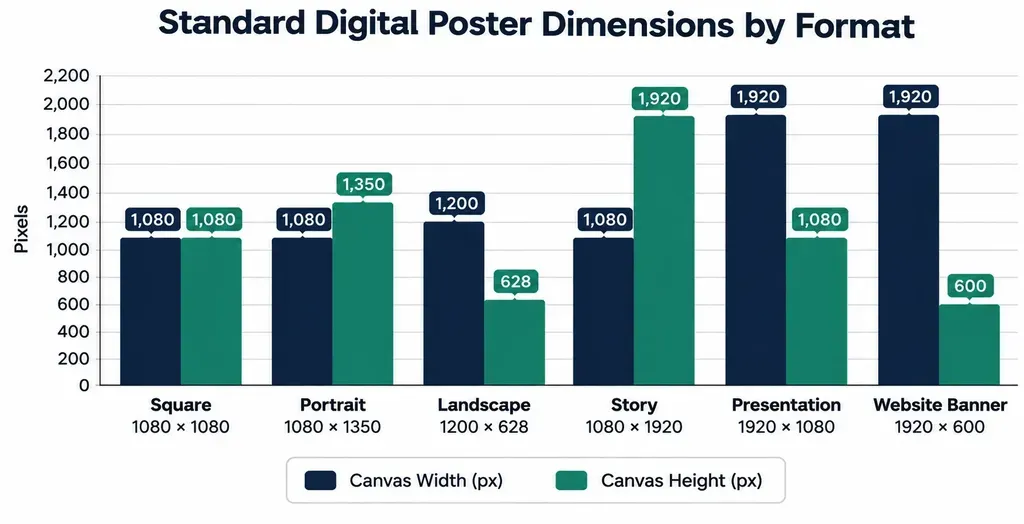
Digital poster dimensions are measured in pixels rather than inches. Different platforms and placements require different aspect ratios.
Social Media Poster Dimensions
The following are useful example canvas dimensions for planning digital artwork, not guaranteed current platform specifications.
Format | Example Dimensions | Typical Application |
Square | 1080 × 1080 px | Square promotional graphics |
Portrait | 1080 × 1350 px | Vertical social content |
Landscape | 1200 × 628 px | Promotional graphics |
Story | 1080 × 1920 px | Vertical full-screen content |
Presentation | 1920 × 1080 px | Slides and screens |
Website banner | 1920 × 600 px | Website promotions |
Always check the latest specifications for the actual platform placement before exporting.
Can One Poster Design Work Across Multiple Platforms?
Yes, but one design should not simply be resized automatically for every channel.
One multi-channel design workflow documented in our research involved approximately 6–8 designs per month, with each design requiring multiple dimensions and two language versions.
A 1080 × 1350-pixel canvas was also mentioned as a shared starting point for some designs. This was an individual workflow choice, not a universal platform standard.
A more reliable workflow is to create a master design and adapt the composition for each destination.
- Identify all required platforms and placements.
- Confirm their current dimensions and aspect ratios.
- Create a master visual layout.
- Build separate versions for each format.
- Adjust typography for different languages.
- Check cropping and safe areas before exporting.
This approach is particularly useful for marketing teams managing multiple campaigns and languages.
How Do You Prepare a Poster for Printing Without Losing Quality?
A poster can look sharp on a monitor but appear blurry, pixelated, or incorrectly cropped after printing. The solution starts with checking source images, effective PPI, and document settings.
Why Does My Poster Look Blurry When Printed?
Our review of documented design questions identified several recurring scenarios:
- A 24 × 36-inch music poster encountered pixelation.
- A 20 × 30-inch wedding welcome poster triggered low-quality warnings from a printing service.
- A 1080 × 1920-pixel design was being enlarged for a large welcome sign.
- An A1 science fair poster raised concerns about photographs and text losing clarity.
The 20 × 30-inch welcome-poster scenario also involved questions about white borders and cropping. JPG, PNG, and PDF Print were considered as export options, but the final solution was not documented.
These examples show why a correct canvas size alone cannot guarantee a successful print.
Use this pre-print checklist:
- Confirm the final physical dimensions.
- Check the original pixel dimensions of every important photograph.
- Calculate effective PPI after scaling.
- Replace insufficiently detailed images where possible.
- Keep text and logos inside the safe area.
- Review the exported file against the printer's requirements.
Does Every Poster Need 300 PPI?
No. The appropriate resolution depends on final size, viewing distance, and printing technology.
The following are indicative large-format production reference ranges:
Application | Viewing Distance | Suggested Resolution |
Outdoor banners | 20+ ft | 50–100 PPI |
Posters and banners | 5–10 ft | 100–150 PPI |
Trade show graphics | 3–5 ft | 150–200 PPI |
Close-up displays | Under 2 ft | 200–300 PPI |
These are guidelines, not universal requirements.
A large exhibition poster viewed from several feet away does not necessarily need the same pixel density as a small art print examined at close range.
The key is to calculate effective PPI at the intended print dimensions and follow the printing provider's specifications.
What Are Bleed, Trim Size, and Safe Area?
These three terms describe different parts of a print layout.
- Trim size: The finished dimensions after cutting.
- Bleed: Extra artwork extending beyond the trim edge.
- Safe area: The interior region where important text and graphics should remain.
The white-border problem identified in a 20 × 30-inch welcome-poster scenario illustrates why bleed and trimming matter. Even when document dimensions are correct, insufficient bleed can expose unwanted white edges after cutting.
Before printing, confirm the required bleed with your provider, extend background artwork beyond the trim line, and keep important content within the safe area.
There is no single bleed measurement suitable for every printer and product.
Is PDF or PNG Better for Poster Printing?
Format | Best For | Considerations |
Professional printing | Can preserve vector elements and document layout | |
PNG | Graphics and illustrations | Lossless image compression |
JPG | Photographic designs | Lossy compression |
PDF is often suitable for professional printing, but the correct format depends on the provider's requirements.
Changing JPG to PNG or converting an image into PDF does not restore missing image details. Check image resolution, fonts, color settings, and bleed before submitting the final file.
Can You Print a Large Poster at Home?
Yes. If your home printer cannot handle the full poster dimensions, you can divide the artwork into smaller sections and print them across multiple sheets.
This process is often called tiled or poster printing.
A practical workflow is:
- Set the final poster dimensions.
- Use printing software that supports tiled output.
- Check page overlap and printable margins.
- Print a test section.
- Trim and align the sheets.
- Assemble the sections on a flat surface.
The number of sheets depends on paper size, printer margins, overlap, and final poster dimensions. Avoid assuming that every printer can produce borderless output.
How Can AI Help Create and Resize Posters?
AI-powered design tools can accelerate visual exploration, concept development, and artwork creation. However, the final poster still needs appropriate dimensions and production checks.
Use AI for Poster Design Ideas
AI can help explore different visual directions, including minimalist typography, retro travel posters, futuristic movie artwork, concert graphics, and product advertising concepts.
Virse.ai provides an infinite creative canvas where references, generated images, text, and visual directions can stay together. Designers can explore different AI models, generate visual concepts, and refine selected artwork in one workspace.
This is particularly useful during the early design stage, when you want to compare several creative directions before committing to a final composition.
Build an AI-Assisted Poster Workflow
A practical workflow includes:
- Define the poster's purpose and dimensions.
- Collect reference images and generate visual concepts.
- Compare different creative directions.
- Refine selected artwork using available image editing tools.
- Arrange typography and supporting information.
- Adapt the composition for the required aspect ratio.
- Export according to the printing provider's requirements.
AI can speed up creative exploration, but it does not eliminate the need for resolution checks, accurate dimensions, and professional print preparation.
Always inspect the final image dimensions and output quality before printing.
Conclusion
Choosing the right poster size starts with understanding its purpose, physical dimensions, and viewing environment. Use common US or ISO formats as references, calculate pixel requirements based on PPI, and check every source image before printing. For digital campaigns, create separate layouts for different aspect ratios instead of relying on automatic resizing. Finally, confirm bleed, trim, and export specifications with your printing provider. Combining accurate measurements with a structured creative workflow helps prevent common production problems and creates posters that work across print and digital channels.
Frequently Asked Questions
What Is the Most Common Poster Size?
18 × 24 inches and 24 × 36 inches are widely used US poster formats. The former is suitable for events and decorative prints, while the latter provides more room for large promotional artwork. The best option depends on display space and printing requirements.
How Many Pixels Should a 24 × 36 Poster Be?
A 24 × 36-inch poster requires 3600 × 5400 pixels at 150 PPI or 7200 × 10800 pixels at 300 PPI. These are calculated dimensions; the resolution of the photographs inside the design must also be sufficient.
Can I Print a 1080 × 1920 Image as a Large Poster?
It depends on the final dimensions and viewing distance. A 1080 × 1920-pixel image may work for a small print but can become visibly soft when enlarged substantially. Calculate its effective PPI at the intended output size before printing.
Why Does My Poster Look Blurry After Printing?
Common causes include low-resolution source images, excessive enlargement, and unsuitable export settings. Increasing canvas dimensions does not automatically add image detail. Check the original pixel dimensions and effective PPI of important images before exporting.