Postcard Size Guide: Standard Dimensions and Print Specs
Vincent9 min read ·
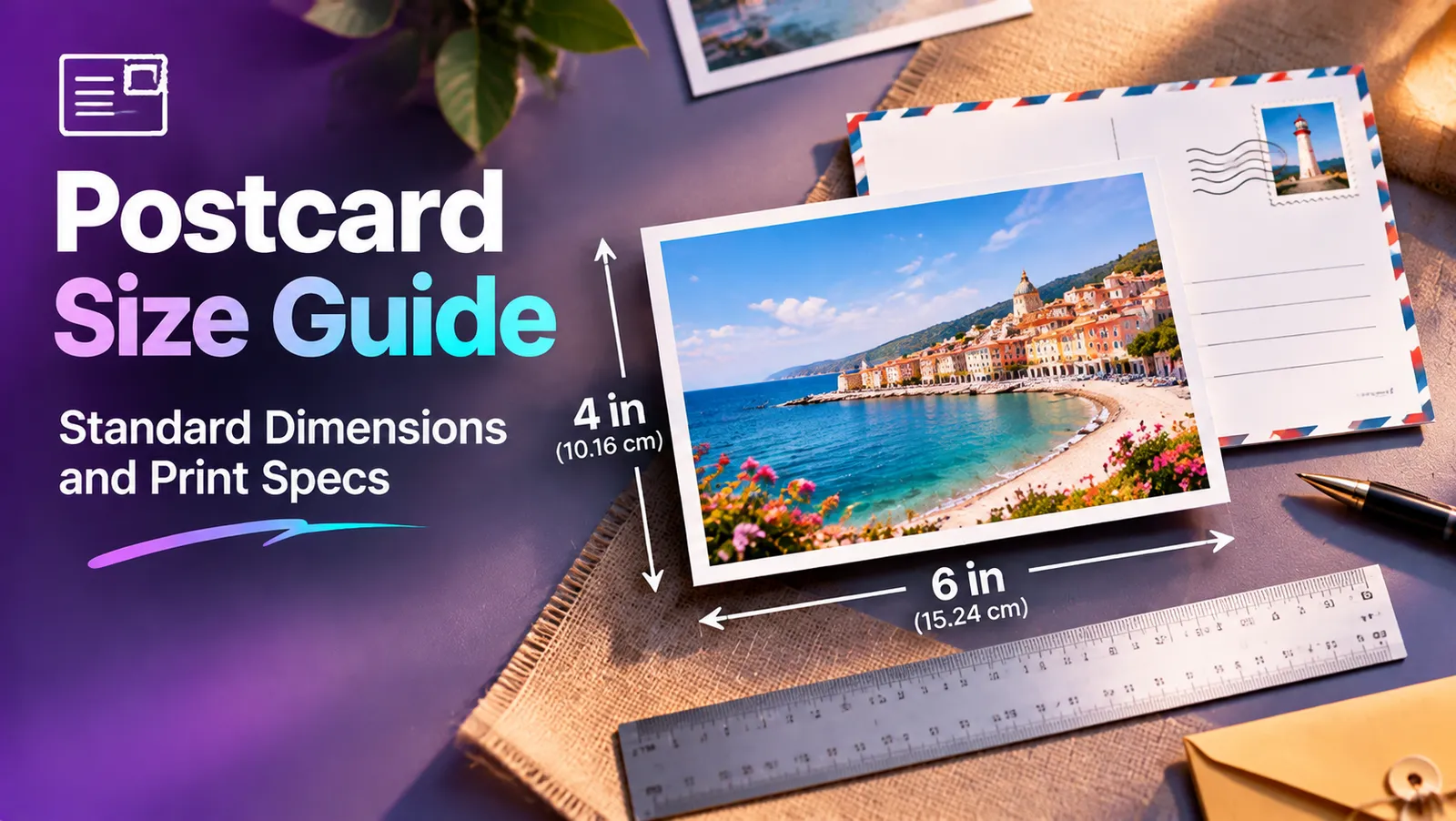
The most common U.S. postcard size is 4 × 6 inches (101.6 × 152.4 mm). Other popular printing formats include 5 × 7, 5.5 × 8.5, and 6 × 9 inches, while A6 (105 × 148 mm) is a common international design format. For professional printing, 300 DPI resolution, appropriate bleed, and suitable cardstock help ensure a clean finished result, and a postcard mockup lets you preview both sides.
However, choosing the wrong postcard dimensions can create expensive problems. Your design might fall outside the intended USPS postage category, lose important details during trimming, or look blurry when printed. Incorrect paper thickness, address layout, and printer-specific file settings can also affect the final result.
With Virse, you can explore creative directions, generate original postcard artwork, and experiment with different visual styles using multiple AI models on a shared creative canvas. Whether you're creating travel postcards, personalized greetings, or branded promotional artwork, Virse helps turn your ideas into distinctive visuals without starting from a blank canvas.
What Is the Standard Postcard Size? Common Dimensions in Inches and MM
A 4 × 6-inch postcard is a familiar U.S. format for personal correspondence, photography, and promotional materials. Larger formats provide additional room for artwork, illustrations, and marketing messages.
Common Postcard Sizes for Printing
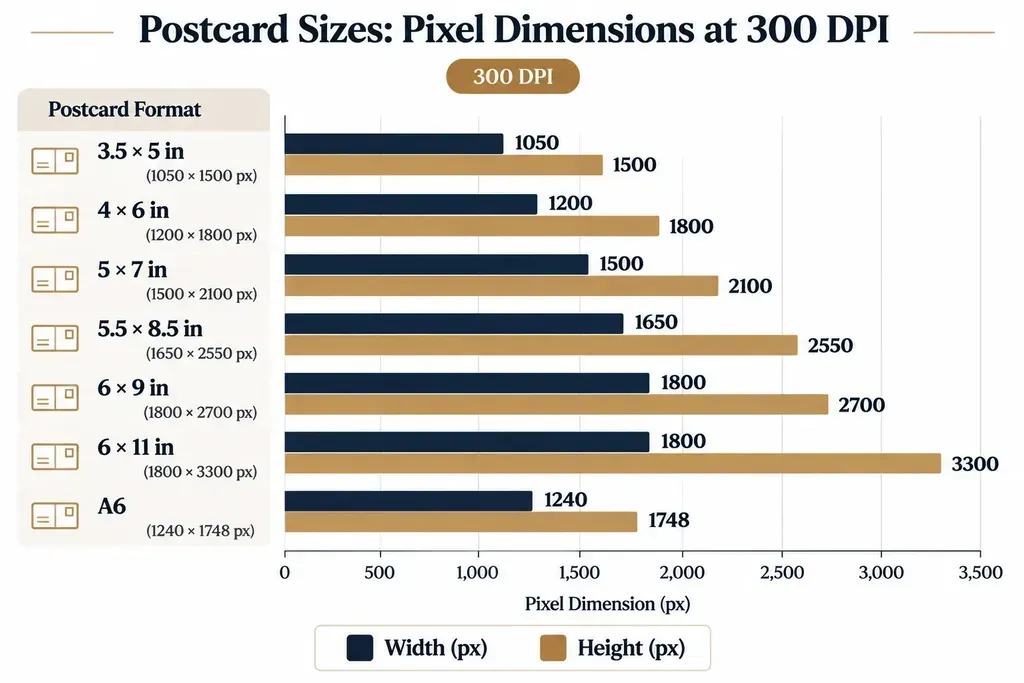
Postcard Size | Dimensions (Inches) | Dimensions (MM) | Pixels at 300 DPI |
Small | 3.5 × 5 | 88.9 × 127 | 1,050 × 1,500 |
Standard | 4 × 6 | 101.6 × 152.4 | 1,200 × 1,800 |
Medium | 5 × 7 | 127 × 177.8 | 1,500 × 2,100 |
Half Letter | 5.5 × 8.5 | 139.7 × 215.9 | 1,650 × 2,550 |
Large | 6 × 9 | 152.4 × 228.6 | 1,800 × 2,700 |
Jumbo | 6 × 11 | 152.4 × 279.4 | 1,800 × 3,300 |
A6 | 4.13 × 5.83 | 105 × 148 | 1,240 × 1,748 |
Pixel dimensions represent finished artwork without bleed.
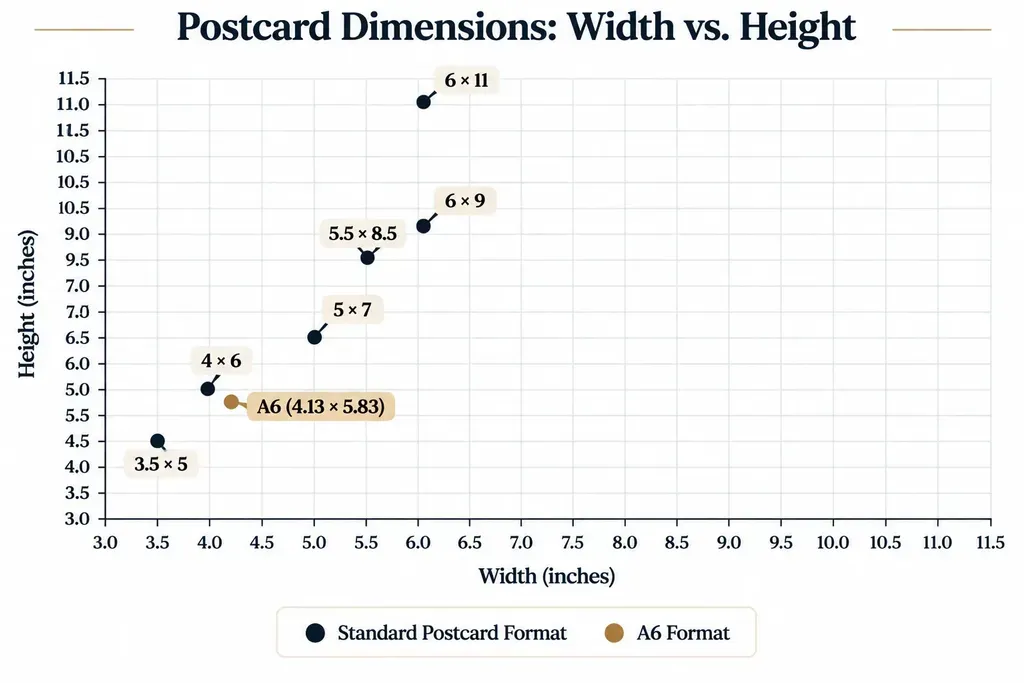
A6 vs. U.S. Postcard Sizes
A6 measures 105 × 148 mm, approximately 4.13 × 5.83 inches. It is a useful international design format, particularly for illustrated postcards and personal correspondence.
Although A6 is similar to 4 × 6 inches, the proportions differ. Automatically resizing artwork between these formats can crop important details or change the composition.
Practical recommendation: Choose 4 × 6 for compact photographic postcards, 5 × 7 for invitations and illustrations, and 6 × 9 for larger promotional designs. Confirm postal requirements before finalizing your canvas.
What Postcard Sizes Qualify for USPS Mailing?
USPS has separate dimensional requirements for retail and commercial postcard pricing. A popular printing dimension does not automatically qualify for the retail postcard rate.
According to USPS Domestic Mail Manual standards, the main dimensional requirements are:
Requirement | Retail Postcard | Commercial Postcard |
Minimum length | 5 in | 5 in |
Maximum length | 6 in | 9 in |
Minimum height | 3.5 in | 3.5 in |
Maximum height | 4.25 in | 6 in |
Thickness | 0.007–0.016 in | 0.007–0.016 in |
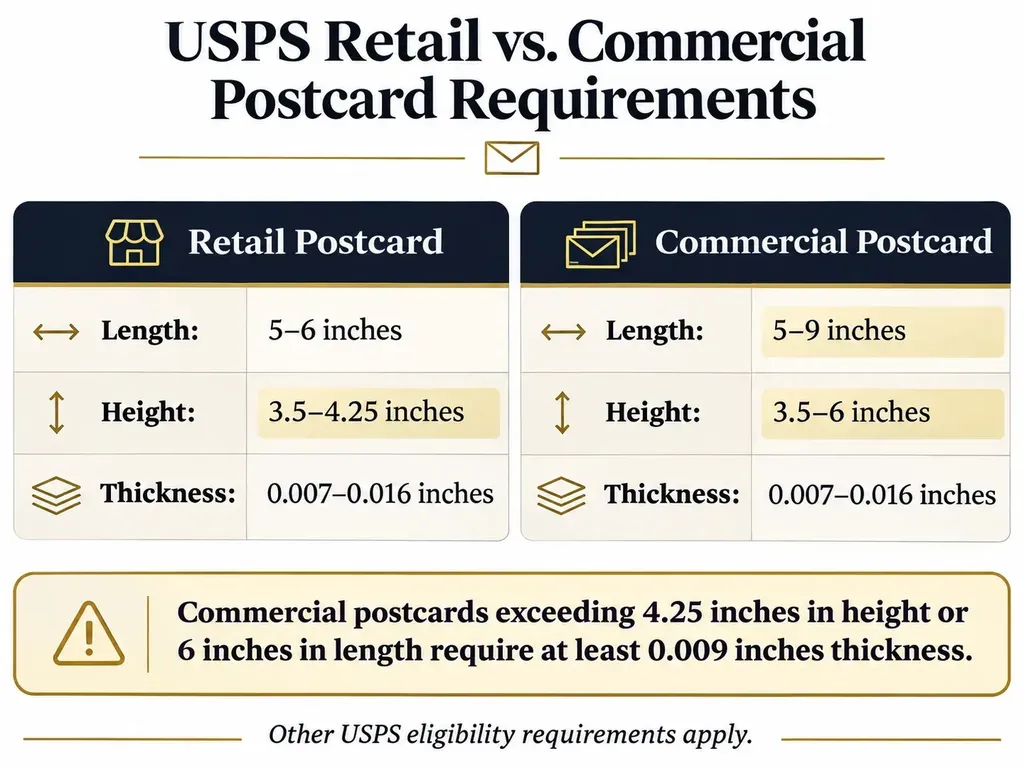
Important: Commercial postcards exceeding 4.25 inches in height or 6 inches in length require a minimum thickness of 0.009 inches. Other eligibility requirements, including shape and aspect ratio, also apply.
4 × 6 vs. 5 × 7 vs. 6 × 9: Which Can You Mail?
Size | Retail Postcard Rate | Commercial Postcard Dimensions |
4 × 6 | Eligible by dimensions | Eligible by dimensions |
5 × 7 | Not eligible | Eligible with required thickness |
5.5 × 8.5 | Not eligible | Eligible with required thickness |
6 × 9 | Not eligible | Eligible with required thickness |
6 × 11 | Not eligible | Exceeds postcard maximum |
A 5 × 7 postcard can qualify for commercial postcard dimensions, but its height requires at least 0.009-inch thickness. The same applies to 5.5 × 8.5 and 6 × 9 formats.
A 6 × 11 card exceeds the commercial postcard maximum length. However, it may qualify as letter-size mail if it satisfies the separate letter requirements.
When Does a Postcard Need Extra Postage?
Postage depends on mailing category, dimensions, thickness, weight, and shape.
Before printing bulk postcards:
- Confirm the destination and mailing category.
- Check finished length and height.
- Verify paper thickness and weight.
- Check shape and processing requirements.
- Calculate postage using current USPS rates.
For international mailing, check the destination country's postal requirements separately. U.S. postcard rules should not be applied universally.
What Is the Correct Postcard Size in Pixels at 300 DPI?
300 DPI is a common target for professional postcard printing. The required pixel dimensions depend on the physical size of the finished card.
How to Calculate Postcard Pixel Dimensions
Use this formula:
Pixels = Inches × DPI
For example, a 5 × 7-inch postcard at 300 DPI requires:
- Width: 5 × 300 = 1,500 pixels.
- Height: 7 × 300 = 2,100 pixels.
For millimeter measurements, divide each dimension by 25.4 before multiplying by DPI.
Choosing the Right Image Resolution
Resolution | Typical Application |
72 DPI | Screen graphics |
150 DPI | Some large-format or less detailed print applications |
300 DPI | Common professional postcard printing target |
Increasing an image's DPI metadata does not restore missing image details. If a small photograph is enlarged to fill a postcard, it may appear blurry or pixelated.
For photographic designs, check the effective resolution at the final print size. Vector graphics are preferable for logos and typography because they can scale without losing sharpness.
How Much Bleed Does a Postcard Need?
Bleed is the additional artwork extending beyond the final cutting boundary. It prevents unwanted white edges caused by small trimming variations.
There is no universal bleed measurement for every printer. Requirements may include 3mm, 5mm, or 0.125 inches, depending on the provider.
Bleed vs. Trim Size vs. Safe Area
Term | Definition | Purpose |
Trim Size | Finished dimensions after cutting | Defines the final postcard |
Bleed | Artwork beyond the trim boundary | Prevents white edges |
Safe Area | Protected region inside the trim | Protects important content |
For example, a 4 × 6-inch postcard with 0.125-inch bleed on each edge requires:
- Finished size: 4 × 6 inches.
- Full artwork size: 4.25 × 6.25 inches.
- Pixel dimensions at 300 DPI: 1,275 × 1,875 pixels.
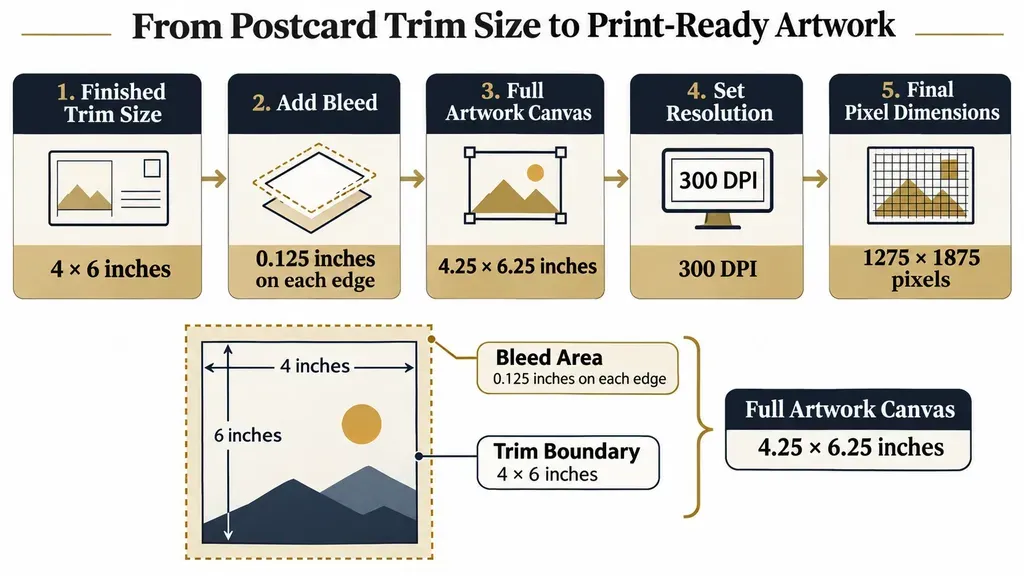
How to Set Up Postcard Bleed and Crop Marks
- Create the document using the finished postcard dimensions.
- Add bleed according to the printer's template.
- Extend backgrounds and edge-to-edge photographs into the bleed area.
- Keep text, logos, and important graphics inside the safe area.
- Include crop marks only when requested.
- Export the PDF using the printer's specifications.
Some printing providers request bleed without manually added crop marks. Others supply their own templates.
Always follow the actual production specifications rather than assuming every printer uses identical settings.
What Is the Best Cardstock for Postcards? GSM, PT, and LB Explained
The right postcard paper should balance stiffness, durability, print quality, and appearance.
Common specifications include 14pt, 16pt, 110lb Cover, 110lb Index, and approximately 300gsm. These measurements describe different properties and should not be treated as directly interchangeable.
14pt vs. 16pt Postcards
Measurement | What It Describes | Important Detail |
GSM | Weight per square meter | Does not directly measure thickness |
PT | Paper thickness | 1 point equals 0.001 inch |
LB | Basis weight | Depends on paper classification |
A 16pt stock is thicker than 14pt stock. However, 110lb Cover and 110lb Index are different paper classifications, even though their numerical weights match.
A recurring paper-selection concern is whether a postcard will bend too easily during handling. Choosing stock based only on its advertised weight may not resolve this issue.
Compare actual thickness, stiffness, material, and surface finish. Request physical samples before placing large orders whenever possible.
Matte vs. Glossy Postcards
Finish | Advantages | Suitable For |
Matte | Reduced reflections and understated appearance | Illustrations and minimalist designs |
Glossy | Reflective surface and vivid-looking images | Photography and colorful promotions |
Uncoated | Natural texture and convenient handwriting | Personal correspondence |
Satin | Balanced visual appearance | General-purpose designs |
If recipients need to write on the postcard, check whether the coating supports the intended pen or marker.
How to Design the Back of a Postcard: Stamp, Address, and Message Layout
The back of a postcard must accommodate postage, recipient information, and personal messages without interfering with postal processing.
Stamp and Address Placement
For a typical U.S. postcard, reserve the upper-right portion of the address side for postage. Place the recipient's address in the designated address area.
For commercial mail, check applicable barcode and postal clear-zone requirements before adding decorative elements.
Postcard Back Layout Mistakes to Avoid
- Placing artwork inside the postage area.
- Leaving insufficient space for the full address.
- Using low-contrast backgrounds behind handwritten text.
- Placing important content too close to the trim edge.
- Assuming international postal layouts follow U.S. requirements.
Treat the back as a separate design canvas rather than leftover space after completing the front.
How to Prepare a Postcard for Professional Printing
A professional postcard requires coordinated decisions about dimensions, image quality, color, paper, and file export.
Exporting a Print-Ready Postcard PDF
Follow this workflow:
- Confirm finished dimensions with the printer.
- Prepare artwork at the required effective resolution.
- Configure bleed and safe areas.
- Check the accepted color mode and profile.
- Embed fonts or convert them to outlines if required.
- Export the PDF using the printer's preferred settings.
- Inspect dimensions, images, typography, and layout.
Choosing an Online Postcard Printing Service
Moo, GotPrint, UPrinting, and VistaPrint are providers worth comparing for custom postcard printing.
Provider | Comparison Criteria |
Moo | Paper selection and artwork presentation |
GotPrint | Pricing and stock options |
UPrinting | Custom dimensions and shipping |
VistaPrint | Product variety and templates |
Do not assume one provider is universally the best. Compare equivalent products based on paper thickness, finishing options, minimum quantities, shipping costs, delivery times, and sample availability.
For the creative stage, Virse can help you explore postcard illustrations, visual styles, and alternative compositions using multiple AI models on a shared creative canvas. You can develop the artwork before preparing the final file for your selected printing provider.
Postcard Printing Checklist: What to Check Before Ordering
Use this checklist before submitting your design:
- Confirm finished postcard dimensions.
- Verify postal eligibility and postage category.
- Calculate pixel dimensions at the required DPI.
- Configure printer-specific bleed.
- Keep essential elements inside the safe area.
- Confirm crop mark requirements.
- Select suitable cardstock and finish.
- Reserve postage and address areas.
- Verify color mode and PDF export settings.
- Inspect the final production file.
- Request a physical proof before large orders when practical.
FAQ
What Is the Standard Postcard Size?
The most common U.S. postcard size is 4 × 6 inches (101.6 × 152.4 mm). Larger formats include 5 × 7 and 6 × 9 inches. A6 (105 × 148 mm) is a common international design format. Postal eligibility depends on the destination and mailing category.
Is a 5 × 7 Postcard Too Big for USPS?
A 5 × 7-inch postcard exceeds USPS retail postcard limits but falls within commercial postcard dimensions. Because its height exceeds 4.25 inches, it needs a minimum thickness of 0.009 inches for commercial postcard eligibility. Other mailing requirements also apply.
How Much Bleed and DPI Do Postcards Need?
300 DPI is a common professional printing target. Bleed depends on the printer. For example, a 4 × 6-inch postcard with 0.125-inch bleed on each edge needs a 4.25 × 6.25-inch canvas, equivalent to 1,275 × 1,875 pixels at 300 DPI.
Is 14pt or 16pt Cardstock Better for Postcards?
16pt cardstock is thicker than 14pt, but the better choice depends on stiffness, appearance, budget, and postal requirements. Compare physical samples instead of relying only on paper-weight labels. PT measures thickness, while GSM and LB use different weight systems.
Conclusion
Choosing the right postcard size requires more than matching artwork to a standard dimension. Confirm postal eligibility first, calculate the correct pixel dimensions, configure printer-specific bleed, and select cardstock based on its actual physical properties. By connecting design decisions with printing and mailing requirements, you can create postcards that look professional, avoid unnecessary production problems, and are ready for delivery.