How to Bypass Nano Banana Restrictions: Fix IMAGE-SAFETY Errors
 Yifan Zhao10 分钟阅读 ·
You cannot legitimately bypass all Nano Banana restrictions or disable its core safeguards. You can, however, resolve many false positives in authorized image-generation and editing workflows by identifying whether the failure comes from the prompt, reference image, generated output, model version, API configuration, quota, or conversation history. A broader Nano Banana review can also help distinguish model behavior from workflow-specific failures.
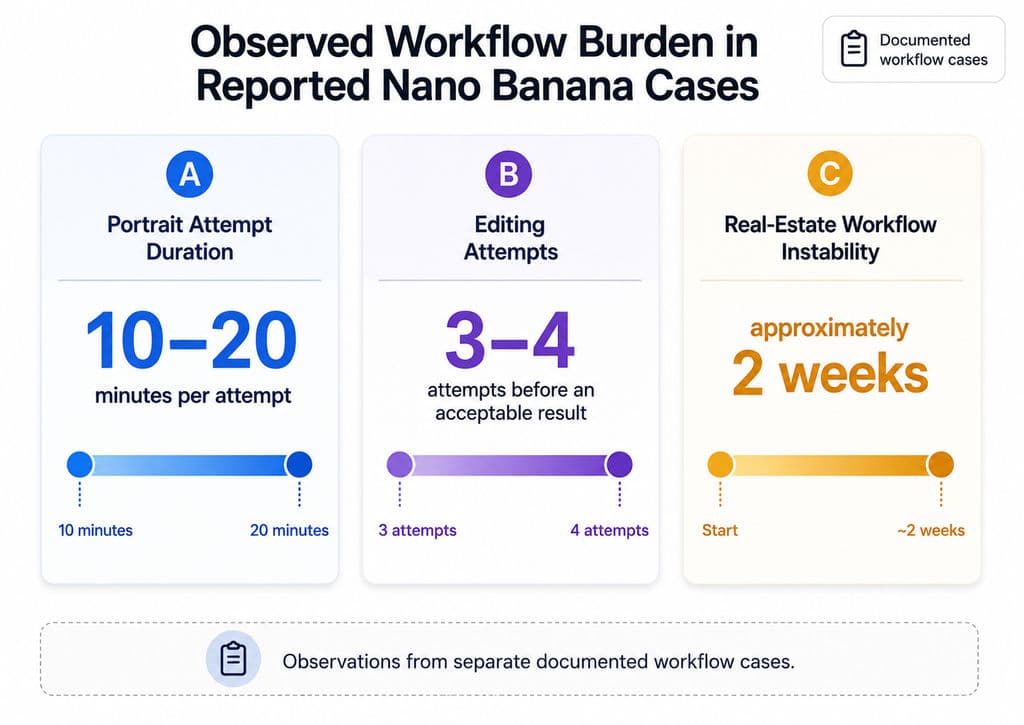
The costly part is not one rejected image; it is an unpredictable production process. Our review of documented user questions found limited cases involving portrait attempts that took 10–20 minutes, edits that required three or four retries, real-estate generation that remained unreliable for roughly two weeks, and multi-turn sessions that returned the original image without applying the requested change. Random synonym replacement and repeated submissions rarely reveal whether the actual cause is safety filtering, model retirement, invalid parameters, context degradation, or output parsing. A structured AI design workflow and a repeatable Nano Banana photo-editing process make these failures easier to isolate.
Virse provides a more structured way to manage these creative workflows. Rather than confining designers to isolated prompt conversations, Virse uses an infinite canvas for organizing references, connecting assets, expressing visual relationships, and coordinating multiple agents that share project context. Its documented capabilities include batch generation, style continuation, asset organization, multi-round revisions, and long-term memory for aesthetic preferences and brand standards. For professional teams, this creates a practical operating layer around AI design agent workflows while keeping designers responsible for creative direction.
What Does Nano Banana IMAGE_SAFETY Mean?
IMAGE_SAFETY means that image generation stopped because the generated or proposed image triggered an image-specific safety decision. It does not automatically mean the written prompt was prohibited.
Google’s GenerateContent API reference distinguishes IMAGE_SAFETY from several other stopping reasons, including SAFETY, IMAGE_PROHIBITED_CONTENT, IMAGE_OTHER, NO_IMAGE, and IMAGE_RECITATION. Each outcome points to a different stage or type of failure. This distinction is important when diagnosing apparent Nano Banana restrictions.
SAFETY vs IMAGE_SAFETY
SAFETY means the response candidate was flagged for safety reasons. IMAGE_SAFETY means the generated image itself triggered an image-safety violation.
Other relevant outcomes include:
- IMAGE_PROHIBITED_CONTENT: The generated image matched another prohibited-content condition.
- IMAGE_OTHER: Generation stopped because of another image-related issue.
- NO_IMAGE: The model was expected to generate an image but did not produce one.
- IMAGE_RECITATION: Generation stopped because of a possible recitation issue.
This distinction matters because changing a prompt may help when the input is ambiguous, but it will not repair an outdated model, a missing output part, a quota problem, or an output-stage safety decision.
Why Safe Nano Banana Prompts Can Still Be Blocked
Nano Banana evaluates the complete request rather than isolated words. The decision can be affected by the prompt, uploaded reference images, previous messages, identity cues, apparent age, clothing coverage, protected characters, public-figure resemblance, logos, weapons, and the visual result the model is attempting to create.
In professional design workflows, the reference image is often the overlooked variable. Testing the same instruction with and without the asset usually provides more information than repeatedly replacing individual terms. Clearer AI design prompts can also reduce ambiguity without attempting to evade safeguards.
Why Does BLOCK_NONE Not Remove Nano Banana Restrictions?
BLOCK_NONE applies only to supported configurable filters. It does not switch off built-in protections, inherent model behavior, or every image-output check.
Google’s current safety documentation identifies four adjustable categories: harassment, hate speech, sexually explicit content, and dangerous content. It also states that core protections, including safeguards involving child safety, are always blocked and cannot be adjusted.
BLOCK_NONE Changes a Filter Threshold
For an adjustable category, BLOCK_NONE allows content to be shown regardless of its probability rating. OFF disables that additional filter.
Neither setting guarantees that:
- Every image request will return an output
- All product-level safeguards are disabled
- Image-output checks will be ignored
- AI Studio, Vertex AI, and consumer interfaces will behave identically
- A prohibited request will become acceptable
A request can therefore still end with IMAGE_SAFETY or IMAGE_PROHIBITED_CONTENT after configurable filters have been reduced.
Why Many Nano Banana Bypass Tutorials Are Misleading
Our research review found third-party guides describing unofficial two-layer, four-layer, or eight-category safety architectures as established fact. The same guides claimed success rates ranging from 70%–80% or improvements from 60% to 95% without publishing their prompts, reference images, sample sizes, regions, failure definitions, or repeated test results.
These figures should not be used to forecast production performance. A credible benchmark must disclose both successful and failed requests under controlled conditions.
Why Does Nano Banana Return HTTP 200 but No Image?
HTTP 200 means the server processed the request. It does not prove that the model successfully returned an image.
A response with no usable image may involve IMAGE_SAFETY, NO_IMAGE, IMAGE_OTHER, an unsupported parameter, a retired endpoint, quota conditions, an SDK problem, malformed output, or incorrect response parsing.
What Should You Check in the Gemini Response?
For each failed request, record:
- Exact model ID
- Platform and API version
- Original prompt
- Reference-image identifiers
- PromptFeedback
- Candidate data
- FinishReason and FinishMessage
- Returned text and image parts
- Usage and quota metadata
- Timestamp, region, session, and retry number
Google’s API reference explains that PromptFeedback can show why an input was blocked, while candidate-level FinishReason values describe why generation stopped. Looking only at the HTTP status removes the evidence needed for accurate diagnosis.
Returning the Original Image Is Not Necessarily IMAGE_SAFETY
An unchanged output should be logged as a separate failure category. It may indicate instruction loss, multi-turn context degradation, an unsupported transformation, incorrect reference selection, or a model-quality issue.
This distinction matters in commercial production because an unchanged image can still consume review time and may appear technically successful in an automated pipeline.
How to Fix Nano Banana IMAGE_SAFETY Errors
The most reliable process is to change one variable at a time while preserving the original response. A systematic Nano Banana restrictions guide is more useful than repeated prompt guessing.
Seven-Step Nano Banana Troubleshooting Workflow
- Confirm the model ID. Avoid generic labels such as latest, Pro, or a third-party alias.
- Check the SDK and endpoint. Google’s current library guide recommends the Google GenAI SDK. The older google-generativeai Python library is listed as not actively maintained.
- Save the complete response. Do this before rewriting the prompt or creating a new session.
- Run a simple text-to-image control. This verifies that the account, model, endpoint, and output handling are functioning.
- Test the reference image separately. Add the image without requesting a major transformation.
- Add one edit at a time. Separate background, lighting, clothing, pose, typography, product placement, and branding.
- Repeat the test in a clean session. Keep the model, prompt, image, settings, output size, and acceptance criteria unchanged.
A new chat is a diagnostic control, not a method for disabling safeguards.
How to Reduce Legitimate Nano Banana False Positives
For authorized portrait, fashion, ecommerce, or editorial work, clarify relevant facts rather than disguising the request:
- State that depicted people are adults.
- Confirm that the material is owned or authorized for editing.
- Define the commercial or editorial purpose.
- Preserve identity, proportions, product geometry, and normal clothing coverage.
- Avoid imitation of public figures or protected characters.
- Move ambiguous cases to manual review instead of retrying indefinitely.
Clearer context may reduce ambiguity, but no wording can guarantee approval.
What Do Real Nano Banana Restriction Cases Reveal?
The cases in our research are limited workflow observations, not platform-wide averages. Their value lies in revealing operational failure patterns.
Portrait and Virtual Fashion Workflows
One documented portrait workflow reported attempts lasting 10–20 minutes while some results changed the subject’s identity or remained unusable. A separate virtual-fashion project required a schedule extension after repeated generation problems disrupted delivery.
The practical lesson is to validate adult status, authorization, identity preservation, and clothing coverage in the first output. Do not build lighting, typography, campaign layouts, and derivative assets before confirming that the subject can be edited consistently.
Ecommerce, Real Estate, and Multi-Turn Editing
Our review found ecommerce workflows that successfully converted basic product photos into studio-style visuals but later returned unchanged source images during follow-up edits. Other cases required three or four attempts, while a real-estate workflow remained unreliable for approximately two weeks.
Teams should separately track:
- Safety rejection rate
- No-image rate
- Unchanged-output rate
- Average retries per accepted image
- Human correction time
Combining these outcomes into one “failed generation” metric hides where the real cost occurs.
Nano Banana 2 vs Nano Banana Pro: Which Model Should You Use?
Neither model should be selected because it is assumed to have fewer restrictions. Choose according to production complexity, speed, reference handling, resolution, and budget.
Current Nano Banana Model IDs
Google’s image-generation guide currently lists:
- Nano Banana 2 Lite: gemini-3.1-flash-lite-image
- Nano Banana 2: gemini-3.1-flash-image
- Nano Banana Pro: gemini-3-pro-image
- Original Nano Banana: gemini-2.5-flash-image
Nano Banana 2 is positioned as the versatile production model for multiple references, conversational editing, text rendering, and up to 4K output. Nano Banana 2 Lite prioritizes speed and cost but is not optimized for complex multi-reference or sequential editing.
Nano Banana Pro is better suited to high-value assets, complex composition, detailed instructions, and demanding brand work. Higher output quality does not guarantee fewer safety blocks.
AI Studio vs Vertex AI
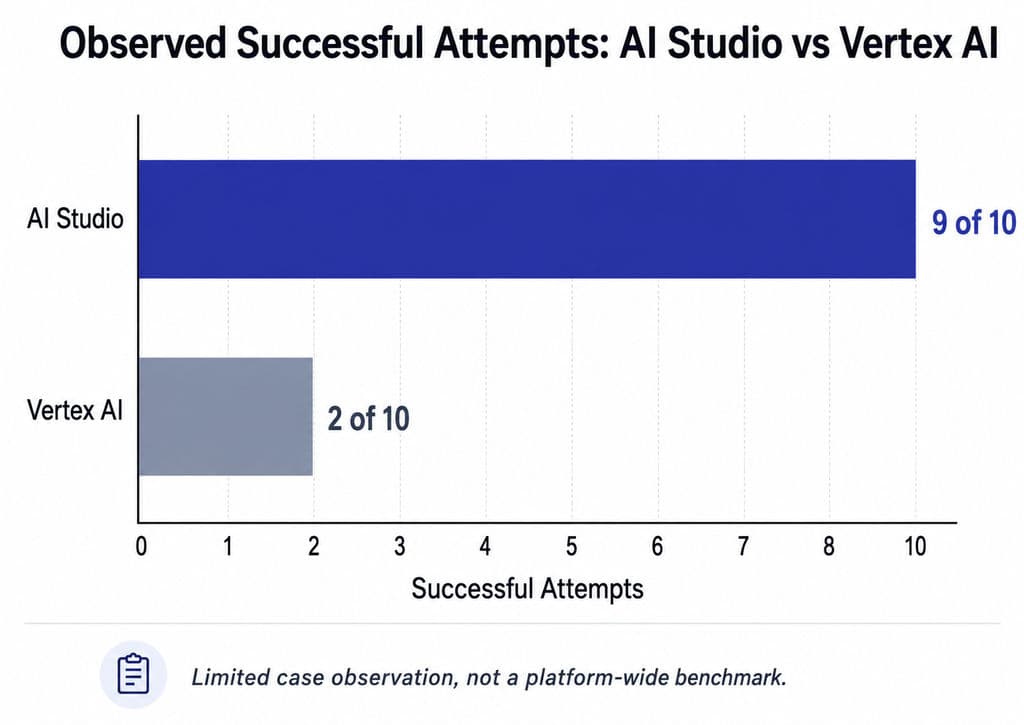
A limited case in our research reported nine successful attempts out of ten in AI Studio and two out of ten in Vertex. This is a useful signal but not evidence that one platform is universally less restrictive.
A valid comparison must control the model, account, region, prompt, reference image, safety settings, output size, attempt count, and acceptance criteria.
How Much Does a Successful Nano Banana Image Really Cost?
The most useful commercial metric is cost per accepted image, not cost per request.
Cost per accepted image = API spending + retries + review time + manual correction cost ÷ approved final images
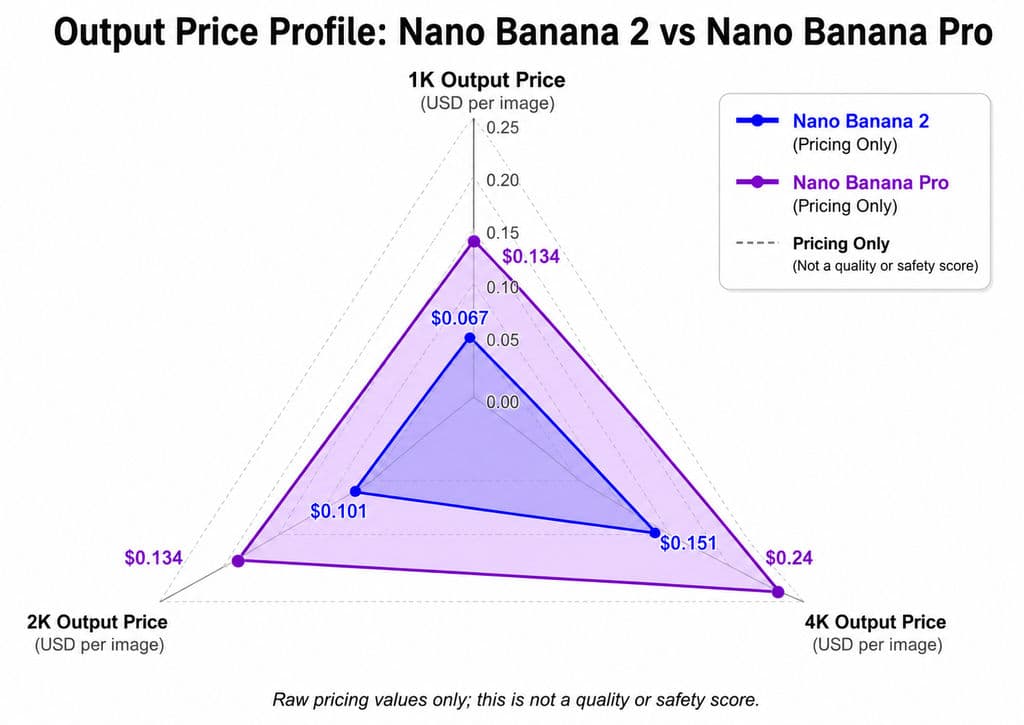
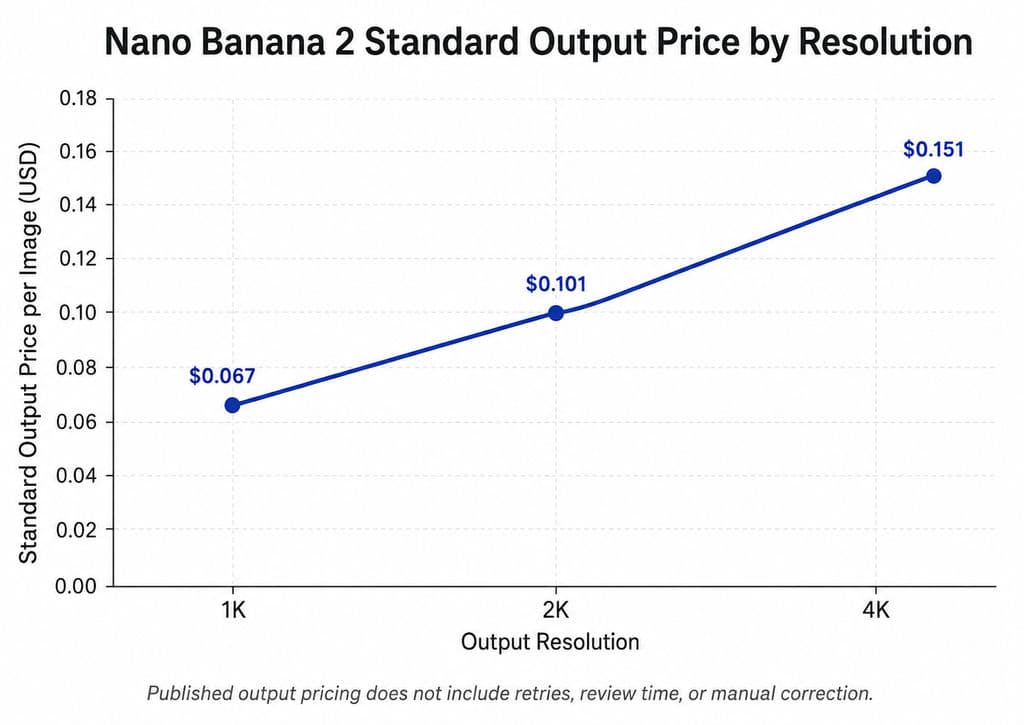
Google’s current pricing page lists standard Nano Banana 2 image output at about $0.067 for 1K, $0.101 for 2K, and $0.151 for 4K. Nano Banana 2 Lite is listed at approximately $0.0336 for a 1K image, while Nano Banana Pro is approximately $0.134 for 1K or 2K and $0.24 for 4K.
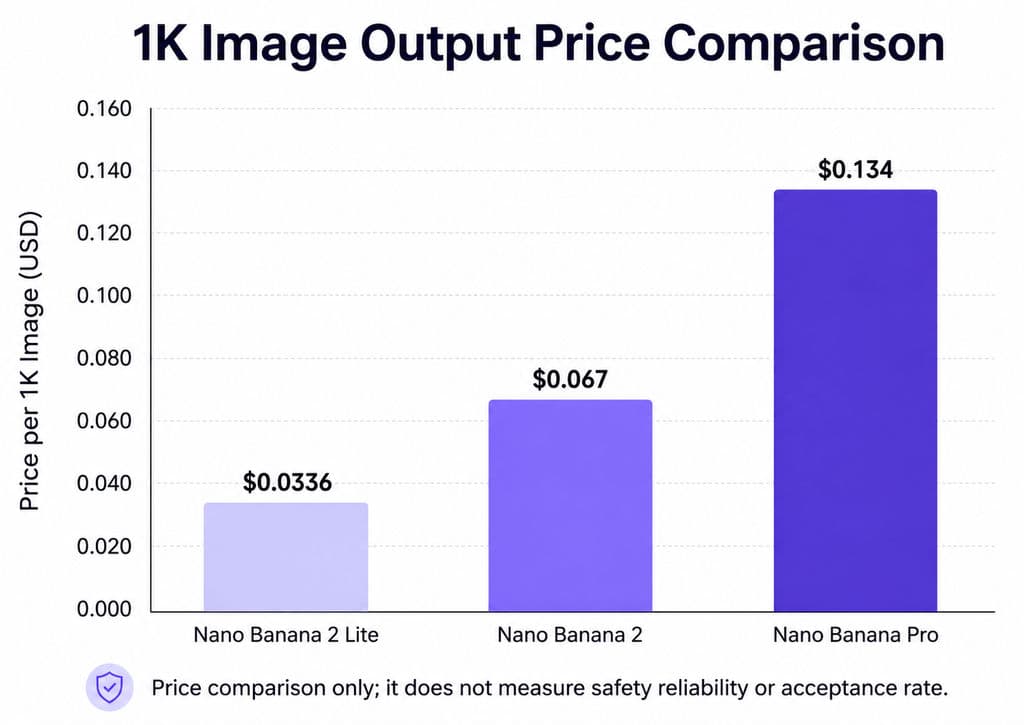
These prices do not reveal the final production cost. A lower-priced model can become more expensive when identity errors, retries, unchanged outputs, or manual correction reduce its acceptance rate.
FAQ
Can BLOCK_NONE disable all Nano Banana restrictions?
No. BLOCK_NONE affects supported adjustable filters but does not disable built-in protections or guarantee that an image will pass output checks. IMAGE_SAFETY, IMAGE_PROHIBITED_CONTENT, and other stopping reasons can still occur.
Why does starting a new chat sometimes fix Nano Banana?
A clean session removes previous instructions, refusals, reference conflicts, and accumulated edit history. It can reveal whether conversation state contributed to the failure, but it does not remove safety protections.
Does HTTP 200 with no image mean IMAGE_SAFETY?
No. HTTP 200 only confirms that the request was processed. Check PromptFeedback, FinishReason, FinishMessage, candidate parts, quota information, and returned output before identifying the cause.
Can a third-party API bypass Nano Banana safety?
Do not assume so. A provider may change prompts, use a model alias, hide response fields, or route requests differently. Verify the actual model, retention policy, billing rules, image storage, and access to original responses before uploading commercial assets.
Conclusion
You cannot fully bypass Nano Banana restrictions, but you can make legitimate image workflows more predictable by treating every failure as a diagnosable production event. Use current models and SDKs, inspect complete responses, separate prompt issues from reference-image risks, stage complex edits, test platforms under identical conditions, and calculate cost per accepted image. A structured AI design workflow turns that diagnosis into a repeatable production process without relying on unsafe circumvention, unsupported success rates, or repeated prompt guessing.