10 Krea AI Alternatives Compared by Use Case
 Yifan Zhao18 menit baca ·
The best Krea AI alternative depends on what part of Krea you need to replace. Adobe Firefly is a strong choice for Adobe-centered creative production, Runway for AI video, Midjourney for visual exploration, Leonardo.Ai for managed real-time creation, ComfyUI for configurable node workflows, and Virse for professional design projects that need shared context, consistent style, and multi-asset production. Teams comparing options should evaluate the best AI design tools by workflow fit rather than model count alone, especially when the goal is a repeatable AI design workflow.
The problem is that most Krea AI alternative lists focus on model count, pretty sample images, or monthly price. Those signals do not tell you whether a tool can handle revisions, preserve products or characters, support team handoff, repeat an approved direction, or turn a first generation into a usable campaign asset. A tool may look better in a demo but cost more in failed outputs, manual repair, exports, and lost design continuity. This matters particularly for AI ad creative and brand consistency and for teams building a more structured AI design system.
Virse is built for teams that need more than one-off AI generations. It brings references, design assets, project context, revisions, and multiple AI agents into one shared creative workspace, helping teams create campaign adaptations, product visuals, packaging concepts, and connected design variations without losing control of the final creative direction. That approach is especially relevant to AI design Agent creative workflows.
What Are the Best Krea AI Alternatives?
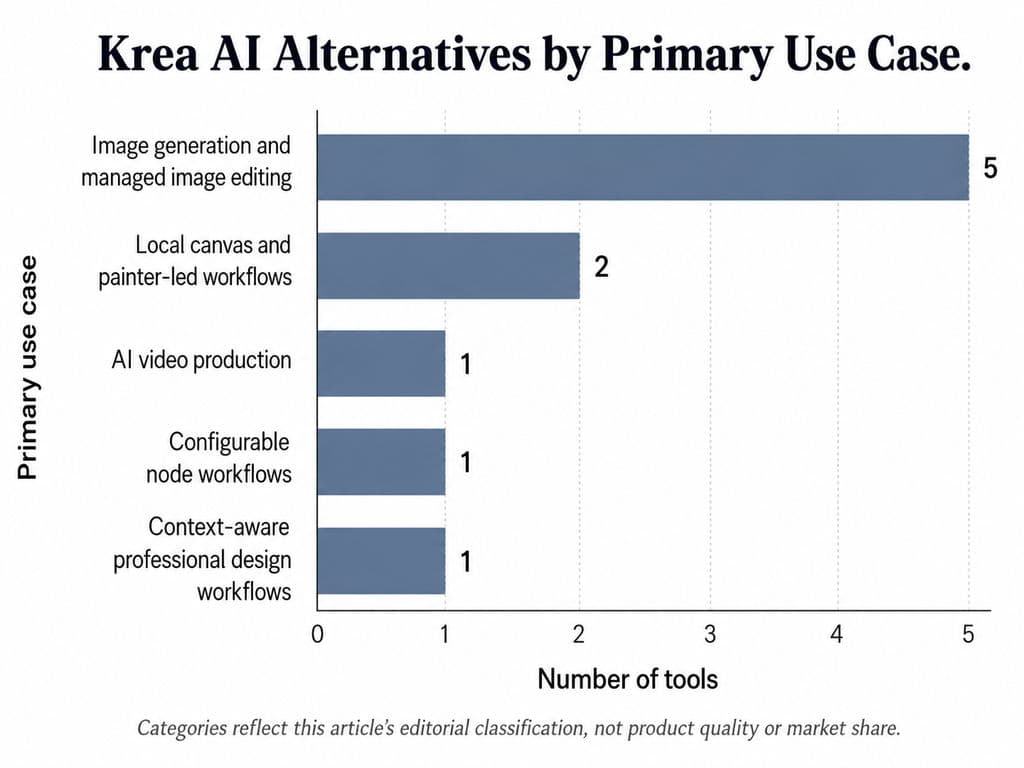
The best Krea AI alternative depends on the task: Adobe Firefly for Adobe-centered creative production, Runway for AI video, Midjourney for visual exploration, Ideogram for typography-led images, ComfyUI for configurable node workflows, and Virse for context-aware professional design projects.
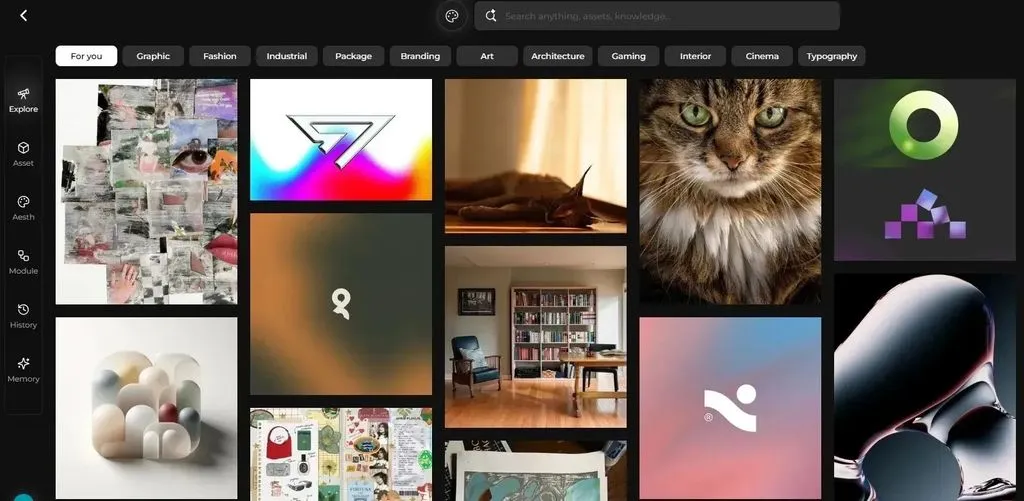
No single tool fully replaces Krea’s combination of real-time generation, image and video models, editing, enhancement, 3D tools, Nodes, and API access. Krea currently positions itself as a creative suite for generating, editing, and enhancing images, video, and 3D assets.
This guide compares verified product capabilities and workflow fit. It is not a controlled image-quality benchmark, and “best” means the strongest match for a defined use case rather than a universal winner.
The Best Krea AI Alternatives at a Glance
Tool | Best for | Why consider it instead of Krea | Main limitation |
Adobe Firefly | Adobe-centered creative production | Images, video, audio, editing, Boards, and partner models | Partner-model terms and credit costs vary |
Runway | AI video generation and editing | Video-focused creation, editing, and API access | Less similar to Krea’s real-time image experience |
Midjourney | Art direction and visual exploration | Moodboards, personalization, and reference-led image creation | Not a complete production or team workflow |
Leonardo.Ai | Accessible image generation and canvas editing | Realtime Canvas, image tools, video, and managed model access | Does not reproduce every Krea real-time workflow |
Ideogram | Images with readable typography | Text rendering, editable text layers, Canvas, and batch generation | Narrower multimedia workflow than Krea |
OpenArt | Multi-model browser-based creation | Broad model access and image-editing tools | Costs and capabilities vary by model |
Krita with AI plugins | Painter-led local editing | Brush, mask, composition, and local creative control | Requires setup and suitable hardware |
InvokeAI | Structured local canvas workflows | Canvas editing plus reusable node workflows | Less extensive node ecosystem than ComfyUI |
ComfyUI | Custom and repeatable generative pipelines | Local models, JSON workflows, custom nodes, and cloud execution | Technical setup and maintenance |
Virse | Professional multi-asset design workflows | Infinite-canvas context, shared agent context, and design continuity | Not a general one-prompt generator or local model engine |
Which Alternative Is Closest to Krea?
Adobe Firefly is one of the closest broad managed alternatives because it combines image, video, audio, editing, Boards, Adobe integrations, and access to Adobe and partner models.
Leonardo.Ai is a closer match for users who mainly value browser-based image generation, Realtime Canvas, editing, and accessible creative tools.
ComfyUI is closer to Krea Nodes for users who want transparent and reusable graphs. Runway is the more relevant alternative when video matters more than real-time image creation.
Who Should Stay with Krea?
Changing platforms may not solve a real problem. Krea remains a sensible choice when:
- Real-time visual feedback is central to your process.
- You need image, video, editing, upscaling, and 3D tools in one managed service.
- You want access to multiple models without maintaining local infrastructure.
- Krea Nodes already cover your reusable workflows.
- Your current compute-unit usage is predictable.
- You need Krea’s API models but not a completely self-hosted pipeline.
Krea’s current pricing includes different allowances for generation, enhancement, model access, concurrency, and collaboration. Product limits should be checked at the time of purchase because model access and allowances can change.
How Were These Krea AI Alternatives Compared?
Each tool was evaluated across five practical questions:
- Which part of Krea can it replace?
- What workflow is it designed for?
- How much control does it provide after the first generation?
- Can it support repeated or multi-asset work?
- What is its most important limitation?
The comparison emphasizes official product documentation. Public user feedback is used only to identify recurring issues worth testing, such as identity drift, failed generations, queue delays, and local setup complexity. It is not treated as controlled performance evidence.
Feature, Platform, and Workflow Replacements
A feature replacement substitutes one function. Runway can replace Krea for a video-focused task, while Ideogram can replace it for typography-led image concepts.
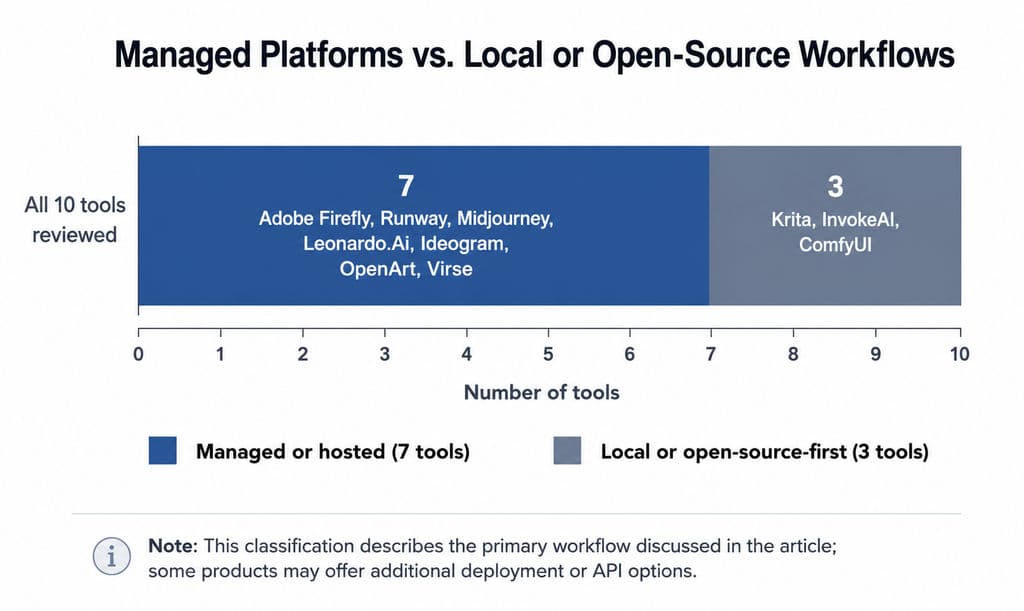
A platform replacement covers several media and editing needs within one subscription. Adobe Firefly, Leonardo.Ai, and OpenArt are examples of broader managed environments.
A workflow replacement changes how projects are organized and repeated. ComfyUI emphasizes configurable graphs; Virse emphasizes shared design context across assets and agents.
Recognizing these categories prevents a common mistake: selecting a tool because it generates attractive samples even though it cannot support the revisions, consistency, or team processes required later.
What Should Be Tested?
Use the same real asset across the tools you shortlist. Evaluate:
- Prompt and reference adherence
- Local editing accuracy
- Character or product preservation
- Style continuity
- Video motion and temporal consistency
- Time required for corrections
- Cost per usable output
- Export and handoff
- Privacy and commercial terms
- Ability to repeat the process
Do not rely on a vendor’s showcase alone. A system can produce an exceptional sample and still require too much manual repair for everyday production.
Which Krea AI Alternatives Are Best for Image Generation?
Midjourney, Adobe Firefly, Leonardo.Ai, Ideogram, and OpenArt are the principal image-focused options in this comparison. Their strengths are different enough that ranking them solely by visual quality would be misleading.
Midjourney: Best for Art Direction and Visual Exploration
Midjourney is a strong fit for early creative direction, editorial imagery, mood exploration, stylized concepts, and visual references.
Its Moodboards feature lets users create a reusable visual direction from selected images. Personalization learns aesthetic preferences, while Style References transfer attributes such as color, medium, texture, and lighting rather than copying the original subject. Omni Reference can introduce a referenced character, object, vehicle, or creature into new images.
Choose Midjourney when:
- You need many art-direction options.
- Aesthetic exploration matters more than real-time painting.
- You can move selected outputs into another editing tool.
- You want image references to guide a visual language.
Main limitation: Midjourney’s reference and personalization controls do not constitute a complete brand-management or campaign-production system. Product geometry, exact text, logos, and small details still require inspection.
Adobe Firefly: Best for Adobe-Centered Creative Work
Adobe Firefly is most suitable for teams already using Photoshop, Illustrator, Premiere Pro, Adobe Express, or related Adobe services.
Firefly combines image, video, audio, editing, Boards, custom-model capabilities, and partner models. Adobe has also expanded partner-model access across its creative applications.
Choose Adobe Firefly when:
- Generated assets must continue into Adobe editing tools.
- You need images, video, audio, and ideation in one ecosystem.
- Content provenance and enterprise controls are relevant.
- Your team already manages files and approvals in Adobe products.
Main limitation: Firefly includes both Adobe models and partner models. Model availability, training-data statements, pricing, and terms may differ. Adobe’s statements about its own Firefly models should not automatically be applied to every partner model.
Leonardo.Ai: Best for an Accessible Managed Canvas
Leonardo.Ai is a practical alternative for creators who want image generation, Realtime Canvas, image editing, video, and managed access without running models locally.
Choose Leonardo.Ai when:
- You prefer a browser-based service.
- Real-time iteration and canvas editing matter.
- You want several image and video options in one account.
- You do not want to maintain local models.
Main limitation: “Realtime Canvas” is not a universal specification. Test the exact interaction you need, such as sketch response, masking, reference control, or local revision, rather than assuming it behaves like Krea.
Ideogram: Best for Typography-Led Images
Ideogram is particularly relevant to posters, covers, social graphics, packaging concepts, signs, and other visuals where text is part of the generated composition.
Its tools emphasize text rendering, Canvas editing, Magic Fill, Extend, editable text layers, and batch generation on eligible plans.
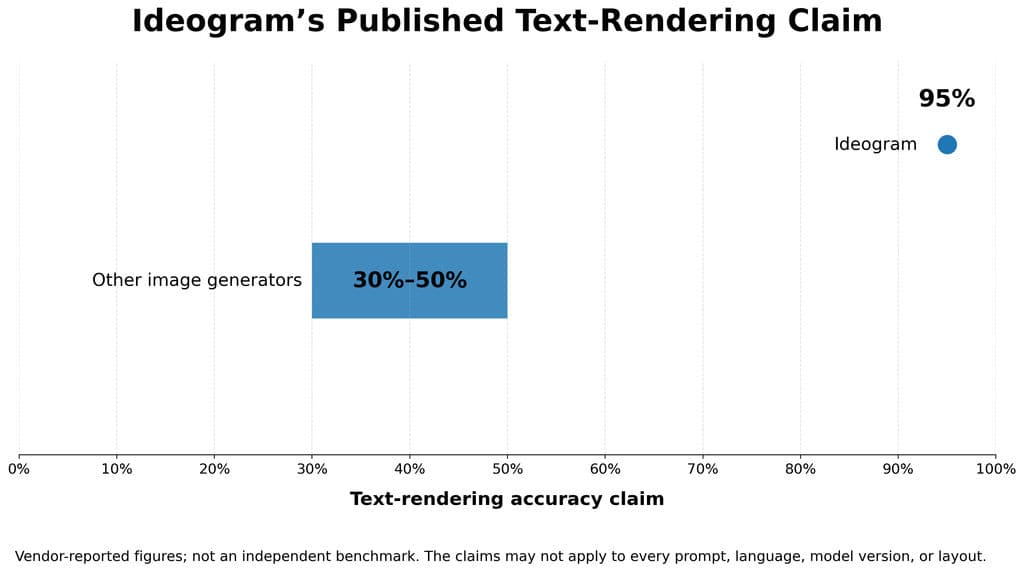
Ideogram has published a claim of 95% text-rendering accuracy compared with a claimed 30% to 50% range for other image generators. This is vendor-reported data rather than an independent benchmark and should not be treated as a universal result across every language, prompt, layout, or model version.
Choose Ideogram when:
- Readable headlines or labels are central to the concept.
- You need generated text to remain editable.
- You are creating posters, covers, or typography-led marketing images.
- Batch prompt generation is useful.
Main limitation: Final typography, regulatory copy, brand fonts, hierarchy, and print-ready layout should still be rebuilt or reviewed in a professional design application.
OpenArt: Best for Broad Browser-Based Model Access
OpenArt is designed as a multi-model creator studio covering images, video, audio, and image editing. Its tools include style transfer, object removal, angle changes, upscaling, and other photo-editing functions.
Choose OpenArt when:
- You want to explore multiple models without local installation.
- Image editing and model variety matter.
- You prefer one browser account for experimentation.
- You do not need complete ownership of the underlying workflow.
Main limitation: A high model count does not guarantee economical production. Credit use, speed, resolution, and output capacity can differ substantially by model and plan.
Which Alternatives Are Best for Video and Real-Time Creation?
Runway is the clearest video-focused option among the ten formal recommendations. Leonardo.Ai provides managed real-time image creation, while Krita and InvokeAI are more relevant when canvas control and local operation matter.
Runway: Best for AI Video Production
Runway is suitable for creators whose main output is generated or transformed video.
Its plans include image, video, audio, editor projects, asset storage, and model-dependent credit allocations. Runway also offers a developer API with separate credit billing.
Choose Runway when:
- Image-to-video or generative video is the primary task.
- You need a video-oriented production interface.
- You want to bring video models into an application through an API.
- Existing footage must be modified or extended.
Main limitation: Runway is not a close substitute for Krea’s painter-like real-time image workflow. Its costs also need to be calculated by model, duration, resolution, and the number of attempts.
A useful video test should include:
- A human subject
- A structured product
- Deliberate camera movement
- A logo or text element
- More than one connected shot
Review motion, geometry, temporal consistency, camera behavior, and repair time.
Krita with AI Plugins: Best for Painter-Led Local Editing
Krita is an open-source digital-painting application rather than a Krea clone. Its value lies in brush-based composition, masking, layers, drawing, and local editing.
Some AI-assisted workflows rely on community plugins and separate local backends. Users should verify plugin origin, compatibility, and hardware requirements rather than assuming every AI function is built into the core application.
Choose Krita when:
- Painting and drawing are already central to your workflow.
- You want AI to complement manual canvas control.
- Local files and models are important.
- You are comfortable configuring plugins and backends.
Main limitation: Setup, plugin maintenance, model storage, and GPU requirements can make the experience less immediate than Krea.
InvokeAI: Best for a Structured Local Canvas
InvokeAI is a free and open-source creative engine for image generation. Its canvas supports drawing, painting, sketching, and precise editing, alongside a node-based Workflow Editor.
Choose InvokeAI when:
- You want a local canvas and reusable workflows.
- You prefer a more structured image interface than a large raw node graph.
- Layer-based review and editing matter.
- You need open-source deployment.
Main limitation: InvokeAI still requires local setup or managed infrastructure, and its extension ecosystem is not identical to ComfyUI’s.
Which Krea Alternatives Are Best for Advanced Workflows?
ComfyUI is the strongest fit in this comparison for users who need configurable model pipelines. Virse is the relevant choice when the central problem is preserving project context across a professional design process.
ComfyUI: Best for Configurable Node Workflows
ComfyUI is an open-source, node-based generative AI environment that can run models locally, support custom nodes, operate as a server, and execute workflows through managed cloud infrastructure.
Workflows can generate images, video, audio, models, or agents. They can be stored as compact JSON files, versioned, archived, shared, and embedded as metadata in generated images.
Choose ComfyUI when:
- You need custom model chains.
- Workflows must be saved and reproduced.
- Local or private deployment matters.
- You need ControlNet, LoRA, restoration, upscaling, video, or batch pipelines.
- Technical control is worth the maintenance cost.
Main limitation: The user is responsible for more of the system. Local installations can involve models, custom nodes, dependencies, GPU memory, storage, updates, and troubleshooting. Third-party custom nodes also require security and maintenance review.
Start with a small workflow rather than downloading a complex graph:
- One generation model
- One reference or control stage
- One local editing stage
- One output or upscale stage
- A saved and documented default
Add nodes only when a real project requires them.
Virse: Best for Context-Aware Professional Design Projects
Virse is designed for professional designers, studios, brand teams, e-commerce creatives, packaging designers, and product-design teams that work across connected assets and repeated revisions.
Its confirmed positioning includes:
- Organizing, connecting, comparing, and editing assets on an infinite canvas
- Interpreting tasks through the context of the whole canvas
- Allowing multiple agents to share project context
- Supporting reference analysis, creative exploration, packaging, and marketing-material tasks
- Learning team aesthetic preferences, brand guidelines, and project experience
- Supporting style continuity, asset organization, variations, and multi-round revisions
- Preserving designer control over direction, editing, review, and delivery
Choose Virse when:
- A project contains many related references and outputs.
- Multiple AI tasks must share the same creative context.
- Style and brand direction must continue across revisions.
- Designers need to compare alternatives on one canvas.
- The work includes campaign adaptation, packaging, product visualization, or repeated variants.
What Do Most Krea AI Alternative Comparisons Miss?
A strong first output is not the same as a reliable production workflow. Image quality determines whether an idea looks promising, but workflow reliability determines whether that idea can be revised, reproduced, handed off, and delivered at scale.
A Strong First Output Is Not a Reliable Production Workflow
A real project rarely ends with the first generation. Users may need to change one detail without altering the rest, preserve a product across several scenes, generate related formats, reproduce an approved direction later, or apply the same visual system to multiple assets.
A useful production test should ask:
- Can one element be revised without damaging the subject?
- Can the same product or character remain stable across variations?
- Can an approved direction be reproduced later?
- Can another team member understand and continue the project?
- Can outputs be reviewed and organized before delivery?
A platform that creates an impressive sample but fails these steps may still be unsuitable for recurring production.
Revision, Reproduction, and Team Handoff
Much of the hidden work begins after generation:
- Repairing faces, text, logos, or product details
- Recreating prompts and settings
- Re-uploading references
- Exporting assets between tools
- Organizing versions
- Producing additional aspect ratios
- Explaining earlier creative decisions to another designer
This is especially important for campaign adaptation, packaging extensions, product visualization, localization, and other multi-asset projects.
The most useful comparison is therefore not only:
Which tool produces the best first image?
It is also:
Which tool creates the least rework between the first concept and the final deliverable?
How Do Krea Alternatives Compare on Consistency and Cost?
Consistency and pricing are often oversimplified. Both need to be tested at the level of the actual project.
Character, Product, Style, and Brand Consistency
These are four separate requirements.
Consistency type | What must remain stable | Useful test |
Character | Face, body, age, hair, clothing, identifying features | Generate close-up, profile, full-body, and new-lighting views |
Product | Shape, proportions, materials, controls, logo, color | Change background and camera angle without changing the product |
Style | Palette, texture, lighting, medium, visual treatment | Generate different subjects within one visual direction |
Brand | Typography, colors, logos, composition, tone, approval rules | Review a multi-channel asset set against the actual brand guide |
Midjourney’s Moodboards, Style References, Personalization, and Omni Reference address parts of subject and style continuity, but they do not replace a formal brand-review process.
The same caution applies to custom models and brand-trained systems: they may improve alignment, but outputs still require human review.
What Does a Krea Alternative Really Cost?
The relevant formula is:
Real production cost = subscription and generation fees + failed-output cost + editing time + transfer time + infrastructure and coordination cost
The tools use different billing structures:
Tool | Primary billing structure | Separate API billing? | Main cost variable |
Krea | App compute units | Yes | Selected model and operation |
Adobe Firefly | Generative credits and plan access | Product-dependent | Premium media and partner models |
Runway | Monthly credits | Yes | Model, duration, resolution, output count |
Leonardo.Ai | Tokens or plan allowances | Yes | Model and generation mode |
Ideogram | Plan credits and API per-image pricing | Yes | Model and operation |
OpenArt | Plan credits | Product-dependent | Selected model and feature |
Local tools | Software may be free | Not necessarily | Hardware, electricity, storage, maintenance |
Krea separates application compute units from its dollar-denominated API balance. Runway’s web plans and developer API also use separate credit systems. Ideogram publishes per-image API pricing, while Leonardo.Ai offers pay-as-you-go API pricing in addition to app subscriptions.
All pricing and product conditions in this article were checked in July 2026. Verify the current official page before purchasing, particularly for:
- Free-credit renewal
- Premium-model multipliers
- Failed-job charging
- Private generations
- Team seats
- Commercial terms
- Data retention
- Regional availability
How Should You Choose the Right Krea AI Alternative?
Choose the tool that solves the most valuable recurring task while creating the least downstream rework.
Choose by Primary Task
Primary need | Start with |
Art direction and aesthetic exploration | Midjourney |
Adobe-based commercial creative work | Adobe Firefly |
Managed real-time image creation | Leonardo.Ai |
Typography-led graphics | Ideogram |
Broad browser-based model access | OpenArt |
AI video production | Runway |
Painter-led local editing | Krita |
Structured local canvas workflows | InvokeAI |
Reusable node automation | ComfyUI |
Professional multi-asset design context | Virse |
This is a use-case map, not an output-quality ranking.
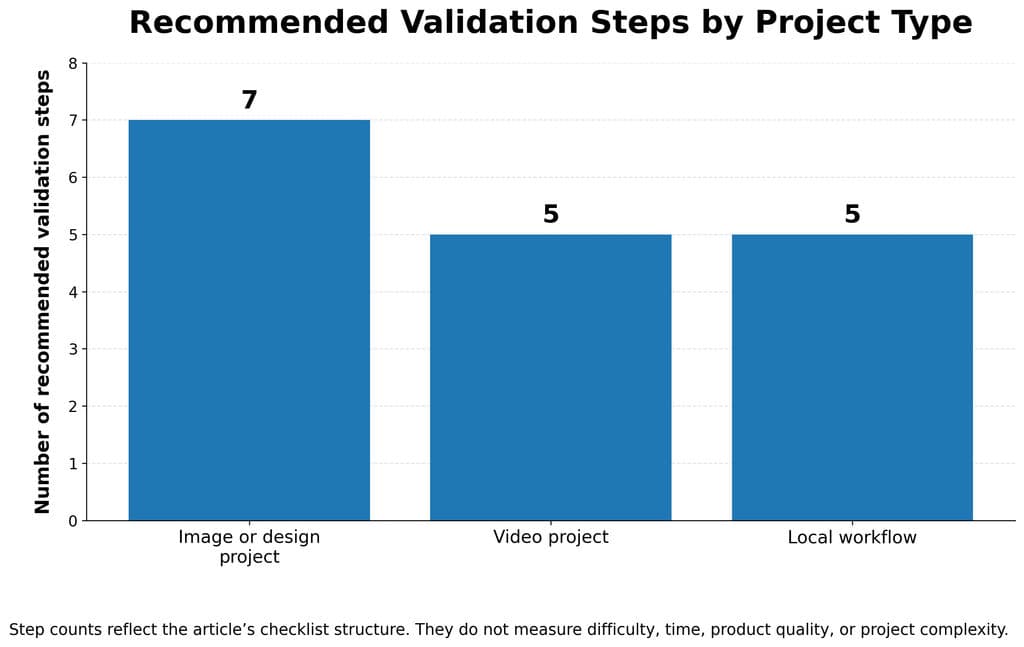
Test One Real Project Before Subscribing
A generic prompt reveals little about workflow fit. Use a real project with real constraints.
For an image or design project:
- Upload an actual reference or product.
- Generate three viable directions.
- Revise one local detail.
- Preserve the main subject.
- Create multiple formats or variations.
- Return later and reproduce the process.
- Record credits and repair time.
For video:
- Animate a real source image.
- Test subject and camera motion.
- Extend or revise the clip.
- Check continuity.
- Calculate the total cost of usable footage.
For a local workflow:
- Install the required models.
- Build one minimal repeatable process.
- Save and document it.
- Update a dependency.
- Confirm that another user can run it.
Evaluate:
- Quality
- Accuracy
- Revision control
- Consistency
- Reliability
- Total cost
- Collaboration
- Export quality
- Commercial suitability
When Is a Tool Stack Better Than One Platform?
One platform is usually enough when projects are small, one medium dominates, and strict consistency is not required.
A modular stack can make sense when:
- One tool is best for canvas editing and another for automation.
- Video and image work require specialist systems.
- Local control is necessary for part of the process.
- Final assets require professional retouching or layout.
- Production volume justifies repeatable workflows.
For example, a creator might combine InvokeAI or Krita for canvas work, ComfyUI for repeatable pipelines, Photoshop for final correction, and Runway for motion.
The disadvantage is operational complexity. Every additional tool adds another account, export, file format, cost, or maintenance task. Add a tool only when it removes a clearly defined bottleneck.
Frequently Asked Questions About Krea AI Alternatives
Is There a Free Alternative to Krea AI?
Yes. ComfyUI, InvokeAI, and Krita are open-source options, although local operation may require a compatible GPU, model storage, setup time, and maintenance.
Several managed services also offer limited free access. Free access may include daily credits, trial credits, restricted models, public outputs, slower queues, or limited commercial features. “Free” should therefore be evaluated by the number of usable outputs and the conditions attached to them, not only by the absence of a subscription fee.
Which Tool Is Most Similar to Krea’s Real-Time Canvas?
Leonardo.Ai is one of the closer managed alternatives because it offers Realtime Canvas and Realtime Generation. InvokeAI is relevant when users want a structured local canvas, while Krita is appropriate for artists who prioritize painting, masks, and layers.
ComfyUI can power low-latency and interactive workflows, but its default experience is a node graph rather than a painter-first creative canvas.
Is ComfyUI Better Than Krea AI?
ComfyUI is more suitable for local models, custom nodes, workflow versioning, automation, and technical control. Krea is more suitable for users who want managed infrastructure, real-time interfaces, multi-model access, video, editing, and enhancement without maintaining a local environment.
Neither is universally better. ComfyUI trades convenience for configurability; Krea trades some infrastructure control for accessibility and integration.
Which Krea Alternative Is Best for Professional Design Teams?
Adobe Firefly is a strong choice for organizations already standardized on Adobe products. Virse is designed for professional multi-asset workflows in which references, variants, design decisions, and AI agents need to share project context.
ComfyUI may fit technical creative teams that can maintain custom infrastructure. Runway is more appropriate when the team’s primary deliverable is video.
Professional teams should compare collaboration, data handling, project continuity, revision control, brand alignment, and human approval—not only generation quality.
Conclusion
The best Krea AI alternative depends on whether you need a managed creative suite, specialist video production, local canvas control, configurable node workflows, or a context-aware professional design environment. Keep Krea if its integrated real-time and multi-model workflow already meets your needs. Before switching, test one real project and compare usable output, correction time, consistency, reliability, and total cost.