
Seedance 2.5 Prompt Guide: How to Stop Character Drift and Wasted Rerolls
Vincent11 min de lecture ·
Seedance 2.5 works best when prompts are written as structured video-production instructions rather than image-style descriptions. The strongest prompts separate reference roles, timeline beats, camera movement, character continuity, audio cues, and editable variables, giving creators more control over complex sequences up to 30 seconds.
The challenge is that every added character, reference, camera move, and scene change introduces another variable. When those responsibilities overlap, creators can encounter identity drift, reference conflicts, missed camera directions, unwanted objects, or weaker adherence later in the sequence. The solution is not simply a longer prompt. It is clearer control over what stays fixed, what changes, and when each change happens.
For teams managing reference-heavy AI design workflows, Virse provides a more structured way to work. Its infinite canvas, shared project context, multi-Agent collaboration, and long-term team memory help professional design teams organize references, handle revisions, maintain style continuity, and automate repetitive production while keeping designers in control of creative decisions. Seedance 2.5, Seedance 2.0 and MiniMax H3 are now available on Virse, so teams can explore and compare multiple leading video models in the same creative workflow.

What Is the Best Seedance 2.5 Prompt Structure?
The best Seedance 2.5 prompt structure combines creative intent, reference mapping, continuity rules, timeline control, camera direction, performance cues, audio, and a defined ending.
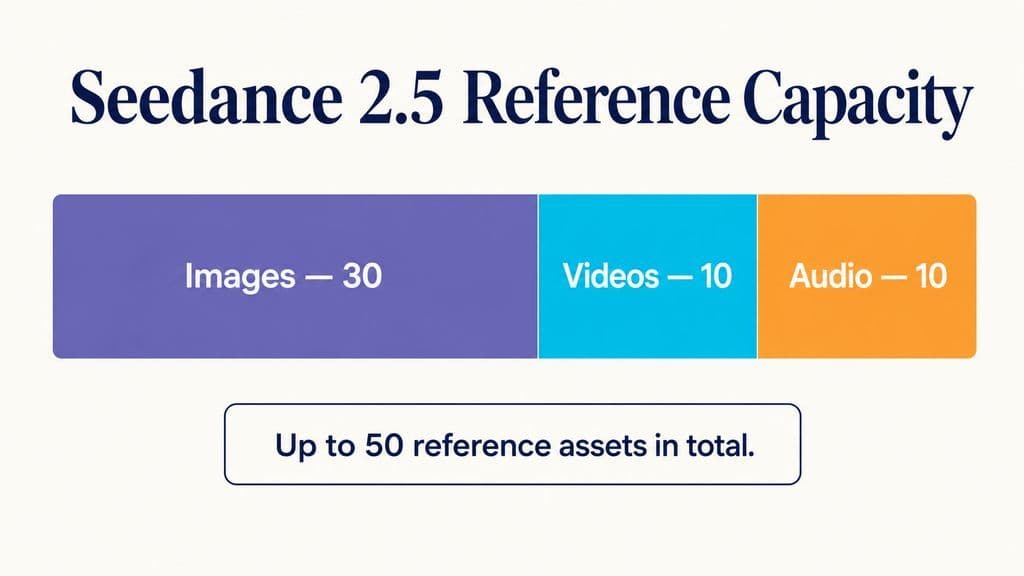
Seedance 2.5 supports videos up to 30 seconds and up to 30 image, 10 video, and 10 audio references, so prompt architecture becomes more important as scene complexity grows.
Start With One Clear Creative Intent
Begin with a single sentence describing what the full sequence should accomplish.
Instead of describing only mood, define the event:
A realistic backstage sequence following a singer from final preparation to walking onto the stage.
This gives the model a clear beginning, progression, and destination. In professional AI design workflows, vague creative direction often creates unnecessary rerolls because the model must invent both the concept and the execution.
Build a Reference Responsibility Map
Reference quantity is less important than reference responsibility.
A practical structure is:
Image 1: character identity only.
Image 2: wardrobe only.
Image 3: environment and lighting only.
Video 1: camera movement and pacing only.
Audio 1: voice only.
This approach reduces reference contamination. Seedance 2.5 may support as many as 50 total reference assets, but capacity does not mean every asset should influence every part of the video.
Lock What Must Stay Consistent
A continuity lock can define persistent attributes such as facial identity, age, skin tone, hairstyle, wardrobe, body proportions, key props, scene layout, and lighting direction in Seedance 2.5.
Our review of documented workflows found recurring issues including face drift, skin-tone changes, hairstyle changes, wardrobe changes, extra characters, unintended objects, and lighting shifts. Treating continuity as an explicit constraint makes these failures easier to diagnose.
How Do You Write a Seedance 2.5 30-Second Timeline Prompt?
For a 30-second Seedance prompt, divide the sequence into clear time ranges with one dominant action per beat.
A useful workflow is approximately four to six beats. This is not an official limit, but it appears repeatedly across the production cases reviewed for this guide.
Use One Main Action Per Timeline Beat
One 30-second travel sequence used five ranges:
- 0–5 seconds
- 5–12 seconds
- 12–20 seconds
- 20–27 seconds
- 27–30 seconds
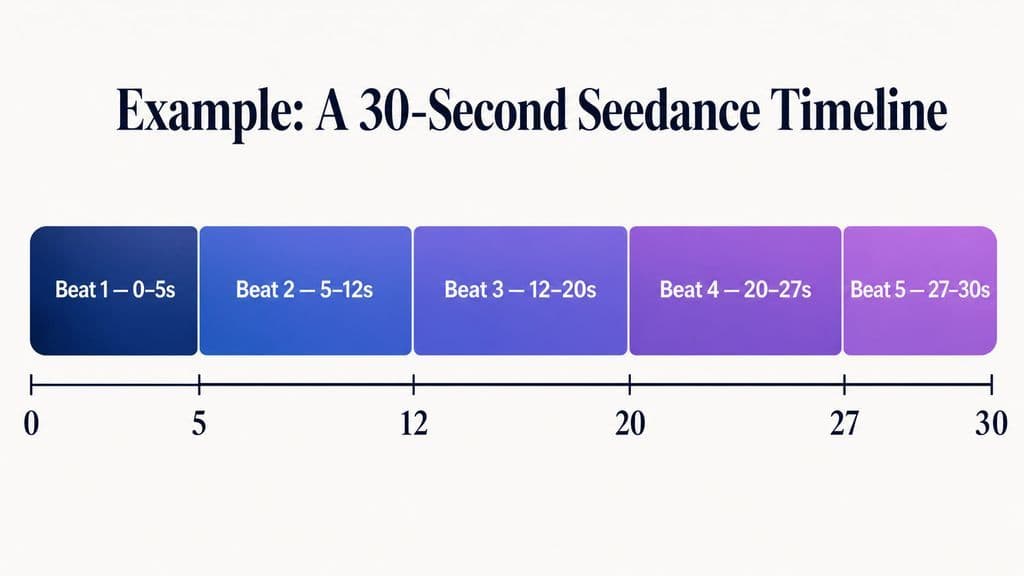
Each range introduced a controlled change in action, location, or framing instead of asking the model to interpret the entire storyboard at once.
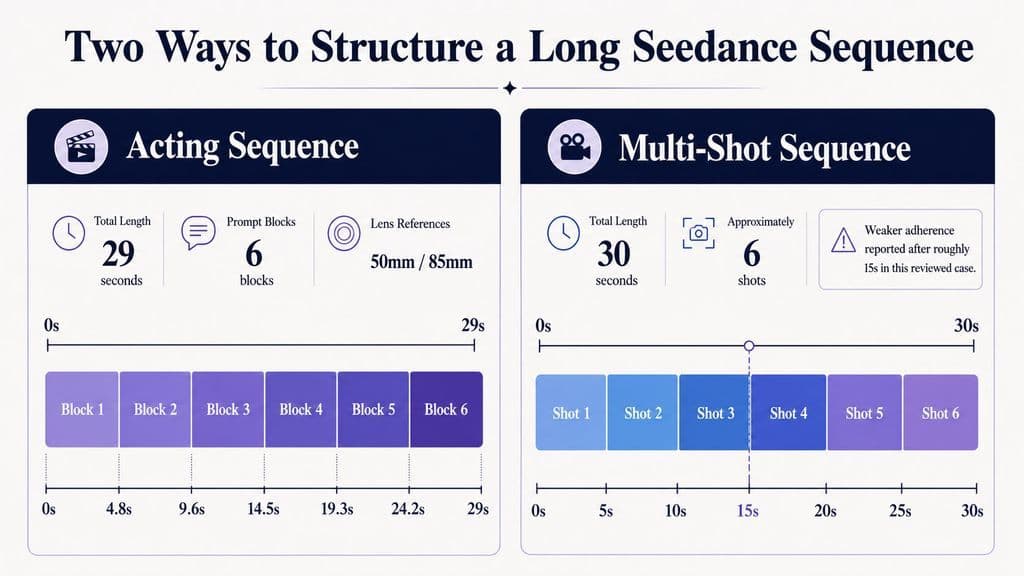
Another 29-second acting sequence used six prompt blocks, combining performance timing with 50mm and 85mm lens language. Emotional changes were tied to dialogue moments instead of relying on generic instructions such as “become more emotional.”
The practical lesson is simple: describe what changes, when it changes, and what triggers the change.
Add Audio and Dialogue Cues to Timeline Beats
Dialogue-heavy scenes need more than visual instructions.
Attach dialogue, voice, ambience, or performance cues to the same time beat as the action they influence. If a character should pause, react, turn, or change expression after a line, describe that relationship explicitly.
This turns audio into part of the scene logic rather than a separate layer added after the visual sequence.
Define the Final Frame
Specify subject position, shot size, expression, camera position, background state, and whether the camera stops or continues moving.
A defined ending gives the final seconds a destination and prevents a well-structured sequence from becoming vague at the finish.
How Do You Control Camera Movement in Seedance 2.5?
Effective camera prompting describes how the camera relates to the subject, not just whether the scene should feel cinematic.
Useful directions include:
- slow tracking beside the subject
- handheld follow from behind
- gradual push-in during a pause
- controlled arc around a product
- pull back into a wide shot
- orbit around a stationary subject
Use One Dominant Camera Move Per Beat
Camera control becomes harder when several major movements compete within the same time range.
A clearer instruction is:
Slow push-in from medium shot to close-up as the character stops speaking.
That defines movement, framing, timing, and the trigger in one sentence.
Our review of production workflows suggests that one dominant camera behavior per beat is easier to control than stacking several unrelated movements.
Should You Generate 30 Seconds at Once or Work Shot by Shot?
A 30-second generation works best when continuity itself is important.
Continuous walking scenes, dialogue in one location, performances, product reveals, and one-take sequences can benefit because separately generated clips often create lighting jumps, subject drift, and visible continuity seams.
When a 30-Second Single Take Works Better
In one workflow reviewed for this guide, longer continuous generation reduced the stitching problems created by shorter clips.
This is especially useful when:
- the same character remains in one environment
- camera movement is continuous
- dialogue or performance develops naturally over time
- the transition between beats matters visually
When Shot-by-Shot Generation Is Safer
Long duration does not mean unlimited shot complexity.
One reviewed case placed approximately six shots into a 30-second sequence and reported weaker instruction adherence after roughly 15 seconds. That is not an official Seedance limit, but it shows how complexity can accumulate.
Scenario | Recommended Workflow |
Continuous environment | 30-second generation |
Dialogue or performance | Often 30-second generation |
One-take product reveal | 30-second generation |
Many independent compositions | Shot by shot |
Frequent location changes | Shot by shot |
One local failure | Targeted edit |
The better question is not “Can Seedance generate 30 seconds?” It is “How many variables need to remain coordinated for 30 seconds?”
How Do You Keep Characters Consistent in Seedance 2.5?
Character consistency improves when identity, styling, environment, and motion are separated.
Separate Identity From Wardrobe and Environment
Use one reference for identity, another for clothing when necessary, and another for the environment.
Video references should primarily transfer motion, pacing, blocking, or camera behavior rather than unintentionally redefining appearance.
Our review of user questions found repeated concerns around face changes, skin-tone drift, hairstyle inconsistency, wardrobe changes, accent variation, and unexpected people appearing in the frame.
The practical fix is often not more references. It is fewer overlapping responsibilities.
Reduce Simultaneous Changes
Consistency becomes harder when identity, wardrobe, lighting, environment, camera, and action all change at the same moment.
A more controlled workflow establishes the character first, introduces motion second, changes camera behavior third, and changes the environment only when necessary.
How Should You Use Video and Clay References in Seedance 2.5?
Different reference types should carry different information.
Reference | Best Use |
Image | Identity, wardrobe, product, scene, lighting |
Video | Motion, pacing, blocking, camera behavior |
Audio | Voice, dialogue, ambience |
Clay or rough 3D | Spatial layout, pose, trajectory, camera choreography |
Trim Motion References to the Useful Section
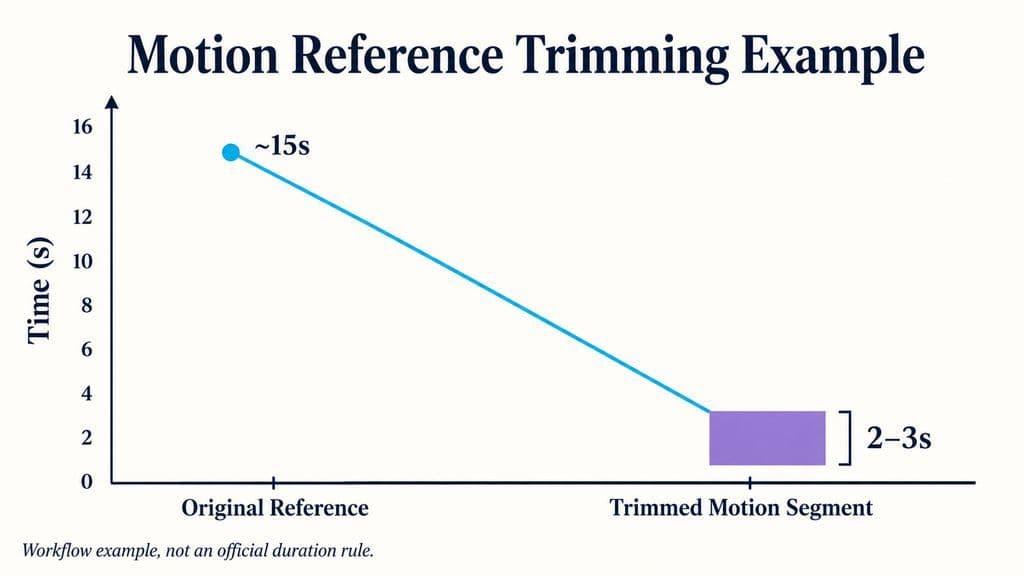
One reviewed workflow reduced an approximately 15-second reference video to a 2–3 second segment containing only the required motion.
That does not establish a universal ideal reference length. The useful principle is to remove visual information unrelated to the motion you want to transfer.
Use Clay References for Blocking and Previsualization
Seedance 2.5 supports rough or clay references for controlling spatial structure, blocking, pose, motion trajectory, camera angle, camera movement, and shot-size transitions.
This creates a professional workflow where motion and appearance can be designed separately: rough geometry establishes choreography while image references define the final character, product, materials, and visual style.
How Long Should a Seedance 2.5 Prompt Be?
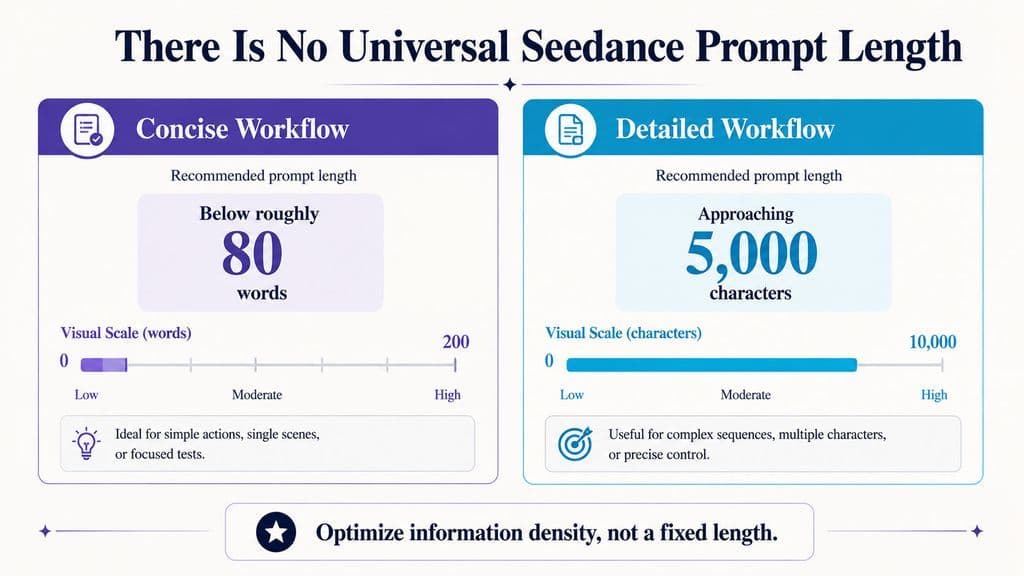
There is no verified universal prompt length.
Our research found directly conflicting approaches. One workflow favored prompts below roughly 80 words, while another reported strong results with prompts approaching 5,000 characters.
The stronger conclusion is that information density matters more than word count.
Use Short Prompts for Simple Shots
Short prompts are well suited to scenes with one subject, one action, one environment, and one camera move.
Use Structured Detail for Complex Sequences
Longer prompts become reasonable when the video includes multiple timeline beats, dialogue, several references, continuity rules, audio cues, or targeted editing instructions.
The goal is not a short prompt or a long prompt. It is a prompt with enough information to remove ambiguity without introducing conflicting instructions.
How Does Seedance 2.5 Targeted Editing Reduce Rerolls?
Targeted editing separates generation from correction.
If a 30-second clip is mostly correct but one camera movement fails, regenerating the full video exposes every successful detail to another round of variation.
A more controlled edit specifies:
KEEP: identity, wardrobe, environment, lighting, performance, timing.
CHANGE ONLY: the failed variable.
TIME RANGE: the section that needs correction.
Seedance 2.5 officially supports time-range and targeted editing workflows, making it possible to preserve correct parts of a sequence while changing a smaller area.
This shifts the production mindset from rerolling the video to debugging the variable.
What Seedance 2.5 Prompt Problems Should You Diagnose First?
When a generation is almost correct, identify the failed variable before making the prompt longer.
Diagnose Identity, Camera, and Timing Separately
- If the character drifts, inspect reference overlap and continuity rules.
- If the camera instruction is ignored, simplify competing camera movements.
- If later sections become inaccurate, count the number of actions, transitions, and state changes rather than blaming duration alone.
Use Negative Constraints for Predictable Failures
Negative constraints work best when they target specific recurring problems.
Useful exclusions include:
- no extra people
- no duplicated objects
- no identity changes
- no wardrobe changes
- no unintended camera cuts
Avoid turning the exclusions section into another long prompt. Use it to block predictable failure modes, not every theoretically possible error.
Seedance 2.5 Prompt Template for Professional Workflows
A production-ready prompt can follow this structure:
Creative Intent
Define the complete sequence in one sentence.
Reference Map
Assign one clear responsibility to every image, video, audio file, or rough reference.
Continuity Lock
Define what must remain stable.
Timeline Beats
For each time range, specify action, camera, performance, and audio.
Ending
Define the exact final composition and camera state.
Exclusions
List the most likely unwanted changes.
The value of this structure is not the labels themselves. It is the separation of production decisions so each variable can be controlled and debugged independently.
FAQ
How many references can Seedance 2.5 use?
Seedance 2.5 supports up to 30 images, 10 videos, and 10 audio references, for as many as 50 reference assets. More references are not automatically better. Use each asset only when it contributes distinct identity, motion, environment, audio, or style information.
Why does Seedance 2.5 stop following my prompt in longer videos?
Longer videos often contain more actions, camera changes, characters, and scene transitions. One reviewed six-shot, 30-second workflow showed weaker adherence after about 15 seconds, but this is a workflow observation, not an official limit. Reducing simultaneous variables or splitting complex sequences into shots can improve control.
Should I use image or video references in Seedance 2.5?
Use images for identity, wardrobe, products, environments, and lighting. Use video for motion, pacing, blocking, and camera behavior. Clay or rough 3D references are useful when you need stronger spatial or camera choreography. The most important rule is to give each reference a clear responsibility.
Can Seedance 2.5 edit only part of a video?
Yes. Seedance 2.5 supports time-range targeted editing, so you can preserve correct elements and change a specific variable or section instead of regenerating the entire video. A useful workflow is to define what to keep, what to change, and the exact time range that needs correction.
Conclusion
Seedance 2.5 prompting is most effective when treated as variable-controlled video production rather than traditional text-to-video description. References define where identity, motion, environment, and audio come from; timelines define when events happen; camera instructions define how viewers experience them; continuity locks define what cannot change; and targeted editing defines what should be corrected without rebuilding the entire sequence. For professional workflows, the biggest gains come from clear reference responsibilities, controlled timeline complexity, explicit camera logic, and choosing between 30-second generation, shot-by-shot production, and local editing based on the actual complexity of the scene.
Plus d’articles du blog Virse
Flux de travail
What Does a Graphic Designer Do? Real Tasks, Revisions, Tools & Workflow
23 septembre 2026 by Yifan Zhao
Flux de travail

How to Learn Graphic Design in 2026: A Step-by-Step Roadmap From Fundamentals to Portfolio
23 septembre 2026 by Yifan Zhao
Flux de travail

What Is Graphic Design? Definition, Real Examples, Process & Tools
23 septembre 2026 by Yifan Zhao