
How to Remove the Nano Banana Watermark: 5 Practical Methods
 Yifan Zhao12 min de lecture ·
To remove the Nano Banana watermark, you can generate the image through a workflow without the visible Gemini sparkle, crop the marked corner, reconstruct the area with Photoshop or inpainting, or use a carefully reviewed browser tool. These methods address the visible logo. They do not prove that Google’s invisible SynthID watermark has been removed. For broader context on the model itself, see this Nano Banana review or a practical guide to editing photos with Nano Banana.
The process becomes more difficult when the logo overlaps packaging, typography, product edges, people, or a finished composition. Our review of user questions found that the main problems are not limited to appearance: repeated cleanup can slow batch production, damage factual details, disrupt layouts, expose confidential files to third-party services, and create confusion about AI provenance. In these cases, a structured AI design workflow, careful Photoshop-based Nano Banana editing, and stronger brand consistency controls become especially important.
For teams that need more than one-image-at-a-time cleanup, Virse brings references, generation, revisions, and asset organization into an infinite canvas where multiple design Agents can share project context. Instead of replacing designers with a one-prompt workflow, Virse helps professional teams automate repetitive execution, preserve brand knowledge, coordinate creative tasks, and keep designers in control of the final decisions. This approach aligns with broader AI design agent workflows and professional AI-assisted graphic design.
What Is the Nano Banana Watermark, and Does Removing It Remove SynthID?
What Is the Visible Nano Banana Watermark?
The visible Nano Banana watermark is usually the small Gemini sparkle placed near the corner of an image generated through a Google consumer interface. Because it is rendered into the visible pixels, it can be removed or avoided through cropping, retouching, reverse alpha blending, or regeneration.
Google’s Nano Banana Pro announcement states that free and Google AI Pro users retain the visible Gemini sparkle, while Google AI Ultra and Google AI Studio are intended to provide a clean visual canvas.
That statement does not mean every paid product, account, region, or generation interface behaves identically. Gemini, Flow, AI Studio, and API access are separate workflows, so the exact output should be tested before it becomes part of a production pipeline.
What Is SynthID in Nano Banana Images?
SynthID is an imperceptible digital watermark embedded into media generated or edited with Google AI. It is different from the visible Gemini sparkle and is intended to support provenance verification rather than visual branding.
Google’s current Gemini API image-generation documentation states that all generated images include SynthID. The same documentation covers Nano Banana 2, Nano Banana 2 Lite, Nano Banana Pro, and the legacy Nano Banana model.
Removing the visible logo does not establish that SynthID is absent. Cropping, retouching, or reconstructing the corner changes the visual presentation of the image, but it should not be described as removing every AI provenance signal.
How to Remove the Nano Banana Watermark: Five Methods Compared
Method | Best For | Main Advantage | Main Limitation |
|---|---|---|---|
Google AI Studio or verified API output | Professional and repeated production | Avoids repairing a finished image | Output behavior must be tested |
Google Flow | Visual exploration and selection | Keeps generation inside a Google workflow | Visible watermark behavior can vary |
Cropping | Simple one-off images | Fast and predictable | Changes composition |
Photoshop or inpainting | Existing images that cannot be cropped | Preserves the full frame | May invent or distort details |
Browser or third-party tool | Non-sensitive consumer assets | Reduces manual steps | Requires privacy and quality review |
1. Generate Without the Visible Gemini Logo in Google AI Studio
For recurring professional production, avoiding the logo during generation is usually safer than repairing it afterward. Google has explicitly described AI Studio as a clean-canvas workflow, making it the strongest official starting point for users who need visual output without the corner sparkle.
Use this verification process:
- Confirm the exact Nano Banana model and interface.
- Generate one non-sensitive test image.
- Download the original file instead of taking a screenshot.
- Inspect every corner at full resolution.
- Record the dimensions, format, account configuration, and cost.
- Test several different aspect ratios.
- Run a small batch before scaling production.
API workflows are suitable for automation and batch generation, but the current API documentation guarantees SynthID rather than making a universal promise about visible-logo behavior. Test the actual API output instead of relying on a third-party article’s definition of “watermark-free.”
2. Test Google Flow Before Using It as a Clean-Output Workflow
Flow can be useful for generating, comparing, and selecting visual alternatives before final production. It should not, however, be treated as automatically watermark-free across every account tier.
Google’s current Flow support documentation says users without Google AI Plus, Pro, or Ultra receive 50 free Flow credits per day. Credit availability does not itself confirm which image models are eligible or whether downloaded images contain a visible sparkle.
Before adopting Flow:
- Check the active model and credit cost.
- Generate a low-risk sample.
- Download the original result.
- Inspect the output rather than relying on the preview.
- Confirm the behavior again after model or account updates.
Flow is most useful as an exploration and approval layer, not as an assumed solution to every watermark requirement.
3. Crop the Nano Banana Watermark
Cropping is the lowest-risk post-production method when the logo appears inside expendable background space. It works well for social posts, flexible hero images, background plates, and assets that will later be resized into another format.
Before cropping, check the final placement. A narrow corner crop may be harmless in a square image but problematic when the asset must fit a 4:5 product listing, 9:16 story, or tightly composed advertisement.
Cropping is not suitable when the watermark touches:
- A product shadow or silhouette
- Packaging or typography
- A person’s hand, face, hair, or clothing
- An intentional area of negative space
- A chart, diagram, or interface element
If cropping changes the meaning, accuracy, or visual hierarchy of the image, regeneration is the safer option.
4. Remove the Gemini Logo With Photoshop or Generative Inpainting
When cropping is impossible, select the visible mark and a small surrounding margin, then rebuild the region with cloning, healing, content-aware fill, or generative inpainting.
This method is most reliable on:
- Flat walls and studio backdrops
- Sky, sand, foliage, and soft gradients
- Low-detail fabric or floor textures
- Out-of-focus background areas
It is less reliable on:
- Packaging text and brand marks
- Reflective or transparent products
- Hands, faces, jewelry, and hair
- Repeating patterns
- Charts, data labels, and UI screens
- Precise industrial-design edges
Inpainting does not recover the original pixels hidden by the logo. It generates a plausible replacement. That distinction is critical for product listings, packaging, technical diagrams, infographics, and client-approved assets.
When accuracy matters, compare the repaired area against the real product, original copy, or approved design reference. Regenerate the image when a repair would require the editor to guess.
5. Review Browser and Third-Party Watermark Tools Before Use
Current search results contain many tools that promise one-click removal, local processing, zero quality loss, or complete watermark elimination. These claims are often published by the tool provider and should not be treated as independent evidence.
A browser tool may use reverse alpha blending when the logo’s position, mask, opacity, and dimensions are known. This can preserve more of the original background than generative inpainting, but it may stop working when Google changes the watermark design or placement.
Before processing professional assets, verify:
- Browser permissions
- Network activity
- Whether files leave the device
- Data retention and training policies
- Output resolution and format
- Compression behavior
- Supported watermark positions
- Failure handling and update history
For confidential prototypes, customer images, unreleased products, or campaign materials, an approved first-party workflow or offline editor is easier to audit than an unknown extension or online service.
Which Nano Banana Watermark Removal Method Is Best for Each Design Workflow?
Nano Banana Watermark Removal for E-Commerce Product Images
Product imagery is one of the least forgiving use cases. A small repair can change a bottle contour, remove a real shadow, distort a material texture, or create packaging details that do not exist.
Our review of user questions repeatedly identified product edges and packaging text as high-risk areas. The recommended workflow is to generate through a verified clean-output interface, retain the real product reference, and compare the final image with the approved SKU before publication.
Regenerate rather than inpaint whenever the watermark touches the product itself.
Nano Banana Watermark Removal for 4K Infographics
Text-heavy infographics require more than visual plausibility. A repaired region may look natural while changing a character, number, label, arrow, or relationship between data points.
Google’s current image-generation documentation confirms that Nano Banana 2 supports 1K, 2K, and 4K generation, while Nano Banana 2 Lite is limited to 1K.
For information-dense content, use Nano Banana to develop the visual structure, illustration style, and composition. Rebuild critical copy, data, and labels in Figma, Illustrator, or another structured design application. This creates editable text, improves localization, and reduces the risk of publishing inaccurate information.
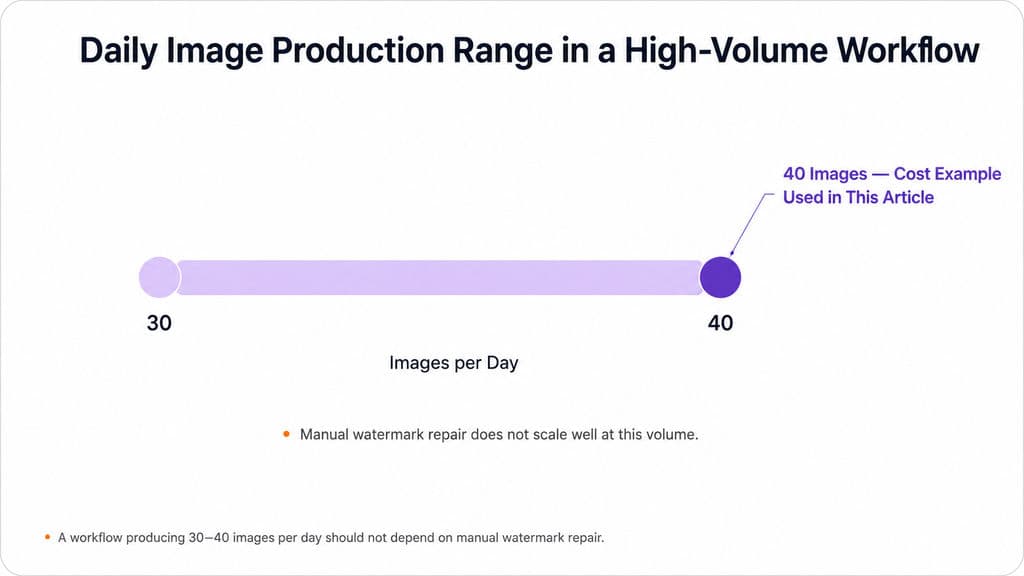
Nano Banana Watermark Removal for 30–40 Images Per Day
A workflow producing 30–40 images per day should not depend on manual watermark repair. At that volume, quality-control consistency becomes more important than the convenience of any single removal tool.
A scalable process is:
- Generate lower-cost drafts.
- Select and approve compositions.
- Produce only the approved assets at the required resolution.
- Use batch generation for non-urgent work.
- Retain prompts, references, models, and output versions.
- Review final images against brand and product requirements.
This approach reduces unnecessary 4K generation and prevents the team from spending time repairing concepts that will never be published.
How Much Does Nano Banana Watermark-Free Generation Cost in 2026?
Nano Banana 2 and Nano Banana 2 Lite API Pricing
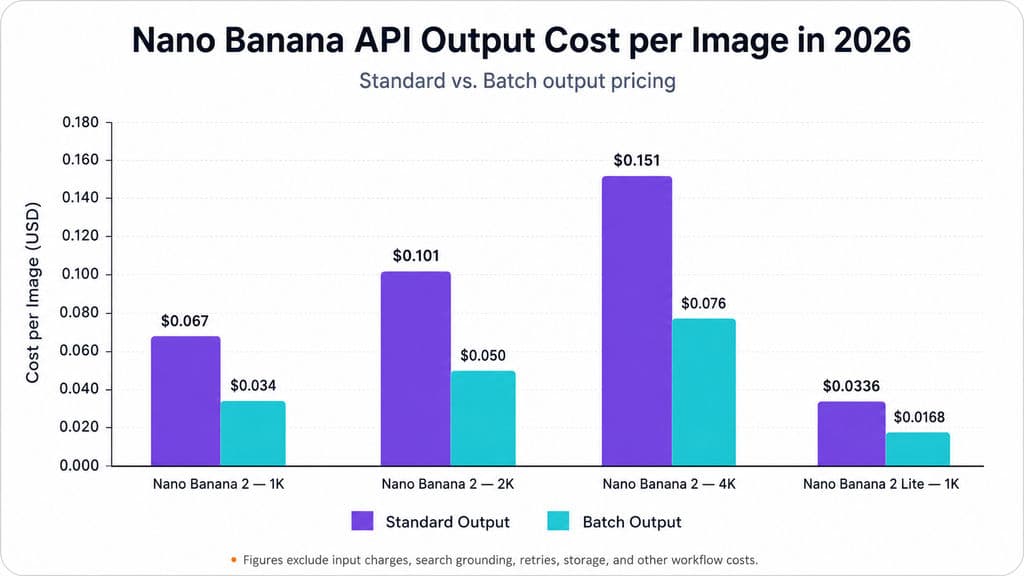
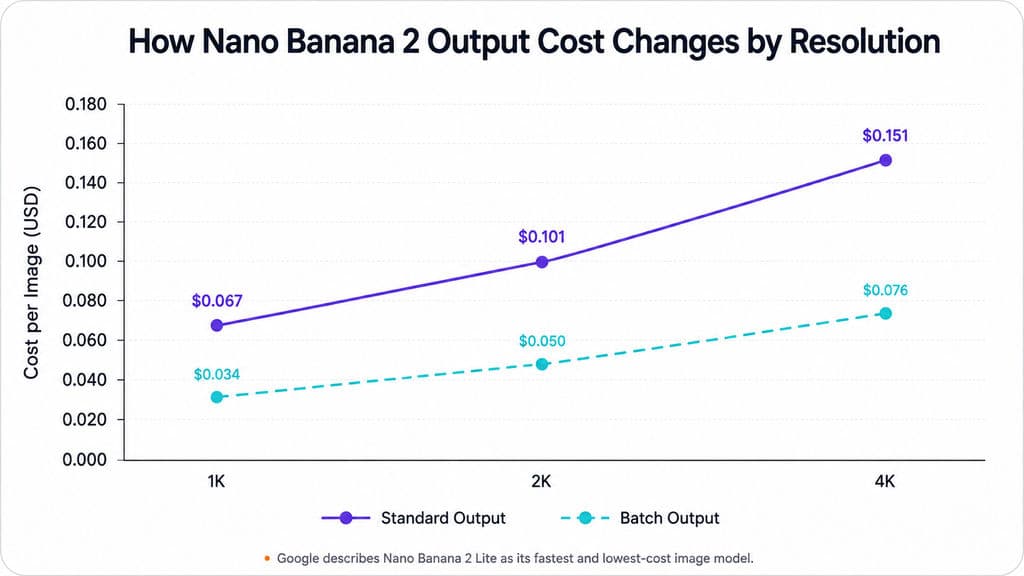
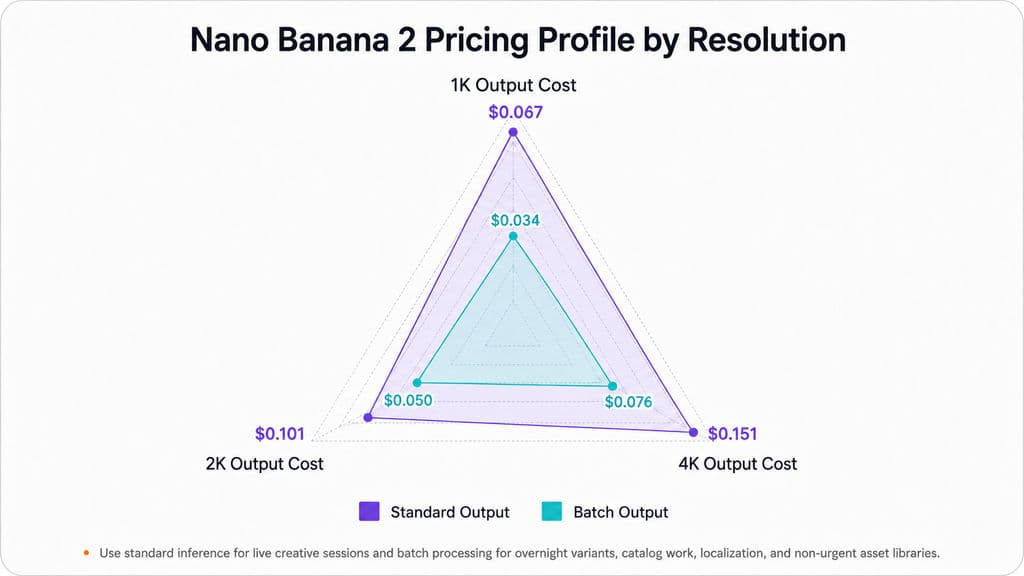
Google’s current Gemini Developer API pricing page lists the following image-output prices. These figures exclude input charges, search grounding, retries, storage, and other workflow costs.
Model and Resolution | Standard Output | Batch Output |
|---|---|---|
Nano Banana 2, 1K | $0.067 | $0.034 |
Nano Banana 2, 2K | $0.101 | $0.050 |
Nano Banana 2, 4K | $0.151 | $0.076 |
Nano Banana 2 Lite, 1K | $0.0336 | $0.0168 |
Google describes Nano Banana 2 Lite as its fastest and lowest-cost image model. Its official launch information reports approximately four seconds for text-to-image generation and a listed standard price of about $0.034 per 1K image.
What Would a 40-Image Batch Cost?
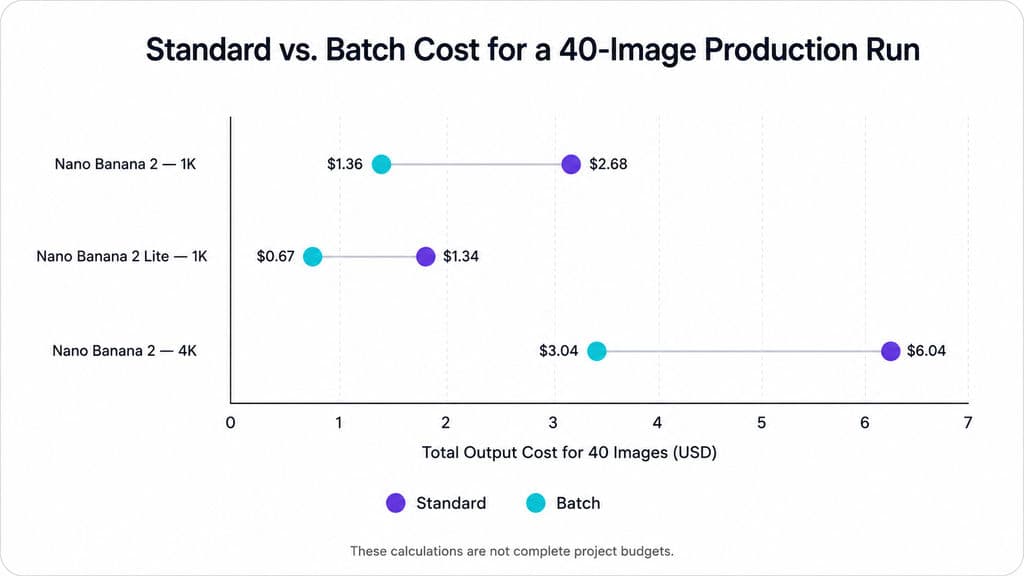
Using the current listed image-output prices as an illustrative model:
40-Image Scenario | Standard Output | Batch Output |
|---|---|---|
Nano Banana 2 at 1K | $2.68 | $1.36 |
Nano Banana 2 Lite at 1K | $1.34 | $0.67 |
Nano Banana 2 at 4K | $6.04 | $3.04 |
These calculations are not complete project budgets. They exclude input charges, failed generations, revisions, storage, human review, and third-party platform fees.
Google’s image-generation guide says batch jobs provide higher rate limits in exchange for turnaround of up to 24 hours. Use standard inference for live creative sessions and batch processing for overnight variants, catalog work, localization, and non-urgent asset libraries.
The cheapest image is not necessarily the cheapest production workflow. Review time, failed outputs, manual repair, and brand corrections can cost more than the API call itself.
Is It Safe to Remove the Nano Banana Watermark for Commercial Use?
Protect Image Accuracy and Design Consistency
Repeated editing can introduce softened edges, duplicated textures, malformed text, color shifts, inconsistent reflections, and accumulated artifacts. Preserve the original generation, edited version, final export, prompt, model, and reference assets as separate files.
For packaging, product design, technical diagrams, factual infographics, and regulated content, require human review. A visually clean reconstruction is not proof that the information is accurate. This is particularly important when maintaining AI ad creative brand consistency across commercial assets.
Protect Client Data and AI Provenance
Third-party services may receive prompts, reference images, customer photographs, or unpublished product designs. Review their privacy terms, retention periods, training policies, processing locations, and deletion procedures before uploading sensitive material.
Removing the visible Gemini sparkle may be appropriate for professional presentation and layout. It should not be used to misrepresent how the image was created.
Commercial suitability also depends on:
- Rights to reference images
- Consent for recognizable people
- Trademark and brand usage
- Product accuracy
- Client contracts
- Platform disclosure requirements
- Applicable laws and industry rules
A visually watermark-free image is not automatically risk-free, provenance-free, or approved for every commercial context.
FAQ
Does Cropping the Nano Banana Watermark Remove SynthID?
No. Cropping removes the visible pixels containing the Gemini sparkle. Google’s current API documentation states that generated Nano Banana images include SynthID, so removing the corner logo does not prove that the invisible provenance watermark is absent.
Why Does My Paid Gemini Account Still Show a Watermark?
Watermark behavior can differ across the Gemini app, Flow, AI Studio, APIs, subscription tiers, regions, and account settings. Generate and download a test image from the exact workflow you plan to use before buying additional credits or starting a large production run.
How Should I Remove a Nano Banana Watermark Covering Text or a Product Edge?
Regenerate the image through a verified clean-output workflow whenever possible. Automatic inpainting can invent letters, packaging details, reflections, or geometry. When regeneration is unavailable, reconstruct the area manually using the correct copy or real product reference, then inspect the result at full resolution. For complex repairs, a Nano Banana Photoshop workflow can provide a more controlled editing process.
What Is the Best Nano Banana Workflow for 30–40 Images Per Day?
Use AI Studio or a verified API workflow, generate draft-resolution options, approve compositions before producing final 4K assets, and move non-urgent jobs to batch processing. Avoid workflows that require manual repair after every generation because quality-control time becomes the main production bottleneck.
Conclusion
The best way to remove the Nano Banana watermark is to avoid the visible Gemini logo during generation through a verified AI Studio or tested API workflow. Cropping remains the safest option for simple one-off images, while careful retouching can repair uncomplicated backgrounds that cannot be cropped. Regenerate whenever the mark overlaps products, text, people, or accuracy-sensitive details, and use batch generation rather than manual cleanup for high-volume work. Whatever method you choose, keep the visible Gemini sparkle and SynthID conceptually separate, protect original assets and client data, verify current pricing and account behavior, and maintain appropriate transparency about AI-generated content.
Plus d’articles du blog Virse
Flux de travail
GPT Image 2.5 vs GPT Image 2: Does It Finally Fix Editing Drift?
21 septembre 2026 by Vincent
Flux de travail
How to Preserve Design Accuracy in AI Mockups Without Endless Cleanup
17 septembre 2026 by Yifan Zhao
Flux de travail
How to Create AI T-Shirt Mockups That Actually Match Your Product
17 septembre 2026 by Yifan Zhao