
Seedance 2.5 vs MiniMax H3: 30s Video, Character Drift & Real Cost Tested
Vincent11 min read ·
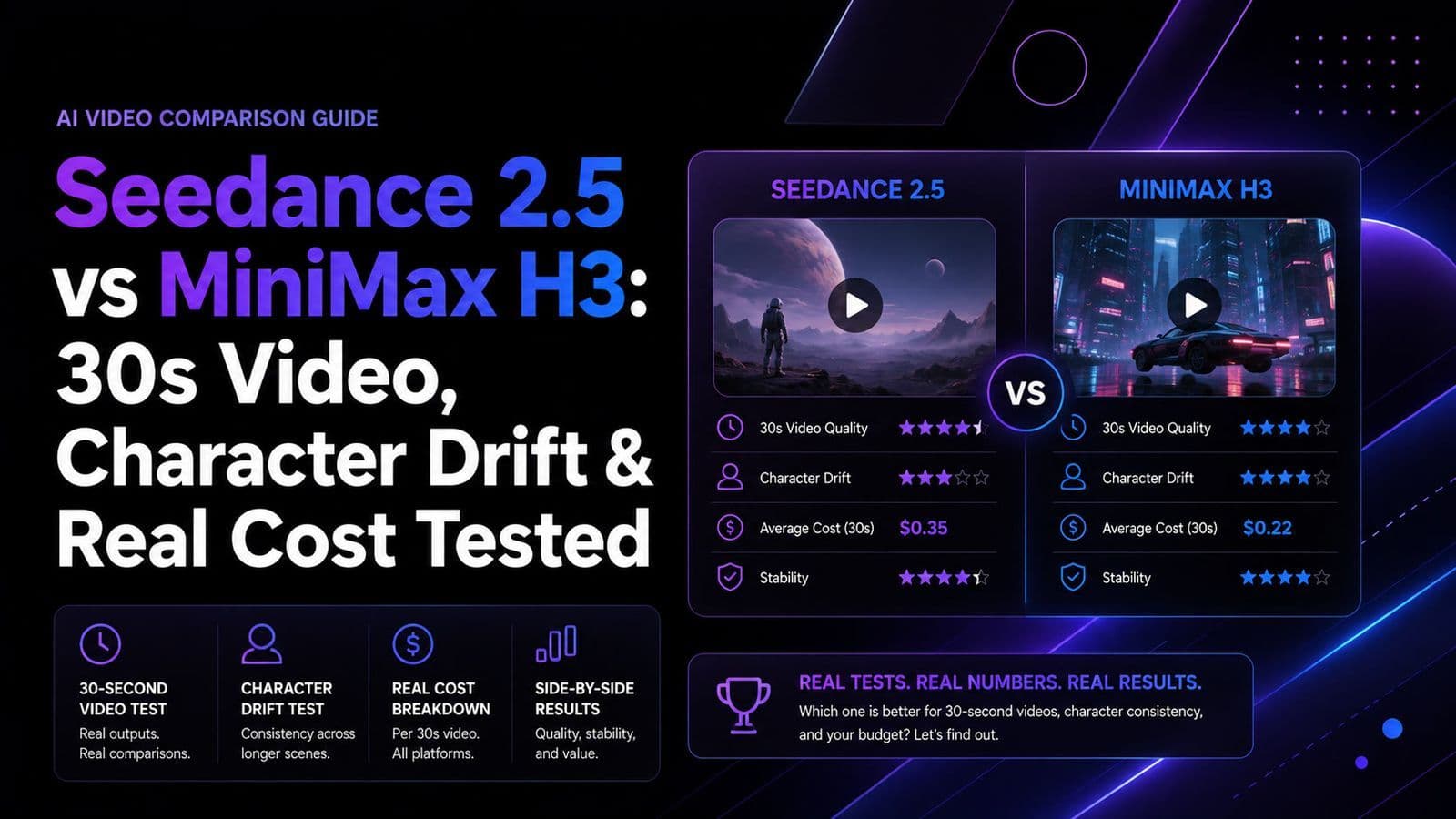
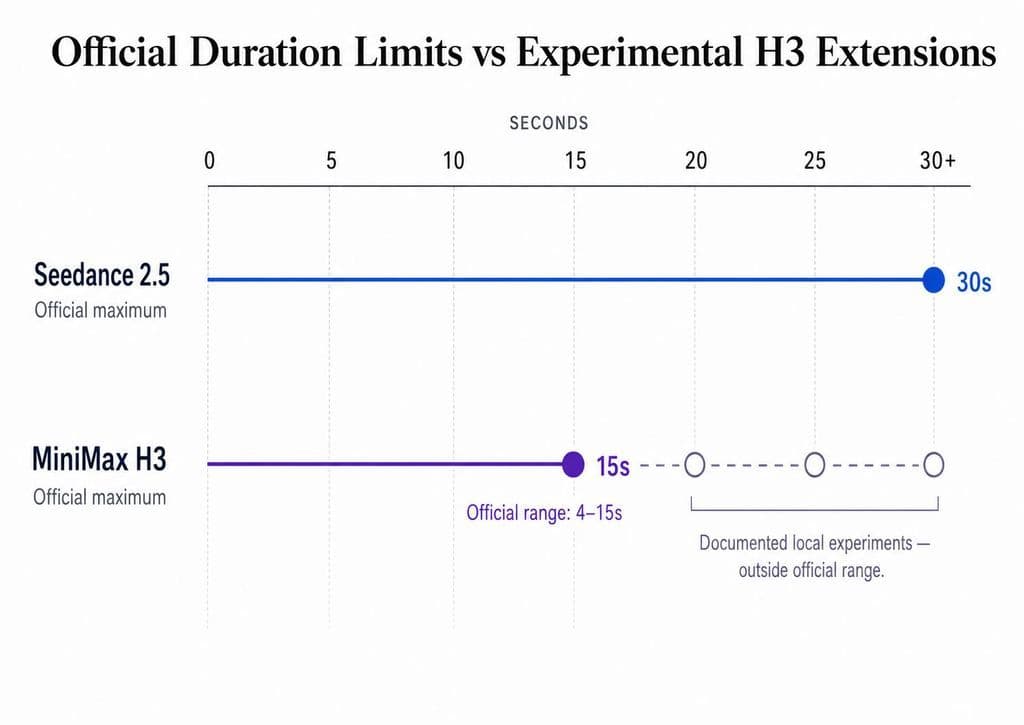
Seedance 2.5 is the better choice for 20–30 second continuous shots, stronger character continuity, and reference-heavy production, while MiniMax H3 is better for local ComfyUI workflows, customization, and high-volume short-form iteration. Seedance officially supports up to 30 seconds per generation, while H3 officially targets 4–15 seconds.
The real problem is rerolls. Character drift, failed interactions, GPU time, audio cleanup, stitching, and continuity fixes can make a cheap generation expensive. H3 can be pushed toward 20–30 seconds in experimental local workflows, but longer runs bring higher compute demands and greater consistency risk. For production, cost per usable clip matters more than cost per generated second.
For repeatable creative workflows, Virse helps teams manage references, revisions, and project context in one shared visual canvas. Its multi-Agent collaboration and long-term memory help preserve brand rules, aesthetic preferences, and production intent, making Seedance and H3 outputs easier to compare, refine, and turn into usable assets. MiniMax H3, Seedance 2.5 and Seedance 2.0, are now available on Virse , so teams can explore and compare multiple leading video models in the same creative workflow.

Seedance 2.5 vs MiniMax H3: What Are the Key Differences?
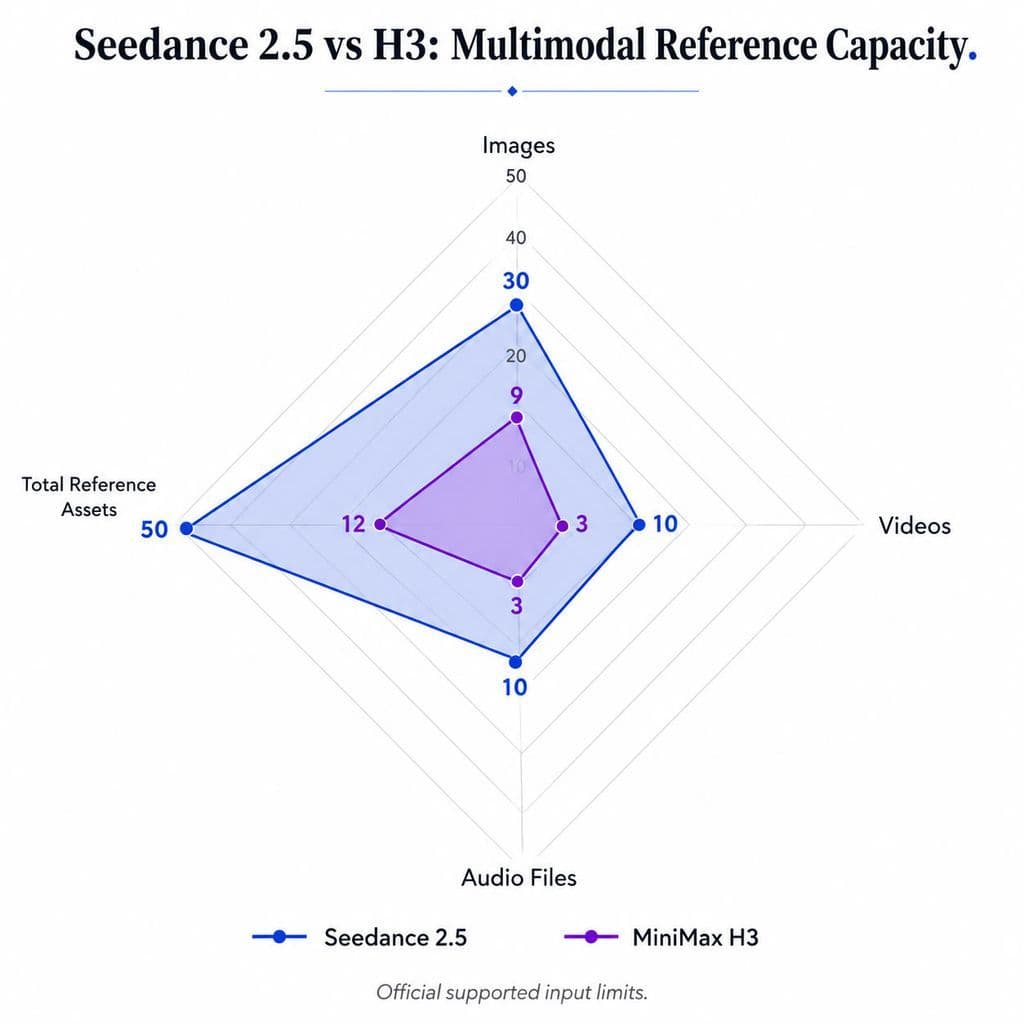
Seedance 2.5 prioritizes longer, reference-heavy production workflows; H3 prioritizes openness, local deployment, and configurable multimodal generation. Officially, Seedance accepts up to 30 images, 10 video clips, and 10 audio clips in one pass , while H3 supports up to 9 images, 3 videos, 3 audio files, and 12 mixed files in total .
Production Need | Seedance 2.5 | MiniMax H3 |
Official output duration | Up to 30s | 4–15s |
Long continuous shots | Stronger fit | Experimental beyond 15s |
Multimodal references | Up to 50 assets | Up to 12 mixed assets |
Local workflow | Not its core advantage | Open weights and local H3-Base |
ComfyUI | Not the main workflow | Officially supported |
Editing | Timestamp, camera, green-screen, reference editing | Multimodal reference and editing |
Native audio-video | Yes | Yes, native stereo |
Best production role | Long-form control | Iteration and customization |
Seedance 2.5 reduces continuity seams
A 30-second sequence assembled from six five-second clips creates five boundaries where faces, lighting, wardrobe, camera speed, or object position can shift. In one documented production case we reviewed, moving from stitched short clips to a single 30-second Seedance generation reduced visible lighting jumps and subject drift.
Another case built a 58-second finished video from two roughly 30-second generations. The value of long generation is therefore not simply duration; it is fewer transitions that need repair.
H3 gives creators more ownership of iteration
H3's open release supports local H3-Base deployment and lists ComfyUI among its recommended frameworks . That makes it attractive when a team wants to run many variations without treating every reroll as another cloud-generation purchase.
The trade-off is infrastructure: VRAM, system RAM, Torch, CUDA, offloading, quantization, attention methods, and acceleration settings become part of the creative workflow.
Can MiniMax H3 Generate 30 Seconds, or Is 15 Seconds the Real Limit?
Official H3 generation is 4–15 seconds. MiniMax also specifies 768P base output with an optional 2K regeneration workflow . However, our review of documented local H3 experiments found creators extending H3 to 20, 25, and 30 seconds outside the officially supported range.
Experimental H3 duration becomes increasingly expensive
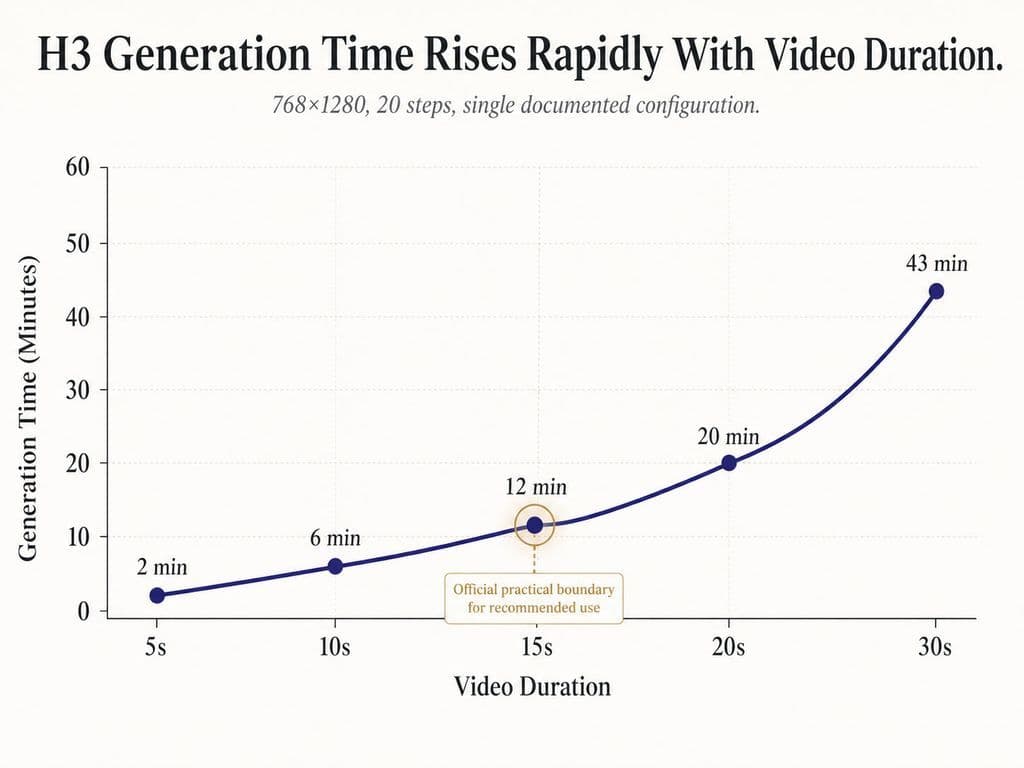
One 768×1280, 20-step H3 workflow reported approximately:
Duration | Generation Time |
5s | 2 min |
10s | 6 min |
15s | 12 min |
20s | 20 min |
30s | 43 min |
This is a single configuration, not a universal benchmark, but it captures the production problem: long H3 generations can become disproportionately expensive to reroll.
A separate RTX 5090 experiment generated approximately 30 seconds at 0.7MP and 20 steps in about 15 minutes 49 seconds, but it used SageAttention 2 and EasyCache. Acceleration makes that result inappropriate as a direct baseline comparison for MiniMax H3.
Fifteen seconds is a practical boundary, not just a number
Our review also found an I2V case where facial identity began drifting after roughly 12 seconds. That is why I would treat 20–30 second H3 generation as an experimental capability, while 5–15 seconds remains a more practical production window for repeated local iteration.
Seedance 2.5 vs H3 for Motion, Camera Control, and Character Consistency
Seedance 2.5 has the more natural workflow for long, continuous character and camera sequences, while H3 performs best when duration and subject interaction remain controlled.
Seedance 2.5 turns 30 seconds into production space
ByteDance positions Seedance 2.5 around 30-second storytelling, smoother transitions, multi-round extension, and improved continuity . In practical terms, that makes it useful for fashion walks, product films, environmental camera moves, and narrative shots where several short generations would create visible seams.
But longer duration does not solve everything. ByteDance itself notes remaining room for improvement in complex motion physics and multi-subject interaction . I would therefore use the 30-second window for one coherent action rather than overloading it with unrelated storyboard beats.
H3 becomes harder with multiple interacting characters
One documented RTX 4090 workflow rated roughly six to seven out of ten simple-scene outputs as usable. When two characters had to interact, reliability dropped toward roughly half.
This is not a standardized success-rate benchmark, but it matches a broader workflow pattern from our review: single subjects and simpler camera movement are easier to iterate than long multi-character choreography.
Seedance 2.5 vs H3 for References, Editing, and Revision
Seedance 2.5 currently offers the broader reference envelope, while both models are moving beyond basic text-to-video toward multimodal control and editing.
Seedance supports up to 50 reference assets
Seedance 2.5 can accept 30 images, 10 videos, and 10 audio clips in one generation . It also supports timestamp-level changes, camera-perspective editing, green-screen editing, and reference-based editing.
For brand work, that matters more than simply generating attractive footage. A team can potentially reference characters, products, environments, movement, sound, and visual language within the same creative context.
However, more references do not automatically guarantee perfect consistency. Our research does not yet provide an independent success-rate benchmark proving that 50 references always outperform smaller reference sets.
H3 supports multimodal reference generation with a smaller input envelope
H3 officially supports up to 9 images, 3 video clips, 3 audio clips, and 12 mixed files total . Its reference workflow can use characters, motion, camera language, style, voice, and editing rhythm.
That makes H3 highly flexible for local experimentation, but Seedance currently provides more reference capacity for complex production setups.
H3 Hardware and Speed: RTX 3060, 4090, and 5090 Results
H3 can run on consumer hardware, but VRAM alone does not predict production speed. Resolution, generation mode, system RAM, software configuration, and acceleration methods can change performance dramatically.
RTX 3060 12GB can run H3
One documented RTX 3060 12GB setup generated:
- 864×480
- 5 seconds
- 124 frames
- 20 steps
- under 9 minutes
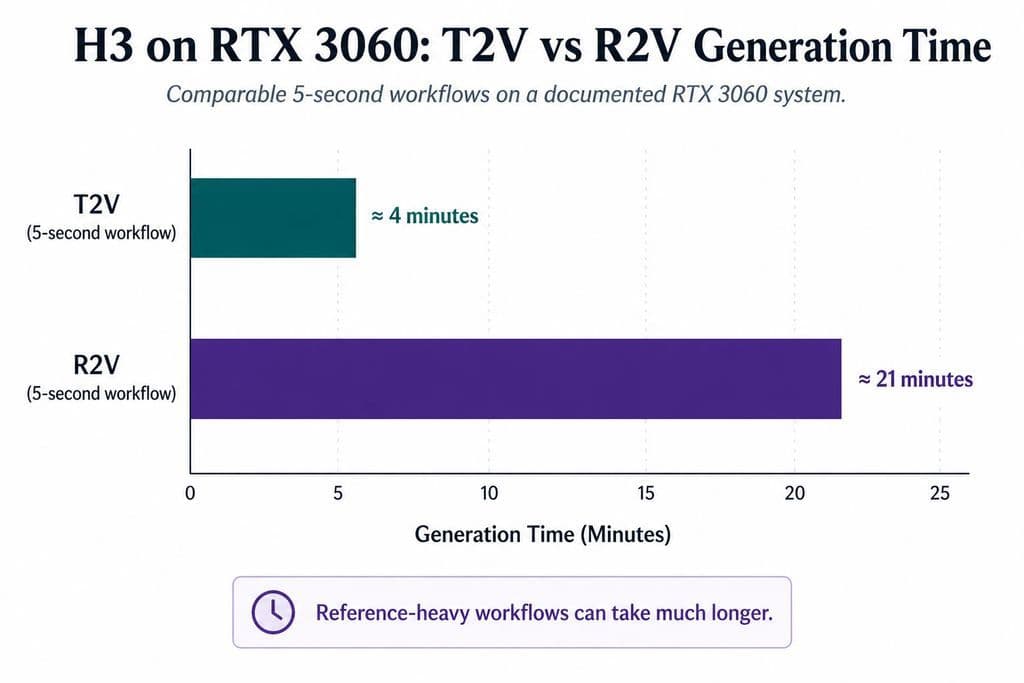
Another 12GB workflow reached roughly 42GB of system RAM usage. On a separate 3060 system, a five-second T2V task took around four minutes while a comparable R2V workflow took about 21 minutes.
That difference matters if references are central to your production workflow.
RTX 4090 and 5090 expose different bottlenecks
A 4090 workflow generated a five-second 0.4MP clip in around two to three minutes. A 5090 can push much further, but higher resolution is not automatically efficient: one 1920×1088, 15-second experiment took approximately 68 minutes and still produced a blurry, noisy result.
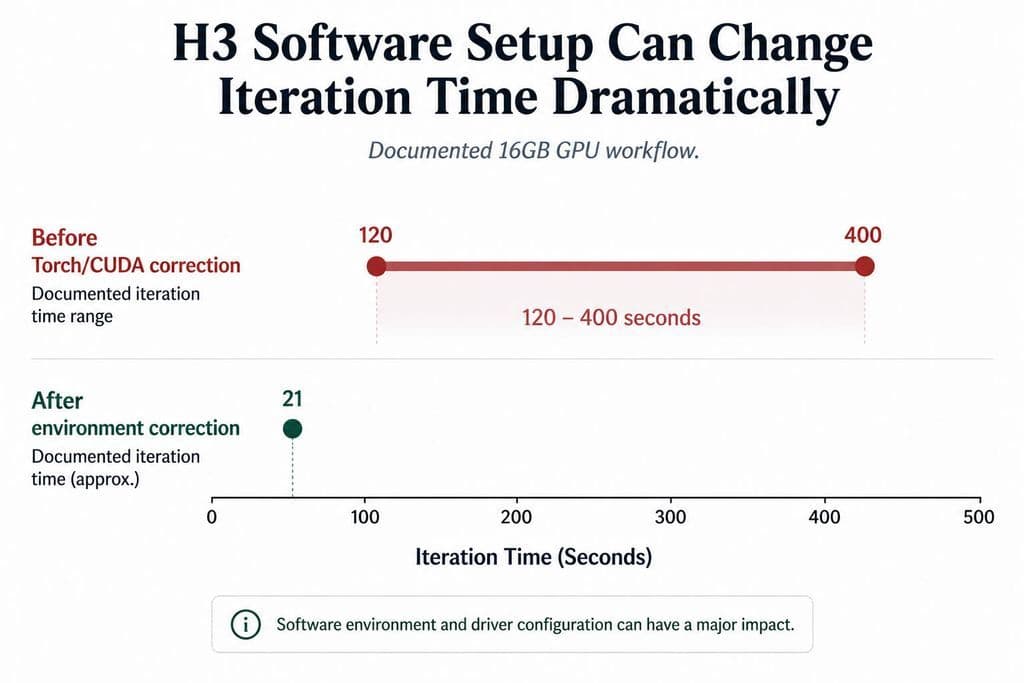
Software can matter just as much. In another documented 16GB GPU case, iteration time dropped from roughly 120–400 seconds to about 21 seconds after the Torch/CUDA environment was corrected.
The practical rule is simple: never compare H3 speed and performance without GPU, duration, resolution, steps, and acceleration settings.
Seedance 2.5 vs H3 Cost: Why Cost per Usable Clip Matters
H3 can reduce direct generation cost, while Seedance can reduce infrastructure and continuity costs. Neither is automatically cheaper once failed outputs and production labor are counted.
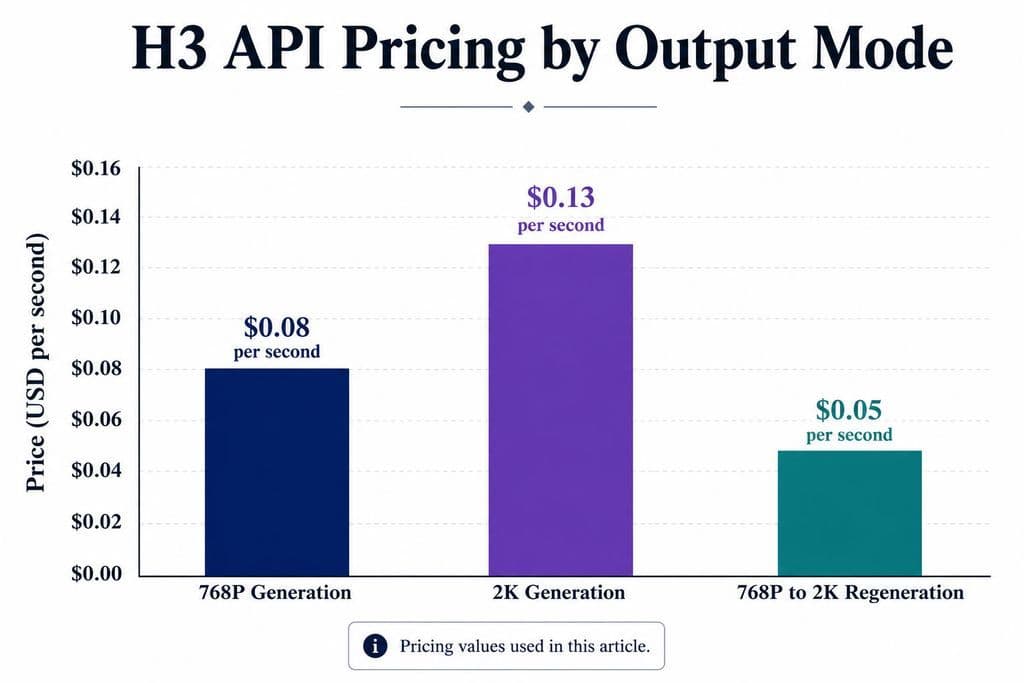
MiniMax currently lists H3 API output pricing at $0.08 per second for 768P and $0.13 per second for 2K, with 768P-to-2K regeneration at $0.05 per second . Local H3 can shift more spending toward owned compute instead.
But local generation still consumes:
- GPU time
- electricity
- system RAM
- failed-render time
- technical maintenance
- operator attention
Seedance reverses that equation. Cloud generation creates a clearer cash cost per attempt, but a successful 30-second clip may replace several short generations, transitions, and continuity fixes.
For production decisions, I use:
Cost per usable clip = generation cost + compute time + rerolls + failed footage + repair + stitching + infrastructure friction
That metric is far more useful than price per second.
Seedance 2.5 vs H3 for Audio, Typography, and Resolution
Both models support native audio-video generation, but H3 deserves special attention for typography and UI motion, while resolution claims for either model should be judged through the actual workflow rather than marketing shorthand.
Native audio can save time or create cleanup
H3 officially generates native stereo audio , while Seedance 2.5 is also an audio-video joint-generation model .
In our review of user questions, H3 audio repeatedly surfaced issues such as unwanted speech, gibberish dialogue, unexpected vocals, and weak continuity between clips. For precise dialogue or branded sound, I would still separate final audio production from video generation.
H3 is worth testing for typography and UI motion
Several specialist cases in our research showed H3 producing more stable lettering, cleaner text integration, and more natural UI easing than Seedance in those particular examples.
The evidence is qualitative rather than a controlled benchmark, so I would not call H3 universally better for text. But for UI animation, kinetic typography, title sequences, and music-video graphics, it deserves a dedicated A/B test.
Do not confuse advertised resolution with usable resolution
H3 officially outputs 768P and supports a 2K regeneration workflow . Seedance provider capabilities can vary; our review included a provider workflow limited to 720p.
The better question is not “Does this model support 2K or 4K?” It is whether your exact provider or local workflow can produce the required shot at that resolution with an acceptable quality-to-time ratio.
Which Should You Choose: Seedance 2.5 or MiniMax H3?
Choose Seedance 2.5 when continuity, longer shots, broad multimodal references, and editing control matter most. Choose H3 when local ownership, ComfyUI customization, and high-volume short-form experimentation matter more.
For 5–10 second advertising concepts, I would start with H3 because failed experiments are easier to absorb in a local workflow.
For 20–30 second continuous product, fashion, or narrative shots, I would start with Seedance 2.5 because reducing continuity seams can save more time than reducing the generation cost of each second.
For UI animation and typography, test H3 early. For complex reference-heavy productions, Seedance's larger multimodal input capacity gives it a structural advantage.
Most importantly, do not benchmark them with one identical prompt. Use the same creative intent, optimize the workflow for each model, run multiple attempts, and compare the percentage of outputs that are actually usable.
FAQ
Can H3 really generate 30s video?
Official H3 output is 4–15 seconds. Experimental local workflows in our research have pushed generation to 20–30 seconds, but those results fall outside the officially supported range and can require significantly more compute while increasing consistency risk.
Can H3 run on 12GB VRAM?
Yes. Our research includes an RTX 3060 12GB workflow producing a five-second 864×480 clip at 20 steps in under nine minutes. However, system RAM, Torch, CUDA, offloading, resolution, and generation mode can dramatically affect performance.
Is Seedance 2.5 better than H3 for character consistency?
For long continuous production shots, Seedance 2.5 has the stronger workflow because it supports up to 30 seconds and a much larger reference set. H3 remains highly capable for shorter controlled clips, but our reviewed cases show more pressure as duration and multi-character interaction increase.
Which is cheaper, Seedance 2.5 or H3?
H3 can be cheaper in direct cash terms through local generation or its API, but hardware time and failed renders still have a cost. Seedance can cost more per attempt while reducing stitching and infrastructure work. Compare cost per usable clip, not price per generated second.
Conclusion
Seedance 2.5 and MiniMax H3 are not competing for one universal quality crown; they optimize different production workflows. Seedance 2.5 is my preferred starting point for 20–30 second continuous shots, larger multimodal reference sets, and editing-heavy professional production, while H3 is more compelling for local ownership, ComfyUI customization, short-form iteration, typography, and high-volume creative exploration. The strongest decision metric is not maximum duration, resolution, or API price. It is how reliably each model turns time, compute, references, and rerolls into an asset that is actually good enough to use.
More from the Virse Blog
Product

What Is Product Design in 2026? What Product Designers Actually Do
September 21, 2026 by Vincent
Product
GPT Image 2.5 Pricing: Flare vs Sunburst & the Real Cost per Image
September 14, 2026 by Vincent
Product
GPT Image 2.5 Review: Does It Finally Fix AI Image Editing Drift?
September 14, 2026 by Vincent