
MiniMax H3 Reference Guide: Images, Video and Audio Explained
 Yifan Zhao11 min read ·
MiniMax H3 references let creators control what a video looks like, how it moves, and how it sounds with different source assets. Images are best for identity, wardrobe, products, and environments; videos for motion, performance, camera behavior, and timing; audio for voice timbre, music, rhythm, and sound characteristics. These controls become especially important in MiniMax H3 Motion Transfer, where different references may own identity, motion, camera, and sound separately.
The challenge is keeping those references from competing. A motion video can leak appearance, multiple images can fight over identity, and Ref2VA can trade visual sharpness for greater reference flexibility. In practice, better results come from defining what each reference should preserve, transfer, and ignore before generation. A structured MiniMax H3 prompt and a repeatable MiniMax H3 workflow make those responsibilities easier to control.
For teams scaling these workflows, Virse brings references, assets, and multiple AI Agents into one infinite canvas with shared creative context and long-term visual memory. Virse gives creators access to 50+ models on one canvas, including Nano Banana 2, GPT Image 2, and Seedance 2.0, helping turn reference-driven generation into a broader AI design workflow. New users can start with free credits, while paid plans unlock premium models and selected unlimited fast-model usage for larger production workflows.

What Are MiniMax H3 References and How Do They Work?
A MiniMax H3 reference is an image, video, or audio asset used to supply specific attributes to a new generation. The most reliable way to use H3 is to think in terms of reference responsibility rather than file type.
Reference | Best For | Typical Role |
|---|---|---|
Image | Stable appearance | Identity, wardrobe, product, environment |
Picture anchor | Specific visual state | Composition, framing, start or end state |
Video | Temporal behavior | Motion, performance, camera, pacing |
Audio | Sound characteristics | Voice, music, rhythm, texture |
A simple production map might assign Image 1 to identity, Image 2 to wardrobe, Video 1 to choreography, Video 2 to camera motion, and Audio 1 to voice timbre. This “one reference, one primary job” approach is not a technical restriction; it is a practical way to reduce ambiguity.
MiniMax H3 Reference Limits
Official H3 specifications also matter when planning a workflow.
Input or Output | Limit |
|---|---|
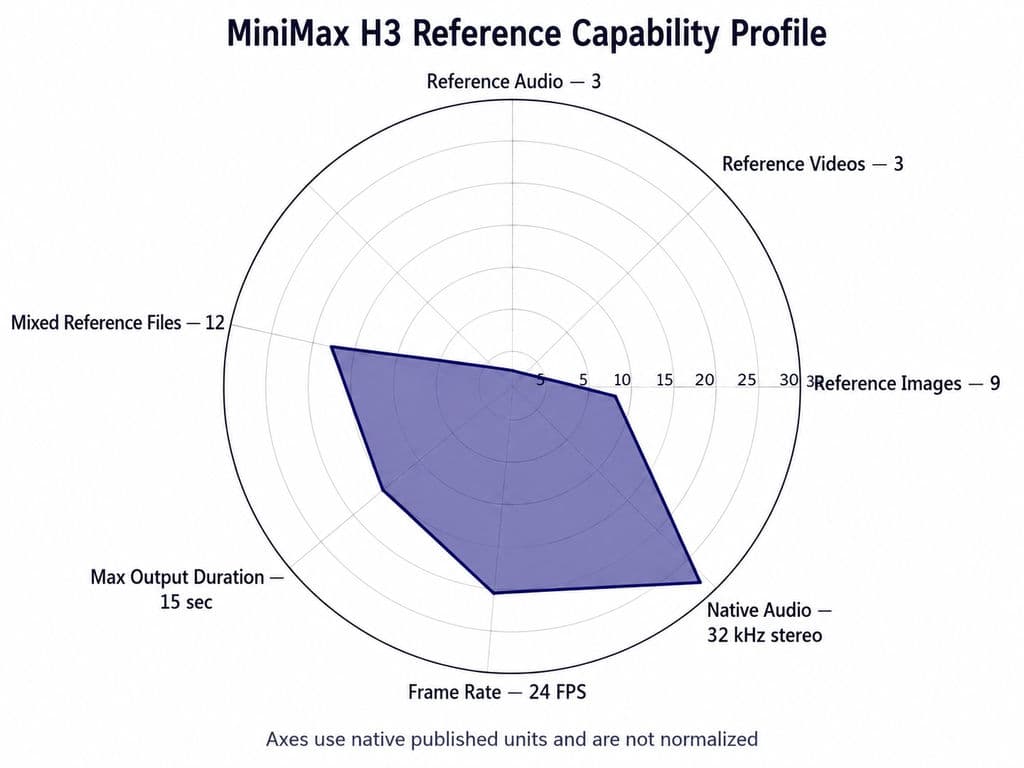
Reference images | Up to 9 |
Reference videos | Up to 3, 2–15 seconds each, 15 seconds total |
Reference audio | Up to 3, 2–15 seconds each, 15 seconds total |
Mixed reference files | Up to 12 |
Audio-only Ref2VA input | Not supported |
Output duration | 4–15 seconds |
Output frame rate | 24 FPS |
Native audio | 32 kHz stereo |
The practical implication is simple: more references are available than most projects should actually use. Start with the smallest set that clearly defines the shot.
How Do MiniMax H3 Image References Control Identity and Appearance?
A MiniMax H3 image reference is best for attributes that should remain visually recognizable across frames, including face, hairstyle, wardrobe, product geometry, materials, environment, and visual style.
MiniMax H3 Subject References vs Picture Anchors
A subject reference represents a reusable person or object. A picture-style anchor is closer to a concrete composition or visual state.
Use a subject-oriented reference when the requirement is “keep this character or product.” Use a frame-oriented workflow when the requirement is “start or end from this specific image.”
Character and Product Consistency
For characters, a clean identity reference is usually more useful than several inconsistent portraits. Conflicting hair, age, clothing, or proportions can weaken identity retention.
Products require even tighter constraints. A cinematic shot is still unusable if a logo moves or the silhouette changes. For branded work, explicitly preserve proportions, logo position, materials, colors, and distinctive structural details.
How Do MiniMax H3 Video References Control Motion and Camera?
Video references are most useful for information that unfolds over time: body movement, choreography, acting, gesture timing, camera paths, pacing, cuts, and editing rhythm.
MiniMax H3 Identity vs Performance Transfer
One of the strongest Ref2VA patterns is:
Image A defines who the character is. Video B defines what the character does.
A fashion workflow, for example, can use one image for identity, another for clothing, a video for walking performance, and a second video for camera movement. This separates visual identity from motion instead of asking one prompt to invent both.
MiniMax H3 Camera Reference Workflows
Video can also define the camera rather than the actor. A product image may preserve geometry while an unrelated video supplies a slow orbit, push-in, handheld track, or crane-like move.
From a design perspective, this matters because camera language is part of the creative direction. The same product can feel premium, energetic, or documentary depending on how the shot moves.
Why “Motion Only” Can Still Leak Appearance
“Use this video for motion only” is an instruction, not a perfect extraction boundary. Clothing, body shape, lighting, or other visual traits can still leak from the source.
When this happens, the best first fix is usually to simplify the reference set, strengthen the intended identity source, and narrow the video's role.
How Do MiniMax H3 Audio References Work?
H3 can generate audio and video jointly, making sound part of the creative system rather than only a post-production layer.
Audio references can influence voice timbre, delivery, music, rhythm, soundtrack structure, sound effects, and sound texture.
MiniMax H3 Audio Reuse vs Audio Reference
Audio reuse means retaining all or part of an existing signal. Audio reference means borrowing characteristics while allowing the generated content to change.
That distinction matters for new dialogue. If the source should define the speaker rather than the words, the creative direction should emphasize voice timbre and delivery, not simply reuse the original audio.
MiniMax H3 Audio Failure Modes
Our review of documented H3 workflows found recurring issues including:
- repeated syllables
- distorted speech
- gibberish-like dialogue
- voice crossover between characters
- weak lip sync
- audio ending before the visual sequence
One documented 20-step Spectrum workflow used 11 real transformer evaluations and predicted nine intermediate steps, cutting sampler work by roughly 45%. The same workflow also produced rougher audio and repeated syllables.
The production lesson is important: an optimization that preserves acceptable frames may still damage dialogue.
MiniMax H3 FL2VA vs Ref2VA: Which Should You Use?
FL2VA and Ref2VA solve different control problems.
Requirement | Better Choice |
|---|---|
Exact first-frame control | FL2VA |
Exact last-frame control | FL2VA |
Character plus motion | Ref2VA |
Character plus camera | Ref2VA |
Multiple image references | Ref2VA |
Audio reference | Ref2VA |
Complex multimodal composition | Ref2VA |
Use FL2VA when the frame itself is the primary constraint. Use Ref2VA when different attributes must come from different references.
When FL2VA Is Better
FL2VA is often the cleaner choice when you already have a designed key visual, storyboard frame, or required ending state. If multi-reference control adds no real creative value, Ref2VA may introduce unnecessary complexity.
When Ref2VA Is Better
Ref2VA is stronger when the shot combines identity, wardrobe, motion, camera, and sound from different sources.
Across the workflows in our research, reduced sharpness, additional grain, and lower perceived detail were recurring Ref2VA concerns. These observations are not a controlled same-seed benchmark, but they reveal a useful trade-off: deeper reference control can come at the cost of perceived image fidelity.
How Do You Combine Multiple MiniMax H3 References Without Conflicts?
A reliable multi-reference workflow starts with three questions:
What must stay the same? What should transfer? What must be ignored?
For a character video:
- Preserve: face, hairstyle, wardrobe
- Transfer: choreography, camera path, voice characteristics
- Ignore: source performer identity, unwanted clothing, irrelevant background details
For a product advertisement:
Creative Variable | Source |
|---|---|
Product geometry | Product image |
Actor | Character image |
Environment | Location image |
Camera | Video reference |
Voice or chime | Audio reference |
Timing | Prompt |
Before rendering, check whether two references define the same attribute differently. Removing one conflicting reference often improves control more than adding more prompt text.
How Do You Write a Better MiniMax H3 Reference Prompt?
A strong H3 prompt reads like a compact production brief.
Define Reference Roles and Retention
Start by stating what each source controls, then lock the details that cannot change: face, hairstyle, wardrobe, product shape, logo, color, or material.
Write the Scene as a Timeline
Video prompts should describe when actions happen. A 15-second shot might establish the scene first, introduce the performance next, add a camera orbit later, and end with dialogue.
This gives H3 a temporal structure and gives the creative team clear checkpoints for review.
Separate Camera, Sound, and Negative Constraints
Camera instructions should describe how the scene is captured: orbit, push-in, handheld movement, rack focus, or shallow depth of field.
Sound instructions should separately define the speaker, voice reference, ambience, music, and timing. Negative constraints should focus on production-critical failures such as changing a logo, inheriting the wrong actor, or introducing a second voice.
The goal is not a longer prompt. It is fewer ambiguous decisions.
What MiniMax H3 Performance Data Matters in Practice?
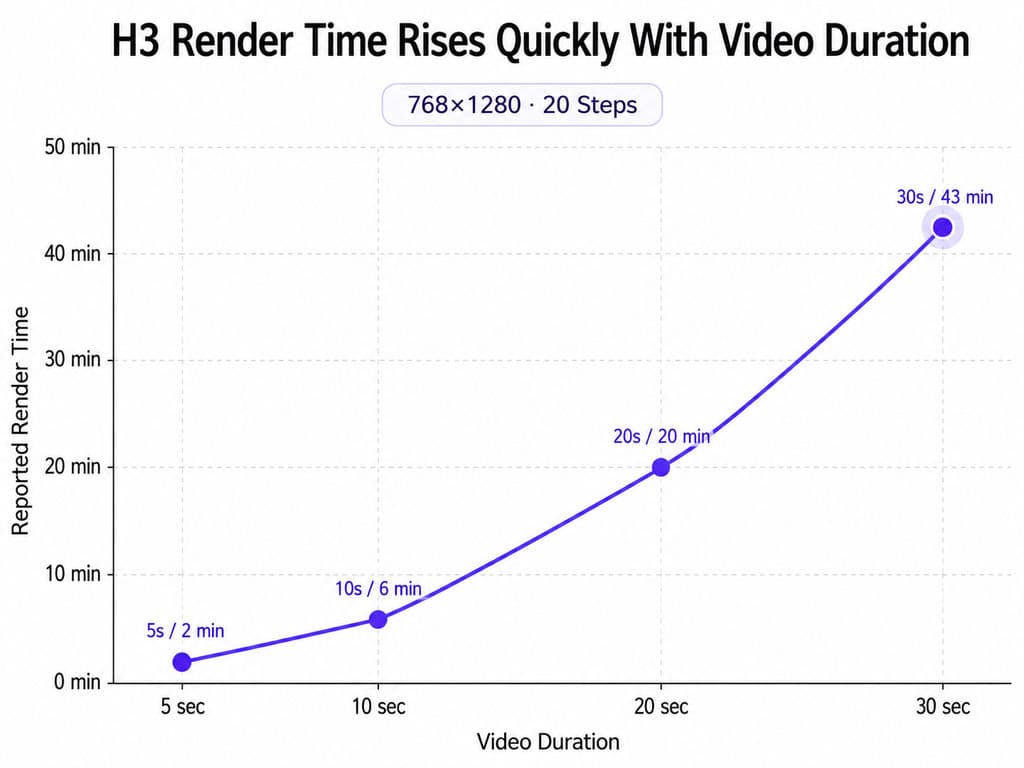
Our review includes several local workflows. These are not standardized benchmarks, but they show how quickly iteration cost can rise.
Hardware / Workflow | Reported Result |
|---|---|
RTX 4070 Ti SUPER 16GB | 640×832, 1.63s in 2m09s; 736×960, 6.58s in 6m55s |
RTX 6000 PRO 96GB | 1K: 14s baseline, 8s EasyCache; 2K: 37s baseline, 22s EasyCache |
RTX 5090 long-form | About 10 min for a 15s clip at roughly 1.5 MP |
768×1280, 20 steps | 5s: 2 min; 10s: 6 min; 20s: 20 min; 30s: 43 min |
The strongest practical lesson is that longer generations can become disproportionately expensive. Draft cheaply to validate references, motion, framing, and seed before committing to final quality.
Can MiniMax H3 Generate Still Images?
H3 has also been used in experimental still-image workflows for posters, character sheets, wardrobe edits, location changes, and camera-angle changes. One documented RTX 5090 RunPod workflow reported roughly eight seconds for a 1920×1088 image edit.
This is better understood as a workflow workaround than an official native image mode.
How Do You Make Longer MiniMax H3 Videos Consistent?
Because native output is 4–15 seconds, longer productions usually require segment-based continuation.
One documented workflow passed roughly 22 previous frames into the next generation. Another reused the final two to three seconds of each section while assembling a project of roughly two minutes.
A practical long-form workflow is:
- Generate a short clip.
- Select the successful take.
- Preserve the ending visual state.
- Reuse identity and wardrobe references.
- Generate the next segment.
- Stitch successful clips.
- Review voice, ambience, and music continuity separately.
Character sheets also help by defining front, side, body, hairstyle, clothing, and accessories across multiple views.
MiniMax H3 Reference Best Practices
For reliable production, keep these principles in one checklist:
- Assign every reference a primary job.
- Separate identity from performance.
- Remove competing references before adding prompt complexity.
- Write time and scene beats explicitly.
- Lock critical brand, product, and identity attributes.
- Evaluate audio separately from visual quality.
- Draft cheaply, then spend compute on the version worth finishing.
These principles are easiest to repeat when they become part of a documented MiniMax H3 workflow rather than being reinvented for every generation.
FAQ
Why Is Ref2VA Blurry Compared With FL2VA?
Our review found recurring reports of softer detail, additional grain, and lower perceived sharpness in some Ref2VA workflows. This is not a universal controlled benchmark. If you only need strong first- or last-frame control, FL2VA may be simpler; use Ref2VA when multi-reference flexibility is necessary.
Should I Use FL2VA or Ref2VA?
Use FL2VA when the starting or ending frame is the dominant constraint. Use Ref2VA when you need to combine identity, clothing, motion, camera, or audio from different sources. The better mode is the one that introduces the least unnecessary control complexity.
Can H3 Make Videos Longer Than 15 Seconds?
Yes, but longer projects are usually assembled from multiple short generations. Practical workflows reuse ending frames, previous seconds of footage, character references, and consistent audio direction to reduce discontinuity between segments.
Can H3 Generate Still Images?
H3 can be used for still-image generation and editing through experimental workflows, although this is not the same as an official native image mode. Documented uses include posters, character sheets, wardrobe edits, and camera-angle changes.
Conclusion
MiniMax H3 is most powerful when image, video, and audio references are treated as separate sources of creative responsibility rather than a pile of context. Images should usually define stable visual identity, videos should define temporal behavior, audio should define sound characteristics, and the prompt should explain how those sources interact. Ref2VA enables deeper multimodal control, but that flexibility can introduce trade-offs in sharpness, audio reliability, consistency, and compute cost. The strongest production strategy is therefore to assign every reference a clear role, separate identity from performance, lock critical attributes, structure scenes over time, validate audio independently, and iterate cheaply before final rendering. For teams deciding where this reference-heavy approach is most useful, where to use MiniMax H3 provides a practical next step.
More from the Virse Blog
Workflow
What Does a Graphic Designer Do? Real Tasks, Revisions, Tools & Workflow
September 23, 2026 by Yifan Zhao
Workflow
How to Learn Graphic Design in 2026: A Step-by-Step Roadmap From Fundamentals to Portfolio
September 23, 2026 by Yifan Zhao
Workflow

What Is Graphic Design? Definition, Real Examples, Process & Tools
September 23, 2026 by Yifan Zhao