
Seedance 2.5 Reference Guide: How to Use Images, Video and Audio
Vincent12 min read ·
Seedance 2.5 works best when images control identity and appearance, video controls motion and camera, and audio controls voice and rhythm. The goal is not to use more references, but to give each reference one clear job so characters, products, environments and actions remain easier to control. This principle is central to how to use Seedance 2.5 and to building a repeatable Seedance 2.5 workflow.
Problems start when those controls overlap. Conflicting character images, inconsistent storyboards or overloaded audio and visual inputs can create identity drift, continuity errors, unnecessary rerolls and higher production costs. The solution is simple: decide exactly what each image, video and audio reference should control before generation. A structured Seedance 2.5 prompt guide and deliberate reference planning make those responsibilities easier to define.
For teams managing reference-heavy creative work, Virse brings AI into the design process instead of reducing it to a chat prompt. Its infinite canvas, multi-Agent collaboration, shared project context and long-term team memory help designers organize references, coordinate parallel creative tasks and retain brand and workflow knowledge across projects. This approach also supports broader AI design agent creative workflows and a more structured AI design workflow from brief to delivery.
Seedance 2.5, Seedance 2.0 and MiniMax H3 are now available on Virse, so teams can explore and compare multiple leading video models in the same creative workflow.

What Is Seedance 2.5 R2V and How Does It Work?
Seedance 2.5 R2V is a multimodal video workflow that uses images, videos and audio as references alongside text. Instead of describing every visual and temporal decision in a prompt, creators can assign those decisions to dedicated source assets.
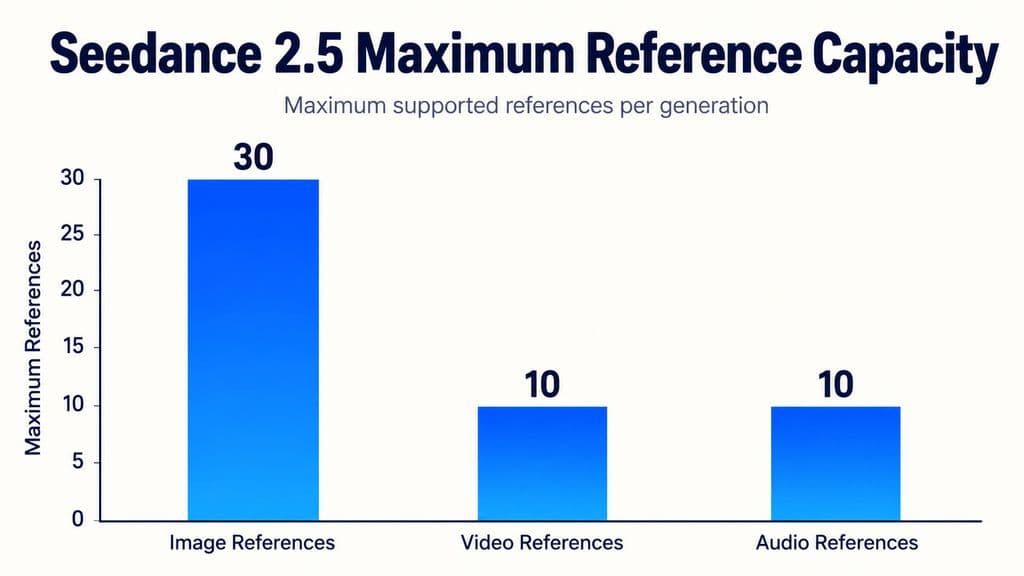
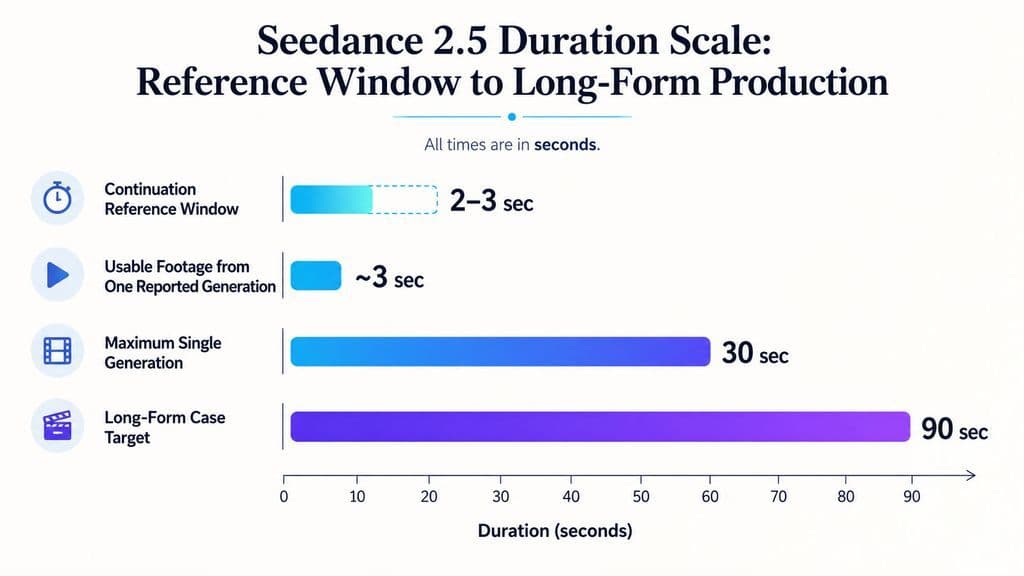
ByteDance’s official Seedance 2.5 release confirms generation of videos up to 30 seconds, with up to 30 images, 10 video clips and 10 audio clips in a single pass. These larger multimodal inputs are a major part of the Seedance 2.5 reference workflow.
What Should Image, Video and Audio References Control?
Reference | Best Used For | Main Risk |
Image | Identity, products, wardrobe, environments, key visual states | Conflicting appearance signals |
Video | Motion, blocking, timing, camera movement | Copying unwanted subjects or backgrounds |
Audio | Voice direction, dialogue, rhythm, music, sound cues | Assuming the original audio is locked |
Storyboard | Composition, sequence and scene states | Internal continuity errors |
Previous clip | Continuation and motion state | Repeating completed action |
The prompt should work as a routing layer, explaining which reference controls each property and what should not transfer. A structured Seedance 2.5 prompt guide can help make those assignments clearer before generation.
How Do You Avoid Seedance 2.5 Reference Conflicts?
The most useful rule is simple: one reference, one primary responsibility.
Build a Reference Map Before Prompting
A commercial video might use one image for character identity, one for the product, another for the environment, a video for camera movement and an audio file for dialogue.
This is more controllable than asking several references to define the same subject.
For video references, specify negative attribution too. If a source clip exists only for camera movement, its actor, clothing and location should not become visual instructions.
From a design-system perspective, identity, environment, motion and sound should remain modular whenever possible.
Remove Conflicts Before Adding More Instructions
A longer prompt cannot always solve contradictory references. When a generation fails, first classify the problem:
- identity
- product fidelity
- environment
- motion
- camera
- audio
- timing
- continuity
Then inspect only the references responsible for that attribute. Removing one conflicting source can be more effective than adding another paragraph of prompt instructions.
How Many References Should You Use in Seedance 2.5?
Seedance 2.5 has a large official reference capacity, but maximum capacity is not an optimal working set.
Start With the Minimum Viable Reference Set
For a simple shot, begin with the fewest assets that provide unique information. A character, product, environment and motion reference may already be enough.
Generate once, identify what remains uncontrolled, then add another reference only when it solves a specific missing variable.
This makes failures easier to diagnose and reduces unnecessary competition between inputs.
What a Five-Character Workflow Reveals About Reference Overload
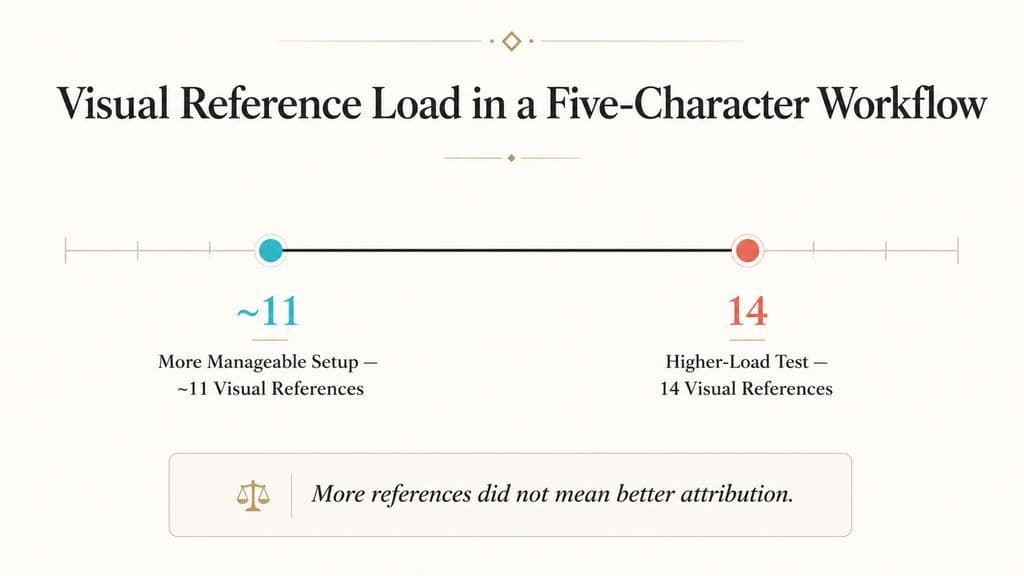
One documented multi-character workflow used five characters, five audio references and up to 14 visual references. Around 11 visual references produced a more manageable balance; pushing the set toward 14 increased visual and voice confusion.
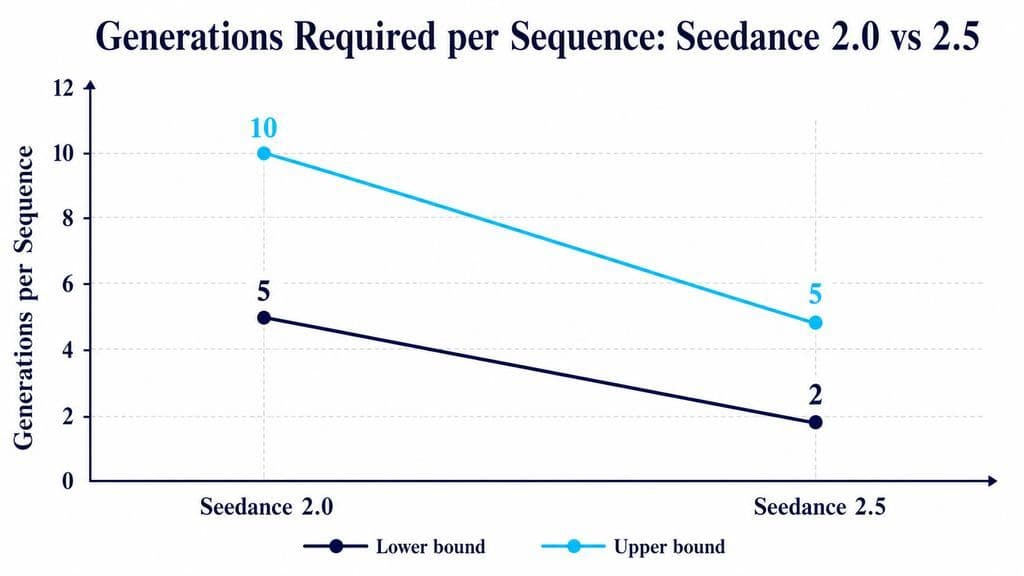
The same production comparison reported approximately 5–10 generations per sequence with Seedance 2.0 versus 2–5 with Seedance 2.5.
For professional teams, the better KPI is not reference count. It is usable takes per generation.
How Should You Use Image References in Seedance 2.5?
Image references are strongest for properties that should remain visually stable across movement and shots.
Separate Character, Product and Environment References
For characters, prioritize face, hair, silhouette, wardrobe and distinctive accessories. For products, prioritize geometry, proportions, packaging, labels and materials. For environments, focus on architecture, lighting and spatial atmosphere.
Keeping these roles separate also makes iteration easier: the same product can move between environments without rebuilding the entire visual reference system.
Check Storyboard Continuity Before Generation
A reviewed 16-panel storyboard workflow exposed an important limitation. Inconsistent object positions and scene states led to disappearing furniture, unexpected background subjects and shifting objects.
After the storyboard was rebuilt with stronger spatial continuity, most problems improved.
The lesson is counterintuitive: stronger reference adherence can make weak reference design more visible. Before generation, check persistent props, furniture, characters, screen direction and spatial relationships across every panel.
How Should You Use Video References in Seedance 2.5?
Video references are best understood as motion and camera guides, not frame-perfect motion capture.
Use Video for Motion, Blocking and Camera Language
Video can communicate walking paths, choreography, camera orbits, handheld movement, pacing and blocking more efficiently than text.
ByteDance also demonstrates clay-render references that separate camera movement, subject trajectory and spatial planning from final materials and lighting. This is useful for professional workflows because previs can control movement while image references control final appearance.
Clean backgrounds, green-screen performances and simplified previs can further reduce unwanted signals.
Actor Replacement Still Has Trade-Offs
In one reviewed action-video workflow, Seedance 2.5 successfully changed clothing and hair while facial replacement remained unstable. Seedance 2.0 handled the face better in that specific case but introduced unwanted cuts and additional motion.
This shows why R2V should not be treated as deterministic editing: motion fidelity, identity fidelity and camera preservation can compete.
How Should You Use Audio References in Seedance 2.5?
Audio references can guide voice, dialogue, rhythm, music, ambience and sound cues, but audio guidance is not the same as locking a final soundtrack.
Separate Voice, Music and Sound Responsibilities
If voice consistency matters, dedicate the reference primarily to voice. If music controls visual timing, map important actions to musical beats. Avoid asking one mixed track to control voice identity, music timing and sound effects simultaneously when those layers can be separated in a Seedance 2.5 workflow.
Do Not Treat Audio Ref as Guaranteed Exact Lip Sync
A reviewed German-language workflow attempted to preserve the original words and voice while generating matching visuals. The output sometimes altered words, dialogue or voice characteristics. Recurring user questions also include voice drift and unwanted accent changes.
If a project requires exact wording, unchanged recorded audio and precise phoneme-level lip sync, treat those as separate production requirements rather than assuming a general audio ref will lock them automatically.
How Do You Write a 30-Second Seedance 2.5 Prompt?
The hardest part of a 30-second Seedance 2.5 generation is state continuity, not duration.
Structure Each Phase Around Action, Camera and End State
Divide the sequence into a few timed phases. Each should define:
- primary action
- relevant subject
- camera behavior
- end state
The end state matters because the next phase needs a logical starting point. If a character finishes one phase holding a product beside a doorway, the following action should begin from that configuration.
Treat timestamps as pacing controls rather than frame-accurate edit points.
Use Timestamp-Level Editing Instead of Regenerating Everything
Seedance 2.5 also adds timestamp-level targeted editing, according to ByteDance’s official release.
This changes the workflow for longer shots. If a specific action, sound or section is wrong, targeted editing can be more efficient than rebuilding the entire 30-second sequence. For production teams, that means separating generation decisions from correction decisions: establish the overall shot first, then repair localized problems when the editing workflow supports it.
Know When 30 Seconds Is Too Complex
A seven-actor scene with dialogue and multiple interactions produced expensive failed attempts before being divided into simpler shots.
At the other extreme, a documented product workflow produced a 30-second vlog-style ad from one product image and one prompt in a single generation.
Thirty seconds is therefore a capability, not automatically the ideal shot length. Character count, dialogue, action density and camera changes determine the practical complexity ceiling.
How Do You Extend Seedance 2.5 Into Longer Videos?
Seedance 2.5 officially supports multi-round extension in addition to 30-second generation. The production challenge is deciding how much previous footage the next segment actually needs.
Use Only the Previous State Needed for Continuity
A useful continuation workflow is to provide roughly the last 2–3 seconds of the previous clip, reuse consistent character and environment references, and begin the next prompt from the previous end state.
Feeding unnecessary earlier footage back into the model can encourage it to replay action that has already happened.
The 90-Second Case Shows the Real Cost of Long-Form AI Video
The strongest long-form production case in our review targeted a 90-second virtual one-shot.
The workflow required:
- 32 generations
- 7 usable segments
- approximately 3 days
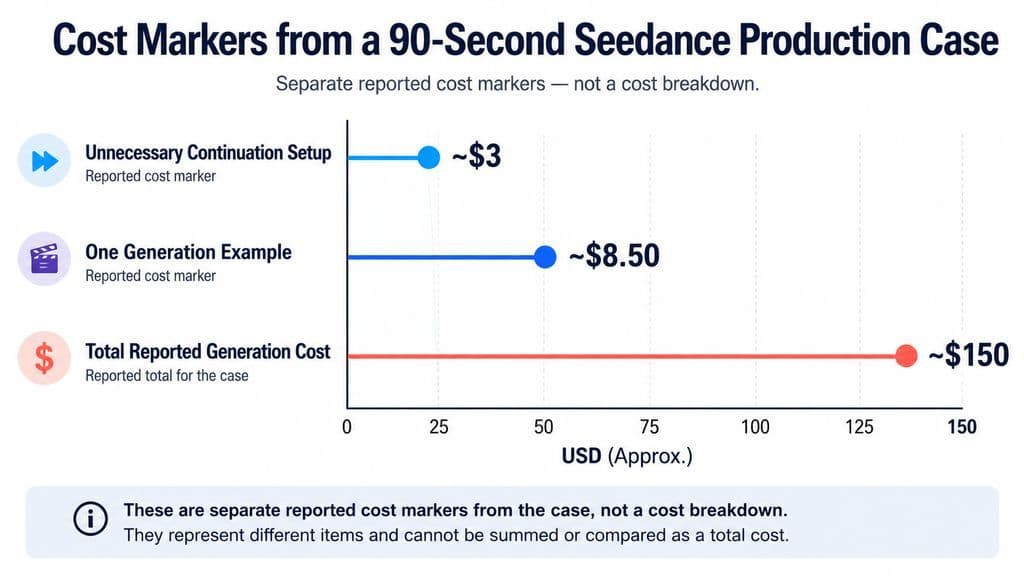
- approximately $150 in generation cost
One unnecessary continuation setup reportedly wasted around $3, while another generation costing about $8.50 contributed only around three usable seconds.
The sequence still required NLE finishing, including Optical Flow and minor framing corrections.
This suggests a more useful production metric: cost per usable second, not cost per generation.
What Do Production Cases Reveal About Seedance 2.5’s Limits?
Seedance 2.5 becomes less predictable as subjects, voices, interactions, camera changes and scene states accumulate.
Multi-Character Consistency Has Improved, but Complexity Still Matters
The five-character case showed fewer rerolls than its 2.0 workflow, while the seven-actor case became more reliable only after the scene was simplified.
ByteDance also states that Seedance 2.5 still has room to improve the physical plausibility of complex motion and the stability of multi-subject interactions.
That aligns with the production evidence: more capable reference handling does not remove scene-complexity limits.
Seedance 2.5 vs Seedance 2.0: Which Is Better?
Seedance 2.5 is stronger for 30-second storytelling, larger multimodal reference sets, structured referencing and targeted editing, but 2.0 can still behave differently on specific tasks.
Choose by Shot Requirements, Not Version Number
In reviewed Seedance 2.5 workflows, 2.5 often followed references more literally and reduced rerolls in complex character sequences. That same strictness also exposed storyboard inconsistencies.
Meanwhile, some 2.0 cases showed more willingness to fill in unspecified motion, and one actor-replacement case preserved facial identity better while adding unwanted movement.
The practical question is therefore: which version produces the highest usable-output rate for this specific shot?
Seedance 2.5 Troubleshooting Checklist
Before rerolling, diagnose the failed control.
Check the Reference System First
Ask:
- Does every ref provide unique information?
- Are two refs competing for the same attribute?
- Is the storyboard spatially consistent?
- Does each timeline phase end in a clear state?
- Could one ref be removed without losing essential control?
If the face drifts, inspect character references. If motion fails, simplify the motion source. If voices swap, reduce competing audio inputs. If continuation repeats footage, shorten the previous-video reference.
Debug the failed attribute before expanding the prompt. This diagnostic approach is also central to a structured Seedance 2.5 workflow.
FAQ
How many refs should I use in Seedance 2.5?
Seedance 2.5 supports up to 30 image refs, 10 video refs and 10 audio refs, but most workflows should start with the smallest set that describes the shot clearly. Add another ref only when it provides information the existing assets do not.
Can Seedance 2.5 copy motion exactly from a video ref?
Not reliably enough to treat R2V as mocap. Video refs are better for camera paths, blocking, timing and movement intent. For stronger control, use simplified motion footage or previs while keeping identity and final visual design in separate image refs.
Can Seedance 2.5 keep my original audio and lip sync exactly?
Do not assume an audio ref creates a hard audio lock. Reviewed workflows include changed words, voice characteristics and accents. If exact recorded dialogue is mandatory, treat audio preservation and precise lip sync as separate requirements.
Why does Seedance 2.5 get worse when I add more refs?
More refs create more possible control conflicts. When several assets describe identity, style, motion, environment or voice differently, attribution becomes less predictable. Reduce redundant refs, assign each asset one primary job and debug the specific attribute that failed before adding more material.
Conclusion
Seedance 2.5 is most useful when treated as a multimodal reference system rather than a prompt-only video generator. Its 30-second generation, large image/video/audio reference capacity, extension workflow and targeted editing create more room for professional production, but the documented cases show that success still depends on Seedance 2.5 reference design: a simple product ad may work in one generation, while a 90-second continuous sequence can require 32 attempts and substantial post-production. The strongest workflow is therefore not to use more inputs, but to assign every reference a clear responsibility, design continuity before generation and optimize for usable output rather than theoretical model limits. For teams moving from experimentation into production, a structured Seedance 2.5 workflow provides the clearest next step.
More from the Virse Blog
Workflow
What Does a Graphic Designer Do? Real Tasks, Revisions, Tools & Workflow
September 23, 2026 by Yifan Zhao
Workflow

How to Learn Graphic Design in 2026: A Step-by-Step Roadmap From Fundamentals to Portfolio
September 23, 2026 by Yifan Zhao
Workflow

What Is Graphic Design? Definition, Real Examples, Process & Tools
September 23, 2026 by Yifan Zhao