
Product Photo Backgrounds: 15 Ideas & Materials Compared
 Yifan Zhao15 min read ·
Product photo backgrounds can dramatically change how a product looks, feels, and sells. The right background makes products stand out, controls visual distractions, and creates a consistent appearance across ecommerce listings. Popular options include white seamless paper, black fabric, colored cardstock, marble surfaces, wood, acrylic, and digitally generated AI backgrounds.
However, choosing a background involves more than selecting an attractive color. Some materials get dirty quickly, others create unwanted reflections, and certain textures become distracting in close-up photography.
In this guide, we'll explore 15 product photo background ideas, compare common backdrop materials, and explain how to choose the right option for different products. You'll also learn how to create professional-looking backgrounds using DIY techniques and AI design tools.
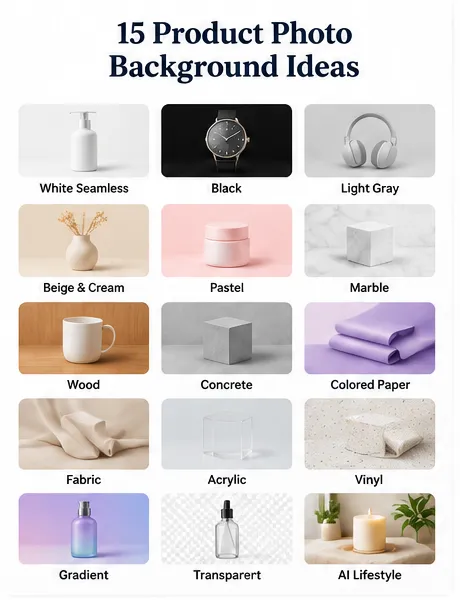
15 Product Photo Background Ideas for Different Styles
The best product photography background depends on your product, brand identity, lighting conditions, and intended visual style.
Here are 15 options worth considering.
1. White Seamless Background
White is one of the most recognizable backgrounds in ecommerce photography.
A clean white background keeps attention on the product and works particularly well for marketplace listings, electronics, cosmetics, and household goods.
Best for: Ecommerce catalogs, electronics, cosmetics, and general retail.
Advantages:
- Creates a clean, distraction-free appearance.
- Makes product colors and details easier to evaluate.
- Fits many ecommerce photography requirements.
Limitations: White paper gets dirty easily. Shadows and uneven lighting can also make a supposedly white background appear gray.
2. Black Background
Black creates contrast, depth, and a premium visual appearance.
It works particularly well for luxury watches, jewelry, dark packaging, and reflective products.
Best for: Luxury products, watches, jewelry, and premium electronics.
Advantages:
- Creates dramatic visual contrast.
- Makes metallic details stand out.
- Supports sophisticated advertising compositions.
Limitations: Reflective surfaces can produce unwanted highlights. Black fabrics such as Duvetyne can help absorb light and reduce reflections.
3. Light Gray Background
Light gray offers a softer alternative to pure white.
It is particularly useful when photographing large product catalogs that need consistent backgrounds without the harsh contrast of white.
Best for: Electronics, furniture, home accessories, and catalog photography.
Advantages:
- Neutral and versatile.
- Provides subtle separation between white products and the background.
- Works well across different product categories.
Limitations: Poor lighting can create uneven gray tones.
4. Beige and Cream Background
Beige and cream create a warm, natural atmosphere.
These backgrounds work well for skincare, handmade products, organic cosmetics, and lifestyle-oriented brands.
Best for: Beauty products, handmade goods, and natural skincare.
Advantages: Creates warmth and a softer brand identity.
Limitations: Similar-colored products may blend into the background.
5. Pastel Color Backgrounds
Pastel pink, lavender, mint, and baby blue add personality without overwhelming the product.
They are popular choices for playful branding, beauty campaigns, stationery, and social media product photography.
Best for: Cosmetics, accessories, stationery, and lifestyle products.
Advantages: Makes product photography more recognizable and visually engaging.
Limitations: Poor color coordination can distract from the actual product.
6. Marble Background
Marble introduces subtle natural patterns and a premium surface appearance.
White marble works especially well for cosmetics, jewelry, skincare, and luxury accessories.
Best for: Beauty products, perfume, jewelry, and premium packaging.
Advantages: Provides visual texture and an elegant aesthetic.
Limitations: Strong marble patterns can compete with small products.
7. Wooden Background
Wood adds warmth and an organic appearance.
Light oak creates a minimal aesthetic, while darker wood produces a more traditional or luxurious atmosphere.
Best for: Coffee, food, handmade goods, furniture, and lifestyle products.
Advantages: Adds natural texture and visual warmth.
Limitations: Wood grain can become distracting in close-up photography.
8. Concrete Background
Concrete offers an industrial, minimalist appearance.
Its neutral gray surface works particularly well for technology products, sneakers, accessories, and contemporary branding.
Best for: Electronics, fashion accessories, and industrial products.
Advantages: Provides a modern visual style.
Limitations: Rough textures may not suit delicate or luxury products.
9. Colored Paper Background
Colored paper is an inexpensive way to experiment with different product photography styles.
You can select complementary or contrasting colors depending on the product's shape and packaging.
Best for: Small products, cosmetics, stationery, and creative campaigns.
Advantages: Affordable, lightweight, and easy to replace.
Limitations: Paper can wrinkle, tear, and become dirty.
10. Fabric Background
Fabric creates a soft, textured photography environment.
Linen, cotton, velvet, and other textiles can support different visual directions.
Best for: Jewelry, fashion accessories, perfume, and lifestyle products.
Advantages: Offers flexible textures and colors.
Limitations: Fabric wrinkles can become highly visible, particularly under directional lighting.
11. Acrylic Background
Acrylic sheets can create clean, glossy surfaces and attractive reflections.
Transparent, white, and colored acrylic are useful for commercial product photography.
Best for: Cosmetics, electronics, bottles, and premium products.
Advantages: Creates controlled reflective effects and smooth surfaces.
Limitations: Scratches, fingerprints, and unwanted reflections require attention.
12. Vinyl Photography Backdrop
Vinyl backdrops are available in different colors and printed patterns, including marble, stone, and tile.
They offer an alternative to carrying multiple physical surfaces into a studio.
Best for: Food photography, cosmetics, small products, and lifestyle scenes.
Advantages: Reusable and available in numerous designs.
Limitations: Some printed textures may look artificial or become distracting in close-up photographs.
13. Gradient Background
Gradient backgrounds transition smoothly between two or more colors.
They add depth without requiring a complicated physical environment.
Best for: Technology products, cosmetics, advertising, and promotional graphics.
Advantages: Creates visual depth and modern compositions.
Limitations: Gradients require careful color and lighting coordination.
14. Transparent Background
A transparent background removes the surrounding environment and isolates the product.
This is especially useful when the same product needs to appear across multiple website layouts, promotional designs, and marketing materials.
Best for: Ecommerce catalogs, product listings, and graphic design.
Advantages: Makes product placement flexible across different layouts.
Limitations: Transparent exports require accurate edge detection, particularly around glass, fine details, and transparent packaging.
15. AI-Generated Lifestyle Background
AI-generated backgrounds allow you to place products in environments that would otherwise require physical sets or location photography.
For example, a skincare bottle can appear in a bright bathroom, a perfume bottle in a luxury interior, or a coffee package on a rustic kitchen counter.
Best for: Advertising creatives, social media campaigns, cosmetics, and lifestyle ecommerce.
Advantages:
- Creates different environments without building physical sets.
- Makes visual experimentation faster.
- Supports multiple creative directions using the same product image.
Limitations: AI-generated scenes require careful checking of product shape, labels, proportions, shadows, and reflections.
Paper vs. PVC vs. Vinyl vs. Acrylic: Which Material Is Best?
Choosing the right photography backdrop material is just as important as choosing its color.
The main considerations are durability, reflectivity, cleaning requirements, surface texture, and purchase cost.
Material | Advantages | Limitations | Best For |
|---|---|---|---|
Seamless paper | Matte appearance, clean colors | Gets dirty and tears easily | White-background ecommerce |
PVC | Durable and easy to clean | Can create unwanted reflections | Repeated studio photography |
Vinyl | Reusable, many printed designs | Texture may look artificial | Lifestyle and food photography |
Acrylic | Smooth surface, reflective effects | Scratches and fingerprints | Cosmetics and premium products |
Foam board | Inexpensive and accessible | Surface and edges can become damaged | DIY photography |
Fabric | Flexible and available in many textures | Wrinkles and folds | Lifestyle photography |
Formica | Durable, smooth, easy to clean | Initial material and size considerations | Long-term studio setups |
Matte board | Soft, controlled appearance | Can become stained or scratched | Small product photography |
Is PVC Better Than Seamless Paper?
Neither material is universally better.
Seamless paper is preferable when you need a clean, matte surface and frequently change background colors. However, it can become dirty quickly, especially when photographing products that touch the floor.
PVC is more suitable for repeated use because it is generally easier to clean. Its main drawback is reflectivity, which can create unwanted highlights.
For a small studio producing hundreds of product images, a reusable surface may be more practical than constantly replacing disposable backgrounds.
When Should You Choose Acrylic?
Acrylic is useful when you deliberately want reflections or a polished surface.
However, glossy acrylic is not always the best choice. If you need a neutral product background, a matte surface may provide better control over reflections and distracting highlights.
Best Product Photography Backgrounds for Different Products
Different product materials interact with light and backgrounds in different ways.
Product Type | Recommended Background | Why It Works |
|---|---|---|
Jewelry | Black velvet, cream, or matte gray | Creates contrast and controls reflections |
Cosmetics | Beige, marble, or pastel | Supports premium and beauty aesthetics |
Electronics | White, light gray, or black | Keeps attention on product details |
Food | Wood, marble, or colored surfaces | Adds warmth and context |
Perfume | Black, beige, or acrylic | Supports luxury presentation |
Clothing | White, gray, or lifestyle scenes | Keeps colors and materials recognizable |
Handmade Products | Wood, fabric, or neutral colors | Reinforces craftsmanship |
Glass Products | Matte backgrounds or controlled backlighting | Helps define transparent edges |
Best Background for Jewelry Photography
Jewelry often contains reflective metals, gemstones, and small details.
Black velvet can provide contrast and absorb unwanted light, while neutral matte surfaces work well for more understated product presentations.
Avoid using highly reflective backgrounds unless the reflections are an intentional part of the composition.
Best Background for Food Photography
Food photography benefits from backgrounds that support the atmosphere of the dish.
Wood can create a rustic appearance, while marble and neutral surfaces provide a cleaner presentation. Colored backgrounds can also help food stand out when the colors are carefully coordinated.
Best Background for Cosmetics
Cosmetics and skincare products often benefit from pastel, beige, marble, and clean white backgrounds.
For advertising images, lifestyle environments can provide additional context without changing the product itself.
DIY Product Photography Backgrounds on a Budget
You don't need a professional photography studio to create attractive product images.
Several inexpensive materials can provide a practical starting point.
Foam Board
Foam board is one of the easiest materials for beginners.
Use a white board as the background and another board as a reflector to control shadows.
It is inexpensive, lightweight, and easy to position.
Colored Cardstock
Colored cardstock provides a simple way to experiment with different backgrounds.
You can purchase several colors and create different visual styles without investing in professional backdrops.
Fabric and Tablecloths
Fabric can create soft backgrounds for lifestyle and handmade product photography.
Choose materials with subtle textures and prepare them carefully to minimize wrinkles.
Reusable Surface Panels
For more frequent photography, consider investing in durable surface panels.
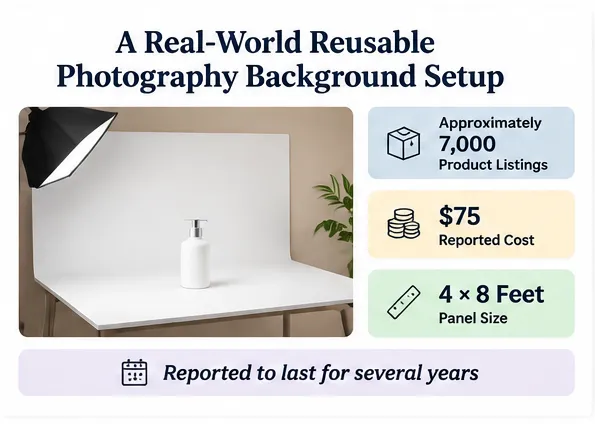
One photographer discussing studio materials described using a 4 × 8-foot white countertop laminate panel costing $75 and reported using a panel for several years.
This illustrates why initial purchase price should be considered alongside replacement frequency.
A Simple DIY Product Photography Setup
Follow these steps to create a basic product photography background:
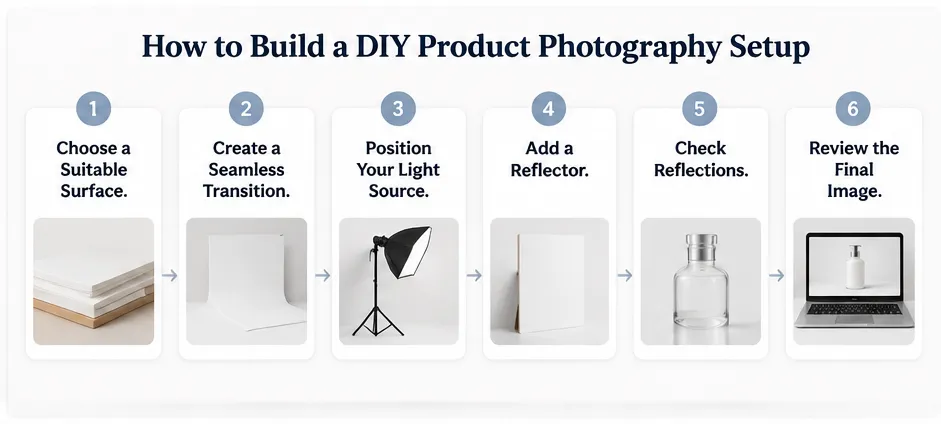
- Choose a suitable surface. Select white paper, foam board, or a reusable panel.
- Create a seamless transition. Curve the background behind the product rather than creating a visible corner.
- Position your light source. Use a soft light source to minimize harsh shadows.
- Add a reflector. Use white foam board to bounce light back onto darker areas.
- Check reflections. Pay particular attention to glossy packaging, glass, and metallic surfaces.
- Review the final image. Check background cleanliness, product edges, shadows, and color consistency.
Common Product Photography Background Problems and How to Fix Them
Even a suitable background can produce poor results if its surface and lighting are not controlled.
Why Does a White Background Look Gray?
A white surface does not automatically produce a pure white photograph.
If the background receives insufficient light, it can appear gray.
How to fix it:
- Light the background separately when possible.
- Adjust the exposure carefully.
- Keep the product properly exposed.
- Check the final background tone during editing.
Avoid simply increasing exposure until the background becomes white, because this can also remove important product details.
How Do You Prevent Background Reflections?
Reflections are especially problematic when photographing glossy products against PVC, acrylic, and black surfaces.
Try these techniques:
- Use larger diffused light sources.
- Change the angle of your lights.
- Use matte surfaces when reflections are unnecessary.
- Add flags or black cards to control reflected light.
- Consider black velvet or Duvetyne for light-absorbing backgrounds.
How Do You Avoid Background Wrinkles?
Fabric and paper can create unwanted folds and irregularities.
Use a smooth, properly supported surface. For fabric, steam or iron it before shooting and inspect it under the actual lighting conditions.
For repeated commercial photography, a rigid background panel may be more practical.
How Do You Maintain Consistency Across Product Catalogs?
Consistency becomes particularly important when photographing hundreds or thousands of products.
A background that looks slightly different across individual images can make an ecommerce catalog feel disorganized.
Create a repeatable setup with:
- The same background material and color.
- Consistent lighting positions.
- A fixed camera angle.
- Consistent product placement.
- Standardized editing settings.
For example, a catalog containing approximately 7,000 product listings creates a very different production challenge from photographing a handful of promotional images. In larger catalogs, repeatability becomes a key part of the photography workflow.
DIY vs. AI Product Photo Backgrounds: Which Should You Use?
Traditional photography and AI background generation solve different problems.
Physical backgrounds provide direct control over lighting, reflections, and real-world product appearance. AI backgrounds offer flexibility when you need multiple environments or creative variations. For more advanced workflows, AI product mockup generation can help create alternative product presentations while keeping product accuracy in focus.
Factor | DIY Photography | AI Background Generation |
|---|---|---|
Initial setup | Requires physical materials and lighting | Requires a digital tool and product image |
Background variety | Limited by available surfaces | Can explore different visual environments |
Lighting control | Direct physical control | Depends on generation and editing capabilities |
Product consistency | Achieved through repeatable studio setups | Requires careful preservation of product details |
Reflections | Managed through lighting and surfaces | Must be checked in the generated result |
Lifestyle scenes | Requires physical sets or locations | Can generate digital environments |
Best application | Accurate product catalogs | Creative campaigns and background variations |
When Should You Use Traditional Photography?
Choose physical backgrounds when:
- You need highly accurate product representation.
- Product labels and packaging must remain unchanged.
- You photograph products regularly using the same setup.
- Real reflections and material characteristics are important.
When Should You Use AI Product Background Generation?
AI is particularly useful when:
- You want multiple background concepts from one product image.
- You need lifestyle scenes without building physical sets.
- You want to experiment with different visual directions.
- You need additional marketing images for different campaigns.
However, AI-generated backgrounds should not be treated as a replacement for product accuracy checks.
Always inspect labels, proportions, packaging details, shadows, and product edges before publishing. Preserving design accuracy in AI mockups is especially important when the resulting image will be used commercially.
How to Change a Product Photo Background with AI
You can use an AI product photography workflow to explore new backgrounds without rebuilding your physical studio.
For example, Virse AI Product Photo Generator can be used as part of a background creation workflow.
Visit: AI Product Photo Generator
A practical workflow:
- Prepare your product image. Start with a clear image showing the entire product.
- Upload the image. Import the product photograph into the AI tool.
- Describe the background. Specify the color, material, environment, lighting, and visual style you want.
- Generate variations. Explore different background concepts.
- Check product accuracy. Inspect the product shape, label, logo, and proportions.
- Review lighting and shadows. Make sure the product looks naturally integrated into the new environment.
- Export the final image. Select the version that best matches your intended use.
The most important principle is to distinguish between changing the environment and changing the product itself. For commercial photography, preserving the product's actual appearance should remain a priority.
How to Choose the Right Product Photography Background
There is no single best background for every product.
A useful selection process starts with four questions:
1. What does the product look like?
Dark products often benefit from lighter backgrounds, while white products may need gray or darker surfaces for separation.
2. Is the product reflective?
Glass, metal, and glossy packaging require more careful reflection management.
3. How frequently will you use the background?
For occasional shoots, inexpensive paper and foam board may be sufficient. For repeated production, reusable materials may provide better long-term value.
4. Do you need multiple visual environments?
If you only need consistent catalog images, a physical studio setup is often practical. If you need multiple lifestyle scenes and creative variations, AI background generation can expand your options.
Ultimately, the best product photo background is one that makes the product easy to understand while supporting the visual identity of the brand.
Frequently Asked Questions
What is the best background for product photography?
White seamless paper is a popular choice for ecommerce photography because it creates a clean, neutral appearance. However, black, gray, beige, marble, and colored backgrounds can work better depending on the product's material, color, and brand positioning.
Is white or black better for product photography?
White is generally useful for clean ecommerce catalog images, while black creates contrast and a more dramatic appearance. Choose based on the product's color and reflective properties. Dark products may disappear against black, while white products can become difficult to distinguish against white.
What is the cheapest material for DIY product photography backgrounds?
White foam board, colored cardstock, and poster paper are inexpensive starting options. They are easy to find and position, making them suitable for small products and beginner photography setups. Their main limitation is durability.
Is PVC better than vinyl for product photography?
PVC and vinyl can both provide reusable photography surfaces. PVC is useful for smooth, easy-to-clean backgrounds, while vinyl offers more printed designs and textures. The better choice depends on the desired finish, reflection control, and frequency of use.
How do I make a white background look completely white?
Use sufficient background lighting, control shadows, and expose the product correctly. Separating background lighting from product lighting can help achieve a more consistent white appearance without overexposing the product.
What background is best for jewelry photography?
Black velvet, matte gray, and neutral cream are useful options. Black velvet absorbs light and helps reduce unwanted reflections, while neutral backgrounds can provide a softer commercial appearance. The choice depends on the metal, gemstones, and intended visual style.
Can AI change the background of a product photo?
Yes. AI image tools can generate new environments around an existing product photograph. They are useful for creating lifestyle scenes, experimenting with colors, and producing advertising variations. Always verify that the generated image preserves the product's original shape, packaging, and identifying details.
More from the Virse Blog
Inspiration

Wine Label Design: Legal Requirements + 30 Creative Examples
November 18, 2026 by Yifan Zhao
Inspiration

30 Best Poster Design Ideas for Every Style and Occasion
November 18, 2026 by Yifan Zhao
Inspiration

Lifestyle Product Photography: 20 Creative Ideas, Examples, and Tips
November 18, 2026 by Yifan Zhao