
Comment utiliser Kling 3.0 : 7 étapes pour de meilleures vidéos IA
 Yifan Zhao13 min de lecture ·
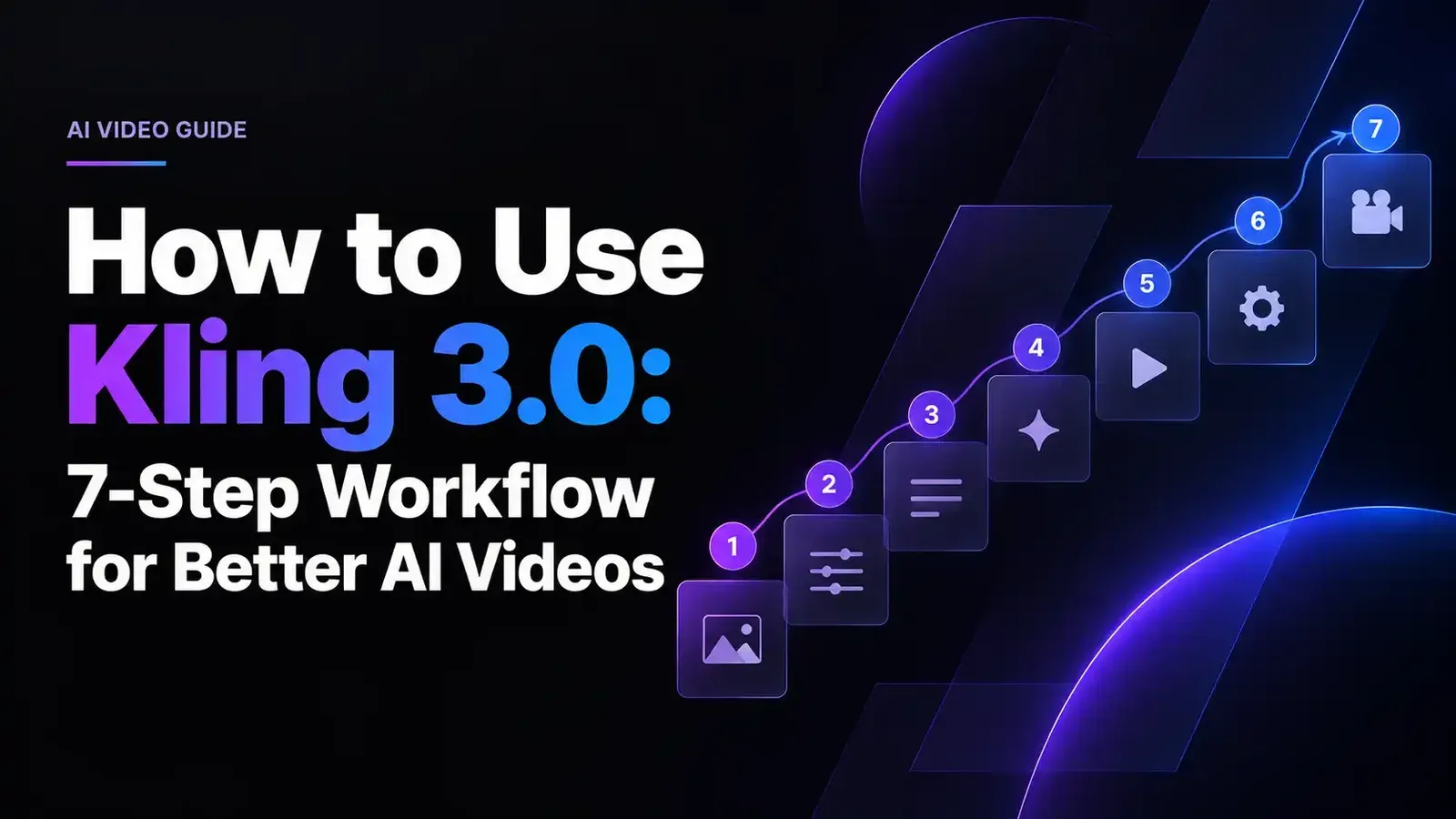
La meilleure façon d’utiliser Kling 3.0 est de construire les vidéos plan par plan. Partez d’une référence visuelle solide, donnez à chaque clip un objectif de mouvement clair, utilisez I2V ou Elements pour la cohérence, Multi-Shot pour des changements de scène délibérés et Motion Control lorsqu’une prestation à transférer existe déjà.
La difficulté est que Kling 3.0 devient moins prévisible lorsqu’une seule génération doit résoudre identité, action complexe, déplacement de caméra, interaction et audio à la fois. Les mouvements ratés, la dérive du personnage, une structure de plans faible et les essais répétés peuvent vite diminuer la qualité et l’efficacité des crédits. De meilleurs résultats viennent du contrôle de ce dont le modèle doit se charger à chaque étape.
Virse rassemble ce flux dans un même espace créatif sur canevas. Sa bibliothèque actuelle comprend Kling 3.0, Seedance 2.5, Seedance 2.0, MiniMax H3, Nano Banana 2 et GPT Image 2. Les forfaits payants incluent l’usage illimité de plus de 40 modèles et un nombre illimité de places. Les nouveaux utilisateurs reçoivent des crédits gratuits couvrant environ 10 images Nano Banana 2 ou une vidéo Seedance 2.0.

Utiliser Kling 3.0 étape par étape
Un flux Kling 3.0 fiable sépare conception visuelle, direction du mouvement et montage final au lieu de demander à une génération de tout résoudre.
- Choisissez T2V ou I2V. Utilisez T2V pour explorer et I2V lorsque l’apparence compte déjà.
- Préparez d’abord la référence. Fixez visage, tenue, détails produit, cadrage et direction visuelle avant l’animation.
- Définissez un mouvement principal. Décidez de ce que le spectateur doit remarquer en premier.
- Réglez séparément la caméra. Choisissez un plan fixe, un suivi, une avancée, un panoramique, une orbite ou un autre mouvement délibéré.
- Définissez l’état final. Décidez où le sujet et la caméra doivent terminer.
- Ajoutez Elements, Multi-Shot ou Motion Control uniquement pour résoudre un problème précis.
- Réutilisez les images réussies. Une bonne image d’un clip peut devenir la référence de continuité du suivant.
Quand utiliser T2V ou I2V dans Kling 3.0 ?
T2V convient mieux à la découverte ; I2V, au contrôle. Pour explorer un concept visuel, T2V peut inventer ensemble sujet, environnement et mouvement. Pour une publicité, un personnage récurrent, une vidéo produit ou une scène de marque, I2V offre généralement un point de départ plus solide puisque l’apparence est déjà définie.
Notre étude des flux de production retrouve le même schéma : les équipes créant des contenus de personnages reproductibles établissent d’abord l’identité dans des images fixes, puis demandent surtout à Kling de résoudre le mouvement.
Mode | Idéal pour | Pourquoi |
|---|---|---|
T2V | Exploration de concepts | Liberté créative maximale |
I2V | Personnages et produits | Contrôle visuel accru |
Elements | Sujets récurrents | Meilleure continuité |
Multi-Shot | Courtes scènes narratives | Couverture caméra structurée |
Motion Control | Prestations existantes | Transfert direct du mouvement |
Utilisez un budget de mouvement plutôt que d’ajouter des détails au prompt
Chaque plan dispose d’un budget de mouvement limité. Identité, mouvement du corps, interaction avec les objets, mouvement de caméra, dialogue et mouvement ambiant se disputent la cohérence temporelle.
Si un plan contient déjà une course, une caméra à l’épaule, une interaction entre deux personnages et du dialogue, ajouter plusieurs coupes et une action complexe avec un accessoire multiplie les risques d’échec. Concentrez la capacité du modèle à traiter la complexité là où le spectateur la remarquera le plus.
Quels réglages utiliser dans Kling 3.0 ?
Selon le guide officiel VIDEO 3.0 de Kling, le modèle prend en charge une génération flexible de 3 à 15 secondes, les sorties 720p et 1080p, l’audio natif, l’absence d’audio natif, les images de début et de fin, Elements et Multi-Shot.
Choisissez durée, résolution et audio en fonction du plan
Pour les premiers tests, les clips courts sont généralement plus efficaces : moins d’images peuvent subir une dérive d’identité, d’anatomie ou de mouvement. Allongez la durée une fois que l’action et la direction de caméra fonctionnent.
Kling indique actuellement les tarifs de crédits VIDEO 3.0 suivants :
Mode | 1080p | 720p |
|---|---|---|
Audio natif | 12 crédits/s | 9 crédits/s |
Sans audio natif | 8 crédits/s | 6 crédits/s |
Une génération de cinq secondes en 1080p avec audio natif coûte donc 60 crédits aux tarifs documentés actuels. Si l’audio ne fait pas partie du test, retirer cette variable peut réduire à la fois coût et complexité.
Quand utiliser les images de début et de fin ?
Utilisez-les lorsque la composition initiale et la composition finale comptent toutes deux. Elles sont particulièrement utiles pour les transformations de produits, transitions de poses, déplacements de caméra vers une destination définie et plans devant se raccorder proprement au montage suivant.
Au lieu de demander à Kling d’inventer où la scène se termine, donnez-lui deux états visuels et laissez le modèle résoudre le mouvement entre les deux.
Écrire des prompts Kling 3.0 pour des mouvements plus réalistes
Un bon prompt Kling 3.0 décrit une évolution dans le temps plutôt que de répéter tout ce qui apparaît déjà dans la référence.
Une structure pratique est sujet + action principale + comportement secondaire + mouvement de caméra + réaction physique + état final.
Utilisez une action principale et un changement secondaire
Voici un exemple de prompt utile :
Exemple de prompt : Une femme marche lentement vers la caméra. Son manteau réagit naturellement à chaque pas. Elle jette un regard vers la vitrine et esquisse un sourire discret. La caméra recule en douceur à la vitesse de marche. Elle termine immobile, en regardant légèrement au-delà de la caméra.
La marche est l’action principale ; le regard et le sourire sont secondaires. La caméra effectue un mouvement prévisible, et le clip a une fin définie.
Notre étude des tests de mouvements subtils de personnages a montré qu’une action physique et un changement d’expression offraient souvent un meilleur équilibre entre mouvement visible et identité stable qu’une longue chaîne d’actions.
Ajoutez des indications physiques si le mouvement paraît artificiel
Lorsque le mouvement semble sans poids, remplacez les adjectifs génériques par des phénomènes physiques observables.
Pour la marche, précisez contact du pied, transfert du poids et réaction des vêtements. Pour une interaction avec un produit, identifiez la main en contact et ce qui se produit après le lâcher. Pour un mouvement assis, décrivez le changement de posture plutôt que de demander simplement un « mouvement naturel ».
Les consignes physiques sont particulièrement utiles pour la marche, les tissus, les mains et les interactions avec des objets, où des prompts vagues laissent trop de logique du mouvement à inventer au modèle.
Garder des personnages cohérents dans Kling 3.0
La cohérence des personnages relève avant tout du système de références, pas de la longueur du prompt.
Créez un repère d’identité réutilisable définissant clairement visage, coiffure, proportions corporelles, silhouette vestimentaire et signes distinctifs. Pour des changements importants de caméra, utilisez plusieurs angles de référence plutôt qu’un seul portrait spectaculaire.
Verrouillez ce qui doit rester constant
Kling VIDEO 3.0 prend en charge l’association d’éléments et plusieurs images de référence ; les Elements de personnages peuvent aussi conserver les informations vocales associées. La documentation officielle présente Elements comme un moyen de stabiliser les sujets importants pendant l’évolution de la caméra et de la scène.
La règle pratique est simple : verrouillez ce qui doit rester constant et ne décrivez que ce qui doit changer.
Réécrire sans cesse le même personnage avec d’autres mots ouvre inutilement la porte à l’interprétation. Des références, une terminologie, une tenue, un format d’image et un langage visuel stables réduisent ce risque.
Utiliser Multi-Shot de Kling 3.0 pour des vidéos plus longues
Multi-Shot fonctionne mieux lorsque chaque plan apporte une information différente.
Donnez une fonction narrative à chaque scène Multi-Shot
Une séquence de découverte de produit pourrait comporter trois plans :
Plan 1 : un plan large montre le personnage approchant du magasin.
Plan 2 : un plan moyen en suivi l’accompagne à travers l’entrée.
Plan 3 : un gros plan révèle sa réaction à la présentation des produits.
Chaque coupe fait avancer la scène. Demander plusieurs angles sans faire évoluer l’histoire ne fait qu’ajouter de la complexité.
Le guide officiel distingue Multi-Shot automatique de Custom Multi-Shot, qui permet de contrôler contenu et durée de chaque plan. Utilisez Custom Multi-Shot lorsque le montage lui-même importe.
Réutilisez des images générées pour poursuivre l’histoire
Un flux étudié dans notre recherche a commencé avec seulement trois images de référence, puis a extrait de bonnes images arrêtées de générations Kling réussies pour les réutiliser comme références ultérieures.
Cela crée une chaîne de continuité utile :
référence initiale → clip réussi → image sélectionnée → clip suivant
La nouvelle image reprend éclairage, tenue, environnement et distance de caméra actuels. Elle constitue ainsi un meilleur point d’appui pour continuer que le retour systématique à l’image initiale.
Utiliser Motion Control de Kling 3.0 pour des prestations reproductibles
Motion Control est le plus utile lorsque le mouvement existe déjà. Au lieu d’inventer une chorégraphie à partir de texte, utilisez une prestation de référence pour le mouvement et une image de personnage pour l’identité.
Utilisez Motion Control pour les contenus centrés sur la prestation
Ce flux convient à la mode, la danse, aux vidéos de style UGC, contenus sociaux, prestations de personnages et formats de campagnes reproductibles.
L’avantage de production est que le mouvement devient une ressource réutilisable. Une fois les timings, poses et rythmes corporels validés, on peut explorer différentes apparences de personnages sans reconstruire la prestation depuis zéro.
Étude de cas : transfert d’une prestation en moins de cinq minutes
Dans un flux Motion Control documenté étudié dans notre recherche, une courte vidéo existante fournissait pose, mouvement, cadrage et structure de scène, tandis que l’interprète était remplacé par un personnage IA.
Le flux allant de la référence au résultat aurait pris moins de cinq minutes. Il s’agit d’un cas isolé, pas d’un benchmark universel, mais il montre pourquoi Motion Control peut réduire le travail lorsque le mouvement souhaité existe déjà.
Que révèlent les études de cas Kling 3.0 sur les flux de production ?
Les meilleurs exemples montrent que Kling fonctionne idéalement comme une étape au sein d’un système créatif plus vaste.
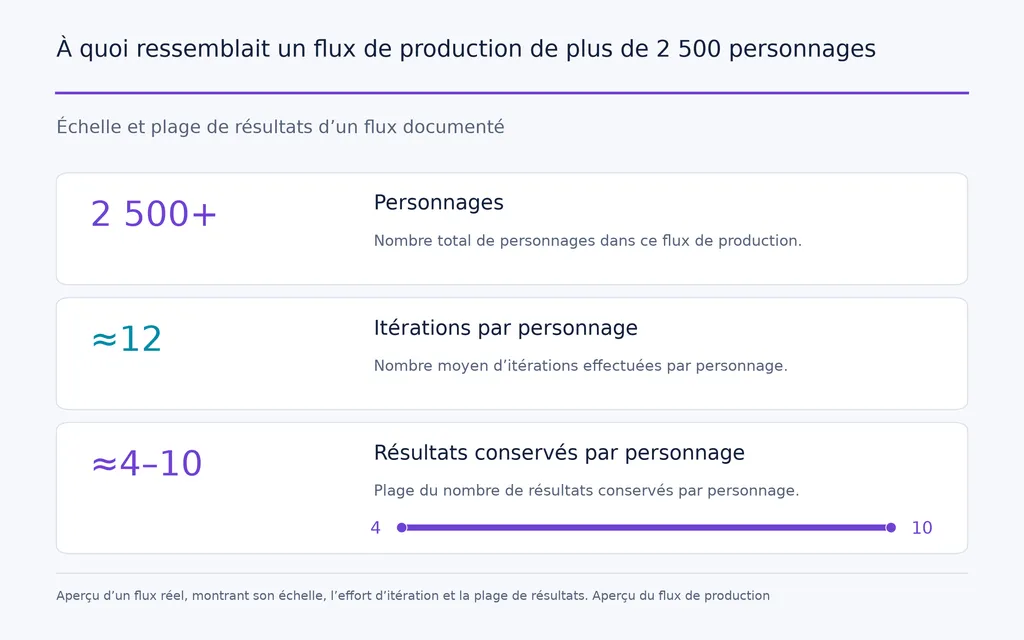
Étude de cas : plus de 2,500 personnages et environ 12 itérations par identité
L’exemple d’échelle le plus utile de notre recherche concernait plus de 2,500 personnages IA.
Le flux documenté comptait en moyenne environ 12 itérations par personnage, dont environ 4 à 10 résultats étaient finalement conservés pour publication.
Ces données changent la manière d’évaluer l’efficacité de la vidéo IA. La vitesse de génération ne suffit pas. Une mesure de production plus pertinente est le résultat exploitable par itération.
La même recherche a montré que les mouvements retenus préservaient souvent mieux l’identité que les grands mouvements de tête, la marche ou les gestes amples. Pour les systèmes de personnages commerciaux, un clip subtil exploitable peut valoir davantage qu’un plan spectaculaire dont le visage dérive.
Étude de cas : les flux d’action et de musique séparent génération et finition
Notre étude a aussi trouvé des flux de courts métrages d’action et de clips musicaux séparant références des personnages, génération du mouvement, cohérence des objets, synchronisation labiale, sons ambiants et montage final.
La leçon rejoint la pratique du design professionnel : références, mouvement, son et montage sont des problèmes de production différents. Les séparer facilite le diagnostic des échecs et la réutilisation des ressources réussies.
Réduire le gaspillage de crédits et les générations ratées dans Kling 3.0
Le moyen le plus rapide de gaspiller des crédits est de tester plusieurs variables inconnues en qualité finale.
Avant de générer, validez qualité des références, identité, action principale, comportement de la caméra, durée, besoin d’audio et état final.
Problème | Cause probable | Meilleure approche |
|---|---|---|
Le visage change | Repère d’identité faible | Réutiliser des Elements stables |
Mouvement raide | Formulation vague de l’action | Ajouter des indications physiques |
Les mains se déforment | Interaction complexe | Simplifier l’action |
L’action rapide échoue | Trop d’étapes de mouvement | Répartir en plusieurs plans |
Multi-Shot paraît aléatoire | Aucun objectif narratif | Définir le rôle de chaque plan |
Les crédits disparaissent | Tests avec les réglages finaux | Valider d’abord à faible coût |
Le flux Kling le plus efficace teste les incertitudes avant de dépenser pour la qualité. Utilisez des clips courts pour valider le mouvement, évitez l’audio natif inutile et réservez les générations complexes aux plans dont la direction est déjà claire.
FAQ Kling 3.0
Comment garder le même personnage dans chaque vidéo Kling 3.0 ?
Utilisez le même repère d’identité ou Element d’un plan à l’autre, avec visage, coiffure, tenue et langage visuel stables. Pour les grands changements d’angle, fournissez de meilleures références multiangles. Des mouvements plus courts et plus retenus réduisent aussi les occasions de dérive.
Pourquoi Multi-Shot de Kling 3.0 crée-t-il un seul plan continu ?
La scène ne contient peut-être pas d’étapes narratives assez différenciées. Utilisez Custom Multi-Shot lorsque des coupes délibérées comptent et attribuez à chaque plan cadrage, action, durée et objectif narratif propres. Pour des plans principaux difficiles, des générations séparées offrent parfois plus de contrôle.
Comment empêcher les personnages de parler dans Kling 3.0 ?
Décrivez positivement le comportement silencieux : le personnage écoute, garde les lèvres détendues, respire naturellement et réagit par le regard ou l’expression. Si la parole est inutile, choisissez l’absence d’audio natif pendant les tests. Des plans de réaction courts réduisent aussi le coût des nouveaux essais.
Quelle durée peuvent avoir les vidéos Kling 3.0 ?
Kling VIDEO 3.0 prend actuellement en charge des clips de 3 à 15 secondes. Pour des vidéos plus longues, utilisez plusieurs clips contrôlés, des séquences Multi-Shot ou des images finales réussies comme références de la génération suivante, au lieu de forcer toute l’histoire dans un seul résultat.
Faut-il utiliser T2V ou I2V dans Kling 3.0 ?
Utilisez T2V pour l’exploration créative si vous acceptez que Kling invente davantage la scène. Utilisez I2V lorsque identité, design produit, marque ou composition comptent déjà. I2V offre plus de contrôle dans la plupart des flux professionnels.
Comment consommer moins de crédits dans Kling 3.0 ?
Testez le mouvement avec la durée minimale permettant de valider l’idée, évitez l’audio natif inutile, simplifiez les actions complexes et confirmez référence et direction de caméra avant d’augmenter résolution ou durée. Réduire les générations ratées économise généralement plus de crédits que simplement raccourcir les prompts.
Conclusion : quelle est la meilleure façon d’utiliser Kling 3.0 ?
La meilleure façon d’utiliser Kling 3.0 est de réduire les variables non maîtrisées à chaque étape: établissez de bonnes références avant l’animation, donnez à chaque plan un objectif principal de mouvement, préservez les sujets récurrents avec Elements, utilisez les images de début et de fin lorsque la destination compte, Multi-Shot seulement si plusieurs plans font réellement avancer une scène, et Motion Control lorsqu’une prestation existe déjà. Nos cas de production —des flux de plus de 2,500 personnages au transfert de prestations et à la narration multiplan— convergent : de meilleures vidéos Kling 3.0 viennent d’un flux mieux conçu, pas de prompts plus longs.
Plus d’articles du blog Virse
Flux de travail
FLUX 3 Image Prompt Guide: 12 Prompts & Editing Fixes
22 octobre 2026 by Vincent
Flux de travail
How to Use FLUX 3 Image: Edit Photos Without Unwanted Changes
21 octobre 2026 by Vincent
Flux de travail
Wan 3.0 Prompt Guide: Fix Wrong Motion, Character Drift, and Ignored Instructions
20 octobre 2026 by Yifan Zhao