
Christmas Card Design: 40 Creative Layouts, Color Combos and Photo Card Tips
 Yifan Zhao15 min read ·
A great Christmas card design combines a distinctive layout design, harmonious festive colors, readable typography, and meaningful personal details. Whether you are creating a minimalist greeting, an elegant illustrated card, or a funny family photo collage, the right composition makes your holiday message more memorable.
However, creating an attractive Christmas card involves more than choosing a template. Generic layouts can feel impersonal, AI-generated portraits may look unnatural, and photographs that appear sharp on screen can disappoint after printing.
This guide covers 40 practical Christmas card layout ideas, 10 festive color combinations, typography recommendations, creative photo concepts, AI-assisted design workflows, and print preparation tips to help you create a card that looks as good in someone's hands as it does on your screen.
What Makes a Good Christmas Card Design?
Christmas card design is the process of combining photographs, illustrations, typography, colors, and decorative elements into a cohesive holiday greeting for digital sharing or physical printing.
A successful design balances five elements:
Element | What It Does | Design Recommendation |
|---|---|---|
Layout | Organizes visual information | Establish one clear focal point |
Color | Creates seasonal atmosphere | Use a coordinated palette |
Typography | Communicates the message | Prioritize readability |
Personalization | Makes the card meaningful | Include authentic photos or stories |
Print preparation | Preserves final quality | Check resolution, bleed, and margins |
The most effective Christmas cards balance originality with recognizable holiday details. You can experiment with unusual compositions, illustrations, and typography without losing the seasonal identity that makes a Christmas greeting recognizable.
40 Christmas Card Layout Ideas for Different Design Styles
The following ideas focus on actual composition structures, not just visual styles. Each layout can be adapted to different colors, photographs, illustrations, and greeting messages.
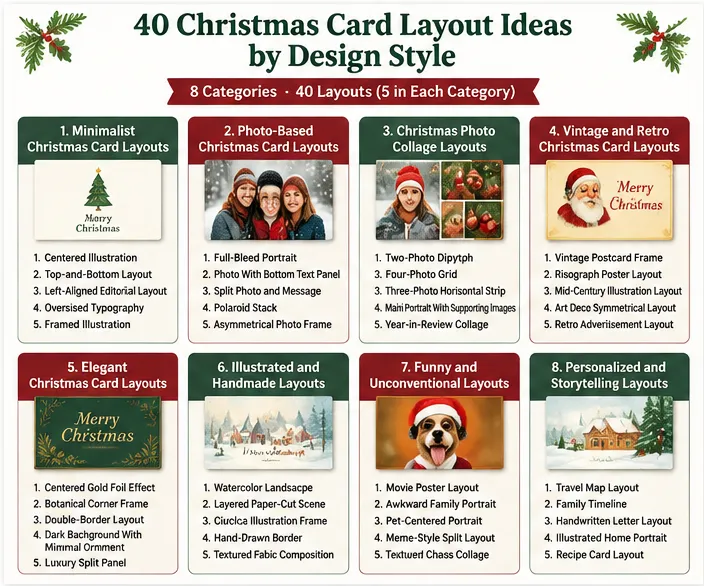
1. Minimalist Christmas Card Layouts
- Centered Illustration: Place one Christmas tree or ornament in the center with a short greeting underneath.
- Top-and-Bottom Layout: Position a small seasonal illustration at the top and the greeting at the bottom.
- Left-Aligned Editorial Layout: Align the headline on the left and use a small decorative illustration on the opposite side.
- Oversized Typography: Make "Merry Christmas" the dominant visual element with minimal supporting graphics.
- Framed Illustration: Place a small winter illustration inside a thin rectangular border, surrounded by negative space.
2. Photo-Based Christmas Card Layouts
- Full-Bleed Portrait: Use one family photograph across the entire front of the card.
- Photo With Bottom Text Panel: Reserve a solid-colored strip below the photograph for the greeting.
- Split Photo and Message: Divide the composition into two sections, one for photography and one for text.
- Polaroid Stack: Arrange overlapping Polaroid-style photographs with small handwritten captions.
- Asymmetrical Photo Frame: Position one large photograph off-center and balance it with a smaller message area.
3. Christmas Photo Collage Layouts
- Two-Photo Diptych: Place two photographs side by side to show different family moments.
- Four-Photo Grid: Arrange four equally sized images in a symmetrical grid.
- Three-Photo Horizontal Strip: Use three photographs in one horizontal row with a greeting above or below.
- Main Portrait With Supporting Images: Feature one large photograph alongside two smaller supporting pictures.
- Year-in-Review Collage: Organize photographs from different moments of the year into a structured composition.
4. Vintage and Retro Christmas Card Layouts
- Vintage Postcard Frame: Add decorative borders, aged-paper textures, and traditional greeting typography.
- Risograph Poster Layout: Use overlapping color blocks and simulated grainy printing textures.
- Mid-Century Illustration Layout: Combine geometric shapes, simplified trees, and playful typography.
- Art Deco Symmetrical Layout: Frame the central greeting with geometric ornaments and symmetrical borders.
- Retro Advertisement Layout: Use oversized headlines, vintage illustrations, and a bold poster-like composition.
5. Elegant Christmas Card Layouts
- Centered Gold Foil Effect: Place metallic-looking typography in the center of a dark background.
- Botanical Corner Frame: Arrange evergreen branches around the corners while leaving the center open.
- Double-Border Layout: Use two thin decorative borders around a central greeting.
- Dark Background With Minimal Ornament: Feature one gold or silver ornament against a deep green or navy background.
- Luxury Split Panel: Combine a textured photographic panel with an elegant typography panel.
6. Illustrated and Handmade Christmas Card Layouts
- Watercolor Landscape: Place a winter village illustration across the lower portion of the card.
- Layered Paper-Cut Scene: Build a winter landscape using overlapping illustrated shapes.
- Circular Illustration Frame: Put a Christmas scene inside a large circular composition.
- Hand-Drawn Border: Surround the greeting with illustrated branches, stars, or seasonal objects.
- Textured Fabric Composition: Simulate embroidery, knitted patterns, or stitched decorative elements.
7. Funny and Unconventional Christmas Card Layouts
- Movie Poster Layout: Present family members as characters in a fictional Christmas movie.
- Awkward Family Portrait: Use a deliberately formal, humorous family photograph with a vintage composition.
- Pet-Centered Portrait: Place a dog or cat in the center with festive props and a short greeting.
- Meme-Style Split Layout: Combine a humorous photograph with a short caption.
- Holiday Chaos Collage: Arrange several funny photographs showing tangled lights, unusual outfits, or festive mishaps.
8. Personalized and Storytelling Layouts
- Travel Map Layout: Combine travel photographs with a simple illustrated map.
- Family Timeline: Arrange important annual milestones in chronological order.
- Handwritten Letter Layout: Use a personal message as the main visual element.
- Illustrated Home Portrait: Feature a drawing of the family's home with seasonal decorations.
- Recipe Card Layout: Present a favorite holiday recipe alongside a personal Christmas greeting.
Design tip: Choose the layout before generating illustrations or editing photographs. This prevents the common problem of creating attractive individual assets that do not fit together in the final composition.
10 Christmas Card Color Combinations That Look Beautiful
Color selection affects the mood, readability, and overall identity of a Christmas card. Traditional red and green remain recognizable, but modern designs can also use muted neutrals, pastel colors, and sophisticated metallic accents.
Palette | Main Colors (Hex) | Best For |
|---|---|---|
Classic Christmas | #B52832, #214E34, #F7F1E3 | Traditional family cards |
Scandinavian Winter | #526B56, #D8CDB9, #FAF8F2 | Minimalist designs |
Emerald and Gold | #103E32, #C5A059, #F5EFE3 | Luxury greetings |
Winter Wonderland | #A9C9DD, #F5F8FC, #65758B | Snowy illustrations |
Vintage Christmas | #9C403B, #788665, #E9D9B9 | Retro postcards |
Midnight Blue | #172A46, #C4CCD5, #FFFFFF | Elegant winter themes |
Rustic Christmas | #B47150, #6C4937, #F0E1C8 | Handmade-style cards |
Modern Pastel | #E4B5BD, #A8C3AB, #FFF4E5 | Contemporary greetings |
Burgundy Elegance | #742C40, #D5B98C, #FFF8EB | Premium typography |
Candy Cane | #D62940, #F8B9C5, #FFFFFF | Playful family cards |
How to Balance Colors in Christmas Card Design
A useful starting point is the 60-30-10 color rule:
- 60% dominant color: Background and large visual areas.
- 30% secondary color: Illustrations, photographs, and supporting graphics.
- 10% accent color: Small decorative details and highlighted text.
This is a flexible composition guideline, not a strict requirement. For photo-based cards, extract supporting colors from clothing, decorations, and the photographic background to create a more cohesive design. Creating a moodboard can also help organize your color choices and visual references before finalizing the card.
How to Choose Fonts for Christmas Cards
Typography determines whether a Christmas card feels playful, traditional, elegant, or contemporary.
Font Pairing | Visual Style | Recommended Use |
|---|---|---|
Playfair Display + Lato | Elegant and refined | Luxury cards |
Cormorant Garamond + Montserrat | Classic and sophisticated | Formal greetings |
Great Vibes + Open Sans | Romantic and decorative | Couples' cards |
Fraunces + DM Sans | Warm and contemporary | Illustrated cards |
Bebas Neue + Inter | Bold and modern | Typography-led designs |
Caveat + Nunito | Friendly and personal | Family greetings |
Follow these typography principles:
- Use no more than two complementary font families unless the design has a specific reason to use more.
- Keep decorative script fonts for short greetings.
- Use simple fonts for names, dates, and longer messages.
- Maintain strong contrast between text and background.
- Avoid placing important wording over busy photographs.
Christmas Card Photo Ideas for Every Family
A memorable photo card does not require a professional photography studio. Simple lighting, coordinated clothing, and a creative concept can produce a more personal result than a generic portrait template.
Creative Family Christmas Photos at Home
Consider these photography concepts:
- Matching Christmas pajamas with coordinated poses.
- A family portrait beside a decorated Christmas tree.
- A humorous vintage-style studio photograph.
- A playful photograph surrounded by holiday lights.
- A family baking or decorating Christmas cookies.
- A staged holiday scene featuring deliberately exaggerated expressions.
One documented household photography project took approximately 30 minutes and produced four collage photographs plus two additional couples' photographs. The creator later reported that relatives continued displaying an earlier holiday photograph.
The takeaway is simple: a strong photography concept can be more important than expensive equipment.
Christmas Card Photo Ideas for Couples, Singles, and Pet Owners
Traditional family templates do not work for everyone. Consider these alternatives:
Audience | Photo Concept | Layout |
|---|---|---|
Couples | Favorite travel memory | Two-photo diptych |
Singles | Personal year-in-review | Main portrait with supporting images |
Pet owners | Pet wearing festive accessories | Centered portrait |
Long-distance families | Separate portraits combined in a grid | Multi-photo collage |
Friends | Matching outfits and humorous poses | Group portrait |
Travel enthusiasts | Favorite destination of the year | Travel map layout |
Personalization should reflect the sender's actual life rather than force everyone into a traditional family-photo format.
How to Make Christmas Photo Collages Look Professional
When combining multiple photographs:
- Select images with similar lighting and visual tone.
- Use consistent spacing between photographs.
- Keep the number of images manageable.
- Use one dominant photograph when the card needs a clear focal point.
- Add short captions only when they contribute to the story.
Avoid combining photographs with drastically different color temperatures or image quality without first adjusting them.
How to Design a Christmas Card With AI
AI-assisted design can help explore visual directions, generate illustrations, and develop alternative compositions. However, the best workflow combines automated generation with human editing.
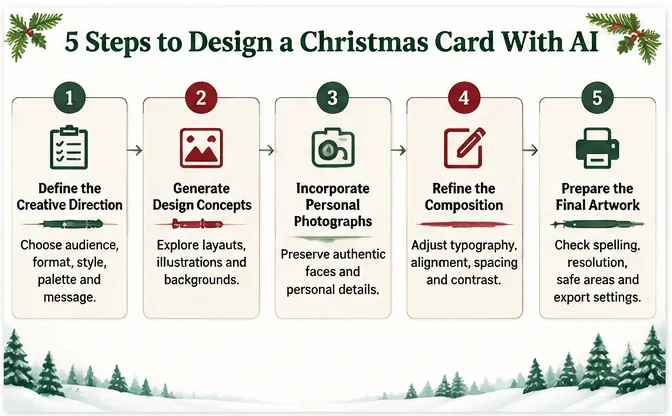
A Practical Five-Step AI Christmas Card Workflow
Step 1: Define the Creative Direction
Choose the audience, card format, visual style, color palette, and message.
Step 2: Generate Design Concepts
Explore different layouts, illustrations, decorative elements, and background treatments.
Step 3: Incorporate Personal Photographs
Use authentic photographs where possible. Check that faces, expressions, and important personal details remain recognizable.
Step 4: Refine the Composition
Adjust alignment, typography, spacing, contrast, and decorative elements. Keep the final greeting editable.
Step 5: Prepare the Final Artwork
Check spelling, image resolution, safe areas, and export settings before sharing or printing.
You can explore personalized holiday concepts with the Virse AI Christmas Card Generator.
Example AI Christmas Card Design Prompt
Create an elegant landscape Christmas greeting card featuring delicate evergreen branches, subtle vintage paper textures, a warm ivory background, burgundy accents, and refined editorial typography. Use a balanced composition with generous negative space for a personalized holiday message. Add restrained seasonal details and maintain a sophisticated, timeless printed-card aesthetic. Avoid excessive decorations and artificial-looking textures.
Important: Add final greetings and names as editable text whenever possible. Image-generation systems may produce incorrect or distorted lettering.
How to Make AI Christmas Cards Look More Natural
AI-generated Christmas cards can suffer from unnatural facial expressions, inconsistent lighting, incorrect subject positioning, and artificial color grading.
A documented family photo-compositing case involved combining two photographs of family members wearing matching pajamas. The generated result contained positioning and background-integration problems and required additional manual correction. AI image editing models can be explored for image-editing workflows, although the final result should always be checked manually.
This illustrates an important distinction: generating a visually attractive image is not the same as creating a believable family photograph.
Use the following checklist:
- Preserve recognizable facial features and natural expressions.
- Match the lighting direction between photographs.
- Avoid excessive skin smoothing.
- Check hands, hair, clothing, and image boundaries.
- Use a consistent background perspective.
- Avoid strong yellow filters that distort skin tones.
- Compare the final result against the original photographs.
When photographs cannot be integrated naturally, a structured collage is often a better design decision than forcing an artificial group portrait.
How to Prepare Christmas Cards for Professional Printing
A design that looks sharp on a monitor may appear pixelated or incorrectly cropped when printed.
Recommended Christmas Card Print Specifications
300 pixels per inch (PPI) is a common target for high-quality close-viewed prints. The actual resolution requirement depends on the printer, image size, and production process. Adobe explains the relationship between image resolution and print quality in its official printing resolution guidance.
The following examples use flat, single-panel card artwork and assume 300 PPI.
Finished Size | Pixels at 300 PPI | Canvas With 0.125-Inch Bleed on Each Edge |
|---|---|---|
4 × 6 inches | 1200 × 1800 px | 4.25 × 6.25 inches |
5 × 7 inches | 1500 × 2100 px | 5.25 × 7.25 inches |
5.5 × 8.5 inches | 1650 × 2550 px | 5.75 × 8.75 inches |
6 × 8 inches | 1800 × 2400 px | 6.25 × 8.25 inches |
The pixel dimensions with bleed are:
Finished Size | Pixel Dimensions Including Bleed |
|---|---|
4 × 6 inches | 1275 × 1875 px |
5 × 7 inches | 1575 × 2175 px |
5.5 × 8.5 inches | 1725 × 2625 px |
6 × 8 inches | 1875 × 2475 px |
Adobe identifies 0.125 inches (3 mm) as a common commercial printing bleed, but the actual requirement should always be confirmed with your chosen print provider. See its official bleed and PDF preparation guidance.
Understanding Bleed, Trim, and Safe Areas
- Bleed: Extra artwork extending beyond the final cutting boundary.
- Trim line: The boundary where the printed card is cut.
- Safe area: The interior region where important text and visual details should remain.
For a design with a 0.125-inch bleed on each edge, the artwork extends beyond the finished dimensions by 0.125 inches on both sides.
Do not assume that the bleed area is also the safe area. Your printer may specify a separate safety margin.
Final Print Quality Checklist
Before submitting a Christmas card:
- Confirm the finished card dimensions.
- Add the bleed required by the printer.
- Keep names and greetings away from trim edges.
- Check the effective image resolution at final size.
- Review color and contrast.
- Verify the front, back, and fold orientation.
- Export using the printer's requested file format.
- Request a proof when ordering a large batch.
Never rely solely on the on-screen preview to judge the final printed result.
How Much Does Christmas Card Printing Cost?
Printing costs vary by quantity, paper, finish, shipping, and provider.
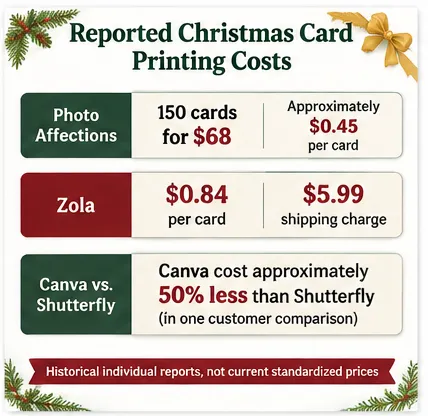
Historical consumer reports provide useful examples of the trade-offs involved:
Reported Purchase Experience | Reported Cost |
|---|---|
Photo Affections order of 150 cards | $68 |
Calculated average per card | Approximately $0.45 |
Zola reported card price | $0.84 |
Zola reported shipping charge | $5.99 |
One Canva vs. Shutterfly comparison | Canva cost approximately 50% less |
These are individual historical purchasing experiences, not current provider quotations or industry-wide price comparisons.
One customer reported lower costs through Canva but experienced grainy photographs and blurry backgrounds after printing. This highlights why price should be evaluated alongside image quality and production consistency.
For a large order, compare the complete cost, including shipping, envelopes, paper quality, and any additional finishing charges.
How to Make Christmas Cards in Bulk Without Losing Personalization
Batch production is useful when you need to create many cards without designing every composition from scratch.
A documented cardmaker produced approximately 60 cards annually using five foundational designs, changing one or two elements on individual cards to maintain variety.
Another volunteer project planned 90 Christmas cards for a local care home and completed 39 in one afternoon using reusable materials and batch-making techniques.
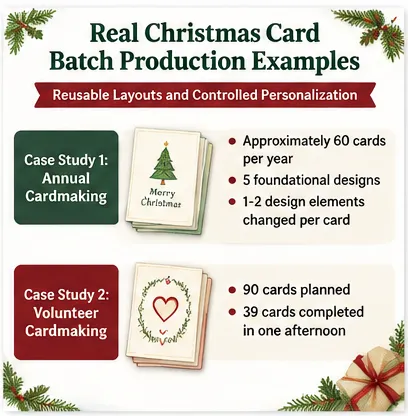
These examples suggest a practical production strategy:
- Create a small collection of master layouts.
- Prepare photographs, illustrations, and messages together.
- Reuse decorative assets and background elements.
- Personalize names, captions, and selected design details.
- Inspect every finished card before printing or delivery.
For AI-assisted production, maintain a consistent visual direction while varying only the elements that need personalization.
A reusable design system makes bulk production easier without forcing every recipient to receive an identical card.
Common Christmas Card Design Mistakes to Avoid
Common Mistake | Better Approach |
|---|---|
Too many decorative elements | Establish one dominant focal point. |
Inconsistent colors | Use a coordinated palette. |
Excessive decorative fonts | Limit typography combinations. |
Artificial AI portraits | Preserve authentic photographs and manually refine composites. |
Crowded photo collages | Use consistent spacing and image hierarchy. |
Low-resolution photographs | Check effective resolution at final print size. |
Text too close to card edges | Follow the printer's safe-area specifications. |
Generic greetings | Include meaningful personal details. |
Recreating every card from scratch | Use reusable layouts with controlled variations. |
Conclusion
The best Christmas card design is not necessarily the most elaborate. It is the one that combines a thoughtful composition, recognizable seasonal colors, readable typography, and personal details that make the recipient feel remembered. Whether you choose a minimalist greeting, a vintage postcard, a humorous family portrait, or a personalized photo collage, start with a clear layout and refine every element before printing. AI can make creative exploration easier, but authentic photographs, careful editing, and meaningful personalization are what make a Christmas card memorable.
Frequently Asked Questions
What is the best layout for a Christmas card?
A full-bleed photograph works well for a strong family portrait, while a split layout provides room for both photography and a personal message. Photo grids are useful for annual updates, and centered illustrations work particularly well for minimalist cards. Choose a layout based on the strongest visual element rather than trying to include everything.
What are the best colors for Christmas card design?
Classic red, forest green, and cream create a traditional Christmas appearance. Emerald and gold work well for elegant designs, while navy and silver create a sophisticated winter atmosphere. Muted green, warm neutrals, and pastel accents are suitable for contemporary holiday cards.
What are some creative Christmas card photo ideas?
Try matching pajamas, humorous family portraits, pet photography, holiday baking scenes, travel memories, or annual photo collages. Choose a concept that reflects your personality. Consistent lighting, coordinated clothing, and simple backgrounds can make even casual home photography look polished.
What resolution should a Christmas card be printed at?
A common target is 300 PPI at the final printed size. For example, a flat 5 × 7-inch card requires 1500 × 2100 pixels before adding bleed. However, the final specifications should follow your printing provider's requirements.
How much bleed should a Christmas card have?
A common commercial printing bleed is 0.125 inches on each edge, although some providers require different specifications. Bleed extends the artwork beyond the trim boundary to prevent unwanted white edges after cutting. Always check the printer's production template.
How can I make an AI-generated Christmas card look realistic?
Start with authentic photographs, preserve natural facial features, and avoid excessive image smoothing. Match lighting and perspective when combining separate photographs. Review the final composition manually, especially faces, hands, backgrounds, and image boundaries.
Can I create Christmas cards without hiring a photographer?
Yes. Use natural window light, a simple background, coordinated clothing, and household decorations. A tripod or stable phone support can help when taking group photographs. You can also use separate portraits in a collage if everyone cannot be photographed together.
How can I make multiple Christmas cards without designing each one separately?
Create a small set of reusable master layouts and change photographs, names, greetings, or accent colors for each recipient. This approach maintains visual consistency while preserving individual personalization. Reusing materials and decorative assets also reduces repetitive production work.
More from the Virse Blog
Inspiration

50 Christmas Card Ideas for 2026 (Designs You Can Make Today)
November 24, 2026 by Vincent
Inspiration
50 Christmas Illustration Ideas for 2026 (Cute, Cozy & Creative Designs)
November 24, 2026 by Yifan Zhao
Inspiration
Business Christmas Cards: 30 Corporate Holiday Card Ideas, Wording and Etiquette
November 24, 2026 by Yifan Zhao