
Business Christmas Cards: 30 Corporate Holiday Card Ideas, Wording and Etiquette
 Yifan Zhao24 min read ·
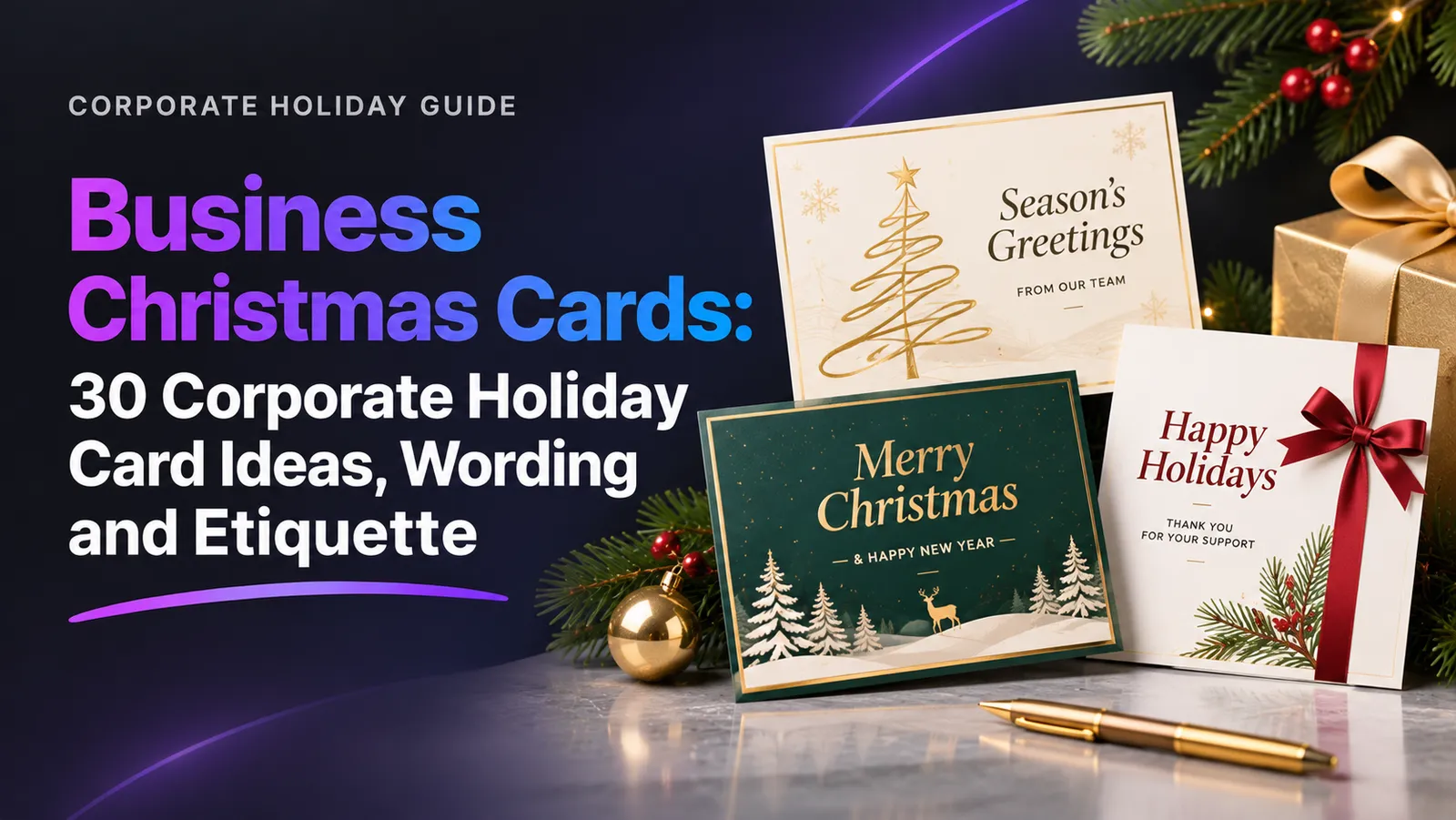
The best business Christmas cards combine professional design, subtle company branding, sincere holiday wishes, and thoughtful personalization. Whether you are sending minimalist corporate holiday cards to clients, premium greetings to business partners, or festive team photo cards to employees, the goal is to express appreciation without making the recipient feel like they are receiving another advertisement. Understanding the fundamentals of graphic design can help businesses create cards that balance visual appeal and clear communication.
However, creating memorable corporate holiday cards involves more than choosing a festive template. Businesses must coordinate branding, recipient lists, personalized messages, executive signatures, printing specifications, and mailing deadlines. These challenges become particularly noticeable when preparing hundreds of cards while trying to preserve a personal touch. Maintaining brand consistency across AI-generated creative assets is also important when producing multiple card variations.
This guide explores 30 business Christmas card ideas, ready-to-use corporate holiday messages, professional design principles, bulk production workflows, and business etiquette. It also explains how AI for graphic design can simplify creative production without sacrificing brand consistency or print quality.
What Makes a Good Business Christmas Card?
A good business Christmas card combines a professional visual identity with a genuine message of appreciation. It should communicate gratitude, reflect the company's personality, and make the recipient feel valued rather than targeted by a marketing campaign.
The most effective corporate holiday cards balance five elements:
Design Element | Recommended Approach | What to Avoid |
|---|---|---|
Branding | Subtle logo placement and consistent brand colors | Oversized logos and promotional messaging |
Typography | Readable serif or sans-serif combinations | Excessive decorative fonts |
Messaging | Genuine appreciation and seasonal wishes | Aggressive sales language |
Personalization | Recipient names and relationship-specific details | Identical impersonal messages |
Visual Design | Cohesive festive illustrations and balanced layouts | Crowded graphics and competing elements |
A business Christmas card should feel like a thoughtful gesture first and a brand communication second.
For example, a technology company might use a minimalist geometric Christmas tree in its brand colors, while a luxury consulting firm might prefer an elegant dark-green card with gold foil accents.
Both can communicate professionalism without turning the greeting into an advertisement.
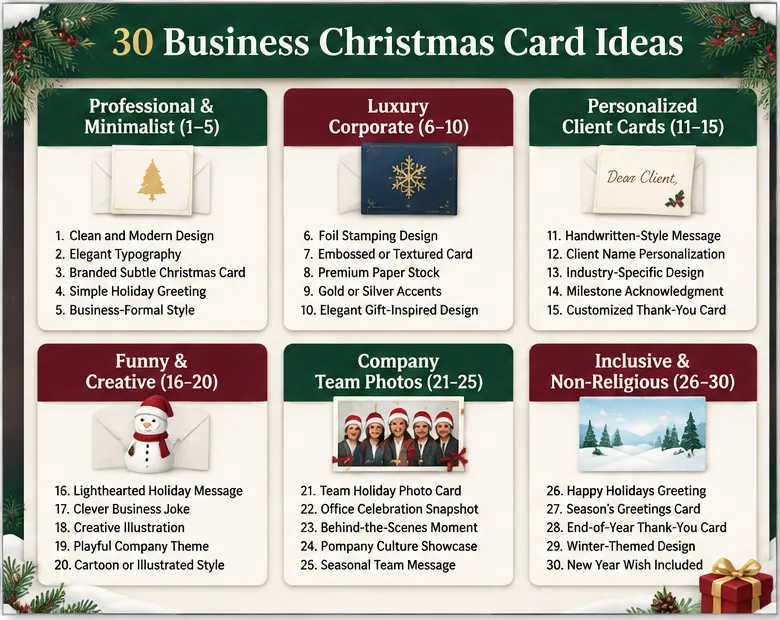
30 Creative Business Christmas Card Ideas
These 30 corporate holiday card ideas cover six visual directions. Each concept includes practical guidance on color, composition, typography, and suitable business applications.
Professional and Minimalist Business Christmas Cards
Minimalist designs work particularly well for technology companies, SaaS businesses, consulting firms, and organizations with established visual identities.
1. Geometric Christmas Tree
Create a Christmas tree using overlapping triangles, circles, and simple geometric shapes.
- Colors: Navy, forest green, cream, and muted gold.
- Layout: Center the geometric tree with a short greeting underneath.
- Typography: Clean sans-serif fonts.
- Best for: Technology companies, startups, and professional services.
2. Single-Line Christmas Illustration
Use a continuous line to illustrate a Christmas tree, ornament, or winter landscape.
- Colors: Charcoal, ivory, and one accent color.
- Layout: Place the illustration in the center with generous whitespace.
- Typography: Elegant serif lettering.
- Best for: Design agencies, creative studios, and consulting firms.
3. Monochromatic Holiday Card
Build the entire composition around different shades of one corporate brand color.
- Colors: Multiple shades of navy, emerald, or burgundy.
- Layout: Combine a subtle background pattern with a prominent holiday greeting.
- Typography: Simple, high-contrast lettering.
- Best for: Companies seeking strong brand consistency.
4. Typography-Only Christmas Card
Make the words "Season's Greetings" or "Warmest Holiday Wishes" the main visual element.
- Colors: Black and cream, or dark green and white.
- Layout: Use oversized typography with carefully balanced negative space.
- Typography: A refined serif paired with a minimal sans-serif.
- Best for: Professional firms and brands with understated identities.
5. Abstract Brand-Inspired Snowflakes
Transform elements of your visual identity into decorative snowflake patterns.
- Colors: Brand colors combined with white or silver.
- Layout: Repeat abstract symbols around a central greeting.
- Typography: Modern sans-serif.
- Best for: SaaS companies, technology brands, and corporate teams.
Luxury Corporate Christmas Cards
Premium designs are appropriate for VIP clients, executive relationships, financial services, and luxury brands.
6. Black and Gold Christmas Card
Combine a matte black background with metallic gold typography and delicate festive illustrations.
- Colors: Black, champagne gold, and ivory.
- Layout: Position a small gold ornament above the greeting.
- Typography: High-contrast serif lettering.
- Best for: Financial firms, luxury brands, and executive clients.
7. Emerald Green and Gold Foil Card
Use deep emerald green, botanical illustrations, and restrained gold foil details.
- Colors: Emerald, antique gold, and cream.
- Layout: Frame the message with illustrated pine branches.
- Typography: Elegant serif fonts.
- Best for: Professional services and premium customer relationships.
8. Embossed Christmas Ornament
Create a tactile design featuring raised ornament illustrations.
- Colors: Ivory, champagne, and muted metallic tones.
- Layout: Feature one large ornament with a small seasonal greeting.
- Typography: Minimal serif lettering.
- Best for: High-value client appreciation and luxury correspondence.
9. Elegant Winter Botanical Card
Combine pine branches, eucalyptus, berries, and delicate winter foliage.
- Colors: Sage green, cream, burgundy, and muted gold.
- Layout: Use a botanical border around the central greeting.
- Typography: Refined serif typography.
- Best for: Hospitality, consulting, and lifestyle businesses.
10. Luxury Architectural Illustration
Feature a winter illustration of your company's headquarters, office building, or a recognizable local landmark.
- Colors: Deep blue, warm gray, and gold accents.
- Layout: Place the building illustration across the lower half of the card.
- Typography: Restrained corporate typography.
- Best for: Real estate firms, architecture studios, and established businesses.
Personalized Business Christmas Cards for Clients
Personalized greetings are particularly useful for maintaining long-term customer relationships.
11. Handwritten Client Appreciation Card
Use a professionally designed cover and reserve the interior for a handwritten message.
- Colors: Warm cream, burgundy, and forest green.
- Layout: Minimal cover with generous writing space inside.
- Personalization: Include the recipient's name and a specific thank-you.
- Best for: Long-term clients and important business partners.
12. Customer Milestone Christmas Card
Recognize a meaningful project, anniversary, or shared business achievement from the past year.
- Colors: Brand colors with festive accents.
- Layout: Feature a short milestone headline and a supporting illustration.
- Personalization: Mention the specific achievement.
- Best for: Account management and customer success teams.
13. Personalized Name Ornament Card
Incorporate the recipient's name into an illustrated Christmas ornament or gift tag.
- Colors: Gold, red, cream, and emerald.
- Layout: Center the name inside a prominent ornament.
- Typography: Clear lettering that remains readable at print size.
- Best for: Retail businesses and personalized client greetings.
14. Local Community Christmas Card
Illustrate a familiar neighborhood, city skyline, or regional winter landscape.
- Colors: Seasonal blues, warm neutrals, and subtle reds.
- Layout: Use a panoramic illustration with a short greeting.
- Personalization: Reference the recipient's local community where appropriate.
- Best for: Real estate agencies, local retailers, and regional businesses.
15. Custom Client Industry Illustration
Create festive illustrations connected to the recipient's profession.
- Colors: Industry-specific brand colors with seasonal accents.
- Layout: Combine a recognizable professional object with Christmas elements.
- Examples: Architectural blueprints, medical symbols, technology products, or financial charts.
- Best for: B2B companies serving specialized industries.
Funny and Creative Business Christmas Cards
Humorous designs can help creative agencies, startups, and informal business brands stand out while maintaining professionalism.
16. Out-of-Office Christmas Card
Illustrate an empty office chair, festive coffee mug, or computer displaying a holiday message.
- Colors: Soft blue, cream, and festive red.
- Layout: Feature a playful office scene.
- Greeting: "Out of Office. Into the Holiday Spirit."
- Best for: Startups and creative teams.
17. Christmas Deadline Survival Card
Use a playful illustration celebrating completed projects, survived deadlines, and a well-earned holiday break.
- Colors: Red, green, and warm beige.
- Layout: Create a small festive checklist or office illustration.
- Greeting: "Another Year of Great Work. Time to Celebrate."
- Best for: Marketing agencies and project-based businesses.
18. Industry-Specific Christmas Pun
Create a tasteful visual joke related to your profession.
- Colors: Brand colors with one festive accent.
- Layout: Pair a simple illustration with a short headline.
- Examples: "Have a Suite Christmas" for hospitality or "Let's Make This Season Bright" for lighting businesses.
- Best for: Creative brands and informal B2B relationships.
19. Santa's Corporate Dashboard
Design a fictional dashboard featuring completed gift deliveries, holiday tasks, and festive progress indicators.
- Colors: Dark navy, red, and white.
- Layout: Use a clean interface-inspired composition.
- Typography: Modern sans-serif.
- Best for: Software companies and technology startups.
20. Office Pet Christmas Card
Feature an illustrated or photographed office pet wearing festive accessories.
- Colors: Warm neutrals, red, and green.
- Layout: Use a large central photograph with a simple greeting.
- Best for: Small businesses, creative agencies, and informal company cultures.
Company Team Photo Christmas Cards
Team-based designs introduce a human dimension that conventional corporate illustrations may lack.
21. Classic Company Team Portrait
Combine a professional group photograph with a simple festive border.
- Colors: Neutral backgrounds with restrained holiday accents.
- Layout: Center the group photo and position the greeting below.
- Typography: Clean corporate lettering.
- Best for: Established businesses and professional teams.
22. Employee Photo Collage
Arrange individual employee portraits into a Christmas tree, ornament, or geometric composition.
- Colors: Consistent background colors and subtle festive accents.
- Layout: Use a structured grid to keep portraits balanced.
- Typography: Minimal text to avoid visual clutter.
- Best for: Distributed companies and larger teams.
23. Behind-the-Scenes Holiday Card
Use candid photographs showing everyday team activities and shared achievements.
- Colors: Natural photography with a simple branded frame.
- Layout: Combine several candid moments with a short thank-you message.
- Best for: Companies emphasizing workplace culture.
24. Illustrated Team Christmas Portrait
Transform team photographs into a cohesive watercolor, editorial illustration, or cartoon-style composition using AI.
- Colors: Consistent across all illustrated portraits.
- Layout: Arrange team members in a unified festive scene.
- Typography: Friendly but professional.
- Best for: Creative agencies and modern startups.
25. Company Year-in-Review Card
Combine selected photographs and meaningful milestones from the past year with a message of appreciation.
- Colors: Corporate brand palette with seasonal accents.
- Layout: Use a photo-led composition with a small milestone section.
- Typography: Clear headings and concise captions.
- Best for: Companies with meaningful annual achievements to celebrate.
Inclusive and Non-Religious Corporate Holiday Cards
Inclusive holiday cards are particularly useful when communicating with international customers and culturally diverse teams.
26. Peaceful Winter Landscape
Use snowy mountains, forests, or quiet city scenes without explicit religious imagery.
- Colors: Ice blue, white, and silver.
- Layout: Full-width winter landscape with a short greeting.
- Typography: Minimal sans-serif.
- Best for: International companies.
27. Stars and Season's Greetings
Combine abstract stars with neutral seasonal messages.
- Colors: Midnight blue, champagne, and ivory.
- Layout: Use scattered stars around a centered greeting.
- Typography: Elegant serif.
- Best for: Corporate teams serving culturally diverse audiences.
28. International Holiday Greetings
Include carefully reviewed multilingual greetings for customers across different markets.
- Colors: Consistent brand colors.
- Layout: Use a balanced typographic composition with clearly separated languages.
- Typography: Fonts that support the required character sets.
- Best for: International businesses and global customer teams.
29. New Year Appreciation Card
Focus on gratitude for the past year and optimism for the year ahead.
- Colors: Navy, gold, and cream.
- Layout: Combine a simple celebratory illustration with a forward-looking message.
- Typography: Refined and professional.
- Best for: Business partners and clients who do not celebrate Christmas.
30. Interactive QR Code Holiday Card
Include a discreet QR code linking to a personalized thank-you video, team message, or digital holiday experience.
- Colors: Brand colors with a small festive accent.
- Layout: Place the QR code on the back or inside the card.
- Typography: Clear instructions such as "Scan to See Our Holiday Message."
- Best for: Technology companies, marketing agencies, and digitally engaged customers.
Always test the QR code after final layout and printing. It should remain large enough to scan reliably and should not replace the actual holiday greeting.
Which Business Christmas Card Design Is Best for Your Industry?
Your industry, brand personality, and recipient relationships should determine the visual direction.
Industry | Recommended Style | Visual Elements |
|---|---|---|
Technology and SaaS | Modern minimalist | Geometry, abstract patterns |
Finance and banking | Luxury corporate | Navy, emerald, gold |
Legal and consulting | Elegant traditional | Serif typography, botanical details |
Real estate | Personalized and local | Architecture, neighborhood illustrations |
Creative agencies | Artistic and humorous | Custom illustrations, playful typography |
Retail and hospitality | Warm and festive | Seasonal imagery, personal messages |
Nonprofits | Community-focused | Human-centered illustrations |
International businesses | Inclusive holiday | Winter landscapes, neutral greetings |
A consistent brand identity does not require identical cards for every recipient. Businesses can maintain shared colors, typography, and illustration styles while adapting messages and compositions for different audiences.
What to Write in a Business Christmas Card
A professional business Christmas card message should thank the recipient, acknowledge their relationship with your organization, and express sincere wishes for the holiday season.
The most effective messages are specific enough to feel personal but concise enough to fit comfortably inside a card.
Business Christmas Card Messages for Clients
- Thank you for your continued trust and partnership. Wishing you a wonderful Christmas and a prosperous New Year.
- We sincerely appreciate the opportunity to work with you. May your holiday season be filled with happiness and peace.
- Your support has been an important part of our year. Wishing you and your loved ones a joyful Christmas.
- It has been a pleasure working with you this year. We look forward to continuing our partnership in the year ahead.
Christmas Card Messages for Customers
- Thank you for choosing us and being part of our journey. Warmest wishes this Christmas.
- Your continued support means so much to our team. Wishing you a joyful holiday season.
- We are grateful for your loyalty and look forward to serving you in the coming year.
- Thank you for making this year meaningful for our business. Happy Holidays!
Corporate Holiday Messages for Employees
- Thank you for your dedication, creativity, and hard work throughout the year. Enjoy a well-deserved holiday break.
- Your contributions make our team stronger. Wishing you a peaceful and joyful holiday season.
- We appreciate everything you have helped us achieve this year. Happy Holidays!
- Your hard work has made a real difference. Wishing you and your family a wonderful Christmas.
Christmas Card Messages for Business Partners
- Thank you for another year of meaningful collaboration. We look forward to achieving more together.
- We value our partnership and wish your entire team a wonderful holiday season.
- Season's greetings and best wishes for continued success in the coming year.
- We appreciate your trust and collaboration. May the New Year bring new opportunities for us all.
Inclusive Business Holiday Messages
- Season's greetings and warm wishes for a happy and peaceful New Year.
- Wishing you and your loved ones joy, health, and happiness throughout the holiday season.
- With sincere appreciation for your support, we wish you a wonderful holiday season.
- May the coming year bring new opportunities, meaningful connections, and continued success.
The strongest business holiday messages emphasize gratitude rather than sales, promotions, or future purchasing decisions.
How to Design Business Christmas Cards with Your Company Logo
Company logos can reinforce brand recognition, but poor placement can make a thoughtful greeting feel like advertising.
Logo Placement | Best Use |
|---|---|
Inside the card | Personalized client greetings |
Back of the card | Luxury corporate cards |
Bottom corner of the cover | Minimalist business cards |
Integrated into illustrations | Creative brands |
Subtle background pattern | Brand-focused designs |
Use your logo as a supporting design element. Maintain adequate clear space, preserve its original proportions, and ensure sufficient contrast against the background.
How to Keep Corporate Branding Subtle
1. Start with the holiday concept. Build the visual composition around the seasonal theme rather than the company logo.
2. Use brand colors selectively. Incorporate one or two recognizable brand colors into the illustration, background, or typography.
3. Preserve logo integrity. Avoid stretching, recoloring, or recreating official brand assets without approval.
4. Separate generated artwork from original brand assets. In professional AI design workflows, it is preferable to generate festive illustrations separately and add the original company logo during editing.
5. Review the final composition. Check that the greeting remains the most prominent element and that the logo does not compete with the message.
This approach reduces the risk of distorted lettering, inaccurate brand symbols, and inconsistent logo reproduction.
How to Personalize Hundreds of Business Christmas Cards
Personalization becomes difficult when businesses rely entirely on handwritten production.
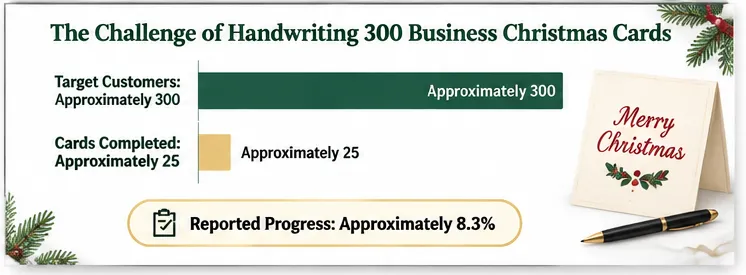
In one documented small-business case, a bakery owner planned to prepare cards for approximately 300 regular customers but experienced hand fatigue after completing around 25 cards, representing approximately 8.3% of the intended batch.
The business considered asking two employees to help write the messages while the owner personally signed the cards. The final efficiency improvement was not reported.
The lesson is that personalization needs a repeatable workflow rather than depending entirely on one person's time.
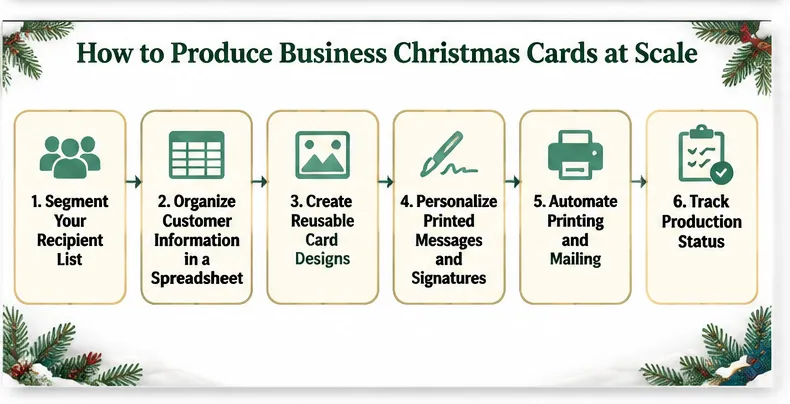
Step 1: Segment Your Recipient List
Do not treat every contact as an identical recipient.
Create separate groups for:
- VIP clients and major business partners.
- Active customers and long-term accounts.
- Prospective clients with established relationships.
- Employees and internal teams.
- General contacts and broader mailing lists.
This makes it easier to determine which recipients deserve handwritten messages, premium materials, or individualized designs.
Step 2: Organize Customer Information in a Spreadsheet
Prepare a centralized customer list before starting design or printing.
A practical CSV structure can include:
Field | Example | Purpose |
|---|---|---|
Recipient Name | Alex Morgan | Personalize the greeting |
Company | Northstar Studio | Identify the organization |
Contact Address | Verified mailing address | Delivery |
Recipient Group | VIP Client | Select the card version |
Message Template | Client Appreciation A | Assign the greeting |
Personal Note | Completed annual project | Add individual context |
Signature Version | Executive Signature | Manage approvals |
Mailing Status | Ready for Print | Track production |
Standardize names, company details, and address formats before importing the file into a mailing or printing service.
For larger lists, check for duplicate contacts, missing postal information, inconsistent capitalization, and outdated addresses.
Avoid including unnecessary personal information in production files.
Step 3: Create a Small Set of Reusable Designs
Instead of creating a completely different card for every recipient, establish a limited design system.
For example:
Card Version | Design | Intended Recipient |
|---|---|---|
Version A | Premium gold and navy | VIP clients |
Version B | Minimalist branded design | General customers |
Version C | Personalized appreciation card | Long-term partners |
Version D | Team photo card | Employees |
Version E | Inclusive winter greeting | International contacts |
This makes large-scale production more manageable while preserving visual consistency.
Step 4: Separate Printed Messages from Handwritten Details
A hybrid personalization approach can reduce repetitive work without eliminating the personal element.
- Printed greeting: Use a consistent, professionally approved message.
- Personalized name: Add the recipient's name where appropriate.
- Handwritten note: Reserve a small area for a genuine personal detail.
- Executive signature: Use approved signatures where permitted.
- Special recipients: Keep selected cards available for fully handwritten messages.
A separate administrative assistant discussion described managing approximately 150 corporate holiday cards, including the challenge of obtaining executive signatures. Scanned signature reproduction and separate versions for special recipients were considered, although measurable efficiency improvements were not reported.
Any reproduction of an executive signature should be explicitly authorized and handled according to company policy.
Step 5: Automate Printing and Mailing Where Appropriate
Businesses with large recipient lists can consider services that support address imports, personalized printing, handwriting, or direct mailing.
Examples mentioned in business discussions include:
Service | Relevant Workflow |
|---|---|
Handwrytten | Handwritten card production and mailing |
Lob | Address-based direct mail and API workflows |
Postable | Contact management and card sending |
PostGrid | Automated printing and mailing |
These services have different capabilities, pricing structures, and geographic coverage. Confirm their current features, data handling policies, and production requirements before selecting one.
AI design tools and mailing automation solve different problems: AI helps create the visual assets, while mailing services handle the physical distribution workflow.
Step 6: Track Production Status
A simple production tracker prevents important tasks from being overlooked.
Production Stage | Status to Record |
|---|---|
Recipient list | Draft / Verified |
Card design | In Progress / Approved |
Message | Draft / Approved |
Signature | Pending / Complete |
Printing | Ordered / Completed |
Quality inspection | Passed / Needs Revision |
Mailing | Ready / Sent |
The result is a repeatable process that supports personalization without requiring every task to be completed manually.
Printed vs. Digital Business Holiday Cards
Neither printed nor digital holiday cards are universally superior. The appropriate format depends on the recipient relationship, distribution requirements, and available budget.
Feature | Printed Cards | Digital Cards |
|---|---|---|
Physical experience | Tangible and tactile | Screen-based |
Distribution | Requires delivery | Electronic delivery |
Personalization | Handwritten or printed | Editable digital content |
Production costs | Printing and postage | Design and distribution |
Multimedia | Limited without QR codes | Supports animation and video |
Best for | Important clients and partners | Larger contact groups |
When Should You Choose Printed Cards?
Printed cards are particularly appropriate when:
- The recipient is a long-term or high-value client.
- Your business relationship benefits from personal correspondence.
- You want to include a handwritten message.
- The card is part of a broader appreciation package.
When Should You Choose Digital Cards?
Digital greetings are useful when:
- Your recipient list is geographically distributed.
- You need to reach a large number of contacts.
- You want to include videos or interactive content.
- Physical printing and postage are impractical.
A hybrid strategy can reserve personalized printed greetings for important relationships while using digital cards for broader communication.
Business Christmas Card Etiquette: When to Send and Who to Include
Corporate holiday card etiquette requires businesses to consider timing, professional boundaries, cultural preferences, and the nature of each relationship.
When Should Businesses Prepare Christmas Cards?
The following is a suggested planning framework, not a universal mailing deadline.
Period | Recommended Activity |
|---|---|
September | Define recipient groups and budget |
October | Develop designs and approve messages |
Early November | Finalize artwork and order proofs |
Late November | Complete printing and personalization |
December | Distribute according to delivery deadlines |
International delivery, custom printing finishes, and supplier availability may require earlier preparation.
A business that starts planning in late November may find itself coordinating card design, address verification, printing, executive signatures, and year-end operations simultaneously.
Who Should Receive Business Christmas Cards?
Prioritize:
- Active customers and loyal clients.
- Important business partners.
- Employees and internal teams.
- Suppliers and collaborators with meaningful relationships.
- Prospective customers with whom you have established contact.
A relationship-based distribution strategy is generally more useful than sending identical cards to every name in a database.
Should You Send Handwritten or Printed Messages?
The right choice depends on the relationship and production volume.
Handwritten messages can communicate genuine individual appreciation, while printed greetings make larger campaigns easier to manage.
A practical compromise is to print the main greeting and leave room for a short handwritten note.
Merry Christmas or Happy Holidays?
Use "Merry Christmas" when appropriate for the recipient and your established relationship.
Choose "Happy Holidays" or "Season's Greetings" when communicating with culturally diverse audiences or when individual preferences are unknown.
For international businesses, reviewing translated greetings with fluent speakers is preferable to relying entirely on automated translation.
How to Create Professional Business Christmas Cards with AI
AI design tools can accelerate visual exploration, generate original festive illustrations, and help businesses develop consistent design variations.
A tool such as Virse's AI Christmas Card Generator provides a starting point for exploring different visual concepts before preparing production-ready designs.
Step 1: Define Your Visual Direction
Determine:
- Recipient group and business relationship.
- Brand personality and visual identity.
- Preferred color palette.
- Greeting and messaging style.
- Intended print or digital format.
A clear creative brief makes it easier to generate consistent results.
Step 2: Generate Holiday Card Concepts
Use a detailed prompt specifying composition, visual style, typography space, and branding requirements.
Example AI Prompt:
Create a sophisticated corporate Christmas card featuring an abstract geometric Christmas tree, deep navy and muted gold colors, elegant minimalist composition, generous whitespace for a holiday greeting, subtle festive details, and a premium editorial design aesthetic. Leave a clean area for the original company logo. Use balanced visual hierarchy and ensure the illustration does not contain distorted text or artificial brand marks.
Generate several visual directions before selecting the final composition.
Step 3: Add Original Brand Assets
Insert approved company logos, brand typography, and finalized messages.
Do not rely on generated text for exact company names, addresses, or important greetings. Add these elements during editing and review spelling carefully.
Step 4: Create Recipient-Specific Variations
Adapt the approved design for clients, employees, business partners, and international audiences while preserving the shared visual identity.
For example, the same base design can support:
- A premium version for VIP clients.
- A personalized version for long-term customers.
- A team-focused version for employees.
- An inclusive version for international contacts.
Step 5: Prepare the Artwork for Printing
Confirm:
- Final trim dimensions.
- Bleed and safe-area requirements.
- Image resolution.
- Printer-required color settings.
- Fold orientation, where applicable.
- Envelope compatibility.
- Text and logo positioning.
For example, a 5 × 7-inch card is a possible finished format, but the actual document size must account for the printer's bleed requirements. A folded card also needs a correctly configured flat artwork layout.
Always follow the selected printing supplier's specifications instead of assuming that one template works for every printer.
Step 6: Approve a Physical or Digital Proof
Before approving a bulk order, review the final production proof.
Check spelling, recipient information, image quality, logo proportions, dimensions, and color appearance.
AI can accelerate creative production, but it cannot replace final human approval of the physical printing specifications.
Common Business Christmas Card Mistakes to Avoid
A reported marketing incident involved an employee ordering 400 incorrectly sized Christmas cards after failing to verify dimensions in an AI-generated printing order.
The incident illustrates why creative automation must include human production checks.
1. Making the Logo Too Prominent
A large company logo can make the card feel like a promotional advertisement.
Solution: Keep the branding secondary to the holiday greeting.
2. Using Generic Messages for Every Recipient
Identical greetings may feel impersonal when sent to important clients.
Solution: Create several message variations and personalize selected cards with specific details.
3. Starting Production Too Late
Last-minute planning creates pressure around approvals, printing, signatures, and mailing.
Solution: Set internal deadlines for artwork, recipient lists, and proof approval.
4. Ignoring Cultural Differences
Religious holiday messages may not suit every recipient.
Solution: Use inclusive greetings when recipient preferences are unknown.
5. Ordering Expensive Cards Without a Clear Purpose
Premium printing does not automatically produce better business relationships.
Solution: Match production quality to the importance of the relationship and your available budget.
6. Failing to Check Print Dimensions
A visually attractive digital design may not be suitable for the selected print format.
Solution: Confirm trim size, bleed, safe zones, resolution, and envelope compatibility before ordering.
7. Sending Incorrect or Duplicate Addresses
Outdated contact lists can lead to returned mail and unnecessary production costs.
Solution: Verify addresses, remove duplicates, and review the final mailing list.
Business Christmas Card Printing Checklist
Use this checklist before approving a corporate holiday card order.
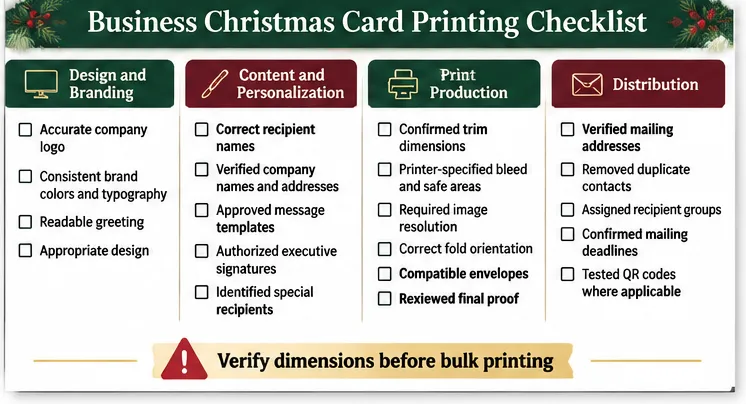
Design and Branding
- Company logo is accurate and correctly positioned.
- Brand colors and typography are consistent.
- Holiday message is readable.
- Design is appropriate for the intended audience.
Content and Personalization
- Recipient names are spelled correctly.
- Company names and addresses are verified.
- Message templates have been approved.
- Executive signatures have been authorized.
- Special recipients have been identified.
Print Production
- Final trim dimensions are confirmed.
- Bleed and safe areas follow printer specifications.
- Images meet the required resolution.
- Fold orientation is correct.
- Envelope dimensions are compatible.
- A final proof has been reviewed.
Distribution
- Mailing addresses have been checked.
- Duplicate contacts have been removed.
- Recipient groups have been assigned.
- Mailing deadlines have been confirmed.
- QR codes have been tested, if included.
Frequently Asked Questions
Should business Christmas cards include a company logo?
Yes. A company logo helps recipients recognize the sender, but it should remain secondary to the holiday greeting. Placing the logo inside the card, on the back, or in a discreet corner generally creates a more professional and less promotional appearance.
Are handwritten business Christmas cards better than printed cards?
Handwritten messages can make greetings feel more personal, particularly for important clients. Printed cards are more practical for larger recipient lists. Combining professionally printed designs with short handwritten messages offers a balance between personalization and production efficiency.
Are expensive corporate holiday cards worth the money?
Premium holiday cards may be appropriate for important business relationships or luxury brands. However, higher printing costs do not guarantee stronger customer relationships. Prioritize thoughtful messaging, relevant personalization, and appropriate design before investing in expensive materials.
What size should business Christmas cards be?
A 5 × 7-inch finished card is one possible format for business holiday greetings. However, businesses should confirm the final dimensions, folded or flat format, bleed requirements, envelope compatibility, and mailing specifications with their printing supplier before placing an order.
Can AI create business Christmas cards with company branding?
Yes. AI can generate festive illustrations, explore visual concepts, and create branded design variations. For accurate results, businesses should add original logo files and approved typography during editing, then review all text, dimensions, and production specifications before exporting.
How can I personalize Christmas cards for hundreds of customers?
Start by organizing customer information in a spreadsheet or CSV file. Segment recipients by relationship, create reusable card designs, assign appropriate message templates, and reserve handwritten notes for important contacts. Printing and mailing services can further simplify distribution, depending on their available features.
Is it appropriate to send digital Christmas cards to business clients?
Yes. Digital business holiday cards are suitable for large recipient lists, international contacts, and organizations seeking simpler distribution. Businesses can also combine digital greetings with personalized printed cards for clients who have particularly important relationships with the company.
Should businesses say Merry Christmas or Happy Holidays?
Use "Merry Christmas" when the recipient celebrates Christmas and the greeting fits your relationship. "Happy Holidays" and "Season's Greetings" are more inclusive alternatives when communicating with culturally diverse audiences or when individual preferences are unknown.
Conclusion
The most memorable business Christmas cards are not necessarily the most expensive or visually elaborate. They are the cards that communicate genuine appreciation, reflect a recognizable brand identity, and respect the recipient's preferences. By combining thoughtful design, appropriate holiday wording, selective personalization, and AI-assisted creative workflows, businesses can create professional corporate holiday cards at scale without losing the human connection that makes seasonal greetings meaningful.
Whether you are designing a minimalist company greeting, preparing premium cards for VIP clients, or organizing a large holiday mailing campaign, the key is to balance brand consistency, personal communication, and reliable production.
Explore Virse's AI Christmas Card Generator to develop festive visual concepts, experiment with different styles, and create distinctive business holiday card designs for your customers, employees, and partners.
More from the Virse Blog
Inspiration

50 Christmas Card Ideas for 2026 (Designs You Can Make Today)
November 24, 2026 by Vincent
Inspiration

50 Christmas Illustration Ideas for 2026 (Cute, Cozy & Creative Designs)
November 24, 2026 by Yifan Zhao
Inspiration
Christmas Card Design: 40 Creative Layouts, Color Combos and Photo Card Tips
November 24, 2026 by Yifan Zhao