
8 Best FLORA AI Alternatives in 2026: Workflow, API, and Cost Comparison
 Yifan Zhao19 min read ·
The best FLORA AI alternative in 2026 depends on the workflow you need to replace. Figma Weave, Freepik Spaces, and Morphic are closest to FLORA’s visual creative canvas. Virse is better suited to professional design teams that need shared project context, brand continuity, and controlled variation. ComfyUI, Wireflow, Krea, and Higgsfield are stronger for local control, API automation, fast generation, or character-led video. Teams comparing the category more broadly may also want to review the best AI design tools, Krea AI alternatives, and tools built for a complete AI design workflow.
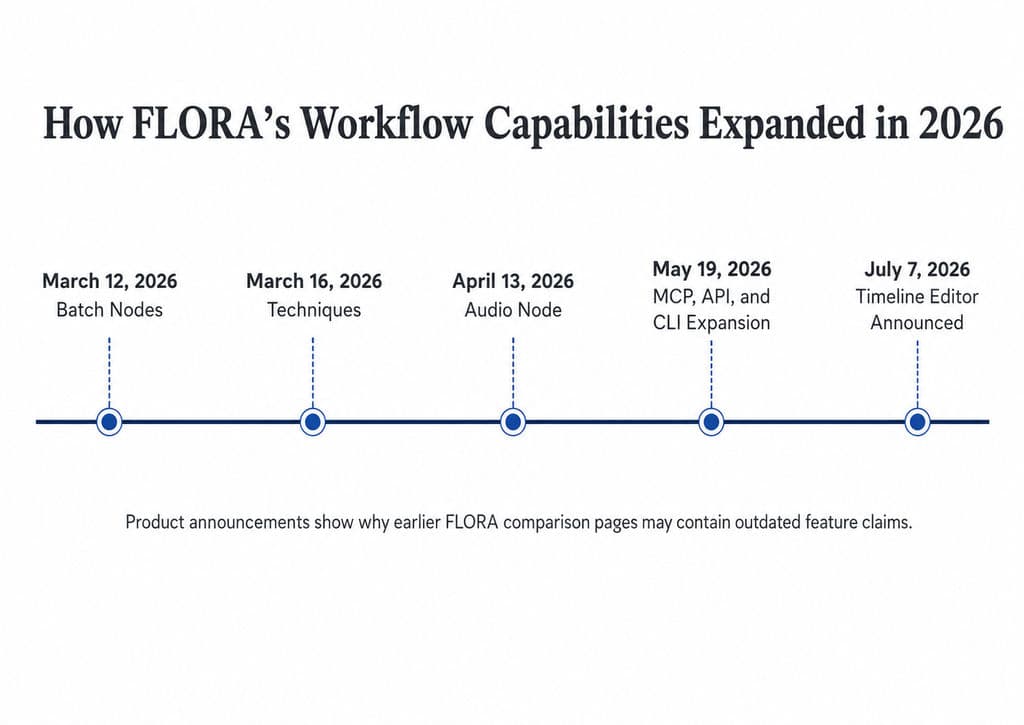
The risk is choosing an alternative based only on model quality or a outdated comparison table. FLORA now includes Batch Nodes, reusable Techniques, audio generation, API, MCP and CLI access, and an in-canvas video timeline. A weak replacement can force your team to rebuild prompts, workflows, brand references, approvals, and automation without solving the real production bottleneck. That makes workflow continuity, brand consistency, and the way teams use AI design agents just as important as model output quality.
Virse is built for teams that need more than one-off AI outputs. It keeps references, brand context, design direction, revisions, and multiple AI Agents inside one shared creative workspace, so teams can create campaign variations, SKU adaptations, packaging concepts, and visual system extensions without losing control of the final brand judgment. This approach fits broader AI design agent creative workflows and professional AI-assisted design workflows.
What Is the Best FLORA AI Alternative in 2026?
The best FLORA AI alternative is the platform that removes your main production constraint without creating a more expensive one elsewhere. Choose a direct visual-workflow replacement when you need a canvas, connected tools, reusable processes, and collaboration. Choose a specialized platform when your real requirement is local model control, workflow automation, rapid media generation, or multi-shot video. A broader comparison of AI design tools can help separate full workflow platforms from specialized generation tools.
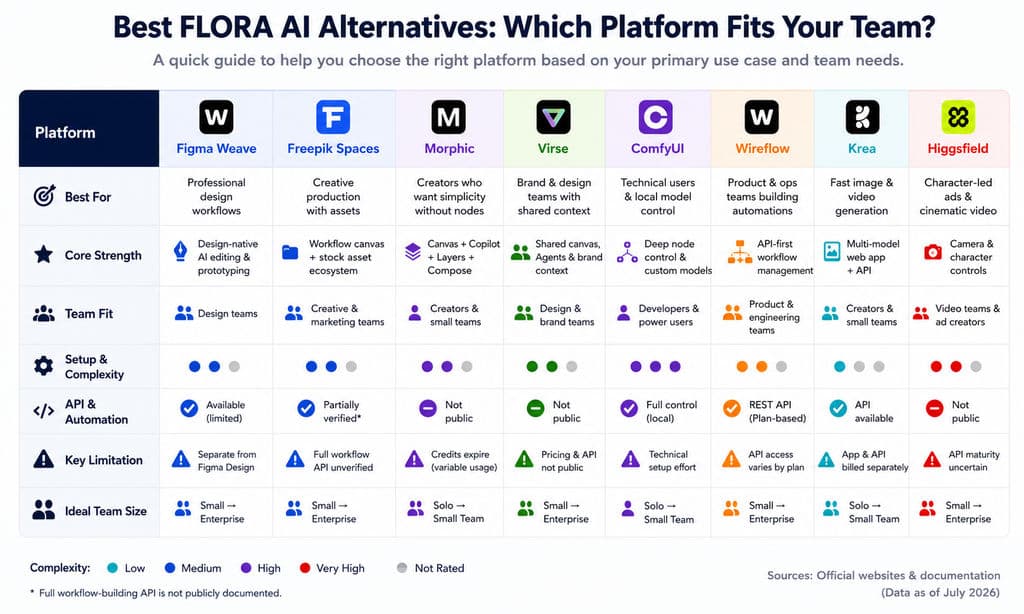
Platform | Best fit | Alternative type | Main documented strength | Main limitation |
Figma Weave | Professional node-based creation | Direct workflow alternative | AI workflows plus compositing tools | Still separate from Figma Design |
Freepik Spaces | Workflow and asset production | Direct workflow alternative | Collaborative reusable visual canvas | Full graph-building API unverified |
Morphic | Creators avoiding complex node graphs | Near-direct alternative | Canvas, Copilot, Layers, and Compose | Credit usage requires planning |
Virse | Brand and professional design teams | Design-workflow alternative | Shared canvas and multi-Agent context | Public pricing and API unverified |
ComfyUI | Technical and local workflows | Technical alternative | Custom models and detailed controls | Setup and maintenance burden |
Wireflow | Product and content automation | API-focused alternative | Programmatic workflow management | API access may depend on plan |
Krea | Rapid image and video creation | Specialized alternative | Broad multi-model creation and API | Not a full project-environment replacement |
Higgsfield | Character-led ads and video | Specialized video alternative | Camera and recurring-subject controls | API maturity needs verification |
Direct FLORA Replacements vs. Specialized Alternatives
A direct FLORA replacement should do more than generate an image or video. It should support enough of the surrounding process to let users organize references, branch concepts, compare outputs, revise selected directions, preserve workflows, and hand work to another person.
Using that definition:
- Figma Weave, Freepik Spaces, and Morphic are the closest general creative-workflow alternatives.
- Virse is relevant when shared context, brand knowledge, and designer-led collaboration matter more than model aggregation alone.
- ComfyUI can replace or exceed FLORA’s low-level technical control, but it introduces a more demanding operating model.
- Wireflow competes most directly with the programmable automation layer.
- Krea and Higgsfield are stronger as specialized production platforms than as complete FLORA replacements.
This distinction prevents a common comparison error: treating every tool that can generate an image as an equivalent creative operating environment.
What Do You Gain and Lose by Leaving FLORA?
FLORA now supports reusable Techniques, batch processes, canvas-based project work, external automation, and timeline editing. Batch Nodes can apply one downstream operation to collections of inputs, while Techniques let teams preserve successful processes for reuse through the canvas, API, or MCP.
Leaving FLORA may provide:
- More compositing-focused image controls in Figma Weave
- A larger integrated asset ecosystem in Freepik Spaces
- A less graph-centered experience in Morphic
- More local model and parameter control in ComfyUI
- Programmatic workflow management in Wireflow
- A unified generation API in Krea
- Specialized cinematic controls in Higgsfield
- A professional design process centered on shared project context in Virse
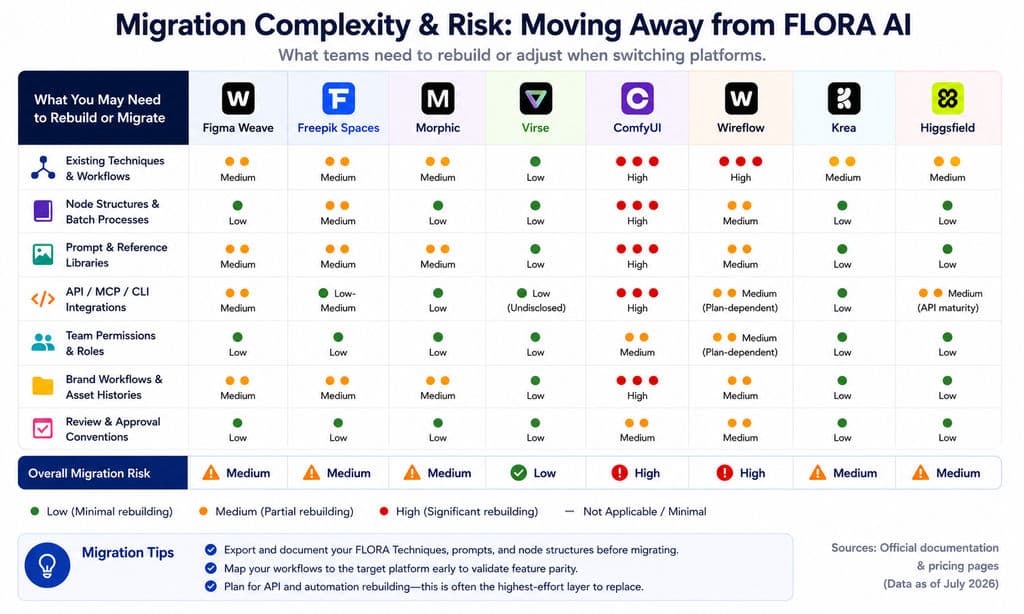
However, migration may require rebuilding:
- Existing Techniques or node graphs
- Batch processes
- Prompt and reference libraries
- API, MCP, or webhook integrations
- Team permissions
- Approved brand workflows
- Asset histories
- Naming, review, and delivery conventions
A replacement is therefore not just a feature decision. It is a workflow-reconstruction decision.
Which Alternatives Most Closely Replace FLORA’s Creative Workflow?
Figma Weave, Freepik Spaces, Morphic, and Virse address the broadest parts of FLORA’s proposition. They differ primarily in how workflows are expressed, how much editing happens inside the canvas, how teams collaborate, and whether context persists beyond one generation.
Figma Weave: Best Fit for Professional Node-Based Creation
Figma Weave combines generative AI with recognizable compositing and image-processing tools in a node-based workspace. Its published capabilities include multi-layer compositing, masks, relighting, structural controls, camera-angle tools, and reusable workflows that can be converted into simplified interfaces for other users.
That workflow-to-tool pattern is valuable in professional teams. A creative technologist can build an approved product-visualization or campaign-variation process, then expose only the inputs that marketers or junior designers are allowed to change.
Figma Weave is particularly relevant when a team needs:
- Visible, inspectable workflow logic
- Generative steps connected to editing operations
- Controlled handoff from workflow builders to workflow users
- Access to image, video, audio, and 3D-related models
- Published commercial-use and data policies
Its most important limitation is organizational: Figma Weave and Figma Design still operate as separate products. They require separate subscriptions and use independent credit systems. Figma says deeper integration is in development, but users should not assume Weave is already embedded inside the main Figma canvas.
Figma Weave Pricing
As reviewed in July 2026, the official monthly plans include:
Plan | Monthly price | Monthly credits | Important condition |
Free | $0 | 150 | Five workflows |
Starter | $24 | 1,500 | Unlimited workflows |
Professional | $45 | 4,000 | Three-month credit rollover |
Team | $60 per user | 4,500 per user | Shared credit pool and administration |
Professional and Team base credits can roll over up to three times the monthly allocation while the subscription remains active. Model consumption varies substantially, so a monthly credit allowance cannot be converted into one reliable number of deliverables. Figma Weave also states that it does not train its platform on customer images or prompts and publishes model-specific commercial-use information.
Verdict: Figma Weave is a strong fit for professionals who want inspectable node workflows and substantial compositing control. It should not yet be selected on the assumption that it is natively integrated into Figma Design.
Freepik Spaces: Best Fit for Workflows, Assets, and Collaboration
Freepik Spaces is a collaborative visual canvas where users connect generation, editing, references, and outputs into reusable workflows. Its documentation emphasizes keeping creative processes in one visual flow, adjusting individual steps, and rerunning the process instead of rebuilding it from scratch.
Spaces combines several layers that often require separate tools:
- Node-based workflow construction
- Image, video, and audio generation
- Freepik stock and uploaded assets
- Reusable process sharing
- Live and asynchronous collaboration
- Comments attached to specific parts of a workflow
- Shared projects and team credit pools
Freepik documents real-time collaboration, feedback, shared Spaces, and centralized visibility over inputs and results.
A practical e-commerce workflow could:
- Import a collection of product images.
- Generate several scenes for each product.
- Route selected outputs into an approved layout.
- Replace copy, prices, or campaign messages.
- Export channel-specific variants.
- Preserve the workflow for the next SKU launch.
This is closer to commercial production than an isolated image-generation feed.
Freepik also offers general API capabilities, but a media-generation API should not automatically be interpreted as a complete API for creating and modifying Spaces graphs. Teams that need programmatic workflow construction should verify the exact endpoint scope.
Freepik Cost Structure
Freepik uses plan-based AI credits, with team plans pooling credits across seats. Its documentation also confirms that Spaces and Shared Projects are available for real-time team collaboration on relevant plans. Exact allowances and promotional terms can change, so buyers should confirm the live pricing page before estimating production volume.
Verdict: Freepik Spaces is a strong choice for teams that want a managed visual workflow, integrated stock assets, collaboration, and repeatable commercial production without maintaining local infrastructure.
Morphic: Best Fit for Creators Who Prefer Fewer Manual Nodes
Morphic approaches creative production through a less graph-centered experience. Its platform combines:
- Canvas for spatial asset and scene development
- Copilot for conversational ideation
- Workflows for repeated processes
- Compose for timeline-based assembly
- Layers for direct element editing
- Custom models for recurring characters, products, objects, or styles
The useful distinction is not that one platform has workflows and the other does not. Both Morphic and FLORA support reusable processes. The difference is how visibly users interact with those processes.
FLORA makes connected workflow logic an explicit part of the canvas. Morphic aims to let users work more directly through scenes, layers, conversation, and timeline assembly.
An explicit graph is valuable when a team needs to:
- Inspect every transformation
- Diagnose a failed branch
- Replace one model without rebuilding the rest
- Document a repeatable process
- Reuse the workflow through external automation
A more direct scene-oriented interface may suit creators who prioritize ideation and assembly over pipeline inspection.
Why Morphic’s FLORA Comparison Requires Rechecking
Morphic’s own alternative page accurately presents many Morphic capabilities, but competitor comparisons can become stale quickly. FLORA’s 2026 releases added Techniques, Batch Nodes, API and MCP expansion, and Timeline Editor capabilities after many earlier comparisons were researched.
This does not invalidate Morphic’s product. It shows why vendor-authored comparison tables should be treated as marketing material and checked against the competitor’s latest official documentation.
Verdict: Morphic is a strong fit when conversational creation, element-level editing, and timeline assembly matter more than manually inspecting every workflow connection.
Virse: A Strong Fit for Brand and Professional Design Teams
Virse is designed as an AI collaborator inside a professional design process rather than as a one-prompt replacement for designers.
Its confirmed product materials describe an infinite canvas where designers can organize, connect, compare, and edit assets while AI interprets the wider canvas context rather than relying only on an isolated prompt. Multiple Agents can work on different project modules while sharing project context. The system is also designed to learn team aesthetic preferences, brand requirements, and project experience over time.
This operating model is especially relevant when the task is not simply “generate another image,” but:
- Extend an approved campaign across formats and channels
- Produce related variations across products or SKUs
- Organize references and working assets
- Preserve a visual direction through several revision rounds
- Coordinate reference analysis, exploration, and production
- Keep designers responsible for direction, review, and delivery
Verdict: Virse is a strong fit for professional teams whose priority is contextual design collaboration, brand continuity, and controlled variation rather than one-off generation.
Which Specialized Alternatives Fit Control, APIs, or Video Workflows?
ComfyUI, Wireflow, Krea, and Higgsfield solve narrower but important production problems. They may outperform a general creative canvas for a specific task without replacing the complete project environment.
ComfyUI: Best Fit for Local Control and Custom Workflows
ComfyUI is an open node-based environment for users who need direct control over models, adapters, preprocessing, sampling, masks, and execution logic.
It is particularly suitable for workflows involving:
- Local model checkpoints
- LoRA
- ControlNet
- Pose, edge, or depth guidance
- Denoising control
- Image-to-image processing
- Masking and regional edits
- Custom preprocessing
- Third-party nodes
- Local data handling
This control is useful when product details, recurring characters, composition, or technical parameters must be managed more precisely than a simplified SaaS interface allows.
The trade-off is operational overhead. A local environment may require GPU capacity, model storage, dependency management, custom-node maintenance, debugging, security review, and internal documentation.
ComfyUI now also offers Comfy Cloud and a Cloud API for executing workflows and managing associated files. Its official documentation describes the cloud interface as experimental, meaning endpoints and behavior can still change.
A practical hybrid workflow may use:
- A managed canvas for rapid exploration.
- ComfyUI for approved directions requiring tighter pose, product, or style control.
- Photoshop or another professional editor for detailed finishing.
- A delivery system for final formats and approval.
Verdict: Choose ComfyUI when local deployment and model-level control justify the infrastructure and specialist time. Do not choose it only because the core software is open source.
Wireflow: Best Fit for Programmatic Workflow Automation
Wireflow is positioned around managed visual workflows that can be executed and managed through REST APIs.
The essential comparison is between three different meanings of “API”:
- Model API
Sends a request to one image, video, text, or audio model. - Workflow execution API
Runs a process previously created inside the platform. - Workflow-building API
Creates or modifies the workflow graph through code.
Many comparison pages simply mark “API: Yes” without identifying which of these capabilities is available.
Wireflow is relevant to:
- SaaS products that generate media for customers
- E-commerce content systems
- Advertising-variation pipelines
- Internal creative automation
- Batch production
- Data-driven workflow routing
Its public documentation emphasizes workflow resources, execution monitoring, authentication, webhooks, errors, and content publishing. Buyers should still verify which endpoints, webhooks, rate limits, and support commitments are included in the intended plan.
Verdict: Wireflow is a strong candidate when workflow execution must be embedded into an external product. Confirm plan-level API access before designing a production architecture around it.
Krea: Best Fit for Fast Multi-Model Image and Video Creation
Krea combines a creative web application with a production API for image generation, video, enhancement, upscaling, and related media tasks.
It is particularly relevant for:
- Rapid concept exploration
- Product-shot generation
- Image and short-video production
- Upscaling and enhancement
- Developers who want one integration across several providers
- Creators who prefer a lower-friction interface
Krea’s visual workflows can also be deployed as API endpoints, giving the platform more automation depth than older comparisons suggest.
However, a visually built workflow exposed as an endpoint is not necessarily equivalent to an API that supports arbitrary graph creation and modification. That distinction matters when a system must generate workflows dynamically from application data.
Krea also separates application usage from API billing. Teams should confirm whether their expected production happens inside the creative app, through external API calls, or through both.
Verdict: Krea is a strong specialized option for rapid creation and multi-model API access. It is less clearly documented as a replacement for FLORA’s complete project, collaboration, and knowledge environment.
Higgsfield: Best Fit for Character-Led Video and Advertising
Higgsfield is oriented toward cinematic video, recurring characters, product advertising, avatars, and camera-directed scenes.
The platform emphasizes controls such as:
- Camera and lens selection
- Focal length
- Depth of field
- Multiple camera movements
- First- and last-frame references
- Recurring-character workflows
- Product-focused video production
These capabilities address a commercial problem that single-frame demos often ignore. A brand rarely needs one attractive image in isolation. It may need several shots that appear to belong to the same campaign, preserve the same subject, and support a consistent edit.
A useful production test should evaluate:
- Identity drift
- Product-detail changes
- Clothing continuity
- Camera repeatability
- Motion artifacts
- Background continuity
- Revision control
- Cost of rejected clips
Product claims about character consistency are not substitutes for a controlled multi-shot benchmark. API availability should also be verified against current technical documentation before Higgsfield is used as part of an automated production architecture.
Verdict: Higgsfield is a strong candidate for video-first briefs involving recurring subjects or deliberate camera language. Test a complete multi-shot sequence before committing to high-volume production.
FLORA AI Alternative Comparison Results
The following results compare documented capabilities and operating models. They do not rank subjective output quality.
Workflow Coverage
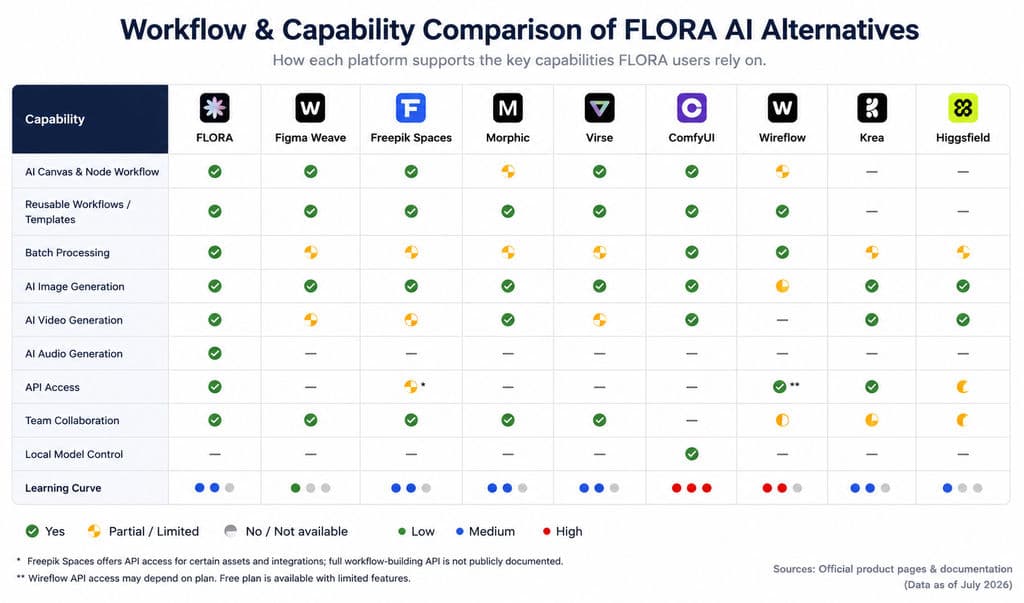
Platform | Visual canvas | Node workflow | Reusable process | Batch production | Editing focus |
Figma Weave | Confirmed | Confirmed | Confirmed | Partial | Professional compositing |
Freepik Spaces | Confirmed | Confirmed | Confirmed | Confirmed | AI creation and layout |
Morphic | Confirmed | Reduced node emphasis | Confirmed | Partial | Layers and timeline |
Virse | Confirmed | Context-driven canvas | Workflow continuity | Batch variations | Designer-led iteration |
ComfyUI | Confirmed | Confirmed | Confirmed | Confirmed | Technical parameter control |
Wireflow | Confirmed | Confirmed | Confirmed | Confirmed | Workflow execution |
Krea | Confirmed | Visual workflows | Confirmed | Confirmed | Generation and enhancement |
Higgsfield | Creative workspace | Not primary | Partial | Partial | Video and camera control |
Result: Figma Weave and Freepik Spaces provide the broadest documented combination of visible workflows and managed creative tooling. Morphic is more suitable when users want less manual graph construction. ComfyUI offers the deepest technical customization but requires more operational support.
Collaboration and Brand Workflows
Team collaboration is not one feature. It includes:
- Simultaneous editing
- Comments and approvals
- Shared assets
- Workflow reuse
- Permission controls
- Shared usage pools
- Persistent project context
- Brand and style references
- AI context shared across tasks
Freepik Spaces documents live and asynchronous collaboration, comments, shared workspaces, and team-level visibility. Figma Weave provides team workspaces, shared credits, file sharing, and administration, although it remains separate from the main Figma product. Morphic supports collaborative canvas work on applicable plans.
Virse’s distinctive emphasis is shared project context across multiple Agents and continuity based on team aesthetics, brand requirements, and project experience. This is different from merely sharing files or seeing another person’s cursor.
Result: Select a platform according to the type of collaboration required. Shared files may be sufficient for a short project. Persistent project and brand context becomes more important for campaigns, product lines, packaging systems, and repeated client work.
API and Deployment
Platform | Model API | Saved workflow execution | Workflow graph management | Async or webhooks | Local deployment |
FLORA | Yes | Techniques | Arbitrary graph API not confirmed | External automation supported | No |
Figma Weave | No public production API confirmed | API listed as forthcoming | Not confirmed | Not confirmed | No |
Freepik Spaces | General media API available | Spaces execution unverified | Not confirmed | General API-dependent | No |
Morphic | Public workflow API unverified | Unverified | Unverified | Unverified | No |
Virse | Unverified | Unverified | Unverified | Unverified | Unverified |
ComfyUI | Local and cloud mechanisms | Yes | JSON workflow control | Yes; cloud API experimental | Yes |
Wireflow | Through connected models | Yes | Documented workflow resources | Yes; verify plan | No |
Krea | Yes | Deployed visual workflows | Arbitrary graph API unverified | Yes | No |
Higgsfield | API entry exists | Scope unverified | Unverified | Unverified | No |
FLORA has published an official case in which a DTC brand used one Technique at large scale to produce product mockups across different decoration methods. As a vendor-published case, it illustrates a production pattern rather than independently audited performance.
Result: Wireflow provides the clearest public positioning around managed workflow resources and REST execution. Krea is strong for a broad generation API. FLORA is relevant for executing saved Techniques. ComfyUI provides extensive local workflow control, while its managed cloud interface remains less stable than a mature enterprise API.
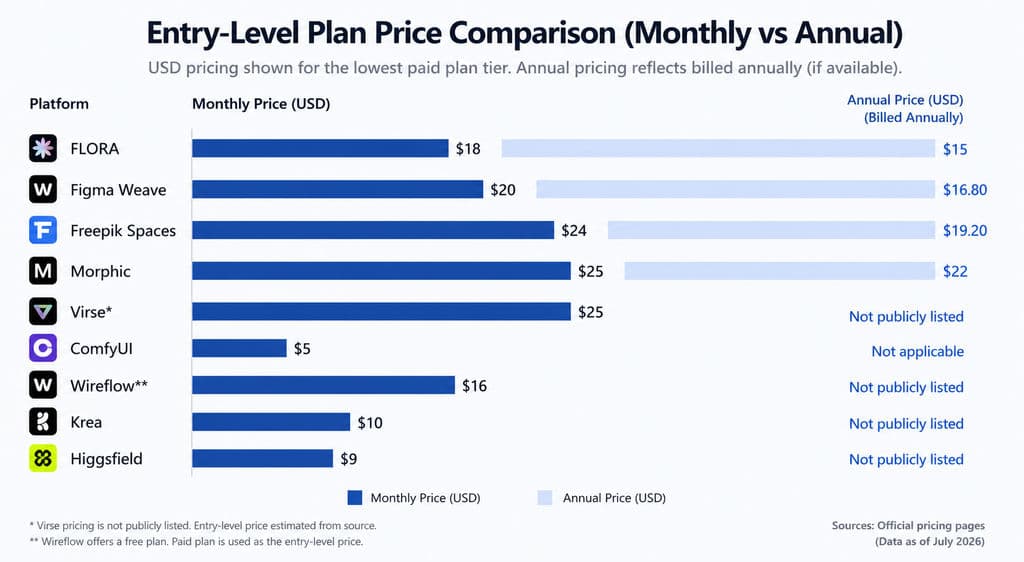
Cost Comparison
Pricing systems are not directly equivalent.
Platform | Starting public cost | Main billing model | Primary cost risk |
Figma Weave | Free; Starter $24/month | Monthly credits | Model-dependent consumption |
Freepik Spaces | Free and paid Freepik plans | Plan credits | Mixed tools consume credits differently |
Morphic | Free and paid tiers | Monthly credits | Variable media consumption |
Virse | Not publicly verified | Not verified | Cost cannot yet be assessed |
ComfyUI | Open-source local software | Hardware or cloud compute | GPU, maintenance, and specialist time |
Wireflow | Free and paid plans | Monthly credits | API access and limits may be plan-specific |
Krea | Free and paid app plans | App usage plus separate API balance | Two billing systems |
Higgsfield | Tiered subscriptions | Subscription and credits | Allowances and promotions may change |
The subscription is only one part of production cost.
Cost per approved asset = subscription + seats + usage + failed outputs + revisions + upscaling + storage + automation + post-production + human review
This is why incompatible credits should not be converted into one “cheapest platform” ranking. A credit may represent a low-cost image, a premium image, part of a video, an upscale, or one step in a larger workflow.
The meaningful business metric is the cost of an approved deliverable—not the price of pressing Generate once.
How Should You Test a FLORA AI Alternative Before Switching?
A meaningful evaluation should use one representative production workflow across every shortlisted platform. Unrelated sample prompts may reveal model aesthetics, but they do not expose migration risk, team usability, revision quality, or total production cost.
Use One Real Brief
Include:
- Target audience
- Product or character references
- Brand guidance
- Required formats and channels
- Number of variations
- Approval criteria
- Final delivery destination
Create Three Different Directions
Check whether the platform supports meaningful branching. Three minor variations of one composition do not demonstrate genuine concept exploration.
Request Two Revision Rounds
The first revision should alter one local element, such as:
- Color
- Material
- Expression
- Background
- Product position
- Copy treatment
The second revision should preserve the approved direction while adapting it for a new channel, market, or format.
Record whether unrelated details change during each revision.
Run a Batch
Use ten SKUs, images, backgrounds, aspect ratios, or copy variations.
Measure:
- Setup time
- Successful outputs
- Failed runs
- Manual corrections
- Usage consumed
- Ease of repeating the process
FLORA’s own guidance recommends validating a transformation on one asset before applying it through a larger batch process. The same principle applies to any workflow platform: validate first, then scale.
Test Character, Product, and Brand Consistency
For characters, inspect:
- Face structure
- Hair
- Age
- Clothing
- Body proportions
- Identity across angles
- Motion drift
For products, inspect:
- Logo
- Geometry
- Labels
- Color
- Material
- Proportions
- Details across backgrounds
For brands, inspect:
- Palette
- Typography
- Composition
- Photography style
- Visual density
- Tone
- Repeated motifs
Do not judge consistency from one attractive output.
Test Team Handoff
Ask a colleague who did not build the workflow to:
- Find the approved direction.
- Understand the required inputs.
- Run the workflow.
- request one controlled revision.
- Locate the correct output.
- Export it for delivery.
This reveals whether the process is reusable or only understandable to its creator.
Evaluate Migration Burden
Migration task | Questions to ask |
Workflows | Can existing Techniques or graphs be exported or recreated? |
References | Can brand, product, and character assets be imported in bulk? |
History | Is generation and revision history transferable? |
Team access | Must permissions and workspaces be rebuilt? |
Automation | Must API calls, webhooks, or MCP processes be rewritten? |
Costs | Will unused credits or prepaid balances be lost? |
Training | How quickly can another person operate the workflow? |
A platform with stronger isolated features may still be a poor migration choice when rebuilding costs are high.
Check Commercial Rights, Privacy, and Security
Professional teams should verify:
- Commercial-use rights
- Model-specific licensing
- Whether prompts or images are used for training
- Data-retention periods
- Zero Data Retention options
- Asset deletion behavior
- SSO and permission controls
- SOC 2 or equivalent documentation
- Indemnification
- Client-confidentiality requirements
A platform-level commercial-use statement does not automatically override the terms of every third-party model.
Frequently Asked Questions About FLORA AI Alternatives
Is There a Free or Open-Source FLORA AI Alternative?
ComfyUI is the strongest open-source option for users who want customizable node workflows and local deployment. The software can run locally, but GPUs, storage, setup, debugging, and maintenance still create real costs.
Several managed platforms also provide limited free access. A free plan is best used to test workflow fit, not to estimate full production capacity.
Is ComfyUI Better Than FLORA AI?
ComfyUI is better suited to local deployment, custom models, LoRA, ControlNet, third-party nodes, and detailed parameter control. FLORA is better suited to teams that want a managed canvas, reusable Techniques, collaboration, batch processes, integrated assets, and less infrastructure maintenance.
Many professional teams do not need to choose only one. They can use a managed canvas for exploration and collaboration, then move selected tasks into ComfyUI when deeper control is required.
Which FLORA AI Alternative Is Best for Professional Design Teams?
Figma Weave is a strong fit for node-based image and compositing workflows. Freepik Spaces is suitable for teams that want shared workflows, stock assets, comments, and repeatable production in one environment. Virse is particularly relevant when multiple Agents need to share project context and the team wants to preserve aesthetic and brand knowledge across revisions.
The best choice depends on whether the main bottleneck is editing, asset production, workflow reuse, brand continuity, or technical control.
Which FLORA AI Alternative Has the Best API for Automation?
Wireflow has the clearest positioning around programmable workflow management, although buyers should confirm which endpoints and webhooks are available on their intended plan. Krea provides broad multi-model generation access and asynchronous tasks. FLORA is relevant for executing saved Techniques and connecting creative workflows to external systems. ComfyUI offers local workflow control and a developing cloud API.
The correct choice depends on whether you need to call one model, run a saved workflow, or build and modify the workflow programmatically.
Conclusion
There is no universal winner among FLORA AI alternatives. Figma Weave and Freepik Spaces most closely match a managed visual-workflow environment, Morphic reduces node-building friction, Virse is relevant to contextual professional design collaboration, ComfyUI provides deep local control, Wireflow focuses on programmable workflow management, Krea supports rapid multi-model production, and Higgsfield targets camera-directed, character-led video. Before switching, run one real project through revisions, batch production, team handoff, cost tracking, rights review, and final export. The platform that leaves the fewest workflow gaps—not the one with the lowest advertised generation price—is usually the better long-term choice.
More from the Virse Blog
Product
GPT Image 2.5 Pricing: Flare vs Sunburst & the Real Cost per Image
September 14, 2026 by Vincent
Product
GPT Image 2.5 Review: Does It Finally Fix AI Image Editing Drift?
September 14, 2026 by Vincent
Product
How Much Is Kling 3.0? 2026 Pricing, Credits, and Real Cost per Video
September 8, 2026 by Yifan Zhao