
Best AI for Product Design in 2026: 10 Tools That Fit Your Workflow
 Yifan Zhao20 min read ·
The best AI for product design in 2026 depends on the output your workflow needs next. Virse and Vizcom are strong choices for physical-product concepts and visual iteration; Figma, v0, Lovable, and Uizard support UI and digital-product prototyping; Autodesk Fusion and Siemens Designcenter serve CAD and engineering workflows. The right tool should produce an editable, reviewable artifact that can move into the next design stage without creating excessive rework. Teams comparing platforms can also review the best AI design tools and specialized Vizcom alternatives to understand which tools fit each stage.
The problem is that many AI tools generate impressive first drafts but lose value during revision. Product geometry shifts, UI states go missing, project context must be re-entered, and generated code or CAD still requires professional validation. A fast output is not a true productivity gain when designers spend more time checking, rebuilding, transferring, and maintaining it than they would in a controlled workflow. A structured AI design workflow from brief to delivery and a persistent AI design system can reduce some of that context loss.
Virse is built for professional teams that need AI to remain connected to the design process rather than replace it: its infinite canvas keeps references, concepts, variants, and feedback in context, while multiple agents collaborate across exploration, iteration, and asset development—without taking creative direction, review, or final control away from the designer. This approach aligns with AI design Agent creative workflows and with the broader discipline of art direction
What Is the Best AI for Product Design in 2026?
The best AI for product design is the tool that creates the right deliverable for the next stage of your workflow without adding excessive verification, reconstruction, or handoff work.
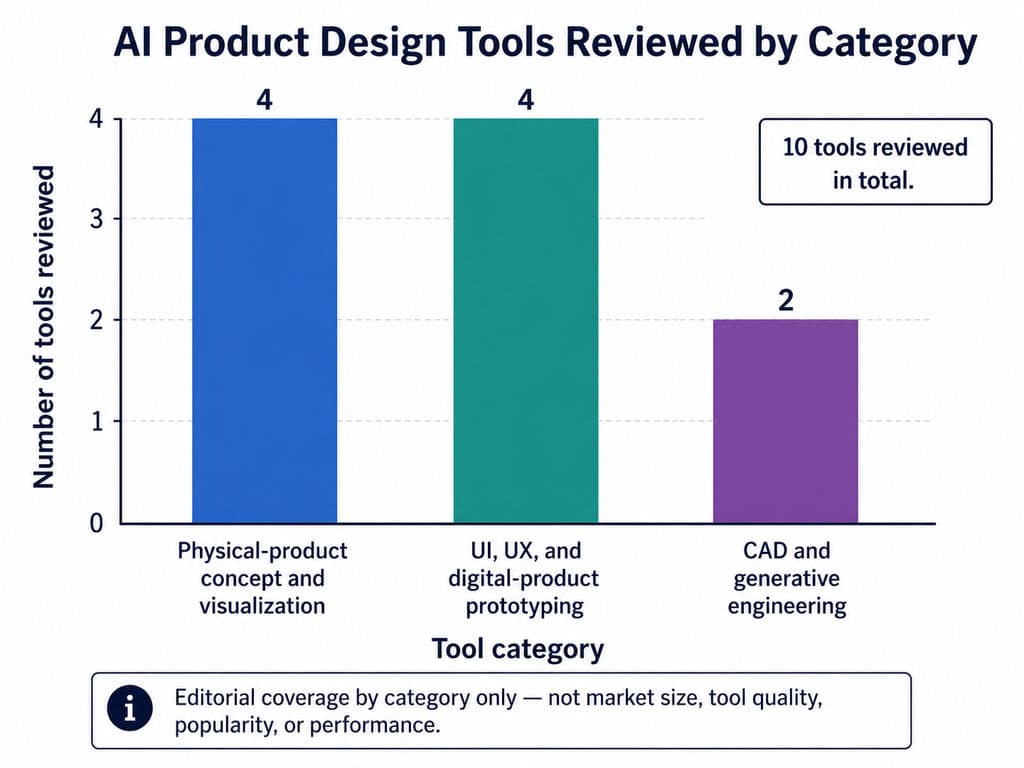
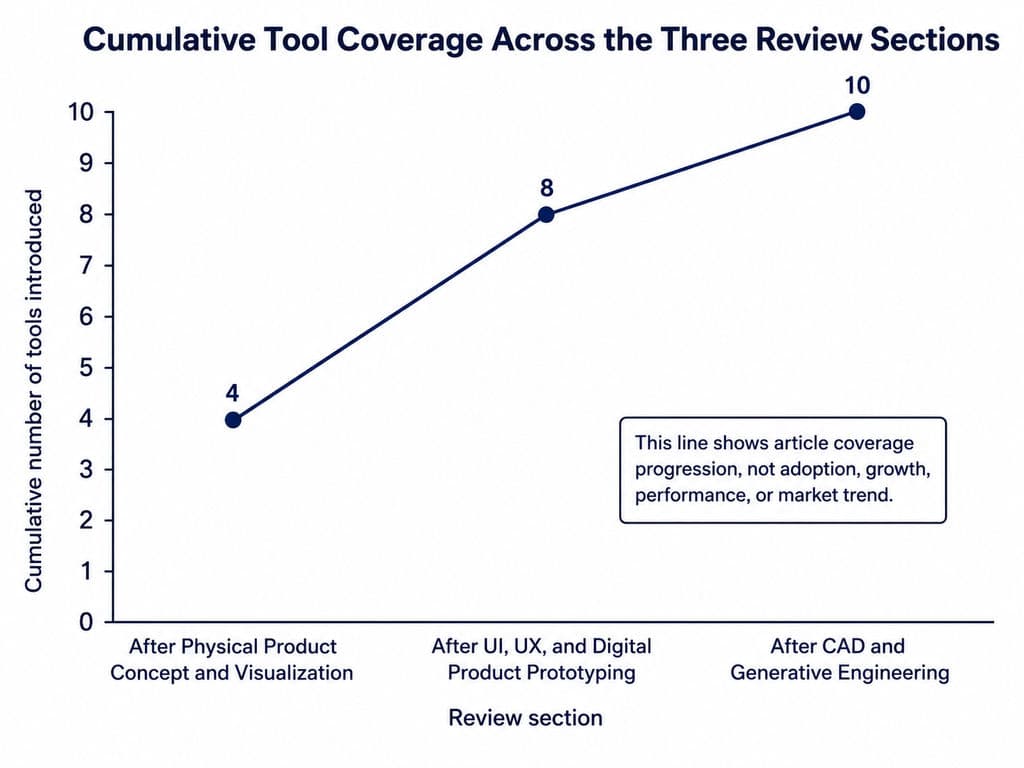
Our recommendations fall into three categories:
- Physical-product concept and visualization: Virse, Vizcom, Adobe Firefly, and Midjourney
- UI, UX, and digital-product prototyping: Figma, v0, Lovable, and Uizard
- CAD and generative engineering: Autodesk Fusion and Siemens Designcenter
These categories are based on two practical criteria:
- The stage of the design process the tool supports
- The primary type of output it produces
A photorealistic product concept, an editable UI flow, working application code, and an engineering CAD model may all be described as AI product design outputs. However, they solve different problems and require different evaluation standards.
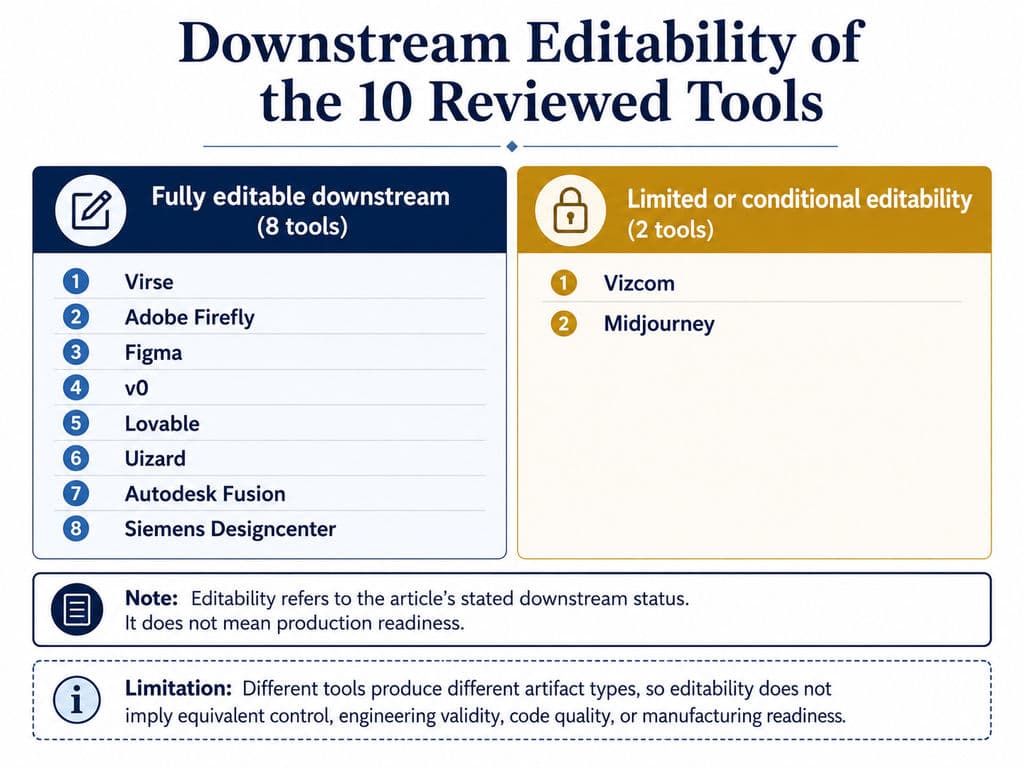
Tool | Best suited to | Primary output | Editable downstream? | Main limitation |
Virse | Connected physical-product concept workflows | Organized references, concepts, and variants | Yes, within its canvas workflow | Not engineering CAD or simulation |
Vizcom | Sketch-to-render and CMF exploration | Controlled product concept renders | Visually editable; requires CAD development | Not dimensionally validated |
Adobe Firefly | Product scenes and asset variations | Edited and generated visual assets | Yes, through Adobe workflows | Limited geometry control |
Midjourney | Early visual and form exploration | Concept imagery and mood directions | Limited image-level editing | Inconsistent precise geometry |
Figma | Collaborative digital-product design | Editable UI and code-backed prototypes | Yes | Generated logic still needs review |
v0 | UI-to-code and front-end prototypes | Working application code | Yes | Production quality depends on the task |
Lovable | Functional full-stack concepts | Deployable web applications | Yes | Requires architecture and security review |
Uizard | Beginner-friendly wireframes | Editable UI concepts and prototypes | Yes | Less suitable for complex systems |
Autodesk Fusion | Constraint-driven generative design | CAD outcomes based on engineering inputs | Yes | Requires engineering knowledge |
Siemens Designcenter | Enterprise CAD and optimization | Engineering geometry and product data | Yes | Enterprise complexity and learning curve |
How we evaluated the tools
Each product was reviewed across four areas:
- Output quality: visual coherence, functional completeness, geometry preservation, or engineering relevance
- Control: references, local editing, component control, persistent context, and engineering constraints
- Workflow fit: collaboration, versioning, design-system support, project knowledge, and handoff
- Downstream usability: whether the output can continue into presentation, testing, code, CAD, simulation, prototyping, or manufacturing
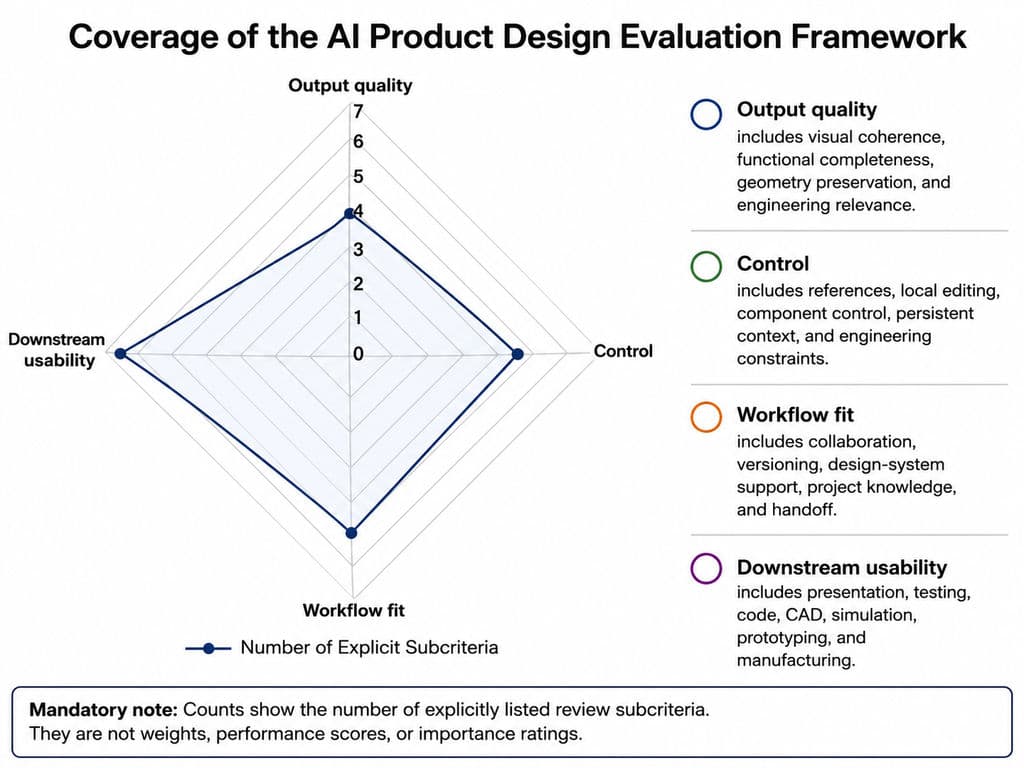
We did not assign numerical scores. An image generator, a UI platform, and an engineering CAD system cannot be reduced to one defensible score without inventing arbitrary weights.
We also did not treat generation speed as total productivity. A result produced in five minutes can still be inefficient if a designer spends hours repairing geometry, rebuilding missing states, correcting code, or repeatedly re-entering project context.
Best AI Tools for Physical Product Concept and Visualization
The leading options for physical-product concept work are Virse for connected, context-rich exploration; Vizcom for sketch-to-render; Adobe Firefly for product-scene editing; and Midjourney for broad visual direction.
These tools are most useful during:
- Ideation
- Sketch development
- CMF exploration
- Product visualization
- Concept presentation
- Design review
- Feedback-driven iteration
- Product-family or SKU extension
Internal JTBD research identifies sketch-to-render as a particularly painful task for industrial-design teams because early concepts may otherwise need to be modeled and rendered before stakeholders can judge their form, material, and visual impact. The research also identifies concept exploration, CMF variation, lifestyle visualization, design review, and feedback iteration as recurring needs. These findings describe user jobs and pain points; they do not prove that every requested workflow is already available in every tool.
Virse: Best for Context-Rich Concept Development and Iteration
Virse is best suited to professional designers and teams that need to organize references, compare directions, coordinate AI agents, and manage repeated design iterations within one visual workspace.
Unlike prompt-only image generators, Virse is positioned as an AI design operating system built around an infinite canvas. Designers can arrange, connect, compare, and edit materials spatially, while AI agents use the broader canvas context instead of responding only to an isolated prompt.
Its confirmed positioning includes:
- An infinite canvas for organizing project materials
- Task understanding based on the wider canvas context
- Multiple agents sharing project context
- Reference analysis and creative exploration
- Batch output and asset variations
- Material organization and multi-round modification
- Learning from team preferences, brand standards, and project history
- Continued designer control over direction, editing, review, and delivery
This structure is especially relevant when a project includes a brief, competing products, hand sketches, moodboards, CMF references, previous iterations, packaging directions, and campaign applications.
Instead of rebuilding this context across multiple independent chats, teams can keep the visual relationships and approved decisions visible. That matters because physical-product design rarely ends after the first render. Teams usually need to:
- Compare several alternatives
- Preserve approved elements
- Respond to stakeholder feedback
- Explore CMF variants
- Extend one direction across a product family
- Prepare related packaging or marketing assets
- Maintain visual consistency across multiple rounds
Virse can also support coordinated work across different tasks. One agent may analyze references while another develops a concept, explores packaging, or creates related marketing material. Because the agents share project context, the workflow can remain connected instead of becoming a collection of unrelated outputs.
Virse should not be treated as a replacement for dimensional CAD, tolerance analysis, structural simulation, ergonomics testing, physical prototyping, DFM, or manufacturing approval.
Choose Virse when: project context, reference organization, multi-round iteration, agent coordination, and visual consistency are central to the work.
Avoid using it as the final engineering authority when: the deliverable requires validated dimensions, production geometry, structural calculations, or formal compliance review.
Vizcom: Best for Sketch-to-Render and CMF Exploration
Vizcom is best suited to industrial designers who need to turn sketches into controlled concept renders and explore color, material, and finish directions before committing to detailed CAD.
Unlike general text-to-image models, Vizcom combines prompts with a designer’s sketch. Its guidance explains that the sketch can act as the primary source of truth, with higher influence settings helping preserve form and proportions while applying materials, lighting, and rendering style.
Typical uses include:
- Converting line sketches into presentation renders
- Exploring materials and surface treatments
- Comparing product colorways
- Developing several concepts from one silhouette
- Communicating early form decisions
- Preparing directions for internal or client review
A practical workflow is to define critical geometry before asking the model to add realism:
- Draw the essential silhouette.
- Mark important edges, seams, controls, and openings.
- Clarify the relationships between components.
- Add a concise material and lighting prompt.
- Increase sketch influence when form preservation matters.
- Generate a controlled number of alternatives.
- Review every unexpected structural change.
- Develop the selected direction through CAD and engineering.
Vizcom describes its role as a bridge between rough ideas and concepts that can be developed further through traditional methods.
The limitation is the gap between visual plausibility and engineering validity. A rendered hinge may not rotate correctly. A seamless enclosure may be impossible to assemble. A thin support may not tolerate the intended load.
The approved direction should continue through:
Concept render → design review → CAD reconstruction → engineering analysis → prototype → manufacturing validation
Choose Vizcom when: preserving a sketch while adding realistic materials and lighting is more important than unconstrained visual novelty.
Avoid treating it as final CAD when: you need tolerances, internal components, validated ergonomics, assembly logic, or production geometry.
Adobe Firefly: Best for Product Mockups and Marketing Variations
Adobe Firefly is best suited to teams that already have a product render or photograph and need to create new scenes, backgrounds, campaign formats, and presentation assets around it.
Its strongest product-design value lies in asset editing rather than dimensional form development. Firefly can replace backgrounds, generate variations, refine lighting, expand images into new aspect ratios, and make targeted changes without requiring the user to restart from an empty image.
This makes Firefly useful for:
- Testing product environments
- Creating e-commerce imagery
- Producing social and campaign formats
- Developing seasonal or regional scenes
- Removing unwanted objects
- Expanding approved compositions
- Preparing retail and presentation concepts
- Extending one product asset across several channels
Adobe’s product-photography workflow specifically shows how an isolated product can be placed into AI-generated environments using prompts that describe positioning, materials, lighting, and scene type.
Firefly Custom Models can also generate image variations aligned with an organization’s visual assets. Adobe lists lifestyle photography, still-life photography, product-shot backgrounds, illustration, and brand-expression exploration among supported use cases.
However, style consistency is not the same as exact geometry or automatic brand compliance. Teams still need to inspect:
- Logos
- Regulatory copy
- Product proportions
- Buttons and controls
- Seams and fasteners
- Material behavior
- Reflections and shadows
- Accessories and package contents
Choose Firefly when: an approved product asset needs to be edited, localized, extended, or adapted for additional visual applications.
Avoid relying on it when: exact product geometry, engineering accuracy, multi-view consistency, or legal label fidelity is required.
Midjourney: Best for Early Visual Direction and Form Exploration
Midjourney is best suited to early ideation when designers need a broad range of visual languages, moods, materials, environments, and speculative directions.
Its Moodboards feature helps users communicate a wider aesthetic direction through a curated image collection, while Style References apply more specific visual characteristics. Image Prompts and the Editor add further ways to guide and modify results.
Useful product-design applications include:
- Comparing alternative design languages
- Building visual moodboards
- Exploring surface and material directions
- Visualizing speculative product categories
- Developing presentation atmospheres
- Testing lifestyle contexts
- Stimulating new sketch directions
A furniture team might compare monolithic, lightweight, modular, and bio-inspired visual languages before developing selected ideas as controlled sketches. A consumer-electronics team might explore how a category could appear in domestic, clinical, outdoor, or luxury settings.
Midjourney’s strength is breadth, not dimensional precision. References can guide content and style, but they do not guarantee that exact proportions, components, interfaces, or logos will remain unchanged across outputs.
Choose Midjourney when: the project needs creative range, mood exploration, and unfamiliar visual directions.
Avoid relying on it when: a product must preserve exact form, dimensions, controls, or component relationships across multiple views.
Best AI Tools for UI, UX, and Digital Product Prototyping
The leading options for digital-product design are Figma for collaborative and editable workflows, v0 for UI-to-code development, Lovable for functional full-stack concepts, and Uizard for accessible wireframing.
These tools should be evaluated by more than screenshot quality. A generated dashboard can look polished while still omitting:
- Empty states
- Loading states
- Error conditions
- Permissions
- Accessibility
- Responsive behavior
- Real data logic
- Reusable components
- Maintainable code
Our review of publicly reported workflows found that designers repeatedly use AI for meeting summaries, PRD analysis, interface copy, alternative user flows, early prototypes, and functional demos. A recurring concern is that verification and correction can offset initial generation speed.
Figma AI and Figma Make: Best for Collaborative Digital Product Design
Figma is our leading general recommendation for established digital-product teams that prioritize editability, design-system continuity, collaboration, and prototype handoff.
Figma Make combines an AI chat with a working application preview and editable code. Teams can attach Figma frames, designs, PDFs, images, audio, and other contextual material. Figma also supports comments, annotations, point-and-edit changes, reusable templates, and version history for both AI and manual edits.
Figma Make can also use design-system packages and guidelines so generated applications better reflect an organization’s existing visual and technical standards.
A practical workflow is:
- Attach the brief, supporting files, existing screens, and design-system references.
- Generate alternative flow structures.
- Compare directions in the shared workspace.
- Check loading, empty, error, success, and permission states.
- Build the preferred direction into a functional prototype.
- Collect feedback in context.
- Restore or branch earlier versions when needed.
- Prepare a clearer design-to-development handoff.
Figma’s main advantage is continuity. AI output remains in an environment where designers already edit components, compare versions, collect feedback, build prototypes, and communicate with developers.
The limitation is false completeness. A generated interface may look convincing before its product logic, accessibility, security, content architecture, and technical feasibility have been validated.
Choose Figma when: several team members need to design, review, iterate, prototype, and hand off work in a shared environment.
Avoid treating the first AI draft as final when: the product contains complex roles, permissions, accessibility requirements, regulated content, or unusual technical behavior.
v0: Best for Rapid UI Generation and Front-End Prototypes
v0 is best suited to product designers, founders, and front-end teams that need working code rather than static mockups.
v0 can generate web applications from prompts, screenshots, mockups, or Figma designs. Users can iterate through Design Mode, edit code directly, and apply a design system to keep branding more consistent.
It is particularly useful for:
- Dashboards
- Landing pages
- Onboarding flows
- Internal tools
- Data-entry interfaces
- Interactive product demonstrations
- Early MVPs
One publicly reported workflow used an LLM to structure meeting notes, v0 to generate an interface, and an HTML-to-Figma process to return the output to the design environment. The report claimed a dramatic time reduction but did not disclose project scope, review effort, accessibility, code quality, or maintenance cost. It demonstrates that the workflow is possible, not that the same productivity result is typical.
Before production use, teams should review:
- Semantic HTML
- Responsive behavior
- Accessibility
- Authentication
- Permissions
- Error handling
- Security
- Data architecture
- Performance
- Component reuse
- Test coverage
- Long-term maintainability
Choose v0 when: the next useful artifact is a working web prototype or front-end implementation.
Avoid treating generated code as production-ready when: the application handles sensitive data, complex architecture, strict accessibility requirements, or long-term maintenance obligations.
Lovable: Best for Functional Full-Stack Product Concepts
Lovable is best suited to founders, product managers, and mixed technical teams that need to turn a defined idea into a functioning full-stack web application.
Lovable describes itself as a full-stack AI development platform for building, iterating, and deploying applications through natural language while producing real code.
Its project and workspace knowledge features can preserve:
- Product purpose
- Audience
- Domain terminology
- Architecture decisions
- Database structure
- Preferred libraries
- Security requirements
- Design and interaction standards
Lovable reads project knowledge, workspace knowledge, code, and connected instruction files before generating edits.
A reasonable workflow is:
- Define the user and core problem.
- Document product and technical constraints.
- Plan the smallest testable flow.
- Generate one bounded feature.
- Review behavior and data handling.
- Edit visually or through instructions.
- Add backend functionality incrementally.
- Run security checks.
- Conduct usability and technical review.
- Publish only after appropriate validation.
Lovable includes automated security analysis that can identify common database-access problems, insecure patterns, and dependency vulnerabilities. However, automated scans do not remove the need for professional security and architecture review.
Choose Lovable when: the goal is to validate a functioning product concept with front-end and backend behavior.
Avoid assuming the result is ready to scale when: the product requires complex infrastructure, regulated data, formal security controls, or extensive custom engineering.
Uizard: Best for Beginner-Friendly Wireframes and Prototypes
Uizard is best suited to founders, product managers, consultants, and early-career designers who need editable UI concepts without first mastering a complex professional tool.
Autodesigner can generate multi-screen mockups from text prompts. Screenshot Scanner converts existing interface images into editable mockups, while Wireframe Scanner digitizes hand-drawn wireframes.
This makes Uizard useful for:
- Stakeholder workshops
- Product-manager concepts
- Basic web and mobile flows
- Digitizing paper sketches
- Reconstructing reference screens
- Creating simple clickable prototypes
- Communicating an idea before a specialist designer joins
Its main value is accessibility. It shortens the distance between an idea and a reviewable interface without requiring code or advanced design-system knowledge.
The tradeoff is depth. Mature product teams may need more control over components, variables, interaction states, responsiveness, accessibility, and developer handoff than Uizard provides.
Choose Uizard when: the immediate need is to communicate and iterate on an early UI idea quickly.
Avoid making it the final source of truth when: the product depends on a complex design system, detailed interaction logic, or advanced development handoff.
Best AI Tools for CAD and Generative Engineering
Autodesk Fusion is the stronger fit for accessible, constraint-driven generative design, while Siemens Designcenter is better suited to enterprise CAD, topology optimization, automation, and connected engineering workflows.
These systems should be evaluated by engineering inputs and downstream validity—not by whether their outputs look photorealistic.
Autodesk Fusion: Best for Constraint-Driven Generative Design
Autodesk Fusion is best suited to product designers and engineers who need to explore CAD alternatives based on preserve regions, obstacle regions, loads, constraints, materials, and manufacturing methods.
Preserve geometry defines the areas whose size and shape must remain. Obstacle geometry defines spaces where generated material must not appear. Teams can also provide starting shapes, material options, load cases, and manufacturing constraints.
A practical workflow is:
- Define required connection points.
- Mark geometry that must remain.
- Mark spaces that must stay empty.
- Apply realistic loads and constraints.
- Select appropriate materials.
- Define allowable manufacturing methods.
- Generate alternatives.
- Compare outcomes using relevant engineering measures.
- Export and refine the selected result.
- Validate it through analysis and physical testing.
Fusion is particularly relevant to:
- Brackets
- Supports
- Frames
- Fixtures
- Lightweight structures
- Manufactured parts with clear load cases
The quality of a generative-design result depends on the study definition. Incorrect constraints, incomplete load cases, unsuitable materials, or unrealistic manufacturing assumptions can produce misleading results.
Generative engineering also cannot independently resolve subjective industrial-design questions such as whether a product feels trustworthy, comfortable, premium, approachable, or aligned with a brand.
Choose Fusion when: the problem can be expressed through geometry, loads, constraints, materials, and manufacturing requirements.
Avoid using it as a substitute for: engineering judgment, DFM, tolerance analysis, assembly review, prototype testing, or safety validation.
Siemens Designcenter: Best for Enterprise CAD and Engineering Optimization
Siemens Designcenter is best suited to large engineering organizations that need advanced CAD, topology optimization, automation, collaboration, and product-development continuity.
In June 2026, Siemens renamed Designcenter NX to Designcenter. The current portfolio combines AI-driven productivity, cloud collaboration, digital-thread continuity, and immersive engineering capabilities.
Relevant uses include:
- Complex parametric CAD
- Large assemblies
- Topology optimization
- CAD automation
- Product-lifecycle integration
- Manufacturing-aware development
- Cross-domain engineering
- Enterprise collaboration
- Revision and product-data continuity
Siemens also promotes AI-enabled analysis, optimization, and generation within Designcenter CAD, while its topology-optimization capabilities suggest geometry intended to reduce material use while meeting strength requirements.
The value is not merely that the software can generate or optimize geometry. Enterprise teams need design information to remain connected across engineering disciplines, suppliers, revisions, simulation, manufacturing, and formal approval processes.
The tradeoff is complexity. A solo industrial designer seeking quick concept renders is unlikely to benefit from an enterprise engineering environment. Its value grows with product complexity, organizational scale, and the need for connected product data.
Choose Siemens Designcenter when: advanced CAD and optimization must operate inside a wider enterprise engineering and product-data environment.
Avoid selecting it for: moodboards, fast sketch rendering, lightweight UI prototypes, or teams without the engineering resources to use it effectively.
Which AI Product Design Tool Should You Choose?
Choose an AI product design tool by working backward from the artifact you must deliver and the professional standard it must meet.
Choose by task and output
- Choose Midjourney for broad visual directions and mood exploration.
- Choose Vizcom for sketch-to-render and controlled CMF exploration.
- Choose Virse for canvas-based reference organization, connected concept development, and repeated team iteration.
- Choose Adobe Firefly for product-scene editing and extending approved imagery.
- Choose Figma for collaborative, editable digital-product design.
- Choose v0 for working UI and front-end prototypes.
- Choose Lovable for functional full-stack concepts.
- Choose Uizard for accessible wireframes and early prototypes.
- Choose Autodesk Fusion for constraint-driven CAD alternatives.
- Choose Siemens Designcenter for enterprise engineering optimization.
Compare total workflow cost—not generation speed
Our review of publicly reported workflows found individual examples in which source-based AI reduced interview synthesis from nearly two weeks to one afternoon, while another workflow moved meeting notes into a generated interface within hours.
These reports show what may be possible, but they do not consistently disclose:
- Project scope
- Quality requirements
- Review time
- Error rates
- Rework
- Accessibility
- Technical debt
- Long-term maintenance
They must not be treated as industry averages.
A more defensible measure is:
Net time saved = previous workflow time − generation time − verification time − correction time − handoff time − future maintenance caused by the output
Track these metrics during a trial:
Metric | What to measure |
Use frequency | How often the target task occurs |
Adoption rate | How many generated outputs are actually used |
Generation time | Time to the first potentially usable result |
Review time | Time spent checking accuracy and quality |
Rework time | Time spent repairing or recreating output |
Handoff time | Effort required to move into the next tool or team |
Error severity | Consequence of an undetected error |
Context loss | Time spent restating requirements and decisions |
Subscription cost | Direct software cost |
Maintenance cost | Future work caused by weak code or inconsistent assets |
A tool that creates ten options rapidly but requires extensive reconstruction may be less valuable than a slower tool that preserves context and produces a more editable result.
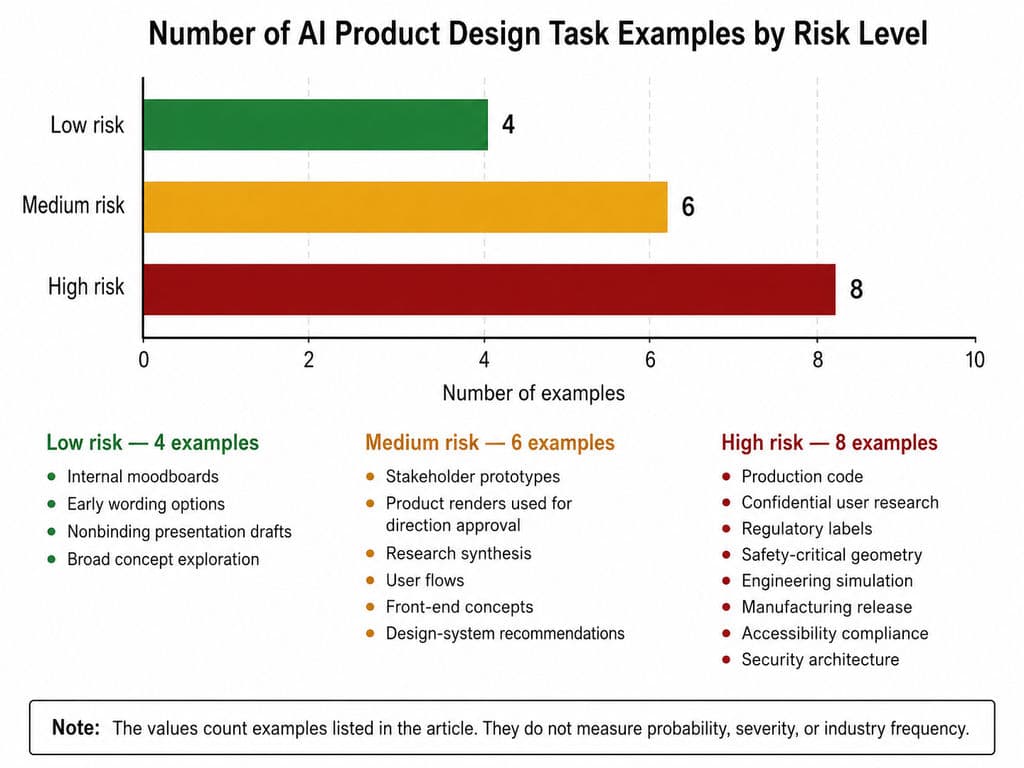
Match the review process to task risk
Low-risk tasks
- Internal moodboards
- Early wording options
- Nonbinding presentation drafts
- Broad concept exploration
These can usually tolerate faster generation and lighter review.
Medium-risk tasks
- Stakeholder prototypes
- Product renders used for direction approval
- Research synthesis
- User flows
- Front-end concepts
- Design-system recommendations
These require documented inputs, clear ownership, and structured human review.
High-risk tasks
- Production code
- Confidential user research
- Regulatory labels
- Safety-critical geometry
- Engineering simulation
- Manufacturing release
- Accessibility compliance
- Security architecture
These require specialist validation and may require formal organizational approval.
Use research AI as a supporting layer
Google renamed NotebookLM to Gemini Notebook in July 2026. It remains a source-grounded research tool that can analyze uploaded PDFs, websites, videos, audio, Google Docs, and other project sources. Its answers include citations to the supplied material.
A source-grounded research assistant can help teams:
- Extract requirements from long PRDs
- Find evidence across interview transcripts
- Compare stakeholder documents
- Summarize technical constraints
- Build searchable project knowledge
- Trace claims back to their sources
However, AI can reorganize existing evidence; it cannot create genuine user evidence by generating a plausible persona.
Decide between one tool and a connected stack
One tool may be enough when:
- The task is narrow
- The output does not cross several disciplines
- A small team can review the complete result
- The project carries limited engineering or confidentiality risk
A connected stack is more appropriate when research, visual design, code, CAD, engineering, and marketing are separate stages.
In that situation, define:
- Which tool owns each artifact
- How approved context is transferred
- How versions are tracked
- Which outputs require validation
- Who has final approval
- How confidential information is handled
- When AI output becomes an official project record
More AI tools do not automatically create a better workflow. Every platform adds training, subscription, permissions, version-control, and context-transfer costs.
FAQ
Can AI replace product designers?
No. AI can accelerate research synthesis, concept generation, sketch rendering, UI prototyping, design variations, and engineering exploration. Product designers still define the problem, interpret evidence, balance constraints, make tradeoffs, review outputs, and take responsibility for delivery.
Which AI is best for sketch-to-render?
Vizcom is the most specialized sketch-to-render tool in this review. Virse is better suited when sketch exploration belongs to a wider canvas-based workflow involving references, multiple directions, shared project context, agent collaboration, and repeated iteration. Neither replaces CAD or physical validation.
Can AI generate production-ready CAD or code?
AI can generate useful CAD outcomes and working code, but generated output is not automatically production-ready. CAD must still be checked for dimensions, tolerances, loads, materials, assembly, DFM, and safety. Code must be checked for accessibility, security, architecture, performance, testing, and maintainability.
Is one AI tool enough for the full product design process?
Usually not. Research synthesis, concept visualization, UI design, code generation, CAD, simulation, and marketing production create different artifacts and carry different risks. Professional teams typically need a controlled workflow in which each tool has a defined role and approved design intent survives every handoff.
Conclusion
The best AI for product design in 2026 is the tool that creates the right artifact for the next design stage without adding more correction, validation, and handoff effort than it removes. Virse and Vizcom support different forms of physical-product exploration; Firefly and Midjourney assist with product imagery and visual direction; Figma, v0, Lovable, and Uizard cover distinct levels of digital-product design and prototyping; Fusion and Siemens Designcenter address engineering-driven CAD. Start with one recurring task, test the tool under real project conditions, measure review and rework alongside generation time, and expand only when the workflow remains editable, traceable, secure, and under human control.
More from the Virse Blog
Workflow
What Is Human-Centered Design? HCD Process, Real Examples & Why Most Teams Get It Wrong
September 21, 2026 by Vincent
Workflow
What Is Design Thinking? 5 Stages, Real Examples & Why Most Teams Get It Wrong
September 21, 2026 by Vincent
Workflow
How to Turn a Design Into a Real Product: What to Do After the Prototype
September 21, 2026 by Vincent